 A simple script for launching dom0 in hardening modes with anti-forensic protection.
 This script adds 3 new options to the GRUB menu for safely launching amnesic modes. You will get two ways to launch dom0 with protection against forensics:
-
Qubes Encrypted-Overlay Amnesic Mode – this mode intercepts the standard boot process to transparently layer a LUKS2-encrypted writable filesystem on top of the immutable root image. The module first remounts the physical root read-only, then generates a 512-bit ephemeral AES-XTS key in RAM and provisions a sparse disk-backed LUKS2 container using dm-crypt. This encrypted block device mounted as the overlay upperdir, while the original rootfs serves as the lowerdir. The final pivot applies an overlayfs mount with volatile semantics, ensuring all runtime writes are redirected into the encrypted layer and will be discarded on reboot. Bind mounts expose the underlying layers for introspection, and the ephemeral key is securely shredded from memory before handing control to the real init. Dom0 security is achieved through isolation rw-upperdir from read-only persistent storage in lowerdir. This mode allows you to run massive VMs of tens or even hundreds of GB, since you’re not limited by the amount of RAM - only by your disk space. By default, overlay module creates a 20 GB dm-container (your free space in overlay mode).
-
Qubes TMPFS-Overlay Amnesic Mode – using tmpfs (RAM) in overlay upperdir. Because all operations run directly from memory instead of disk, this delivers maximum speed – RAM is orders of magnitude faster than storage – and minimizes CPU load by eliminating disk I/O overhead and filesystem synchronization operations.
-
Qubes Zram-Live Amnesic Mode – this mode sets up live mode via zram: root FS from disk is copied into zram (compressed block device in RAM), then mounted for fully memory-based operation. The pivot completes with the zram-backed filesystem mounted as the new /sysroot with restrictive flags, after which the underlying physical root is detached. This yields a zero-write, wear-free runtime environment that eliminates disk I/O latency for system operations, and isolates the physical storage from all runtime mutations. This mode is heavily dependent on RAM - you use 80% of the device’s memory multiplied by ~2x zram compression for live storage.
This script also adds the Ram‑Wipe module to wipe memory after shutdown. This tool is used by Tails and original Kicksecure / Whonix to wipe memory for protection against cold boot attack.
You will see new entries after shutdown Qubes 

This script also creates an ultra‑hardened dom0 in amnesic modes:
- root read‑only
user@dom0:$ mount | grep /dev/mapper/qubes_dom0-root
/dev/mapper/qubes_dom0-root on /live/image type ext4 (ro,relatime,stripe=16)
- strong hardening mount (
nodev,nosuid,noatime,nodiratime,noexec,nr_inodes=500k) - strong kernel hardening (Secureblue hardening)
- grub and initramfs / dracut updates disabled
- swap disabled
- all data (dom0 logs, home-root files, metadata) is destroyed after shutdown.
It protects system from any hacker or malware attacks! And it protects dom0 from user errors during configuration or when testing new software.
 This guide solves the old problems:
- implement live boot by porting grub-live to Qubes - amnesia / non-persistent boot / anti-forensics
- DisposableVMs: support for in-RAM execution only (for anti-forensics
- Reduce leakage of disposable VM content and history into dom0 filesystem
- Wipe RAM after shutdown

Encrypted-Overlay keeps most data on read-only and stores only changes in ephemeral encrypted dm-container, so you don’t need a full in memory copy of everything. This greatly reduces the amount of SSD space used, enabling you to run massive VMs (even Windows with games) in amnesia mode. In overlay mode, you can use zram-swap for even greater memory savings. This swap is volatile. The secondary swap (unencrypted swapfile) is disabled. You can create a temporarily encrypted swap file on the disk if you run out of memory. The best option by default.
TMPFS-Overlay is very fast. This mode is used in Kicksecure/Whonix live mode and Tails OS.

Zram‑Live Mode starts slowly (you copy the entire disk and work with a complete dom0 copy). This mode operates entirely in RAM. This allows you to not use the disk at all if you copy all your working qubes to the varlibqubes pool (if your device has 32-128 GB of RAM). This is ideal for users who want to remove the SSD after starting dom0 or reduce SSD wear.
Both live modes significantly increase dom0 security:
dom0 operates in the ultra-hardened amnesic-mode,
VMs in varlibqubes pool operate with full amnesia after shutdown,
All data is destroyed after shutdown.
RAM-wipe always and everywhere.
Now your private data are protected from forensic analysis. Dom0 with isolation and strong hardening is securely shielded from any hacks. Even if a genius attacker gets into dom0, he won’t be able to make any persistent changes because your root is mounted read‑only, and a reboot will wipe out the attacker! You have the most powerful system protection: xen-isolation, robust hardening, a read‑only root, ephemeral encryption, non-persistent mode with ram-wipe.
This also works great for experiments in Qubes or for beginners who want to learn without fear of breaking anything in dom0 - all changes disappear after a reboot.
Don’t worry about installing these modes - default Qubes boot won’t be affected at all and won’t change! I created this scenario to be as safe as possible and isolated from the default Qubes boot:
New GRUB options are added to/etc/grub.d/40_custom(so it don’t modify your/etc/default/grub).
dom0 size is only changed if there is more than 100 GB of free space on the disk.
New sysctl options start only in live modes.
New dracut live modules start only in live modes.
/boot, GRUB and initramfs/dracut updates disabled in live modes.
New ephemeral DVMs don’t affect the operation or settings of the default DVMs.
Swap disabled in live modes.
Make a backup before you run script 
You will see this notification on the desktop when launching live mode:
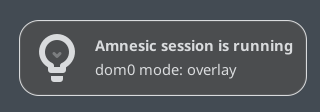
Next, please review the rules and guidelines for using live modes
||||||||||||||||||||||||||||||||||||||||||||||||||||||||||||||||||||||||||||||||||||||||||||||||||||||||||||||||||||||||||||||||||||||||||||||||||||||||


 Create amnesic VMs: AppVM, Template, StandaloneVM
After launching Amnesic Mode from the GRUB menu, only dom0 operates in amnesia mode by default.
To run any qube in amnesia mode, just copy any qube to the varlibqubes pool and launch this copy:
-
In Qube Manager click clone qube and in Advanced select varlibqubes in
Storage pool. Or create a new appVM, and select varlibqubesStorage poolin the Advanced Options. -
In encrypted overlay mode, you can copy all your appVMs to the varlibqubes pool with this command (but first, check that all your appVMs fit in dm-container):
for vm in $(qvm-ls -O name,class | awk '$2=="AppVM"{print $1}'); do
    echo "Cloning $vm..."
    qvm-clone -P varlibqubes "$vm" "${vm}-clone"
done
- Or use this command to exclude a specific appVMs from being copied to varlibqubes In encrypted overlay mode (edit
vm_name):
for vm in $(qvm-ls -O name,class | awk '$2=="AppVM"{print $1}'); do
    [[ "$vm" == "vm_name1" || "$vm" == "vm_name2" ]] && continue
    echo "Cloning $vm..."
    qvm-clone -P varlibqubes "$vm" "${vm}-clone"
done
- and can set the color to black for default appVMs so that they don’t blend in with copies by color (set appVMs in
vm_name):
echo "vm_name1 vm_name2 vm_name3" | tr ' ' '\n' | xargs -I {} qvm-prefs {} label black
 You can check which pools appVMs use with this command in dom0 terminal:
qvm-volume
Your appVMs / Templates in default vm-pool will act like templates: make persistent changes there, while qubes in the varlibqubes pool will behave like disposable VMs (dvm) - they will be completely wiped after dom0 shutdown.
If you copied sys-usb, enable keyboard and mouse support for the sys-usb copy in Qubes Global Settings. Do not run both sys-usb qubes simultaneously. Also, do not run sys-whonix and its copy at the same time. Additionally, add the sys-whonix copy to Updates in Qubes Global Settings for automatic updates.
- You can also add these anti-forensics kernel options for paranoid protection against forensics in your appVMs (it will increase appVM CPU load by 5-15%).
Run in dom0 terminal (editvm_name):
qvm-prefs vm_name kernelopts "xen_scrub_pages=1 init_on_free=1 init_on_alloc=1"

 If you need more free space in encrypted overlay mode, execute these commands in default persistent dom0 mode:
#replace numbers with your desired dom0 storage size
sudo lvresize --size 80G /dev/mapper/qubes_dom0-root
sudo resize2fs /dev/mapper/qubes_dom0-root
sudo lvresize -L +40G qubes_dom0/root-pool
and if you need to resize dm-container, edit seek=20480 here:
sudo nano /usr/lib/dracut/modules.d/90overlay-crypt
and update dracut:
sudo dracut --verbose --force

Useful tips and rules:
Remember:
varlibqubes pool = full amnesia mode (if dom0 in amnesic mode)
vm-pool = persistent mode (even if dom0 in amnesic mode!)
Run script after dom0 / Xen kernel updates in default persistent dom0 for grub_custom kernel update.
You can update templates if they are not added to varlibqubes pool. But always update dom0 in persistent mode (default boot)!
You can make backups of all VMs (and dom0) in amnesic modes. Don’t back up vm-copies - it will only increase the backup size. If you need to create backup a vm-copy, then vm-copy must be powered off (this rule applies to VMs from
varlibqubes), otherwise backup won’t work.
Max memory in zram mode must exceed the size of dom0 on disk. For example, if dom0 size is 10 GB, zram disk size should be at least 13 GB (dom0 + 3 GB free space). Otherwise, zram0 mode will fail to start due to insufficient disk space! This error may occur after a dom0 update, as updates increase the size of dom0 on the disk.
I recommend removing old dom0 kernels to speed up Zram Mode boot (
sudo dnf list installed kernel*)
If you need an additional ephemerally encrypted swap partition (your device has up to 16 GB of memory) in Encrypted-Overlay Amnesic Mode, do it in default persistent dom0:
sudo swapoff -a
sudo wipefs -a /dev/dm-5
edit crypttab
sudoedit /etc/crypttab
add this:
swap /dev/dm-5 /dev/urandom swap,offset=2048,cipher=aes-xts-plain64,size=512
edit fstab
sudoedit /etc/fstab
add this:
/dev/mapper/swap none swap defaults,x-systemd.device-timeout=0 0 0
update dracut
sudo dracut --force
All created dracut modules are located in these directories:
/usr/lib/dracut/modules.d/90overlay-crypt(Overlay Mode)
/usr/lib/dracut/modules.d/90ramboot(Zram Mode)
/usr/lib/dracut/modules.d/90overlayfs-root(Overlay RAM Mode)
/usr/lib/dracut/modules.d/40ram-wipe(RAM-Wipe)

Checking dom0 mode
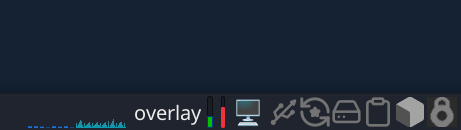
You can add a “Generic Monitor” widget to the XFCE panel and configure it to run command findmnt -n -o SOURCE /. This widget will display which mode you’re currently in:
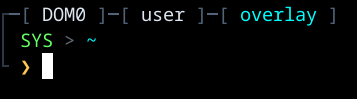
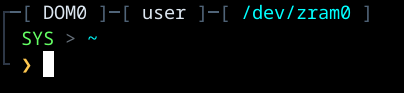
You can also use this terminal theme so can see which mode you’re currently in:
Click CTRL + H in thunar in dom0 and add this code into .bashrc instead of the default code:
# .bashrc

if [ -f /etc/bashrc ]; then
    . /etc/bashrc
fi

if ! [[ "$PATH" =~ "$HOME/.local/bin:$HOME/bin:" ]]; then
    PATH="$HOME/.local/bin:$PATH"
fi
export PATH

export VIRTUAL_ENV_DISABLE_PROMPT=true

# ── Cyber Dark Theme ────────────────────────────────
HULL='\[\e[38;2;80;100;120m\]'
PANEL='\[\e[38;2;45;55;70m\]'
HUD_GREEN='\[\e[38;2;100;255;100m\]'
HUD_AMBER='\[\e[38;2;255;200;80m\]'
HUD_RED='\[\e[38;2;255;60;60m\]'
HUD_BLUE='\[\e[38;2;80;180;255m\]'
HUD_CYAN='\[\e[38;2;0;255;255m\]'
HUD_WHITE='\[\e[38;2;220;230;240m\]'
HUD_DIM='\[\e[38;2;100;110;120m\]'
RESET='\[\e[0m\]'

__elite_prompt() {
    local RETVAL=$?
    local alert=""
    [[ "$RETVAL" -ne 0 ]] && alert="${HUD_RED}[ALERT]${RESET} "

    PS1=""
    PS1+="${PANEL}┌${HULL}─[${HUD_WHITE} $(hostname | tr '[:lower:]' '[:upper:]') ${HULL}]─[${HUD_WHITE} \u ${HULL}]─[ ${HUD_CYAN}$(findmnt -n -o SOURCE /)${HULL} ]${RESET}\n"
    PS1+="${PANEL}│${RESET} ${HUD_GREEN}SYS${RESET} ${HUD_DIM}>${RESET} ${HUD_CYAN}\w${RESET}\n"
    PS1+="${PANEL}└${RESET} ${alert}${HUD_AMBER}❯${RESET} "

    return $RETVAL
}

PROMPT_COMMAND='__elite_prompt'
set -b

Also see these my guides:
- Encrypted AppVMs and Templates. Encrypted pool. Secret vault in a LUKS-Pool. Paranoid security
- Hidden “nuke” duress password to LUKS-encrypted disk. Qubes self-destruct module
- Alternative duress passwords for ScreenSaver and LightDM
- Ephemeral DVMs in fully ephemeral thin pools (ephemeral encryption, zram-disk, tmpfs)
- Awesome Overlay: overlayfs on tmpfs, zram block device. and plain dm-crypt. Ephemerality for VMs and directories
- Installation of Amnezia VPN and Amnezia WG: effective tools against internet blocks via DPI for China, Russia, Belarus, Turkmenistan, Iran. VPN with Vless XRay reality. Best obfuscation for WireGuard. Easy self‑hosted VPN. Bypass
- DNScrypt-proxy qube. Encrypted anon DNS with relay routing (like Tor)
- Antidetect‑appVM with FOSS Antidetect Browsers. Windows fingerprint. Random fingerprint in dvm
See also this guides:
- USB Kill Switch for Qubes OS
- Install Qubes OS with boot partition and a detached LUKS header on USB
- Qubes OS Security Hardening Guide – 11 tabs + automated helper script
- Anonymize hostname hardened template automatic installation of browser
- Apparmor profile for Qubes available!
 License:Unlicense
Anyone may use and redistribute these code under their own name.
 Now launching dom0 in live mode provides additional protection.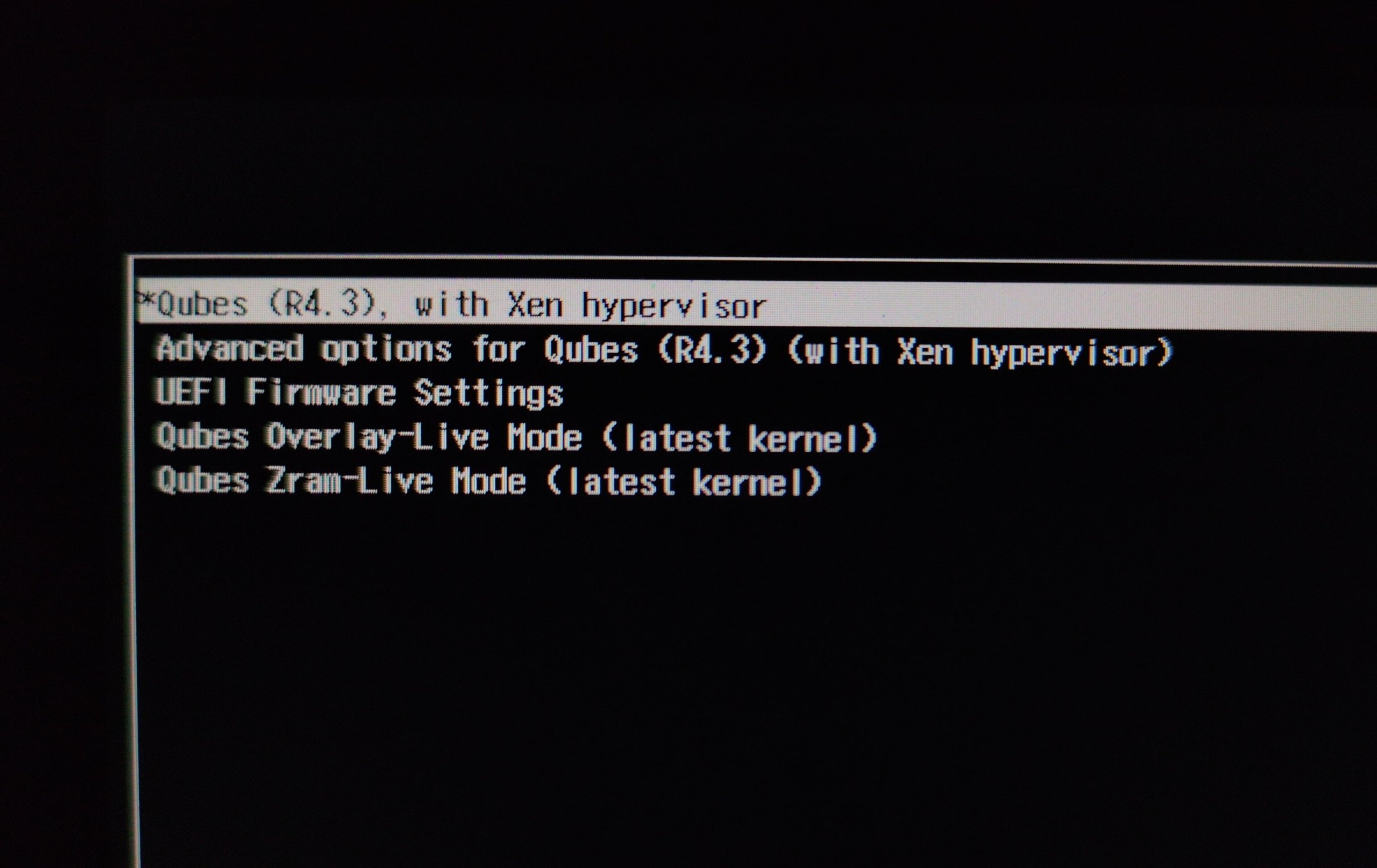
 Now both live modes have very high security!