 A simple script for launching dom0 in hardening modes with anti-forensic protection.
 License:Unlicense
 This script adds two new options to the GRUB menu for safely launching amnesic modes. You will get two ways to launch dom0 with protection against forensics:
-
Qubes Encrypted-Overlay Amnesic Mode – this mode intercepts the standard boot process to transparently layer a LUKS2-encrypted writable filesystem on top of the immutable root image. The module first remounts the physical root read-only, then generates a 512-bit ephemeral AES-XTS key in RAM and provisions a sparse disk-backed LUKS2 container using dm-crypt. This encrypted block device mounted as the overlay upperdir, while the original rootfs serves as the lowerdir. The final pivot applies an overlayfs mount with volatile semantics, ensuring all runtime writes are redirected into the encrypted layer and will be discarded on reboot. Bind mounts expose the underlying layers for introspection, and the ephemeral key is securely shredded from memory before handing control to the real init. Dom0 security is achieved through isolation rw-upperdir from read-only persistent storage in lowerdir. This mode allows you to run massive VMs of tens or even hundreds of GB, since you’re not limited by the amount of RAM - only by your disk space. By default, overlay module creates a 20 GB dm-container (your free space in overlay mode).
-
Qubes Zram-Live Amnesic Mode – this mode sets up live mode via zram: root FS from disk is copied into zram (compressed block device in RAM), then mounted for fully memory-based operation. The pivot completes with the zram-backed filesystem mounted as the new /sysroot with restrictive flags, after which the underlying physical root is detached. This yields a zero-write, wear-free runtime environment that eliminates disk I/O latency for system operations, and isolates the physical storage from all runtime mutations. This mode is heavily dependent on RAM - you use 80% of the device’s memory multiplied by ~2x zram compression for live storage.
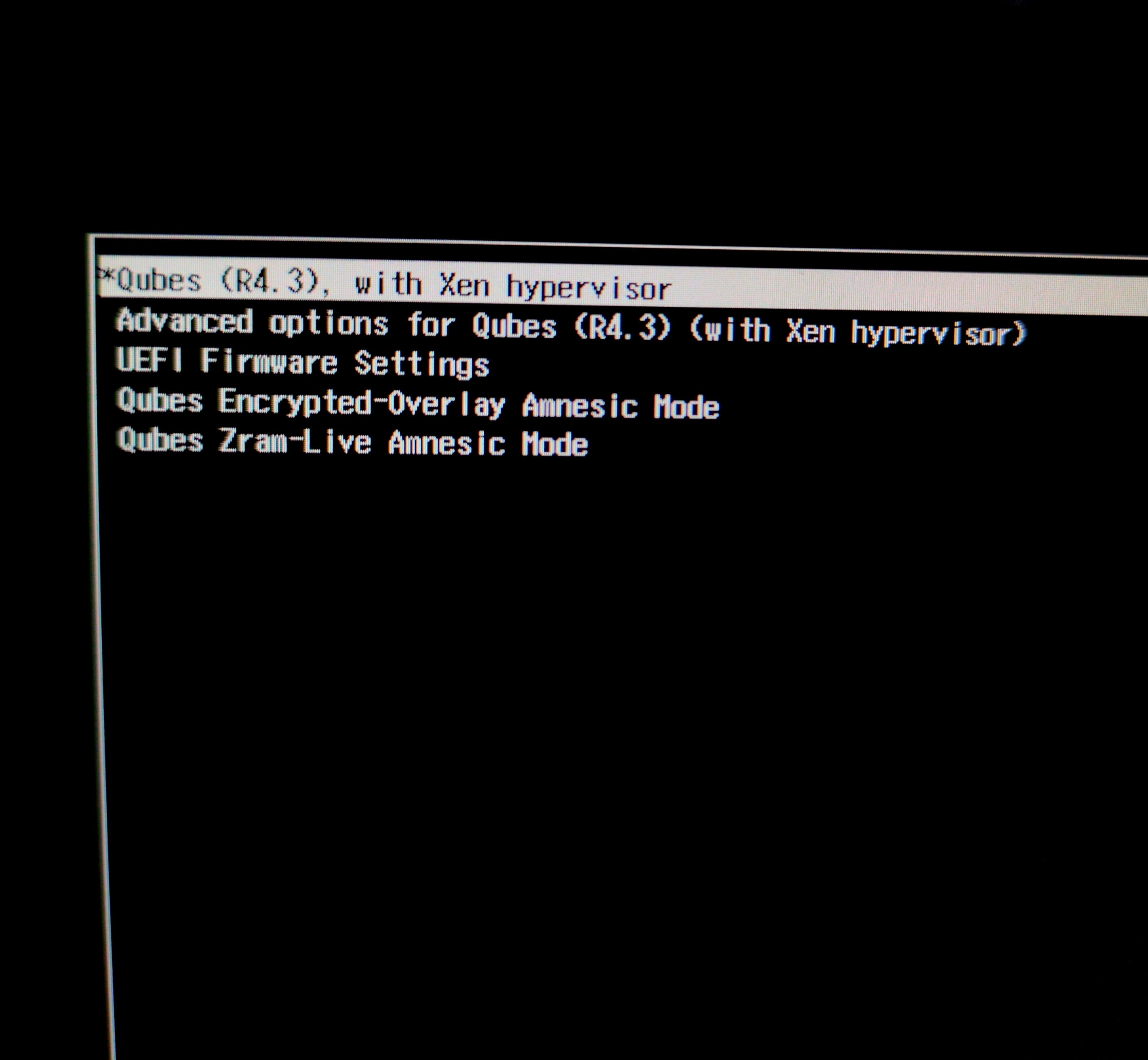
This script also adds the Ram‑Wipe module to wipe memory after shutdown. This tool is used by Tails and original Kicksecure / Whonix to wipe memory for protection against cold boot attack.
You will see new entries after shutdown Qubes 

This script also creates an ultra‑hardened dom0 in amnesic modes:
- root read‑only
user@dom0:$ mount | grep /dev/mapper/qubes_dom0-root
/dev/mapper/qubes_dom0-root on /live/image type ext4 (ro,relatime,stripe=16)
- strong hardening mount (
nodev,nosuid,noatime,nodiratime,noexec,nr_inodes=500k) - strong kernel hardening (Secureblue hardening)
- grub and initramfs / dracut updates disabled
- swap disabled
- all data (dom0 logs, home-root files, metadata) is destroyed after shutdown.
It protects system from any hacker or malware attacks! And it protects dom0 from user errors during configuration or when testing new software.
 This guide solves the old problems:
- implement live boot by porting grub-live to Qubes - amnesia / non-persistent boot / anti-forensics
- DisposableVMs: support for in-RAM execution only (for anti-forensics
- Reduce leakage of disposable VM content and history into dom0 filesystem
- Wipe RAM after shutdown
Encrypted-Overlay is very fast. Overlayfs keeps most data on read-only and stores only changes in ephemeral encrypted dm-container, so you don’t need a full in memory copy of everything. This greatly reduces the amount of SSD space used, enabling you to run massive VMs (even Windows with games) in amnesia mode. In overlay mode, you can use zram-swap for even greater memory savings. This swap is volatile. The secondary swap (unencrypted swapfile) is disabled. You can create a temporarily encrypted swap file on the disk if you run out of memory. The best option by default.


Zram‑Live Mode starts slowly (you copy the entire disk and work with a complete dom0 copy). This mode operates entirely in RAM. This allows you to not use the disk at all if you copy all your working qubes to the varlibqubes pool (if your device has 32-128 GB of RAM). This is ideal for users who want to remove the SSD after starting dom0 or reduce SSD wear.
Both live modes significantly increase dom0 security:
dom0 operates in the ultra-hardened amnesic-mode,
VMs in varlibqubes pool operate with full amnesia after shutdown,
All data is destroyed after shutdown.
RAM-wipe always and everywhere.
Now your private data are protected from forensic analysis. Dom0 with isolation and strong hardening is securely shielded from any hacks. Even if a genius attacker gets into dom0, he won’t be able to make any persistent changes because your root is mounted read‑only, and a reboot will wipe out the attacker! You have the most powerful system protection: xen-isolation, robust hardening, a read‑only root, ephemeral encryption, non-persistent mode with ram-wipe.
This also works great for experiments in Qubes or for beginners who want to learn without fear of breaking anything in dom0 - all changes disappear after a reboot.
Don’t worry about installing these modes - default Qubes boot won’t be affected at all and won’t change! I created this scenario to be as safe as possible and isolated from the default Qubes boot:
New GRUB options are added to/etc/grub.d/40_custom(so it don’t modify your/etc/default/grub).
dom0 size is only changed if there is more than 100 GB of free space on the disk.
New sysctl options start only in live modes.
New dracut live modules start only in live modes.
/boot, GRUB and initramfs/dracut updates disabled in live modes.
New ephemeral DVMs don’t affect the operation or settings of the default DVMs.
Swap disabled in live modes.

 Simple script for automatically creating dom0 amnesic modes
By default, script resizes dom0 to 40 GB, overlay module creates a 20 GB dm-container. Script checks free disk space before resizing. Make sure you have enough free disk space (script check it).
Make a backup before you run script 
You just need:
- Save script into txt, for example, with name
amnesic.shin/home/user/in appVM. - Copy file to dom0. Run it in dom0 terminal (
qube-name- appVM with script):
qvm-run --pass-io qube-name 'cat /home/user/amnesic.sh' > amnesic.sh - Make file executable. Run in dom0 terminal:
sudo chmod +x amnesic.sh
or right mouse click on scirt → Properties → Permissions → Program: → click - Run script in dom0 terminal with sudo
sudo ./amnesic.sh
#!/bin/bash

# Qubes Dom0 Amnesic modes
# ⚠️ Make backup before running! Run as root: sudo ./amnesic.sh
echo "=== Qubes Dom0 Live Boot Setup ==="

#BOOT_UUID
BOOT_UUID=$(findmnt -n -o UUID /boot 2>/dev/null || echo "AUTO_BOOT_NOT_FOUND")
if [ "$BOOT_UUID" = "AUTO_BOOT_NOT_FOUND" ]; then
    BOOT_UUID=$(blkid -s UUID -o value -d $(findmnt -n -o SOURCE /boot 2>/dev/null))
fi

# LUKS_UUID
LUKS_DEVICE=$(blkid -t TYPE="crypto_LUKS" -o device 2>/dev/null | head -n1 || echo "")
if [ -n "$LUKS_DEVICE" ]; then
    LUKS_UUID=$(sudo cryptsetup luksUUID "$LUKS_DEVICE" 2>/dev/null)
else
    LUKS_UUID="AUTO_LUKS_NOT_FOUND"
fi

# Latest XEN_PATH
XEN_PATH=$(ls /boot/xen*.gz 2>/dev/null | sort -V | tail -1 | xargs basename 2>/dev/null || echo "/xen-4.19.4.gz")

# Latest kernel/initramfs
LATEST_KERNEL=$(ls /boot/vmlinuz-*qubes*.x86_64 2>/dev/null | grep -E 'qubes\.fc[0-9]+' | sort -V | tail -1 | xargs basename)
LATEST_INITRAMFS=$(echo "/initramfs-${LATEST_KERNEL#vmlinuz-}.img")

# Max memory dom0
system_total_mb=$(xl info | grep total_memory | awk '{print $3}')

if [ -n "$system_total_mb" ] && [ "$system_total_mb" -gt 0 ] 2>/dev/null; then
    # 80% total_memory
    DOM0_MAX_MB=$((system_total_mb * 80 / 100))
    DOM0_MAX_GB=$((DOM0_MAX_MB / 1024))
    DOM0_MAX_RAM="dom0_mem=max:${DOM0_MAX_MB}M"
    DOM0_MAX_GBG="${DOM0_MAX_GB}G"
else
    DOM0_MAX_RAM="dom0_mem=max:10240M"
    DOM0_MAX_GB="10"
    DOM0_MAX_GBG="10G"
fi

# qubes_dom0-root
Qubes_Root=$(findmnt -n -o SOURCE /)

# /home/user
if [ -n "$SUDO_USER" ] && [ "$SUDO_USER" != "root" ]; then
    USER_HOME=$(getent passwd "$SUDO_USER" | cut -d: -f6)
else
    USER_HOME="$HOME"
fi

if [ ! -d "$USER_HOME" ]; then
    echo "home dir '$USER_HOME' not found!" >&2
    exit 1
fi

# === dom0 resize ===

REQUIRED_FREE_GB=100
MIN_DOM0_SIZE_GB=40

get_dom0_size_gb() {
    local size_bytes
    size_bytes=$(df -B1 /dev/mapper/qubes_dom0-root 2>/dev/null | awk 'NR==2 {print $2}')
    if [[ -z "$size_bytes" ]]; then
        echo "Warning: failed to determine dom0 size" >&2
        return 1
    fi
    echo "$((size_bytes / 1024 / 1024 / 1024))"
    return 0
}

get_vg_free_gb() {
    local lv_size data_pct
    lv_size=$(lvs --noheadings --nosuffix --units b -o lv_size qubes_dom0/vm-pool 2>/dev/null | tr -dc '0-9')
    data_pct=$(lvs --noheadings -o data_percent qubes_dom0/vm-pool 2>/dev/null | tr ',' '.' | tr -dc '0-9.')

    if [[ -z "$lv_size" || -z "$data_pct" ]]; then
        echo "Warning: failed to determine free space in vm-pool" >&2
        return 1
    fi

    local free_gb
    free_gb=$(awk "BEGIN { printf \"%.0f\", ($lv_size * (100 - $data_pct) / 100) / 1024 / 1024 / 1024 }")
    echo "$free_gb"
    return 0
}

main() {
    if [[ "$EUID" -ne 0 ]]; then
        echo "Warning: This script should be run as root (sudo)" >&2
        # Changed from exit 1 to just warning
    fi

    local dom0_size_gb vg_free_gb
    dom0_size_gb=$(get_dom0_size_gb) || dom0_size_gb="unknown"
    vg_free_gb=$(get_vg_free_gb) || vg_free_gb="unknown"

    echo "Current dom0 size: ${dom0_size_gb} GB"
    echo "Free space in VM pool: ${vg_free_gb} GB"

    if [[ "$vg_free_gb" != "unknown" ]] && ((vg_free_gb < REQUIRED_FREE_GB)); then
        echo "Info: free space is less than ${REQUIRED_FREE_GB} GB (available: ${vg_free_gb} GB) - skipping resize"
        # Changed from exit 0 to continue
    elif [[ "$dom0_size_gb" != "unknown" ]] && ((dom0_size_gb >= MIN_DOM0_SIZE_GB)); then
        echo "Info: dom0 size is already ${dom0_size_gb} GB (>= ${MIN_DOM0_SIZE_GB} GB) - skipping resize"
        # Changed from exit 0 to continue
    else
        echo "Conditions met. Starting dom0 resize..."

        if lvresize --size 40G /dev/mapper/qubes_dom0-root; then
            resize2fs /dev/mapper/qubes_dom0-root
            lvresize -L +20G qubes_dom0/root-pool
            echo "Done. New dom0 size: $(get_dom0_size_gb) GB"
        else
            echo "Warning: dom0 resize failed - continuing with other commands"
        fi
    fi

    echo "--- dom0 resize completed ---"
}

main "$@"

# === swapoff ===
sudo sed -i '/\/dev\/mapper\/swap/!{/^[[:space:]]*#/!{/\<swap\>/s/^/# /}}' /etc/fstab
sudo sed -i '/\/dev\/mapper\/swap/b; /[[:space:]]\+swap[[:space:]]\+/s/^/# /' /etc/fstab

# === harden autostart ===
mkdir -p "$USER_HOME/.config"
if [ ! -f "$USER_HOME/.config/harden.sh" ]; then
    cat > "$USER_HOME/.config/harden.sh" << 'EOF'
#!/bin/bash
sleep 1
if findmnt -n -o SOURCE / | grep -qE "(overlay|/dev/zram0)"; then
    notify-send --expire-time=20000 "Amnesic session is running" "dom0 mode: $(findmnt -n -o SOURCE /)" --icon=dialog-information
    sudo sysctl -w kernel.sysrq=0
    sudo sysctl -w kernel.perf_event_paranoid=3
    sudo sysctl -w kernel.kptr_restrict=2
    sudo sysctl -w kernel.panic=5
    sudo sysctl -w fs.protected_regular=2
    sudo sysctl -w fs.protected_fifos=2
    sudo sysctl -w kernel.printk="3 3 3 3"
    sudo sysctl -w kernel.kexec_load_disabled=1
    sudo sysctl -w kernel.io_uring_disabled=2
    sudo chattr +i /boot/grub2/grub.cfg
    sudo chattr +i /boot
else
    sudo chattr -i /boot/grub2/grub.cfg
    sudo chattr -i /boot
fi
EOF
    chmod 755 "$USER_HOME/.config/harden.sh"
    echo "Created harden.sh"
else
    echo "harden.sh already exists, skipping"
fi

# === autostart desktop entry ===
mkdir -p "$USER_HOME/.config/autostart"
if [ ! -f "$USER_HOME/.config/autostart/harden.desktop" ]; then
    cat > "$USER_HOME/.config/autostart/harden.desktop" << EOF
[Desktop Entry]
Encoding=UTF-8
Version=0.9.4
Type=Application
Name=harden
Comment=
Exec=$USER_HOME/.config/harden.sh
OnlyShowIn=XFCE;
RunHook=0
StartupNotify=false
Terminal=false
Hidden=false
EOF
    echo "Created harden.desktop"
else
    echo "harden.desktop already exists, skipping"
fi

# === Dracut module directories ===
DIR_OVERLAY_CRYPT=/usr/lib/dracut/modules.d/90overlay-crypt
DIR_RAMBOOT=/usr/lib/dracut/modules.d/90ramboot
DIR_OVERLAY=/usr/lib/dracut/modules.d/90overlayfs-root
DIR_RAMWIPE=/usr/lib/dracut/modules.d/40ram-wipe

for d in "$DIR_RAMBOOT" "$DIR_OVERLAY" "$DIR_RAMWIPE" "$DIR_OVERLAY_CRYPT"; do
    if [ ! -d "$d" ]; then
        mkdir -p "$d"
        echo "Created $(basename "$d")"
    else
        echo "$(basename "$d") already exists, skipping"
    fi
done

# === 90overlay-crypt/module-setup.sh ===
if [ ! -f "$DIR_OVERLAY_CRYPT/module-setup.sh" ]; then
    cat > "$DIR_OVERLAY_CRYPT/module-setup.sh" << 'EOF'
#!#!/bin/bash

check() {
    require_binaries cryptsetup || return 1
    require_binaries losetup || return 1
    require_binaries mkfs.ext4 || return 1
    return 0
}

depends() {
    return 0
}

installkernel() {
    hostonly='' instmods overlay 2>/dev/null || true
    hostonly='' instmods dm-crypt 2>/dev/null || true
}

install() {
    inst_multiple cryptsetup losetup mkfs.ext4 dd modprobe mount umount shred
    inst_hook pre-pivot 10 "$moddir/overlay-crypt.sh"
}
EOF
    chmod 755 "$DIR_OVERLAY_CRYPT/module-setup.sh"
    echo "Created 90overlay-crypt/module-setup.sh"
else
    echo "90overlay-crypt/module-setup.sh already exists, skipping"
fi

# === 90overlay-crypt/overlay-crypt.sh ===
if [ ! -f "$DIR_OVERLAY_CRYPT/overlay-crypt.sh" ]; then
    cat > "$DIR_OVERLAY_CRYPT/overlay-crypt.sh" << 'EOF'
#!/bin/bash

. /lib/dracut-lib.sh

if ! getargbool 0 cryptovl ; then
    return
fi

modprobe overlay 2>/dev/null || true
modprobe dm-crypt 2>/dev/null || true

#
mount -o remount,ro /sysroot 2>/dev/null || true

#
mkdir -p /live/image
mount --bind /sysroot /live/image
umount /sysroot

#
dd if=/dev/urandom bs=64 count=1 of=/dev/shm/overlay-key status=none
chmod 600 /dev/shm/overlay-key

# create 20 GB size (seek)
mkdir -p /var/lib
dd if=/dev/zero of=/var/lib/overlay-crypt.img bs=1M count=0 seek=20480 status=none

#
losetup -f
LOOP_DEV=$(losetup -f --show /var/lib/overlay-crypt.img)

#
cryptsetup luksFormat --type luks2 \
    --cipher aes-xts-plain64 --key-size 512 \
    --hash sha256 --pbkdf pbkdf2 --pbkdf-force-iterations 1000 \
    --batch-mode --key-file /dev/shm/overlay-key "$LOOP_DEV"

#
cryptsetup open --type luks2 --key-file /dev/shm/overlay-key "$LOOP_DEV" overlaycrypt

#
mkfs.ext4 -F -L "overlaycrypt" /dev/mapper/overlaycrypt

#
mkdir -p /cow
mount -o noatime,nodiratime,nobarrier /dev/mapper/overlaycrypt /cow
mkdir -p /cow/work /cow/rw

#
mount -t overlay -o noatime,nodiratime,volatile,lowerdir=/live/image,upperdir=/cow/rw,workdir=/cow/work,default_permissions,relatime overlay /sysroot

#
mkdir -p /sysroot/live/cow /sysroot/live/image
mount --bind /cow/rw /sysroot/live/cow
mount --bind /live/image /sysroot/live/image

#
umount /cow 2>/dev/null || true
umount /live/image 2>/dev/null || true

#
shred -u /dev/shm/overlay-key 2>/dev/null || rm -f /dev/shm/overlay-key
EOF
    chmod 755 "$DIR_OVERLAY_CRYPT/overlay-crypt.sh"
    echo "Created 90overlay-crypt/overlay-crypt.sh"
else
    echo "90overlay-crypt/overlay-crypt.sh already exists, skipping"
fi

# === 90ramboot/module-setup.sh ===
if [ ! -f "$DIR_RAMBOOT/module-setup.sh" ]; then
    cat > "$DIR_RAMBOOT/module-setup.sh" << 'EOF'
#!/usr/bin/bash
check() {
    return 0
}
depends() {
    return 0
}
install() {
    inst_simple "$moddir/zram-mount.sh"
    inst_hook cleanup 00 "$moddir/zram-mount.sh"
}
EOF
    chmod 755 "$DIR_RAMBOOT/module-setup.sh"
    echo "Created 90ramboot/module-setup.sh"
else
    echo "90ramboot/module-setup.sh already exists, skipping"
fi

# === 90ramboot/zram-mount.sh ===
if [ ! -f "$DIR_RAMBOOT/zram-mount.sh" ]; then
    cat > "$DIR_RAMBOOT/zram-mount.sh" << EOF
#!/bin/sh

. /lib/dracut-lib.sh

if ! getargbool 0 rootzram ; then
    return
fi

mkdir /mnt
umount /sysroot
mount -o ro $Qubes_Root /mnt
modprobe zram
echo $DOM0_MAX_GBG > /sys/block/zram0/disksize
/mnt/usr/sbin/mkfs.ext2 /dev/zram0
mount -o nodev,nosuid,noatime,nodiratime /dev/zram0 /sysroot
cp -a /mnt/* /sysroot
umount /mnt
exit 0
EOF
    chmod 755 "$DIR_RAMBOOT/zram-mount.sh"
    echo "Created 90ramboot/zram-mount.sh"
else
    echo "90ramboot/zram-mount.sh already exists, skipping"
fi

# === 90overlayfs-root/module-setup.sh ===
if [ ! -f "$DIR_OVERLAY/module-setup.sh" ]; then
    cat > "$DIR_OVERLAY/module-setup.sh" << 'EOF'
#!/bin/bash

check() {
    [ -d /lib/modules/$kernel/kernel/fs/overlayfs ] || return 1
}

depends() {
    return 0
}

installkernel() {
    hostonly='' instmods overlay
}

install() {
    inst_hook pre-pivot 10 "$moddir/overlay-mount.sh"
}
EOF
    chmod 755 "$DIR_OVERLAY/module-setup.sh"
    echo "Created 90overlayfs-root/module-setup.sh"
else
    echo "90overlayfs-root/module-setup.sh already exists, skipping"
fi

# === 90overlayfs-root/overlay-mount.sh ===
if [ ! -f "$DIR_OVERLAY/overlay-mount.sh" ]; then
    cat > "$DIR_OVERLAY/overlay-mount.sh" << 'EOF'
#!/bin/sh
. /lib/dracut-lib.sh

if ! getargbool 0 rootovl ; then
    return
fi

modprobe overlay
mount -o remount,nolock,noatime $NEWROOT
mkdir -p /live/image
mount --bind $NEWROOT /live/image
umount $NEWROOT
mkdir /cow
mount -n -t tmpfs -o mode=0755,size=100%,nr_inodes=500k,noexec,nodev,nosuid,noatime,nodiratime tmpfs /cow
mkdir /cow/work /cow/rw
mount -t overlay -o noatime,nodiratime,volatile,lowerdir=/live/image,upperdir=/cow/rw,workdir=/cow/work,default_permissions,relatime overlay $NEWROOT
mkdir -p $NEWROOT/live/cow
mkdir -p $NEWROOT/live/image
mount --bind /cow/rw $NEWROOT/live/cow
umount /cow
mount --bind /live/image $NEWROOT/live/image
umount /live/image
umount $NEWROOT/live/cow
EOF
    chmod 755 "$DIR_OVERLAY/overlay-mount.sh"
    echo "Created 90overlayfs-root/overlay-mount.sh"
else
    echo "90overlayfs-root/overlay-mount.sh already exists, skipping"
fi

# === ramboot dracut.conf ===
if [ ! -f /etc/dracut.conf.d/ramboot.conf ]; then
    cat > /etc/dracut.conf.d/ramboot.conf << 'EOF'
add_drivers+=" zram "
add_dracutmodules+=" ramboot "
EOF
    echo "Created ramboot.conf"
else
    echo "ramboot.conf already exists, skipping"
fi

# === 40ram-wipe/module-setup.sh ===
if [ ! -f "$DIR_RAMWIPE/module-setup.sh" ]; then
    cat > "$DIR_RAMWIPE/module-setup.sh" << 'EOF'
#!/bin/bash
# -*- mode: shell-script; indent-tabs-mode: nil; sh-basic-offset: 4; -*-
# ex: ts=8 sw=4 sts=4 et filetype=sh

## Copyright (C) 2023 - 2025 ENCRYPTED SUPPORT LLC <adrelanos@whonix.org>
## See the file COPYING for copying conditions.

check() {
   require_binaries sync || return 1
   require_binaries sleep || return 1
   require_binaries dmsetup || return 1
   return 0
}

depends() {
   return 0
}

install() {
   inst_simple "/usr/libexec/ram-wipe/ram-wipe-lib.sh" "/lib/ram-wipe-lib.sh"
   inst_multiple sync
   inst_multiple sleep
   inst_multiple dmsetup
   inst_hook shutdown 40 "$moddir/wipe-ram.sh"
   inst_hook cleanup 80 "$moddir/wipe-ram-needshutdown.sh"
}

installkernel() {
   return 0
}
EOF
    chmod +x "$DIR_RAMWIPE/module-setup.sh"
    echo "Created 40ram-wipe/module-setup.sh"
else
    echo "40ram-wipe/module-setup.sh already exists, skipping"
fi

# === 40ram-wipe/wipe-ram-needshutdown.sh ===
if [ ! -f "$DIR_RAMWIPE/wipe-ram-needshutdown.sh" ]; then
    cat > "$DIR_RAMWIPE/wipe-ram-needshutdown.sh" << 'EOF'
#!/bin/sh

## Copyright (C) 2023 - 2025 ENCRYPTED SUPPORT LLC <adrelanos@whonix.org>
## See the file COPYING for copying conditions.

type getarg >/dev/null 2>&1 || . /lib/dracut-lib.sh

. /lib/ram-wipe-lib.sh

ram_wipe_check_needshutdown() {
   #local kernel_wiperam_setting

   kernel_wiperam_setting="$(getarg wiperam)"

   if [ "$kernel_wiperam_setting" = "skip" ]; then
      force_echo "wipe-ram-needshutdown.sh: Skip, because wiperam=skip kernel parameter detected, OK."
      return 0
   fi

   true "wipe-ram-needshutdown.sh: Calling dracut function need_shutdown to drop back into initramfs at shutdown, OK."
   need_shutdown

   return 0
}

ram_wipe_check_needshutdown
EOF
    chmod +x "$DIR_RAMWIPE/wipe-ram-needshutdown.sh"
    echo "Created 40ram-wipe/wipe-ram-needshutdown.sh"
else
    echo "40ram-wipe/wipe-ram-needshutdown.sh already exists, skipping"
fi

# === 40ram-wipe/wipe-ram.sh ===
if [ ! -f "$DIR_RAMWIPE/wipe-ram.sh" ]; then
    cat > "$DIR_RAMWIPE/wipe-ram.sh" << 'EOF'
#!/bin/sh

## Copyright (C) 2023 - 2025 ENCRYPTED SUPPORT LLC <adrelanos@whonix.org>
## See the file COPYING for copying conditions.

## Credits:
## First version by @friedy10.
## https://github.com/friedy10/dracut/blob/master/modules.d/40sdmem/wipe.sh

. /lib/ram-wipe-lib.sh

drop_caches() {
   sync
   echo 3 > /proc/sys/vm/drop_caches
   sync
}

ram_wipe() {
   #local kernel_wiperam_setting

   kernel_wiperam_setting="$(getarg wiperam)"

   if [ "$kernel_wiperam_setting" = "skip" ]; then
      force_echo "wipe-ram.sh: Skip, because wiperam=skip kernel parameter detected, OK."
      return 0
   fi

   force_echo "wipe-ram.sh: RAM extraction attack defense... Starting RAM wipe pass during shutdown..."

   drop_caches

   force_echo "wipe-ram.sh: RAM wipe pass completed, OK."
}

ram_wipe
EOF
    chmod +x "$DIR_RAMWIPE/wipe-ram.sh"
    echo "Created 40ram-wipe/wipe-ram.sh"
else
    echo "40ram-wipe/wipe-ram.sh already exists, skipping"
fi

# === ram-wipe dracut.conf ===
if [ ! -f /etc/dracut.conf.d/30-ram-wipe.conf ]; then
    cat > /etc/dracut.conf.d/30-ram-wipe.conf << 'EOF'
add_dracutmodules+=" ram-wipe "
EOF
    echo "Created 30-ram-wipe.conf"
else
    echo "30-ram-wipe.conf already exists, skipping"
fi

# === ram-wipe-lib.sh ===
DIR_RAMWIPE_LIB=/usr/libexec/ram-wipe
if [ ! -d "$DIR_RAMWIPE_LIB" ]; then
    mkdir -p "$DIR_RAMWIPE_LIB"
fi

if [ ! -f "$DIR_RAMWIPE_LIB/ram-wipe-lib.sh" ]; then
    cat > "$DIR_RAMWIPE_LIB/ram-wipe-lib.sh" << 'EOF'
#!/bin/sh

## Copyright (C) 2023 - 2025 ENCRYPTED SUPPORT LLC <adrelanos@whonix.org>
## See the file COPYING for copying conditions.

if [ -z "$DRACUT_SYSTEMD" ]; then
    force_echo() {
        echo "<28>dracut INFO: $*" > /dev/kmsg
        echo "dracut INFO: $*" >&2
    }
else
    force_echo() {
        echo "INFO: $*" >&2
    }
fi
EOF
    chmod +x "$DIR_RAMWIPE_LIB/ram-wipe-lib.sh"
    echo "Created ram-wipe-lib.sh"
else
    echo "ram-wipe-lib.sh already exists, skipping"
fi

# Update INITRAMFS
dracut --verbose --force

# Create GRUB custom
echo "Creating GRUB custom ..."

cat > /etc/grub.d/40_custom << EOF
#!/usr/bin/sh
exec tail -n +3 \$0

menuentry 'Qubes Encrypted-Overlay Amnesic Mode' --class qubes --class gnu-linux --class gnu --class os --class xen \$menuentry_id_option 'xen-gnulinux-simple-/dev/mapper/qubes_dom0-root' {
	insmod part_gpt
	insmod ext2
	search --no-floppy --fs-uuid --set=root $BOOT_UUID
	echo 'Loading Xen ...'
	if [ "\$grub_platform" = "pc" -o "\$grub_platform" = "" ]; then
	    xen_rm_opts=
	else
	    xen_rm_opts="no-real-mode edd=off"
	fi
	insmod multiboot2
	multiboot2 /$XEN_PATH placeholder console=none dom0_mem=min:1024M $DOM0_MAX_RAM ucode=scan smt=off gnttab_max_frames=2048 gnttab_max_maptrack_frames=4096 \${xen_rm_opts}
	echo 'Loading Linux $LATEST_KERNEL ...'
	module2 /$LATEST_KERNEL placeholder root=/dev/mapper/qubes_dom0-root ro rd.luks.uuid=$LUKS_UUID rd.lvm.lv=qubes_dom0/root rd.lvm.lv=qubes_dom0/swap plymouth.ignore-serial-consoles rhgb cryptovl quiet module.sig_enforce=1 bootscrub=on
	echo 'Loading initial ramdisk ...'
	insmod multiboot2
	module2 --nounzip $LATEST_INITRAMFS
}

menuentry 'Qubes Zram-Live Amnesic Mode' --class qubes --class gnu-linux --class gnu --class os --class xen \$menuentry_id_option 'xen-gnulinux-simple-/dev/mapper/qubes_dom0-root' {
	insmod part_gpt
	insmod ext2
	search --no-floppy --fs-uuid --set=root $BOOT_UUID
	echo 'Loading Xen ...'
	if [ "\$grub_platform" = "pc" -o "\$grub_platform" = "" ]; then
	    xen_rm_opts=
	else
	    xen_rm_opts="no-real-mode edd=off"
	fi
	insmod multiboot2
	multiboot2 /$XEN_PATH placeholder console=none dom0_mem=min:1024M $DOM0_MAX_RAM ucode=scan smt=off gnttab_max_frames=2048 gnttab_max_maptrack_frames=4096 \${xen_rm_opts}
	echo 'Loading Linux $LATEST_KERNEL ...'
	module2 /$LATEST_KERNEL placeholder root=/dev/mapper/qubes_dom0-root ro rd.luks.uuid=$LUKS_UUID rd.lvm.lv=qubes_dom0/root rd.lvm.lv=qubes_dom0/swap plymouth.ignore-serial-consoles rhgb rootzram quiet module.sig_enforce=1 bootscrub=on
	echo 'Loading initial ramdisk ...'
	insmod multiboot2
	module2 --nounzip $LATEST_INITRAMFS
}
EOF

chmod 755  /etc/grub.d/40_custom

# Update GRUB
grub2-mkconfig -o /boot/grub2/grub.cfg

echo
echo "Done!"
echo "✓ ALL STEPS COMPLETED SUCCESSFULLY! Reboot Qubes OS, select one of the new GRUB options (Encrypted-Overlay or Zram-Live), and clone your appVMs to the varlibqubes pool to run in full amnesia mode."
Done!
Restart Qubes OS and Test Qubes live modes 
You will see this notification on the desktop when launching live mode:
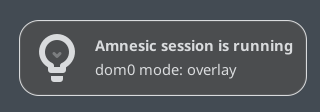
Next, please review the rules and guidelines for using live modes
||||||||||||||||||||||||||||||||||||||||||||||||||||||||||||||||||||||||||||||||||||||||||||||||||||||||||||||||||||||||||||||||||||||||||||||||||||||||


 Create amnesic VMs: AppVM, Template, StandaloneVM
After launching Amnesic Mode from the GRUB menu, only dom0 operates in amnesia mode by default.
To run any qube in amnesia mode, just copy any qube to the varlibqubes pool and launch this copy:
-
In Qube Manager click clone qube and in Advanced select varlibqubes in
Storage pool. Or create a new appVM, and select varlibqubesStorage poolin the Advanced Options. -
In encrypted overlay mode, you can copy all your appVMs to the varlibqubes pool with this command (but first, check that all your appVMs fit in dm-container):
for vm in $(qvm-ls -O name,class | awk '$2=="AppVM"{print $1}'); do
    echo "Cloning $vm..."
    qvm-clone -P varlibqubes "$vm" "${vm}-clone"
done
- Or use this command to exclude a specific appVMs from being copied to varlibqubes In encrypted overlay mode (edit
vm_name):
for vm in $(qvm-ls -O name,class | awk '$2=="AppVM"{print $1}'); do
    [[ "$vm" == "vm_name1" || "$vm" == "vm_name2" ]] && continue
    echo "Cloning $vm..."
    qvm-clone -P varlibqubes "$vm" "${vm}-clone"
done
- and can set the color to black for default appVMs so that they don’t blend in with copies by color (set appVMs in
vm_name):
echo "vm_name1 vm_name2 vm_name3" | tr ' ' '\n' | xargs -I {} qvm-prefs {} label black
 You can check which pools appVMs use with this command in dom0 terminal:
qvm-volume
Your appVMs / Templates in default vm-pool will act like templates: make persistent changes there, while qubes in the varlibqubes pool will behave like disposable VMs (dvm) - they will be completely wiped after dom0 shutdown.
If you copied sys-usb, enable keyboard and mouse support for the sys-usb copy in Qubes Global Settings. Do not run both sys-usb qubes simultaneously. Also, do not run sys-whonix and its copy at the same time. Additionally, add the sys-whonix copy to Updates in Qubes Global Settings for automatic updates.
- You can also add these anti-forensics kernel options for paranoid protection against forensics in your appVMs (it will increase appVM CPU load by 5-15%).
Run in dom0 terminal (editvm_name):
qvm-prefs vm_name kernelopts "xen_scrub_pages=1 init_on_free=1 init_on_alloc=1"

 If you need more free space in encrypted overlay mode, execute these commands in default persistent dom0 mode:
#replace numbers with your desired dom0 storage size
sudo lvresize --size 80G /dev/mapper/qubes_dom0-root
sudo resize2fs /dev/mapper/qubes_dom0-root
sudo lvresize -L +40G qubes_dom0/root-pool
and if you need to resize dm-container, edit seek=20480 here:
sudo nano /usr/lib/dracut/modules.d/90overlay-crypt
and update dracut:
sudo dracut --verbose --force

Useful tips and rules:
Remember:
varlibqubes pool = full amnesia mode (if dom0 in amnesic mode)
vm-pool = persistent mode (even if dom0 in amnesic mode!)
Run script after dom0 / Xen kernel updates in default persistent dom0 for grub_custom kernel update. Re-running script won’t break anything.
You can update templates if they are not added to varlibqubes pool. But always update dom0 in persistent mode (default boot)!
You can make backups of all VMs (and dom0) in amnesic modes. Don’t back up vm-copies - it will only increase the backup size. If you need to create backup a vm-copy, then vm-copy must be powered off (this rule applies to VMs from
varlibqubes), otherwise backup won’t work.
Max memory in zram mode must exceed the size of dom0 on disk. For example, if dom0 size is 10 GB, zram disk size should be at least 13 GB (dom0 + 3 GB free space). Otherwise, zram0 mode will fail to start due to insufficient disk space! This error may occur after a dom0 update, as updates increase the size of dom0 on the disk.
If you need an additional ephemerally encrypted swap partition (your device has up to 16 GB of memory) in Encrypted-Overlay Amnesic Mode, do it in default persistent dom0:
sudo swapoff -a
sudo wipefs -a /dev/dm-5
edit crypttab
sudoedit /etc/crypttab
add this:
swap /dev/dm-5 /dev/urandom swap,offset=2048,cipher=aes-xts-plain64,size=512
edit fstab
sudoedit /etc/fstab
add this:
/dev/mapper/swap none swap defaults,x-systemd.device-timeout=0 0 0
update dracut
sudo dracut --force
If you want to run overlay mode in memory rather than in a container (if your device has plenty of RAM), replace kernel option
cryptovltorootovlin/etc/grub.d/40_customand update grubsudo grub2-mkconfig -o /boot/grub2/grub.cfg

Checking dom0 mode
You can add a “Generic Monitor” widget to the XFCE panel and configure it to run command findmnt -n -o SOURCE /. This widget will display which mode you’re currently in:
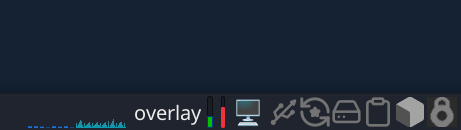
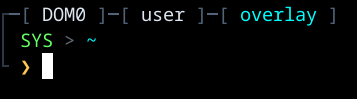
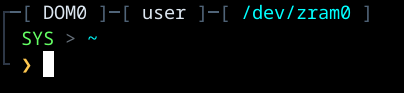
You can also use this terminal theme so can see which mode you’re currently in:
Click CTRL + H in thunar in dom0 and add this code into .bashrc instead of the default code:
# .bashrc

if [ -f /etc/bashrc ]; then
    . /etc/bashrc
fi

if ! [[ "$PATH" =~ "$HOME/.local/bin:$HOME/bin:" ]]; then
    PATH="$HOME/.local/bin:$PATH"
fi
export PATH

export VIRTUAL_ENV_DISABLE_PROMPT=true

# ── Cyber Dark Theme ────────────────────────────────
HULL='\[\e[38;2;80;100;120m\]'
PANEL='\[\e[38;2;45;55;70m\]'
HUD_GREEN='\[\e[38;2;100;255;100m\]'
HUD_AMBER='\[\e[38;2;255;200;80m\]'
HUD_RED='\[\e[38;2;255;60;60m\]'
HUD_BLUE='\[\e[38;2;80;180;255m\]'
HUD_CYAN='\[\e[38;2;0;255;255m\]'
HUD_WHITE='\[\e[38;2;220;230;240m\]'
HUD_DIM='\[\e[38;2;100;110;120m\]'
RESET='\[\e[0m\]'

__elite_prompt() {
    local RETVAL=$?
    local alert=""
    [[ "$RETVAL" -ne 0 ]] && alert="${HUD_RED}[ALERT]${RESET} "

    PS1=""
    PS1+="${PANEL}┌${HULL}─[${HUD_WHITE} $(hostname | tr '[:lower:]' '[:upper:]') ${HULL}]─[${HUD_WHITE} \u ${HULL}]─[ ${HUD_CYAN}$(findmnt -n -o SOURCE /)${HULL} ]${RESET}\n"
    PS1+="${PANEL}│${RESET} ${HUD_GREEN}SYS${RESET} ${HUD_DIM}>${RESET} ${HUD_CYAN}\w${RESET}\n"
    PS1+="${PANEL}└${RESET} ${alert}${HUD_AMBER}❯${RESET} "

    return $RETVAL
}

PROMPT_COMMAND='__elite_prompt'
set -b

Also see these my guides:
- Encrypted AppVMs and Templates. Encrypted pool. Secret vault in a LUKS-Pool. Paranoid security
- Hidden “nuke” duress password to LUKS-encrypted disk. Qubes self-destruct module
- Alternative duress passwords for ScreenSaver and LightDM
- Ephemeral DVMs in fully ephemeral thin pools (ephemeral encryption, zram-disk, tmpfs)
- Installation of Amnezia VPN and Amnezia WG: effective tools against internet blocks via DPI for China, Russia, Belarus, Turkmenistan, Iran. VPN with Vless XRay reality. Best obfuscation for WireGuard. Easy self‑hosted VPN. Bypass
- DNScrypt-proxy qube. Encrypted anon DNS with relay routing (like Tor)
- Antidetect‑appVM with FOSS Antidetect Browsers. Windows fingerprint. Random fingerprint in dvm
See also this guides:
 Now launching dom0 in live mode provides additional protection.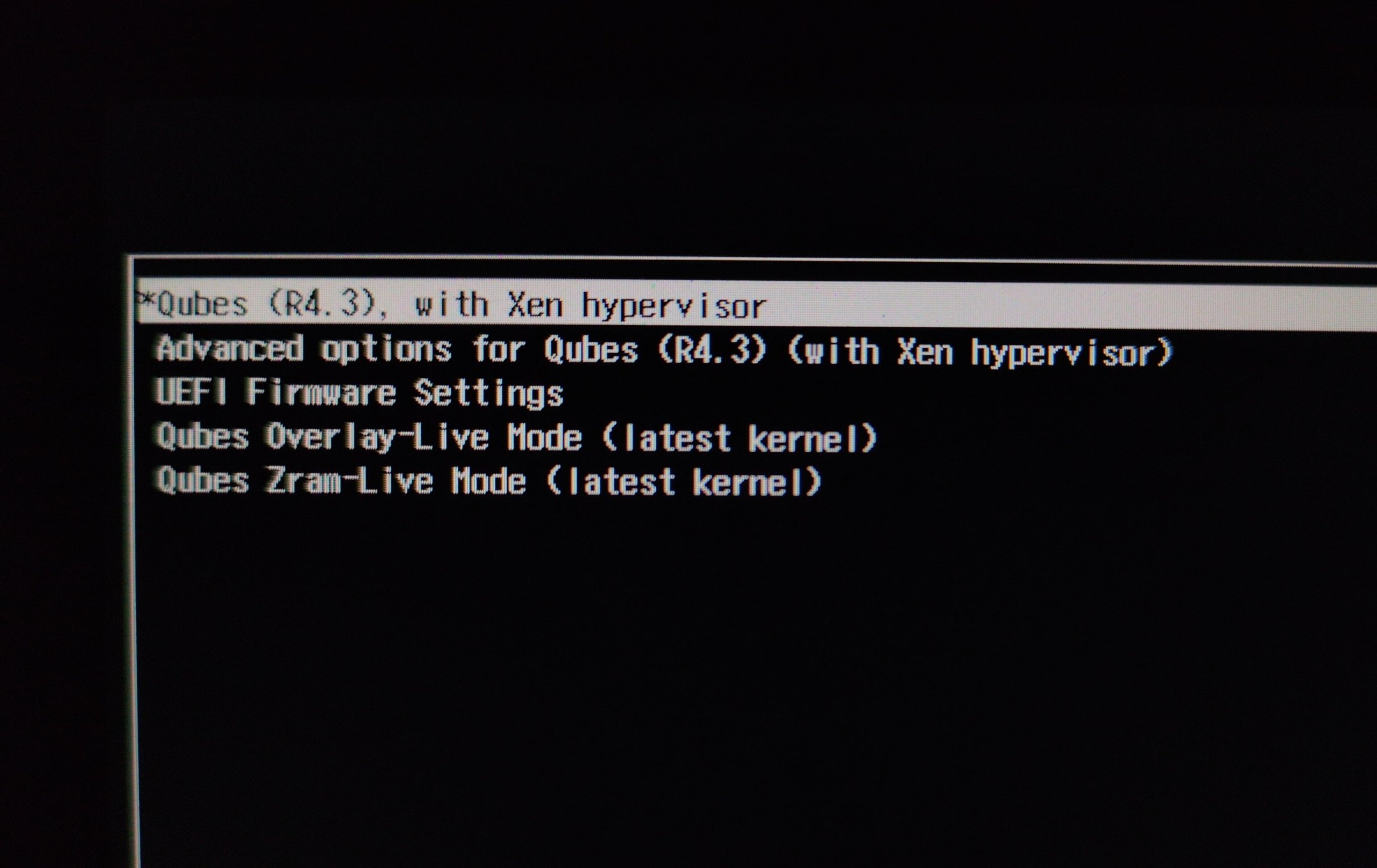
 Now both live modes have very high security!