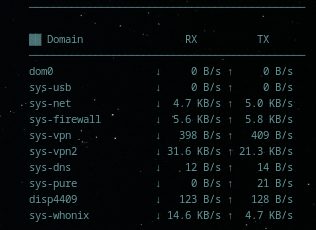
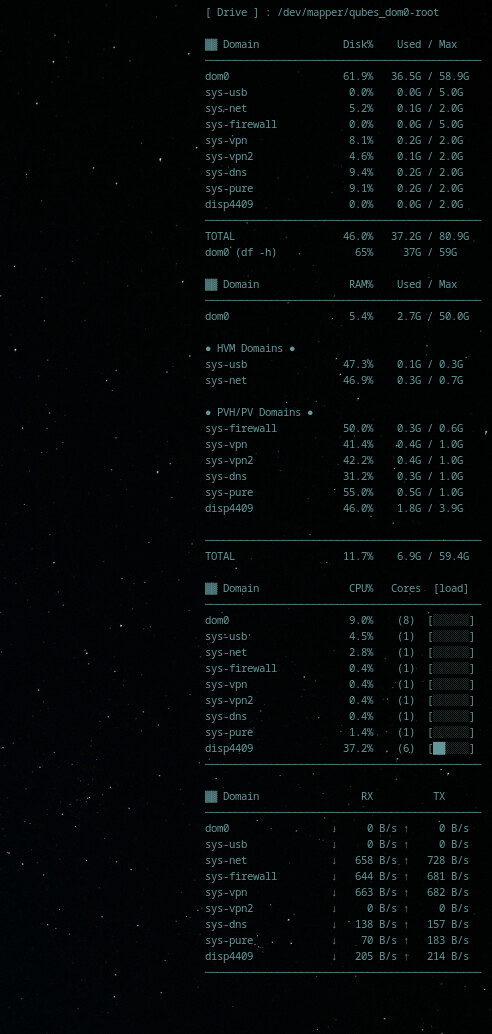
Yesterday I tried creating a Conky monitor for an overview of the load across all my qubes. Conky runs three scripts that you can save in dom0 - for example, disk.sh, ram.sh, cpu.sh. net.sh. Or save these scripts in /etc/conky (then change the path in the config from ~/disk.sh to /etc/conky/disk.sh). All scripts are set up to show max accuracy data (improved standard utilities including xentop and similar tools).
You can also use these scripts with a Generic Monitor on xfce4-panel.

- Script for private storages:
#!/bin/bash
# Qubes Private Storage Monitor for Conky

# Arrays to store output
declare -a vm_lines
declare -a dom0_lines

# Get list of running VMs from xl list (full names, not truncated like xentop)
while IFS= read -r line; do
    # Skip header
    [[ -z "$line" ]] && continue
    [[ "$line" =~ ^Name ]] && continue

    # Parse: Name ID Mem VCPUs State Time(s)
    vm_name=$(echo "$line" | awk '{print $1}')

    [[ -z "$vm_name" ]] && continue

    if [[ "$vm_name" == "Domain-0" ]]; then
        vm_name="dom0"
    fi

    # Get disk info for this VM from qvm-ls
    disk_info=$(qvm-ls --fields=name,priv-curr,priv-max | awk -v name="$vm_name" '$1 == name {print $2, $3}')
    priv_curr=$(echo "$disk_info" | awk '{print $1}')
    priv_max=$(echo "$disk_info" | awk '{print $2}')

    if [[ "$vm_name" == "dom0" ]]; then
        # dom0 doesn't have private storage like VMs, use root filesystem
        used_mb=$(df -m / 2>/dev/null | awk 'NR==2 {print $3}')
        total_mb=$(df -m / 2>/dev/null | awk 'NR==2 {print $2}')
    else
        # Use values from qvm-ls (already in MiB)
        used_mb="$priv_curr"
        total_mb="$priv_max"
    fi

    # Skip if no private storage
    [[ -z "$total_mb" || "$total_mb" == "0" ]] && continue

    # Calculate percentage
    if [[ -n "$total_mb" && "$total_mb" -gt 0 ]]; then
        pct=$(awk "BEGIN {printf \"%.1f\", ($used_mb / $total_mb) * 100}")
    else
        pct="0.0"
    fi

    # Convert to human readable
    if [[ "$total_mb" -gt 1048576 ]]; then
        total_hr=$(awk "BEGIN {printf \"%.1fG\", $total_mb/1048576}")
        used_hr=$(awk "BEGIN {printf \"%.1fG\", $used_mb/1048576}")
    elif [[ "$total_mb" -gt 1024 ]]; then
        total_hr=$(awk "BEGIN {printf \"%.1fG\", $total_mb/1024}")
        used_hr=$(awk "BEGIN {printf \"%.1fG\", $used_mb/1024}")
    else
        total_hr="${total_mb}M"
        used_hr="${used_mb}M"
    fi

    # Format: name (20 chars), 2 spaces, pct (5 chars), used/total
    formatted=$(printf '%-20s  %5s%%  %6s / %-6s' "$vm_name" "$pct" "$used_hr" "$total_hr")

    if [[ "$vm_name" == "dom0" ]]; then
        dom0_lines+=("$formatted")
    else
        vm_lines+=("$formatted")
    fi

done < <(xl list 2>/dev/null)

# Print header
echo "▓▓ Domain              Disk%    Used / Max"
echo "──────────────────────────────────────────────"

# Print dom0 first
for line in "${dom0_lines[@]}"; do
    echo "$line"
done

# Then other VMs
for line in "${vm_lines[@]}"; do
    echo "$line"
done

# Calculate totals for running VMs only
total_used=0
total_size=0

while IFS= read -r line; do
    [[ -z "$line" ]] && continue
    [[ "$line" =~ ^Name ]] && continue

    vm_name=$(echo "$line" | awk '{print $1}')

    [[ "$vm_name" == "Domain-0" ]] && continue
    [[ -z "$vm_name" ]] && continue

    disk_info=$(qvm-ls --fields=name,priv-curr,priv-max | awk -v name="$vm_name" '$1 == name {print $2, $3}')
    priv_curr=$(echo "$disk_info" | awk '{print $1}')
    priv_max=$(echo "$disk_info" | awk '{print $2}')

    [[ -z "$priv_max" || "$priv_max" == "0" ]] && continue

    total_used=$(awk "BEGIN {printf \"%.0f\", $total_used + $priv_curr}")
    total_size=$(awk "BEGIN {printf \"%.0f\", $total_size + $priv_max}")
done < <(xl list 2>/dev/null)

# Add dom0
root_used=$(df -m / 2>/dev/null | awk 'NR==2 {print $3}')
root_total=$(df -m / 2>/dev/null | awk 'NR==2 {print $2}')
total_used=$(awk "BEGIN {printf \"%.0f\", $total_used + $root_used}")
total_size=$(awk "BEGIN {printf \"%.0f\", $total_size + $root_total}")

if [[ "$total_size" -gt 0 ]]; then
    total_pct=$(awk "BEGIN {printf \"%.1f\", ($total_used / $total_size) * 100}")
else
    total_pct="0.0"
fi

# Convert totals to human readable
if [[ "$total_size" -gt 1048576 ]]; then
    total_size_hr=$(awk "BEGIN {printf \"%.1fG\", $total_size/1048576}")
    total_used_hr=$(awk "BEGIN {printf \"%.1fG\", $total_used/1048576}")
elif [[ "$total_size" -gt 1024 ]]; then
    total_size_hr=$(awk "BEGIN {printf \"%.1fG\", $total_size/1024}")
    total_used_hr=$(awk "BEGIN {printf \"%.1fG\", $total_used/1024}")
else
    total_size_hr="${total_size}M"
    total_used_hr="${total_used}M"
fi

echo "──────────────────────────────────────────────"
printf '%-20s  %5s%%  %6s / %-6s\n' 'TOTAL' "$total_pct" "$total_used_hr" "$total_size_hr"

# Physical disk info
phys_total=$(df -m / 2>/dev/null | awk 'NR==2 {print $2}')
phys_avail=$(df -m / 2>/dev/null | awk 'NR==2 {print $4}')
phys_used=$(df -m / 2>/dev/null | awk 'NR==2 {print $3}')

if [[ "$phys_total" -gt 1048576 ]]; then
    phys_total_hr=$(awk "BEGIN {printf \"%.1fG\", $phys_total/1048576}")
    phys_used_hr=$(awk "BEGIN {printf \"%.1fG\", $phys_used/1048576}")
    phys_avail_hr=$(awk "BEGIN {printf \"%.1fG\", $phys_avail/1048576}")
elif [[ "$phys_total" -gt 1024 ]]; then
    phys_total_hr=$(awk "BEGIN {printf \"%.1fG\", $phys_total/1024}")
    phys_used_hr=$(awk "BEGIN {printf \"%.1fG\", $phys_used/1024}")
    phys_avail_hr=$(awk "BEGIN {printf \"%.1fG\", $phys_avail/1024}")
else
    phys_total_hr="${phys_total}M"
    phys_used_hr="${phys_used}M"
    phys_avail_hr="${phys_avail}M"
fi

df_used=$(df -h / 2>/dev/null | awk 'NR==2 {print $3}')
df_total=$(df -h / 2>/dev/null | awk 'NR==2 {print $2}')
df_avail=$(df -h / 2>/dev/null | awk 'NR==2 {print $4}')
df_pct=$(df -h / 2>/dev/null | awk 'NR==2 {print $5}')
printf '%-23s  %3s     %-1s / %s\n' 'dom0 (df -h)' "$df_pct" "$df_used" "$df_total"
- Script for RAM:
Script is adapted to the specifics of HVM and PVH/PV domains. I split the script into 2 blocks - now it displays not only RAM data but also Virt mode info.
#!/bin/bash
# Qubes RAM Monitor - HVM domains first

kb_to_gb() {
    local kb=$1
    if [ -z "$kb" ] || [ "$kb" = "0" ]; then
        echo "0.0"
    else
        awk "BEGIN {printf \"%.1f\", $kb/1048576}"
    fi
}

# Pre-fetch HVM memory data
declare -A hvm_meminfo
for vm in sys-net sys-usb; do
    meminfo=$(qvm-run -p "$vm" "awk '/MemTotal/{t=\$2} /MemAvailable/{a=\$2} END{print t-a}' /proc/meminfo" 2>/dev/null)
    if [[ "$meminfo" =~ ^[0-9]+$ ]]; then
        hvm_meminfo[$vm]=$meminfo
    fi
done

total_meminfo=0
total_static_max=0

declare -a dom0_lines
declare -a pvh_lines
declare -a hvm_lines

while read vm_name domid rest; do
    [ -z "$vm_name" ] && continue
    [ -z "$domid" ] && continue
    [[ "$vm_name" == *"-dm" ]] && continue

    if [ "$domid" = "0" ]; then
        vm_name="dom0"
    fi

    meminfo_kb=$(xenstore-read /local/domain/$domid/memory/meminfo 2>/dev/null)
    static_max_kb=$(xenstore-read /local/domain/$domid/memory/static-max 2>/dev/null)

    if [ -z "$meminfo_kb" ] && [ "$vm_name" != "dom0" ]; then
        if [ -n "${hvm_meminfo[$vm_name]}" ]; then
            meminfo_kb=${hvm_meminfo[$vm_name]}
        else
            meminfo_kb=$(xenstore-read /local/domain/$domid/memory/target 2>/dev/null)
        fi
        vm_type="hvm"
    else
        vm_type="pvh"
    fi

    [ -z "$meminfo_kb" ] && meminfo_kb="0"
    [ -z "$static_max_kb" ] && static_max_kb="0"

    meminfo_gb=$(kb_to_gb $meminfo_kb)
    static_max_gb=$(kb_to_gb $static_max_kb)

    if [ "$static_max_kb" != "0" ] && [ "$meminfo_kb" != "0" ]; then
        ram_pct=$(awk "BEGIN {printf \"%.1f\", ($meminfo_kb / $static_max_kb) * 100}")
    else
        ram_pct="0.0"
    fi

    if [ "$meminfo_kb" != "0" ]; then
        total_meminfo=$((total_meminfo + meminfo_kb))
    fi
    if [ "$static_max_kb" != "0" ]; then
        total_static_max=$((total_static_max + static_max_kb))
    fi

    formatted=$(printf '%-20s  %5s%%    %sG / %sG' "$vm_name" "$ram_pct" "$meminfo_gb" "$static_max_gb")

    if [ "$vm_name" = "dom0" ]; then
        dom0_lines+=("$formatted")
    elif [ "$vm_type" = "hvm" ]; then
        hvm_lines+=("$formatted")
    else
        pvh_lines+=("$formatted")
    fi
done < <(xl list | tail -n +2)

total_meminfo_gb=$(kb_to_gb $total_meminfo)
total_static_max_gb=$(kb_to_gb $total_static_max)

if [ "$total_static_max" != "0" ] && [ "$total_meminfo" != "0" ]; then
    total_ram_pct=$(awk "BEGIN {printf \"%.1f\", ($total_meminfo / $total_static_max) * 100}")
else
    total_ram_pct="0.0"
fi

echo "▓▓ Domain               RAM%    Used / Max"
echo "──────────────────────────────────────────────"

for line in "${dom0_lines[@]}"; do
    echo "$line"
done

echo ""
echo "● HVM Domains ●"
for line in "${hvm_lines[@]}"; do
    echo "$line"
done

echo ""
echo "● PVH/PV Domains ●"
for line in "${pvh_lines[@]}"; do
    echo "$line"
done

echo ""
echo "──────────────────────────────────────────────"
printf '%-20s  %5s%%    %sG / %sG\n' 'TOTAL' "$total_ram_pct" "$total_meminfo_gb" "$total_static_max_gb"
- Script for CPU:
CPU values are normalized per vCPU, showing average utilization across each virtual core rather than total consumption. Normalized values are now scaled to a 0-100% range.
#!/bin/bash
# Qubes CPU Monitor for Conky

# [load] config
cpu_bar() {
    local pct=$1
    local max=100
    local width=6
    local filled=$(awk "BEGIN {printf \"%d\", ($pct / $max) * $width}")
    local empty=$((width - filled))

    local bars=""
    for ((i=0; i<filled; i++)); do bars+="█"; done
    for ((i=0; i<empty; i++)); do bars+="░"; done

    echo "$bars"
}

total_cpu=0
total_norm=0

declare -a vm_lines
declare -a dom0_lines

# Cache xentop output (second iteration only)
xentop_data=$(xentop -bi2 -d1 2>/dev/null)

# Extract second iteration: after second NAME header
xentop_second=$(echo "$xentop_data" | awk '
    /^[[:space:]]*NAME[[:space:]]+STATE/ {header_count++; next}
    header_count == 2 {print}
')

# Get running VMs from xl list (full names)
while IFS= read -r line; do
    [[ -z "$line" ]] && continue
    [[ "$line" =~ ^Name ]] && continue

    vm_name=$(echo "$line" | awk '{print $1}')
    [[ -z "$vm_name" ]] && continue

    # Skip -dm (Device Model) domains
    [[ "$vm_name" == *"-dm" ]] && continue

    if [[ "$vm_name" == "Domain-0" ]]; then
        vm_name="dom0"
    fi

    # Find CPU info in xentop second iteration
    xentop_name="$vm_name"
    if [[ ${#vm_name} -gt 10 ]]; then
        xentop_name="${vm_name:0:10}"
    fi

    xentop_line=$(echo "$xentop_second" | awk -v name="$xentop_name" '$1 == name {print; exit}')

    # If not found, try Domain-0 for dom0
    if [[ -z "$xentop_line" && "$vm_name" == "dom0" ]]; then
        xentop_line=$(echo "$xentop_second" | awk '$1 == "Domain-0" {print; exit}')
    fi

    cpu_pct=$(echo "$xentop_line" | awk '{print $4}')
    vcpus=$(echo "$xentop_line" | awk '{print $9}')

    [[ -z "$cpu_pct" ]] && cpu_pct="0.0"
    [[ -z "$vcpus" ]] || [[ "$vcpus" == "0" ]] && vcpus=1

    norm_cpu=$(awk "BEGIN {printf \"%.1f\", $cpu_pct / $vcpus}")

    if [[ "$cpu_pct" != "0.0" ]] && [[ -n "$cpu_pct" ]]; then
        total_cpu=$(awk "BEGIN {printf \"%.1f\", $total_cpu + $cpu_pct}")
        total_norm=$(awk "BEGIN {printf \"%.1f\", $total_norm + $norm_cpu}")
    fi

    bar=$(cpu_bar "$norm_cpu")
    formatted=$(printf '%-20s  %5s%%    (%1s)  [%s]' "$vm_name" "$norm_cpu" "$vcpus" "$bar")

    if [[ "$vm_name" == "dom0" ]]; then
        dom0_lines+=("$formatted")
    else
        vm_lines+=("$formatted")
    fi
done < <(xl list 2>/dev/null)

# Print dom0 first
echo "▓▓ Domain               CPU%   Cores  [load]"
echo "──────────────────────────────────────────────"
for line in "${dom0_lines[@]}"; do
    echo "$line"
done

# Then other VMs
for line in "${vm_lines[@]}"; do
    echo "$line"
done

echo "──────────────────────────────────────────────"
#printf '%-20s  %5s%%\n' 'TOTAL' "${total_norm}"

#system_cpus=$(xl info 2>/dev/null | grep nr_cpus | awk '{print $3}')
#printf '%-20s  %5s\n' 'Physical CPUs' "${system_cpus}"
- Script for network traffic:
#!/bin/bash
# Qubes Network Monitor for Conky

prev_file="/tmp/qubes_net_prev"
interval=1
declare -A prev_rx prev_tx curr_rx curr_tx speed_rx speed_tx

# Read previous values and calculate interval
if [[ -f "$prev_file" ]]; then
    while read -r vm rx tx; do
        prev_rx["$vm"]=$rx; prev_tx["$vm"]=$tx
    done < "$prev_file"
    interval=$(($(date +%s) - $(stat -c %Y "$prev_file")))
    (( interval < 1 )) && interval=1
fi

# List of VMs (excluding stubdomains)
readarray -t vm_order < <(xl list 2>/dev/null | awk 'NR>1 && $1!~/-dm$/ {print $1}')

# dom0 - read directly
read rx tx < <(awk '/^[[:space:]]+(lo|Inter|face)/{next} {rx+=$2; tx+=$10} END{print rx,tx}' /proc/net/dev)
curr_rx["Domain-0"]=${rx:-0}
curr_tx["Domain-0"]=${tx:-0}

# Other VMs — sequentially, without intermediate files
for vm in "${vm_order[@]}"; do
    [[ "$vm" == "Domain-0" ]] && continue
    if read -r rx tx < <(qvm-run --pass-io --no-autostart "$vm" \
        'awk "/^[[:space:]]+(lo|Inter|face)/{next} {rx+=\$2; tx+=\$10} END{print rx,tx}" /proc/net/dev' 2>/dev/null); then
        curr_rx["$vm"]=${rx:-0}
        curr_tx["$vm"]=${tx:-0}
    else
        curr_rx["$vm"]=0
        curr_tx["$vm"]=0
    fi
done

# Calculate speeds
for vm in "${vm_order[@]}"; do
    prx=${prev_rx[$vm]:-0}; ptx=${prev_tx[$vm]:-0}
    crx=${curr_rx[$vm]:-0}; ctx=${curr_tx[$vm]:-0}
    drx=$((crx-prx)); dtx=$((ctx-ptx))
    (( drx<0 )) && drx=0; (( dtx<0 )) && dtx=0
    speed_rx[$vm]=$((drx/interval))
    speed_tx[$vm]=$((dtx/interval))
done

# Output with single awk call (saves 2*N forks)
{
    for vm in "${vm_order[@]}"; do
        echo "${speed_rx[$vm]} ${speed_tx[$vm]} $vm"
    done
} | awk '
    function hr(b,    s) {
        if (b>=1048576) {s=sprintf("%.1f MB/s", b/1048576)}
        else if (b>=1024) {s=sprintf("%.1f KB/s", b/1024)}
        else {s=sprintf("%d B/s", b)}
        return s
    }
    BEGIN {
        print "▓▓ Domain                 RX          TX"
        print "──────────────────────────────────────────────"
    }
    {
        sr=$1; st=$2; vm=$3
        dn=vm; if(vm=="Domain-0") dn="dom0"
        printf "%-20s ↓%10s ↑%10s\n", dn, hr(sr), hr(st)
    }
    END { print "──────────────────────────────────────────────" }
'

# Save current values
> "$prev_file"
for vm in "${vm_order[@]}"; do
    echo "$vm ${curr_rx[$vm]} ${curr_tx[$vm]}" >> "$prev_file"
done
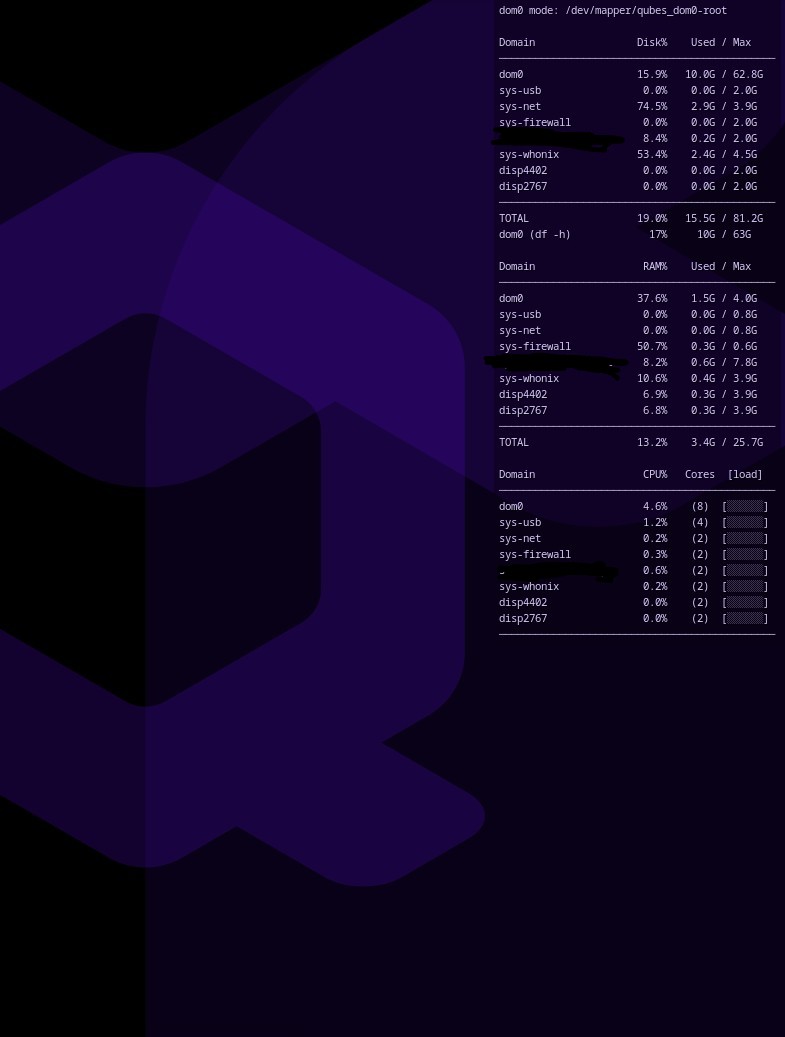
My /etc/conky/conky.conf:
You can edit
conky.configand change gaps, size, font size, color, and any other parameters.dom0 modeis for those who use Qubes OS with amnesic modes
conky.config = {
    alignment = 'top_right',
    background = false,
    own_window = true,
    --## me change, added next 2 lines
    --## own_window_type override
    own_window_type = 'normal',
    own_window_argb_visual = true,
    own_window_transparent = true,
    own_window_hints = 'undecorated,sticky,skip_taskbar,skip_pager,below',
    own_window_argb_value = 12,
    own_window_colour = '000000',
    border_width = 1,
    cpu_avg_samples = 2,
    default_color = 'e0e0e0',
    default_outline_color = 'red',
    draw_borders = false,
    draw_graph_borders = true,
    draw_outline = false,
    draw_shadows = false,
    use_xft = true,
    font = 'Noto Sans Mono:size=7',
    gap_x = 10,
    gap_y = 45,
    minimum_height = 5,
    minimum_width = 5,
    net_avg_samples = 2,
    no_buffers = true,
    out_to_console = false,
    out_to_stderr = false,
    extra_newline = false,
    own_window = true,
    own_window_class = 'Conky',
    own_window_type = 'desktop',
    own_window_transparent = true,
    own_window_argb_visual = true,
    stentch = 1,
    double_buffer = true,
    update_interval = 2.0,
    uppercase = false,
    use_spacer = 'none',
    show_graph_scale = false,
    show_graph_range = false
}

conky.text = [[
#dom0 mode: ${exec findmnt -n -o SOURCE /}

${execi 5 ~/disk.sh}

${execi 3 ~/ram.sh}

${execi 3 ~/cpu.sh}

${execi 2 ~/net.sh}
]]
 License:Unlicense
 I might later color code each VM or each script, see how bored I am