Change your browser fingerprint and make Linux look like Windows. Create disposable browsers with unique fingerprints (OS (Windows, Mac), CPU, GPU, timezone …etc) in DispVM!

This guide is intended for regular users. Experienced users can improve this guide.
I used these this antidetect-browsers:
Shard Browser (Chromium base) I recommend this browser for beginners — it has a complete GUI and is very easy to configure.
Fingerprint Chromium (Ungoogled-Chromium base)
Camoufox (Firefox base)

- Install:
Shard Browser:
Download the appImage to /home from the releases (or use deb package in debian-template):
Fingerprint Chromium
Make appImage executable: right mouse click on appImage→ Properties → Permissions → Program: → click 
Install Camoufox v150:
Run in debian-13-xfce terminal:
sudo apt install python3.13-venv pip python3-pyqt5 python3-pyqt5.qtwebengine
Shutdown debian-13-xfce template.
Run in AppVM terminal:
nano cam.py
write the configuration code according to the Camoufox documentation, for example like this:
from camoufox.utils import launch_options
from playwright.sync_api import sync_playwright
import os
import time

PROFILE_DIR = "/home/user/my_profile"

if not os.path.exists(PROFILE_DIR):
    raise FileNotFoundError(f"Профиль не найден: {PROFILE_DIR}")

options = launch_options(
    headless=False,
    os="windows",
    locale="en-US",
    window=(1696, 1026),
    config={
        "timezone": "Europe/Istanbul",
        "geolocation:latitude": 41.0082,
        "geolocation:longitude": 28.9784,
        "navigator.language": "en-US",
        "navigator.languages": ["en-US", "en"],
        "headers.Accept-Language": "en-US,en;q=0.9",
        "screen.width": 1700,
        "screen.height": 970,
        "screen.availWidth": 1700,
        "screen.availHeight": 940,
        "screen.colorDepth": 24,
        "screen.pixelDepth": 24,
    },
    i_know_what_im_doing=True,
)

options.pop("executable_path", None)
options.pop("headless", None)

options["viewport"] = {"width": 1700, "height": 970}

custom_args = ["-new-instance", "-no-remote"]
if "args" in options:
    custom_args = options.pop("args") + custom_args

with sync_playwright() as p:
    context = p.firefox.launch_persistent_context(
        user_data_dir=PROFILE_DIR,
        executable_path="/home/user/.cache/camoufox/browsers/official/150.0.2-alpha.26/camoufox-bin",
        headless=False,
        args=custom_args,
        **options
    )

    page = context.pages[0] if context.pages else context.new_page()

    try:
        page.goto("https://abrahamjuliot.github.io/creepjs", wait_until="commit", timeout=60000)
    except Exception as e:
        print(f"Failed to load page: {e}")

    while True:
        try:
            if context.pages is None:
                break
            pages = context.pages
            if not pages:
                break
            page.evaluate("1")
            time.sleep(1)
        except Exception:
            break

    try:
        context.close()
    except:
        pass
then click CTRL + O and CTRL + X
python3 -m venv ~/venvs/camoufox150
source ~/venvs/camoufox150/bin/activate
pip install cloverlabs-camoufox[geoip]
python3 -m camoufox fetch official/stable/v150.0.2-alpha.26
pip install playwright==1.51.0
python3 cam.py
You can also use a profile created in Donut Browser. Profiles are located in /home/user/.local/share/DonutBrowser/profiles/. Copy profile to, for example, /home/user, rename it for simplicity, for example donut_profile, and add profile to Camoufox configuration into PROFILE_DIR = for example, PROFILE_DIR = "/home/user/donut_profile" or add this profile in camoufox gui manager.
Create files .sh for launch this profiles:
nano /home/user/camoufox.sh
#!/usr/bin/env bash
source ~/venvs/camoufox150/bin/activate
python3 cam.py
then click CTRL + O and CTRL + X
chmod +x /home/user/camoufox.sh
You can add GUI profile manager for camoufox v150 GitHub - TechQaiser/camoufox-profile-manager: Manage multiple Camoufox browser profiles with proxy, storage, and fullscreen — GoLogin-style GUI built in PyQt5. · GitHub
git clone https://github.com/TechQaiser/camoufox-profile-manager.git
cd camoufox-profile-manager
python3 -m venv venv
then change py configs for camoufox v150 (default works on camoufox 135):
nano /home/user/camoufox-profile-manager/run.py
add this:
import os
import sys
import subprocess
import importlib.util
from pathlib import Path

REQUIREMENTS = ["PyQt5", "cloverlabs-camoufox[geoip]"]

HERE = Path(__file__).resolve().parent

ENTRY_CANDIDATES = [
    "main_window.py",
]

def run(cmd, cwd=None):
    print(f"[\~] Running: {' '.join(map(str, cmd))}")
    subprocess.check_call(cmd, cwd=str(cwd) if cwd else None)

def pip_install(pkg):
    run([sys.executable, "-m", "pip", "install", pkg], cwd=HERE)

def check_and_install():
    try:
        import pip
    except ImportError:
        print("[x] pip is not installed. Please install pip and re-run.")
        sys.exit(1)

    for spec in REQUIREMENTS:
        base = spec.split("[", 1)[0]
        if importlib.util.find_spec(base) is None:
            print(f"[!] Missing {spec}, installing…")
            pip_install(spec)
        else:
            print(f"[✓] {base} already installed")

def ensure_camoufox_browser():
    """Skip browser check"""
    print("[✓] Skipping browser auto-install — using manually installed v150.0.2-alpha.26")
    return

def find_entry_file() -> Path:
    for name in ENTRY_CANDIDATES:
        candidate = HERE / name
        if candidate.exists():
            return candidate
    print("[x] Could not find an entry file. Expected one of:")
    for n in ENTRY_CANDIDATES:
        print(f"    - {n} (in {HERE})")
    sys.exit(2)

def main():
    check_and_install()
    ensure_camoufox_browser()

    entry = find_entry_file()
    print("\n[✓] Environment ready. Launching Camoufox Manager…\n")
    try:
        run([sys.executable, str(entry.name)], cwd=HERE)
    except subprocess.CalledProcessError as e:
        print("\n[x] Failed to launch the app.")
        print(f"    Command: {' '.join(map(str, e.cmd))}")
        print(f"    Exit code: {e.returncode}")
        sys.exit(e.returncode)

if __name__ == "__main__":
    main()
then click CTRL + O and CTRL + X
nano /home/user/camoufox-profile-manager/main_window.py
add this:
import json
import os
import sys
import time
from dataclasses import dataclass, asdict, field
from typing import Dict, Any, Optional, List
from pathlib import Path

from PyQt5 import QtCore, QtGui, QtWidgets, uic

# ---- Camoufox ----------------------------------------------------------------
try:
    from camoufox.utils import launch_options
    CAMOUFOX_OK = True
except Exception:
    CAMOUFOX_OK = False

PROFILES_FILE = "profiles.json"

CAMOUFOX_V150_EXE: Optional[str] = "/home/user/.cache/camoufox/browsers/official/150.0.2-alpha.26/camoufox-bin"

if CAMOUFOX_V150_EXE is None and CAMOUFOX_OK:
    from platformdirs import user_cache_dir
    cache_dir = Path(user_cache_dir("camoufox"))
    version_dir = cache_dir / "browsers" / "official" / "150.0.2-alpha.26"
    if sys.platform == "linux":
        candidate = version_dir / "camoufox-bin"
        if candidate.exists():
            CAMOUFOX_V150_EXE = str(candidate)
    elif sys.platform == "darwin":
        candidate = version_dir / "Camoufox.app" / "Contents" / "Windows" / "camoufox"
        if candidate.exists():
            CAMOUFOX_V150_EXE = str(candidate)
    elif sys.platform == "win32":
        candidate = version_dir / "camoufox.exe"
        if candidate.exists():
            CAMOUFOX_V150_EXE = str(candidate)


# ===== Data models =====
@dataclass
class ProxyConfig:
    host: str = ""
    port: int = 0
    username: str = ""
    password: str = ""

    def to_proxy_dict(self) -> Optional[Dict[str, Any]]:
        if not self.host or not self.port:
            return None
        d = {"server": f"http://{self.host}:{self.port}"}
        if self.username:
            d["username"] = self.username
        if self.password:
            d["password"] = self.password
        return d


@dataclass
class Profile:
    name: str = "Profile"
    viewport_width: int = 1700
    viewport_height: int = 970
    fullscreen: bool = False
    persistent_dir: str = ""
    use_geoip: bool = False
    proxy: ProxyConfig = field(default_factory=ProxyConfig)

    def to_dict(self) -> Dict[str, Any]:
        d = asdict(self)
        d["proxy"] = asdict(self.proxy)
        return d

    @staticmethod
    def from_dict(d: Dict[str, Any]) -> "Profile":
        raw_proxy = d.get("proxy", {})
        if not isinstance(raw_proxy, dict):
            raw_proxy = {}
        name = d.get("name", "Profile")

        persistent_dir = d.get("persistent_dir", "")
        if not persistent_dir:
            persistent_dir = os.path.join("C:\\", name)

        return Profile(
            name=name,
            viewport_width=int(d.get("viewport_width", 1700)),
            viewport_height=int(d.get("viewport_height", 970)),
            fullscreen=bool(d.get("fullscreen", False)),
            persistent_dir=persistent_dir,
            use_geoip=bool(d.get("use_geoip", False)),
            proxy=ProxyConfig(
                host=raw_proxy.get("host", ""),
                port=int(raw_proxy.get("port", 0) or 0),
                username=raw_proxy.get("username", ""),
                password=raw_proxy.get("password", ""),
            ),
        )


# ===== Persistence =====
def load_profiles() -> List[Profile]:
    if not os.path.exists(PROFILES_FILE):
        return []
    with open(PROFILES_FILE, "r", encoding="utf-8") as f:
        raw = json.load(f)
    return [Profile.from_dict(x) for x in raw]


def save_profiles(profiles: List[Profile]) -> None:
    with open(PROFILES_FILE, "w", encoding="utf-8") as f:
        json.dump([p.to_dict() for p in profiles], f, indent=2)


# ===== Worker thread =====
class CamoufoxWorker(QtCore.QThread):
    started_ok = QtCore.pyqtSignal(str)
    error = QtCore.pyqtSignal(str)
    stopped = QtCore.pyqtSignal(str)

    def __init__(self, profile: Profile, launch_size: Optional[tuple[int, int]] = None, parent=None):
        super().__init__(parent)
        self.profile = profile
        self.launch_size = launch_size
        self._stop = False
        self._context = None
        self._playwright = None

    def run(self):
        if not CAMOUFOX_OK:
            self.error.emit(
                "Camoufox Python package not available.\n"
                "Install: pip install -U 'cloverlabs-camoufox[geoip]'"
            )
            return

        if not CAMOUFOX_V150_EXE or not os.path.exists(CAMOUFOX_V150_EXE):
            self.error.emit(
                f"Camoufox v150 executable not found.\n"
                f"Expected at: {CAMOUFOX_V150_EXE or '<auto-detect failed>'}\n\n"
                f"Please set CAMOUFOX_V150_EXE in the script to the correct path.\n"
                f"Find it with: python3 -m camoufox list installed --path\n"
                f"Or: ls ~/.cache/camoufox/browsers/official/"
            )
            return

        try:
            from playwright.sync_api import sync_playwright

            VIEWPORT_W, VIEWPORT_H = 1700, 970

            options = launch_options(
                headless=False,
                os="windows",
                locale="en-US",
                window=(1696, 1026),
                config={
                    "timezone": "Europe/Berlin",
                    "navigator.language": "en-US",
                    "navigator.languages": ["en-US", "en"],
                    "headers.Accept-Language": "en-US,en;q=0.9",
                    "screen.width": 1700,
	            "screen.height": 970,
	            "screen.availWidth": 1700,
	            "screen.availHeight": 940,
	            "screen.colorDepth": 24,
	            "screen.pixelDepth": 24,
                },
                i_know_what_im_doing=True,
            )

            options.pop("executable_path", None)
            options.pop("headless", None)

            options["viewport"] = {"width": VIEWPORT_W, "height": VIEWPORT_H}

            custom_args = ["-new-instance", "-no-remote"]
            if "args" in options:
                custom_args = options.pop("args") + custom_args

            user_data_dir = None
            if self.profile.persistent_dir:
                user_data_dir = os.path.abspath(self.profile.persistent_dir)
                os.makedirs(user_data_dir, exist_ok=True)

            px = self.profile.proxy.to_proxy_dict()
            if px:
                options["proxy"] = px

            with sync_playwright() as p:
                self._playwright = p
                self._context = p.firefox.launch_persistent_context(
                    user_data_dir=user_data_dir,
                    executable_path=CAMOUFOX_V150_EXE,
                    headless=False,
                    args=custom_args,
                    **options
                )

                page = self._context.pages[0] if self._context.pages else self._context.new_page()

                try:
                    page.set_viewport_size({"width": VIEWPORT_W, "height": VIEWPORT_H})
                except Exception:
                    pass

                try:
                    page.goto("https://abrahamjuliot.github.io/creepjs", wait_until="commit", timeout=60000)
                except Exception:
                    pass

                if self.profile.fullscreen:
                    try:
                        page.keyboard.press("F11")
                    except Exception:
                        pass

                self.started_ok.emit(f"Session started for '{self.profile.name}'.")

                while not self._stop:
                    time.sleep(0.2)

                self._context.close()

        except Exception as e:
            self.error.emit(f"Failed to start Camoufox: {e}")
        finally:
            if self._context is not None:
                try:
                    self._context.close()
                except Exception:
                    pass
            self.stopped.emit(f"Session stopped for '{self.profile.name}'.")

    def request_stop(self):
        self._stop = True

# ===== MainWindow Controller =====
class MainWindow(QtWidgets.QMainWindow):
    def __init__(self):
        super().__init__()
        uic.loadUi("camoufox_manager.ui", self)

        self.profileList: QtWidgets.QListWidget
        self.newProfileButton: QtWidgets.QPushButton
        self.deleteProfileButton: QtWidgets.QPushButton
        self.nameEdit: QtWidgets.QLineEdit
        self.spinW: QtWidgets.QSpinBox
        self.spinH: QtWidgets.QSpinBox
        self.fullscreenCheck: QtWidgets.QCheckBox
        self.proxyHostEdit: QtWidgets.QLineEdit
        self.proxyPortSpin: QtWidgets.QSpinBox
        self.proxyUserEdit: QtWidgets.QLineEdit
        self.proxyPassEdit: QtWidgets.QLineEdit
        self.geoipCheck: QtWidgets.QCheckBox
        self.storageEdit: QtWidgets.QLineEdit
        self.browseStorageButton: QtWidgets.QPushButton
        self.saveButton: QtWidgets.QPushButton
        self.launchButton: QtWidgets.QPushButton
        self.stopButton: QtWidgets.QPushButton

        self.profiles: List[Profile] = load_profiles()
        self.current_index: int = -1
        self.worker: Optional[CamoufoxWorker] = None

        self.profileList.itemSelectionChanged.connect(self._on_select_profile)
        self.newProfileButton.clicked.connect(self._new_profile)
        self.deleteProfileButton.clicked.connect(self._delete_profile)
        self.saveButton.clicked.connect(self._save_changes)
        self.browseStorageButton.clicked.connect(self._browse_storage)
        self.launchButton.clicked.connect(self._launch)
        self.stopButton.clicked.connect(self._stop)

        self.launchButton.setObjectName("primary")
        self.stopButton.setObjectName("danger")

        self._refresh_list()
        if self.profiles:
            self.profileList.setCurrentRow(0)
        self._set_running(False)

        QtWidgets.QApplication.setStyle("Fusion")
        self._apply_palette()
        self.statusbar.showMessage("Ready")

    def _apply_palette(self):
        p = QtGui.QPalette()
        base = QtGui.QColor(248, 249, 251)
        text = QtGui.QColor(33, 37, 41)
        highlight = QtGui.QColor(76, 110, 245)
        p.setColor(QtGui.QPalette.Window, base)
        p.setColor(QtGui.QPalette.Base, QtGui.QColor(255, 255, 255))
        p.setColor(QtGui.QPalette.AlternateBase, QtGui.QColor(245, 246, 248))
        p.setColor(QtGui.QPalette.WindowText, text)
        p.setColor(QtGui.QPalette.Text, text)
        p.setColor(QtGui.QPalette.ButtonText, text)
        p.setColor(QtGui.QPalette.Highlight, highlight)
        p.setColor(QtGui.QPalette.HighlightedText, QtGui.QColor(255, 255, 255))
        self.setPalette(p)

    def _refresh_list(self):
        self.profileList.clear()
        for p in self.profiles:
            self.profileList.addItem(p.name)

    def _current(self) -> Optional[Profile]:
        if 0 <= self.current_index < len(self.profiles):
            return self.profiles[self.current_index]
        return None

    def _populate_form(self, p: Optional[Profile]):
        if not p:
            self.nameEdit.setText("")
            self.spinW.setValue(1700)
            self.spinH.setValue(970)
            self.fullscreenCheck.setChecked(False)
            self.proxyHostEdit.setText("")
            self.proxyPortSpin.setValue(0)
            self.proxyUserEdit.setText("")
            self.proxyPassEdit.setText("")
            self.geoipCheck.setChecked(False)
            self.storageEdit.setText("")
            return
        self.nameEdit.setText(p.name)
        self.spinW.setValue(p.viewport_width)
        self.spinH.setValue(p.viewport_height)
        self.fullscreenCheck.setChecked(p.fullscreen)
        self.proxyHostEdit.setText(p.proxy.host)
        self.proxyPortSpin.setValue(p.proxy.port)
        self.proxyUserEdit.setText(p.proxy.username)
        self.proxyPassEdit.setText(p.proxy.password)
        self.geoipCheck.setChecked(p.use_geoip)
        self.storageEdit.setText(p.persistent_dir)

    def _gather_form(self) -> Profile:
        p = self._current() or Profile()
        p.name = self.nameEdit.text().strip() or "Profile"
        p.viewport_width = int(self.spinW.value())
        p.viewport_height = int(self.spinH.value())
        p.fullscreen = self.fullscreenCheck.isChecked()
        p.proxy.host = self.proxyHostEdit.text().strip()
        p.proxy.port = int(self.proxyPortSpin.value())
        p.proxy.username = self.proxyUserEdit.text().strip()
        p.proxy.password = self.proxyPassEdit.text().strip()
        p.use_geoip = self.geoipCheck.isChecked()
        s = self.storageEdit.text().strip()
        if not s:
            s = os.path.join("C:\\", p.name)
        p.persistent_dir = s
        return p

    def _set_running(self, running: bool):
        self.launchButton.setEnabled(not running)
        self.stopButton.setEnabled(running)
        for w in [
            self.profileList, self.newProfileButton, self.deleteProfileButton,
            self.nameEdit, self.spinW, self.spinH, self.fullscreenCheck,
            self.proxyHostEdit, self.proxyPortSpin, self.proxyUserEdit, self.proxyPassEdit,
            self.geoipCheck, self.storageEdit, self.browseStorageButton, self.saveButton
        ]:
            w.setEnabled(not running)

    def _on_select_profile(self):
        self.current_index = self.profileList.currentRow()
        self._populate_form(self._current())

    def _new_profile(self):
        p = Profile(name=f"Profile {len(self.profiles)+1}")
        p.persistent_dir = os.path.join("C:\\", p.name)
        self.profiles.append(p)
        save_profiles(self.profiles)
        self._refresh_list()
        self.profileList.setCurrentRow(len(self.profiles)-1)
        self.statusbar.showMessage("New profile created", 3000)

    def _delete_profile(self):
        row = self.profileList.currentRow()
        if row < 0:
            return
        name = self.profiles[row].name
        if QtWidgets.QMessageBox.question(self, "Confirm Delete", f"Delete profile '{name}'?") != QtWidgets.QMessageBox.Yes:
            return
        del self.profiles[row]
        save_profiles(self.profiles)
        self._refresh_list()
        self._populate_form(None)
        self.current_index = -1
        self.statusbar.showMessage(f"Deleted '{name}'", 3000)

    def _save_changes(self):
        if self.current_index == -1:
            self._new_profile()
            return
        self.profiles[self.current_index] = self._gather_form()
        save_profiles(self.profiles)
        self._refresh_list()
        self.profileList.setCurrentRow(self.current_index)
        self.statusbar.showMessage("Profile saved", 3000)

    def _browse_storage(self):
        d = QtWidgets.QFileDialog.getExistingDirectory(self, "Select Storage Directory")
        if d:
            self.storageEdit.setText(d)

    def _launch(self):
        if self.worker and self.worker.isRunning():
            self.statusbar.showMessage("A session is already running", 3000)
            return
        if self.current_index == -1:
            QtWidgets.QMessageBox.information(self, "No profile", "Create or select a profile first.")
            return

        prof = self._gather_form()
        self.profiles[self.current_index] = prof
        save_profiles(self.profiles)

        if not CAMOUFOX_OK:
            QtWidgets.QMessageBox.warning(
                self, "Camoufox not available",
                "Install with:\n  pip install -U 'cloverlabs-camoufox[geoip]'"
            )
            return

        if not CAMOUFOX_V150_EXE or not os.path.exists(CAMOUFOX_V150_EXE):
            QtWidgets.QMessageBox.warning(
                self, "Camoufox v150 not found",
                f"Executable not found at:\n{CAMOUFOX_V150_EXE or '<auto-detect failed>'}\n\n"
                f"Set CAMOUFOX_V150_EXE in the script, or run:\n"
                f"  python3 -m camoufox list installed --path\n"
                f"to find the correct path."
            )
            return

        if prof.fullscreen:
            screen = QtWidgets.QApplication.primaryScreen().availableGeometry()
            launch_size = (screen.width(), screen.height())
        else:
            launch_size = (1700, 970)

        self.worker = CamoufoxWorker(prof, launch_size)
        self.worker.started_ok.connect(lambda m: self.statusbar.showMessage(m, 5000))
        self.worker.error.connect(lambda m: QtWidgets.QMessageBox.critical(self, "Session Error", m))
        self.worker.stopped.connect(self._on_stopped)
        self.worker.start()
        self._set_running(True)

    def _stop(self):
        if self.worker and self.worker.isRunning():
            self.worker.request_stop()
            self.worker.wait(5000)
            self.statusbar.showMessage("Stopping session…", 3000)
        else:
            self.statusbar.showMessage("No session to stop", 3000)

    def _on_stopped(self, msg: str):
        self.statusbar.showMessage(msg, 5000)
        self._set_running(False)


def apply_qss(app, path="dark.qss"):
    full = os.path.abspath(path)
    if not os.path.exists(full):
        raise FileNotFoundError(f"QSS not found: {full}")
    with open(full, "r", encoding="utf-8") as f:
        app.setStyleSheet(f.read())


def main():
    QtCore.QCoreApplication.setAttribute(QtCore.Qt.AA_EnableHighDpiScaling, True)
    QtCore.QCoreApplication.setAttribute(QtCore.Qt.AA_UseHighDpiPixmaps, True)
    app = QtWidgets.QApplication(sys.argv)
    apply_qss(app, "dark.qss")
    win = MainWindow()
    win.show()
    sys.exit(app.exec_())


if __name__ == "__main__":
    main()
then click CTRL + O and CTRL + X
then run:
source venv/bin/activate
pip install PyQt5
Create launch file for GUI manager:
nano camoufox_gui.sh
#!/usr/bin/env bash
cd camoufox-profile-manager
source venv/bin/activate
python3 run.py
then click CTRL + O and CTRL + X
chmod +x /home/user/camoufox_gui.sh
Set this proxy value in user.js to enable internet access in the donor profile:
user_pref("network.proxy.type", 0);

- Usage:
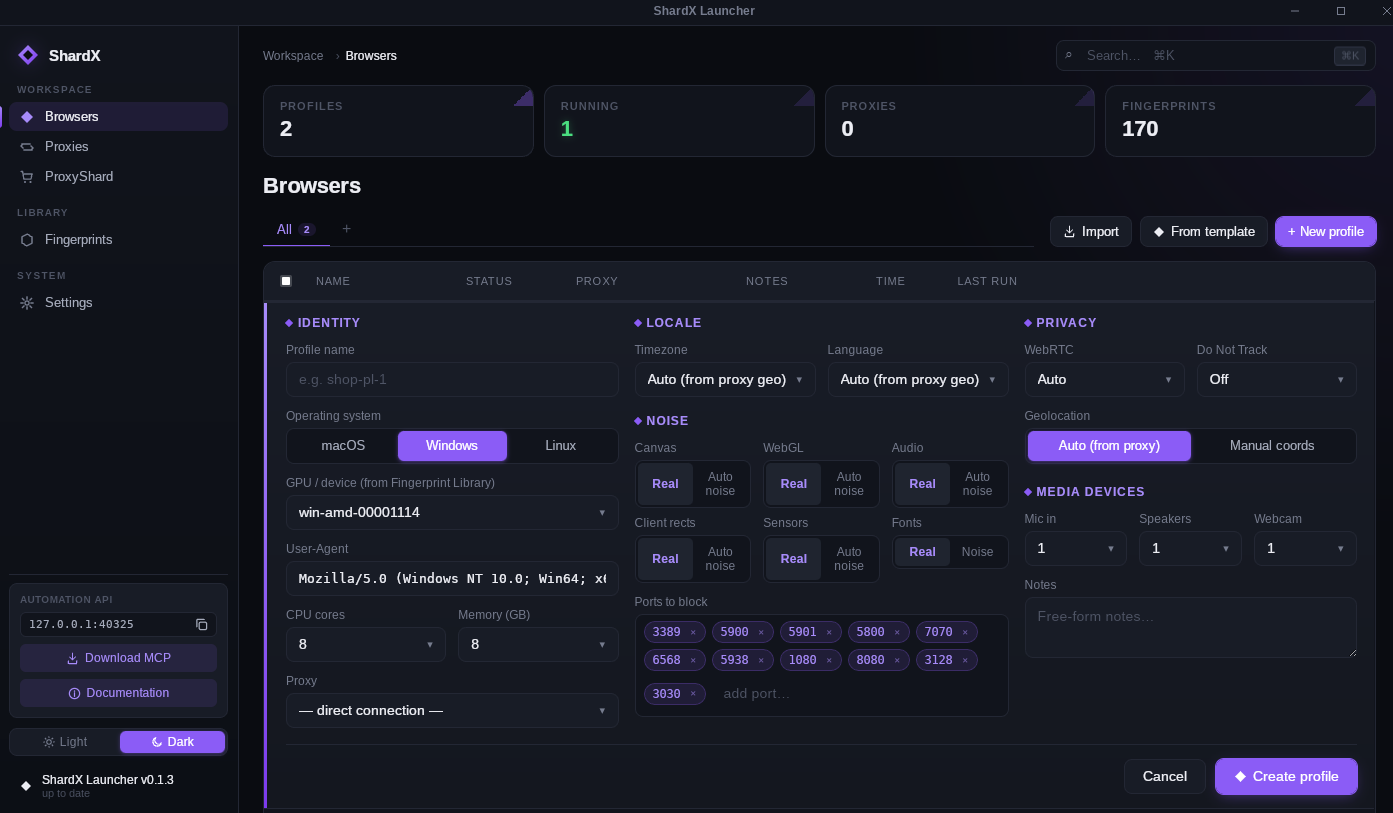
ShardX Launcher (best for beginners):
Run appimage or run app in qubes-menu → Click Browsers → New profile → Add name → Edit → Select the desired fingerprint parameters (to choose Windows 11, 10, or 8: edit Windows version in User-Agent) → Save changes → Start
Camoufox:
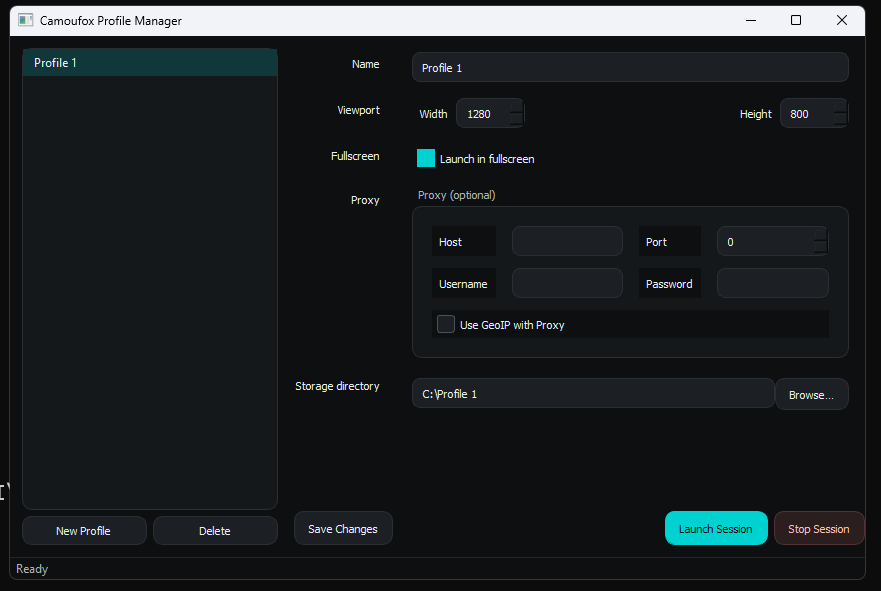
run in terminal:
./camoufox.sh for create new profile
then only
./camoufox_gui.sh
Click New Profile → Add name → Change parameters (Viewport, proxy…) → Add camoufox profile /home/user/my_profile in Storage directory → Launch Session
Change main_window.py file for new fingerprint (OS, timezone…)
Fingerprint Chromium:
follow the instructions to create config for browser with the various antidetect parameters and create file /home/user/fingerprint.sh for example:
nano /home/user/chrome.sh
add this parameters: (add full name of Appimage!)
#!/bin/bash
./ungoogled-chromium-x86_64....AppImage --fingerprint=4 --fingerprint-platform=windows --fingerprint-platform-version="15.2.0" --fingerprint-brand="Edge" --timezone="Europe/Berlin" --font="Arial" --fingerprint-gpu-vendor="Intel Inc." --fingerprint-gpu-renderer="ANGLE (Intel, Intel(R) HD Graphics Direct3D11 vs_5_0 ps_5_0)" --fingerprint-hardware-concurrency="2" --user-data-dir=%TEMP%\chromium --password-store=basic
then click CTRL + O and CTRL + X
then:
chmod +x /home/user/chrome.sh
and run ./chrome.sh

- Create app shortcuts:
Run in template terminal and in AppVMs terminal:
mkdir -p /home/user/.local/share/applications
nano /home/user/.local/share/applications/shardx.desktop
[Desktop Entry]
Type=Application
Name=Shardx-Chromium
Comment=Ungoogled chromium
Exec=/home/user/ShardX.Launcher....AppImage #add full name of file
Terminal=false
(Specify the full filename of the AppImage!)
then click CTRL + O and CTRL + X
nano /home/user/.local/share/applications/fingerprint.desktop
[Desktop Entry]
Type=application
Name=Fingerprint-Chromium
Comment=Ungoogled antidetect chromium
Exec=/home/user/chrome.sh
Terminal=false
then click CTRL + O and CTRL + X
nano /home/user/.local/share/applications/camoufox.desktop
[Desktop Entry]
Name=Camoufox
Comment=GUI manager for Camoufox
Exec=/home/user/camoufox_gui.sh
Type=Application
Terminal=true
then click CTRL + O and CTRL + X
chmod +x /home/user/.local/share/applications/fingerprint.desktop
chmod +x /home/user/.local/share/applications/shardx.desktop
chmod +x /home/user/.local/share/applications/camoufox.desktop
Refresh applications in qube manager and then shutdown template. Restart AppVMs.

 Browsers effectively fool even the most advanced browser‑fingerprint scanners
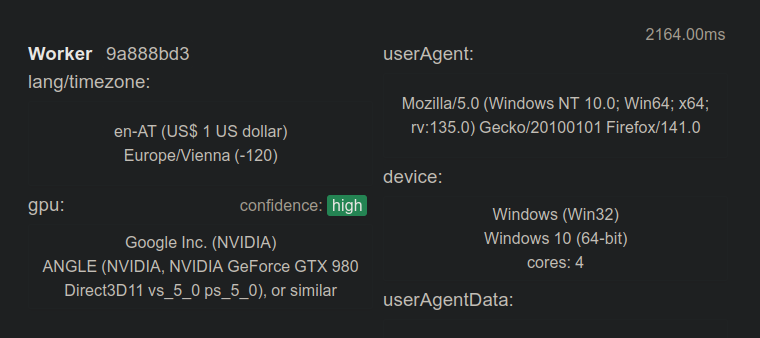
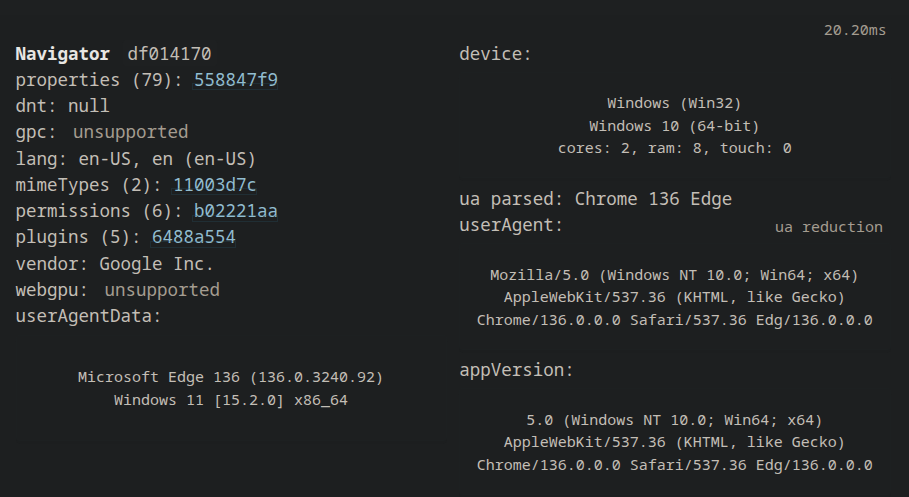
Use a Firefox user‑agent in Camoufox and an Edge user‑agent in fingerprint‑chromium for maximum realism of browser fingerprints.
It reliably bypass Facebook and Google. I also tested this on Telegram
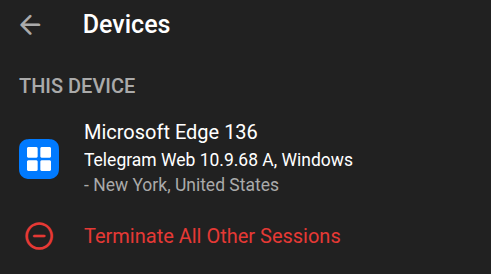
(I do NOT recommend using Telegram! I used it only for testing the browsers!)
 Donat Browser will soon discontinue support for Camoufox. Moving forward, it will support only proprietary Wayfern browser, which requires a paid subscription for Windows fingerprint spoofing. Antidetect‑appVM with FOSS Antidetect Browsers. Windows fingerprint. Random fingerprint in dvm - #60 by linuxuser1
 . Thanks for your work! Wishing you success.
 I would love to add an anti-detect option for chromium, but speaking of the project you mentioned, I’m considering it, but the project doesn’t offer binaries for all systems and architectures that I support, and there is no easy way to fork it and start building on top of it in case the developer doesn’t have time to work on it any longer, so I need more time to evaluate what I can do with it. Maybe I will go with developing my own solution. Don’t expect any integrations like this for the next few months