🛡 Qubes OS live mode. dom0 in RAM. Non-persistent Boot. RAM-Wipe. Protection against forensics. Tails mode. Hardening dom0. Root read‑only. Paranoid Security

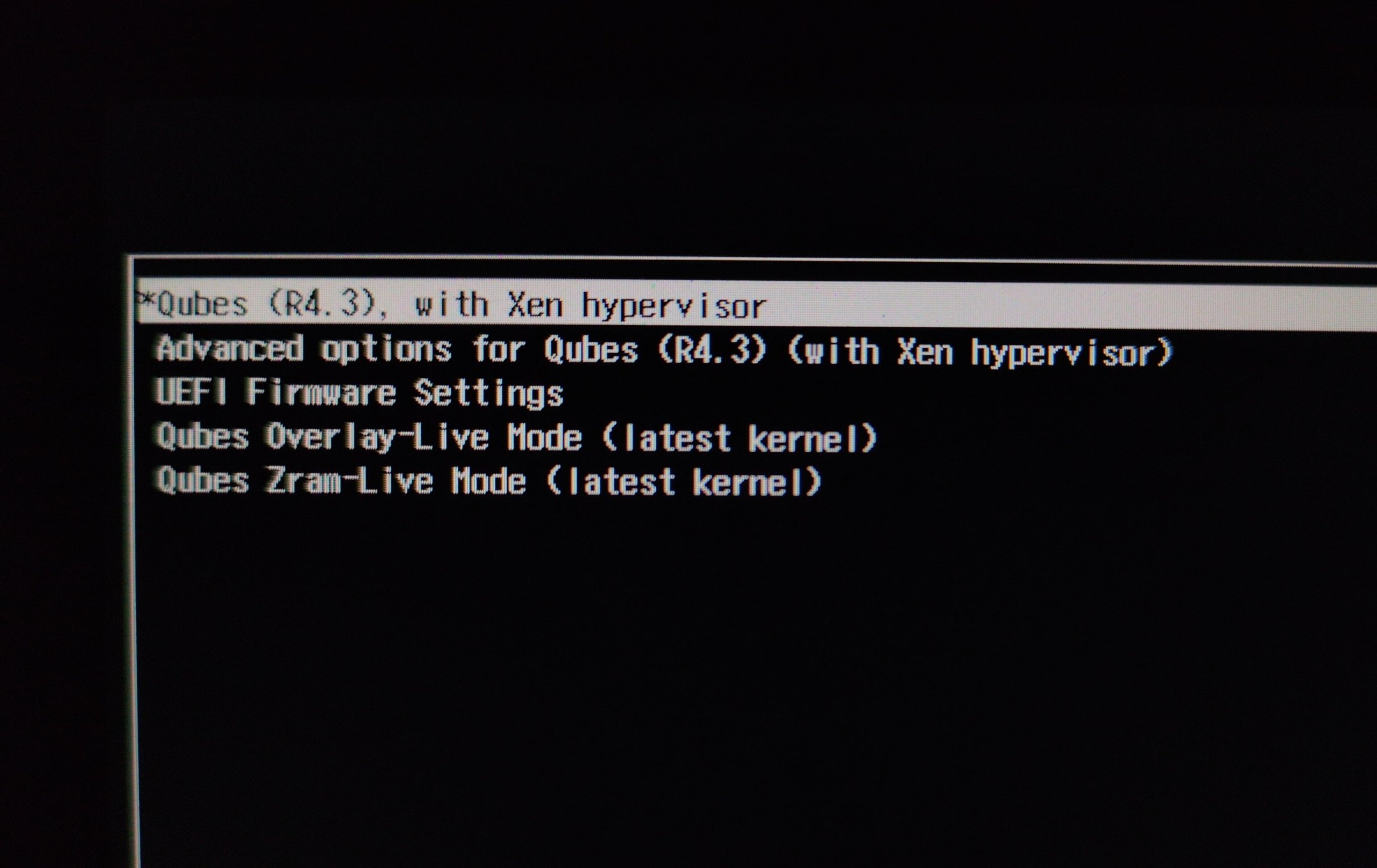
This guide adds two new options to the GRUB menu for safely launching live modes. You will get two ways to launch dom0 in RAM for protection against forensics:

  1. Qubes Overlay-Live Mode
  2. Qubes Zram-Live Mode

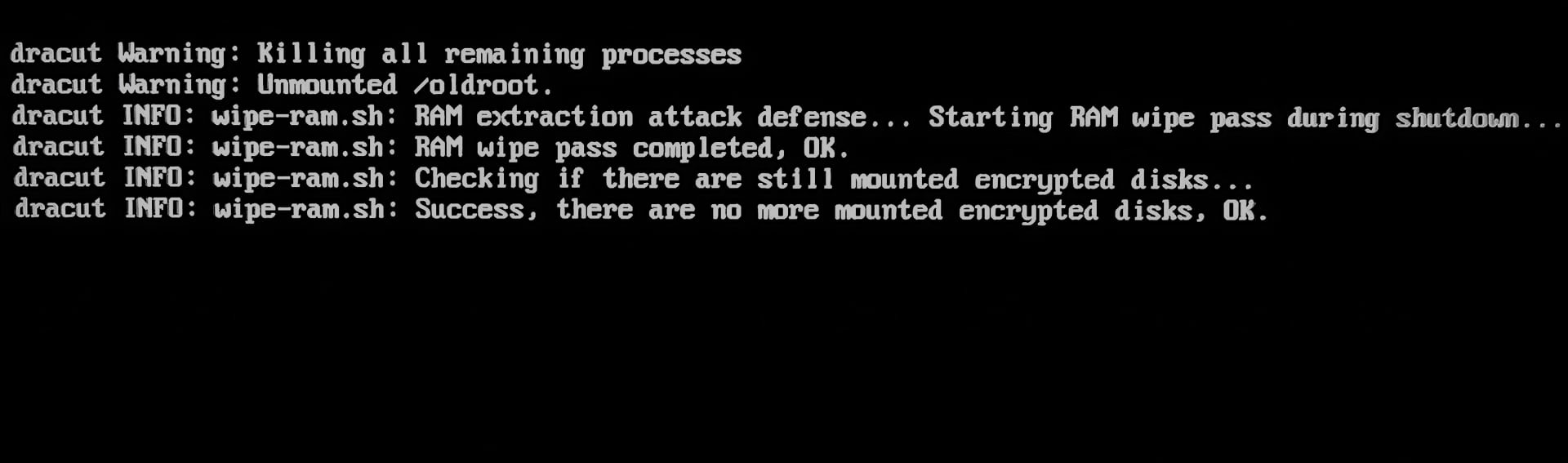
This guide also adds the Ram‑Wipe module to wipe memory after shutdown. This tool is used by Tails and Kicksecure / Whonix to wipe memory for protection against forensics.
You will see new entries after shutdown Qubes :point_down:

This guide also creates an ultra‑hardened overlay: root read‑only, strong hardening overlay mount, strong kernel hardening inside overlay (kernel hardening from Secureblue).

This guide solves the old problems:
1 implement live boot by porting grub-live to Qubes - amnesia / non-persistent boot / anti-forensics
2 Wipe RAM on shutdown

Overlay‑Live Mode is very fast and maximally secure. Overlay is used in Tails and Kicksecure/Whonix.
Zram‑Live Mode starts slowly, uses more CPU power, but saves RAM dramatically (~ 2× compared to Overlay‑Live). It is perfect for devices with 16 GB of memory or for running large VMs (Standalone qube) in live mode.

Both live modes significantly increase dom0 security:
:shield: Root mount in read‑only mode,
:muscle: All operations are performed in the ultra-hardened RAM-overlay,
:fire: RAM-wipe after shutdown.

This also works great for experiments in Qubes or for beginners who want to learn without fear of breaking anything - all changes disappear after a reboot. It will extend the lifespan of your SSD.

:loudspeaker: Don’t worry about installing these modes - doing so won’t affect the default Qubes boot!
I created this scenario to be as safe as possible and isolated from the default Qubes boot:
The new GRUB options are added to /etc/grub.d/40_custom (so it don’t modify your /etc/default/grub),
The new dracut live modules start only if additional kernel parameters are added in GRUB (these parameters aren’t present in the default boot).

:warning: Important: The size of the dom0 memory must exceed the amount of space used on the dom0 disk! Otherwise Zram-Mode won’t start and Overlay-Mode may freeze when launching multiple VMs. The size of dom0 changes after each update; kernel updates can significantly increase the dom0 size on disk, and live modes may stop working after a kernel update.
Keep an eye on the dom0 size on the disk when install appVM for live modes and remove old kernels to save disk space.

Simple script for automatically creating Dracut Modules and GRUB Custom files

Make a backup before you run script :slightly_smiling_face:

( :mega: Use this script (second comment) with additional kernel parameters bootscrub=1 init_on_free=1 for maximum paranoid protection against forensics, but it may reduce system performance by 5-15%! )

Default Script
You just need:
Save the script into txt, for example, with name live.sh in /home/user/
Make the file executable. Run in terminal sudo chmod +x live.sh or tick the box in File Properties → Permissions → Program:
Copy file to dom0. Run it in dom0 terminal qvm-run --pass-io <qube-name> 'cat /home/user/live.sh' > live.sh
Run it with sudo sudo ./live.sh

#!/bin/bash

# Qubes Dom0 Live Boot and RAM-Wipe
# ⚠️ Make backup before running! Run as root: sudo ./live.sh

set -e  # Exit on any error

#BOOT_UUID
BOOT_UUID=$(findmnt -n -o UUID /boot 2>/dev/null || echo "AUTO_BOOT_NOT_FOUND")
if [ "$BOOT_UUID" = "AUTO_BOOT_NOT_FOUND" ]; then
    BOOT_UUID=$(blkid -s UUID -o value -d $(findmnt -n -o SOURCE /boot 2>/dev/null))
fi

# LUKS_UUID
LUKS_DEVICE=$(blkid -t TYPE="crypto_LUKS" -o device 2>/dev/null | head -n1 || echo "")
if [ -n "$LUKS_DEVICE" ]; then
    LUKS_UUID=$(sudo cryptsetup luksUUID "$LUKS_DEVICE" 2>/dev/null)
else
    LUKS_UUID="AUTO_LUKS_NOT_FOUND"
fi

# Latest XEN_PATH 
XEN_PATH=$(ls /boot/xen*.gz 2>/dev/null | sort -V | tail -1 | xargs basename 2>/dev/null || echo "/xen-4.19.4.gz")

# Latest kernel/initramfs
LATEST_KERNEL=$(ls /boot/vmlinuz-*qubes*.x86_64 2>/dev/null | grep -E 'qubes\.fc[0-9]+' | sort -V | tail -1 | xargs basename)
LATEST_INITRAMFS=$(echo "/initramfs-${LATEST_KERNEL#vmlinuz-}.img")

# Max memory dom0
system_total_mb=$(xl info | grep total_memory | awk '{print $3}')

if [ -n "$system_total_mb" ] && [ "$system_total_mb" -gt 0 ] 2>/dev/null; then
    # 80% total_memory
    DOM0_MAX_MB=$((system_total_mb * 80 / 100))
    DOM0_MAX_GB=$((DOM0_MAX_MB / 1024))
    DOM0_MAX_RAM="dom0_mem=max:${DOM0_MAX_MB}M"
    DOM0_MAX_GBG="${DOM0_MAX_GB}G"
else
    DOM0_MAX_RAM="dom0_mem=max:10240M"
    DOM0_MAX_GB="10"
    DOM0_MAX_GBG="10G"
fi

# qubes_dom0-root
Qubes_Root=$(findmnt -n -o SOURCE /)

echo "=== Qubes Dom0 Live Boot Setup ==="

# Disable Dom0 Swap:
sed -i '/[[:space:]]\+swap[[:space:]]\+/s/^/#/' "/etc/fstab"
swapoff -a

# Create Dracut directories
echo "Creating Dracut modules..."
mkdir -p /usr/lib/dracut/modules.d/90ramboot
mkdir -p /usr/lib/dracut/modules.d/90overlayfs-root

# Create 90ramboot/module-setup.sh
cat > /usr/lib/dracut/modules.d/90ramboot/module-setup.sh << 'EOF'
#!/usr/bin/bash
check() {
    return 0
}
depends() {
    return 0
}
install() {
    inst_simple "$moddir/zram-mount.sh"
    inst_hook cleanup 00 "$moddir/zram-mount.sh"
}
EOF

chmod 755 /usr/lib/dracut/modules.d/90ramboot/module-setup.sh

# Create 90overlayfs-root/module-setup.sh
cat > /usr/lib/dracut/modules.d/90overlayfs-root/module-setup.sh << 'EOF'
#!/bin/bash

check() {
    [ -d /lib/modules/$kernel/kernel/fs/overlayfs ] || return 1
}

depends() {
    return 0
}

installkernel() {
    hostonly='' instmods overlay
}

install() {
    inst_hook pre-pivot 10 "$moddir/overlay-mount.sh"
}
EOF

chmod 755 /usr/lib/dracut/modules.d/90overlayfs-root/module-setup.sh

# Create overlay-mount.sh
cat > /usr/lib/dracut/modules.d/90overlayfs-root/overlay-mount.sh << 'EOF'
#!/bin/sh
. /lib/dracut-lib.sh

if ! getargbool 0 rootovl ; then
    return
fi

modprobe overlay
mount -o remount,nolock,noatime $NEWROOT
mkdir -p /live/image
mount --bind $NEWROOT /live/image
umount $NEWROOT
mkdir /cow
mount -n -t tmpfs -o mode=0755,size=100%,nr_inodes=500k,noexec,nodev,nosuid,noatime,nodiratime tmpfs /cow
mkdir /cow/work /cow/rw
mount -t overlay -o noatime,nodiratime,volatile,lowerdir=/live/image,upperdir=/cow/rw,workdir=/cow/work,default_permissions,relatime overlay $NEWROOT
mkdir -p $NEWROOT/live/cow
mkdir -p $NEWROOT/live/image
mount --bind /cow/rw $NEWROOT/live/cow
umount /cow
mount --bind /live/image $NEWROOT/live/image
umount /live/image
EOF

chmod 755 /usr/lib/dracut/modules.d/90overlayfs-root/overlay-mount.sh

# Create zram-mount.sh
cat > /usr/lib/dracut/modules.d/90ramboot/zram-mount.sh << EOF
#!/bin/sh

. /lib/dracut-lib.sh

if ! getargbool 0 rootzram ; then
    return
fi

mkdir /mnt
umount /sysroot
mount -o ro $Qubes_Root /mnt
modprobe zram
echo $DOM0_MAX_GBG > /sys/block/zram0/disksize
/mnt/usr/sbin/mkfs.ext2 /dev/zram0
mount -o nodev,nosuid,noatime,nodiratime /dev/zram0 /sysroot
cp -a /mnt/* /sysroot
exit 0
EOF

chmod 755 /usr/lib/dracut/modules.d/90ramboot/zram-mount.sh

# Create ramboot dracut.conf
echo "Creating dracut configuration..."
cat > /etc/dracut.conf.d/ramboot.conf << 'EOF'
add_drivers+=" zram "
add_dracutmodules+=" ramboot "
EOF

echo "Creating dracut ram-wipe module..."

# Create module directory
mkdir /usr/lib/dracut/modules.d/40ram-wipe/

# Create module-setup.sh
cat > /usr/lib/dracut/modules.d/40ram-wipe/module-setup.sh << 'EOF'
#!/bin/bash
# -*- mode: shell-script; indent-tabs-mode: nil; sh-basic-offset: 4; -*-
# ex: ts=8 sw=4 sts=4 et filetype=sh

## Copyright (C) 2023 - 2025 ENCRYPTED SUPPORT LLC <adrelanos@whonix.org>
## See the file COPYING for copying conditions.

# called by dracut
check() {
   require_binaries sync || return 1
   require_binaries sleep || return 1
   require_binaries dmsetup || return 1
   return 0
}

# called by dracut
depends() {
   return 0
}

# called by dracut
install() {
   inst_simple "/usr/libexec/ram-wipe/ram-wipe-lib.sh" "/lib/ram-wipe-lib.sh"
   inst_multiple sync
   inst_multiple sleep
   inst_multiple dmsetup
   inst_hook shutdown 40 "$moddir/wipe-ram.sh"
   inst_hook cleanup 80 "$moddir/wipe-ram-needshutdown.sh"
}

# called by dracut
installkernel() {
   return 0
}
EOF

chmod +x /usr/lib/dracut/modules.d/40ram-wipe/module-setup.sh

# Create wipe-ram-needshutdown.sh
cat > /usr/lib/dracut/modules.d/40ram-wipe/wipe-ram-needshutdown.sh << 'EOF'
#!/bin/sh

## Copyright (C) 2023 - 2025 ENCRYPTED SUPPORT LLC <adrelanos@whonix.org>
## See the file COPYING for copying conditions.

type getarg >/dev/null 2>&1 || . /lib/dracut-lib.sh

. /lib/ram-wipe-lib.sh

ram_wipe_check_needshutdown() {
   ## 'local' is unavailable in 'sh'.
   #local kernel_wiperam_setting

   kernel_wiperam_setting="$(getarg wiperam)"

   if [ "$kernel_wiperam_setting" = "skip" ]; then
      force_echo "wipe-ram-needshutdown.sh: Skip, because wiperam=skip kernel parameter detected, OK."
      return 0
   fi

   true "wipe-ram-needshutdown.sh: Calling dracut function need_shutdown to drop back into initramfs at shutdown, OK."
   need_shutdown

   return 0
}

ram_wipe_check_needshutdown
EOF

chmod +x /usr/lib/dracut/modules.d/40ram-wipe/wipe-ram-needshutdown.sh

# Create wipe-ram.sh
cat > /usr/lib/dracut/modules.d/40ram-wipe/wipe-ram.sh << 'EOF'
#!/bin/sh

## Copyright (C) 2023 - 2025 ENCRYPTED SUPPORT LLC <adrelanos@whonix.org>
## See the file COPYING for copying conditions.

## Credits:
## First version by @friedy10.
## https://github.com/friedy10/dracut/blob/master/modules.d/40sdmem/wipe.sh

## Use '.' and not 'source' in 'sh'.
. /lib/ram-wipe-lib.sh

drop_caches() {
   sync
   ## https://gitlab.tails.boum.org/tails/tails/-/blob/master/config/chroot_local-includes/usr/local/lib/initramfs-pre-shutdown-hook
   ### Ensure any remaining disk cache is erased by Linux' memory poisoning
   echo 3 > /proc/sys/vm/drop_caches
   sync
}

ram_wipe() {
   ## 'local' is unavailable in 'sh'.
   #local kernel_wiperam_setting dmsetup_actual_output dmsetup_expected_output

   ## getarg returns the last parameter only.
   kernel_wiperam_setting="$(getarg wiperam)"

   if [ "$kernel_wiperam_setting" = "skip" ]; then
      force_echo "wipe-ram.sh: Skip, because wiperam=skip kernel parameter detected, OK."
      return 0
   fi

   force_echo "wipe-ram.sh: RAM extraction attack defense... Starting RAM wipe pass during shutdown..."

   drop_caches

   force_echo "wipe-ram.sh: RAM wipe pass completed, OK."

   ## In theory might be better to check this beforehand, but the test is
   ## really fast.
   force_echo "wipe-ram.sh: Checking if there are still mounted encrypted disks..."

   ## TODO: use 'timeout'?
   dmsetup_actual_output="$(dmsetup ls --target crypt 2>&1)"
   dmsetup_expected_output="No devices found"

   if [ "$dmsetup_actual_output" = "$dmsetup_expected_output" ]; then
      force_echo "wipe-ram.sh: Success, there are no more mounted encrypted disks, OK."
   elif [ "$dmsetup_actual_output" = "" ]; then
      force_echo "wipe-ram.sh: Success, there are no more mounted encrypted disks, OK."
   else
      ## dracut should unmount the root encrypted disk cryptsetup luksClose during shutdown
      ## https://github.com/dracutdevs/dracut/issues/1888
      force_echo "\\
wipe-ram.sh: There are still mounted encrypted disks! RAM wipe incomplete!

debugging information:
dmsetup_expected_output: '$dmsetup_expected_output'
dmsetup_actual_output: '$dmsetup_actual_output'"
      ## How else could the user be informed that something is wrong?
      sleep 5
   fi
}

ram_wipe
EOF

chmod +x /usr/lib/dracut/modules.d/40ram-wipe/wipe-ram.sh

# Create ram-wipe dracut.conf.d
cat > /usr/lib/dracut/dracut.conf.d/30-ram-wipe.conf << 'EOF'
add_dracutmodules+=" ram-wipe "
EOF

# Create ram-wipe-lib.sh
mkdir /usr/libexec/ram-wipe
cat > /usr/libexec/ram-wipe/ram-wipe-lib.sh << 'EOF'
#!/bin/sh

## Copyright (C) 2023 - 2025 ENCRYPTED SUPPORT LLC <adrelanos@whonix.org>
## See the file COPYING for copying conditions.

## Based on:
## /usr/lib/dracut/modules.d/99base/dracut-lib.sh
if [ -z "$DRACUT_SYSTEMD" ]; then
    force_echo() {
        echo "<28>dracut INFO: $*" > /dev/kmsg
        echo "dracut INFO: $*" >&2
    }
else
    force_echo() {
        echo "INFO: $*" >&2
    }
fi
EOF

chmod +x /usr/libexec/ram-wipe/ram-wipe-lib.sh

# Update INITRAMFS
dracut --verbose --force

# Create GRUB custom
echo "Creating GRUB custom ..."

cat > /etc/grub.d/40_custom << EOF
#!/usr/bin/sh
exec tail -n +3 \$0

menuentry 'Qubes Overlay-Live Mode (latest kernel)' --class qubes --class gnu-linux --class gnu --class os --class xen \$menuentry_id_option 'xen-gnulinux-simple-/dev/mapper/qubes_dom0-root' {
	insmod part_gpt
	insmod ext2
	search --no-floppy --fs-uuid --set=root $BOOT_UUID
	echo 'Loading Xen ...'
	if [ "\$grub_platform" = "pc" -o "\$grub_platform" = "" ]; then
	    xen_rm_opts=
	else
	    xen_rm_opts="no-real-mode edd=off"
	fi
	insmod multiboot2
	multiboot2 /$XEN_PATH placeholder console=none dom0_mem=min:1024M $DOM0_MAX_RAM ucode=scan smt=off gnttab_max_frames=2048 gnttab_max_maptrack_frames=4096 \${xen_rm_opts}
	echo 'Loading Linux $LATEST_KERNEL ...'
	module2 /$LATEST_KERNEL placeholder root=/dev/mapper/qubes_dom0-root ro rd.luks.uuid=$LUKS_UUID rd.lvm.lv=qubes_dom0/root rd.lvm.lv=qubes_dom0/swap plymouth.ignore-serial-consoles rhgb rootovl quiet kernel.sysrq=0 kernel.perf_event_paranoid=3 kernel.kptr_restrict=2 kernel.panic=5 fs.protected_regular=2 fs.protected_fifos=2 kernel.printk=3333 kernel.kexec_load_disabled=1 kernel.io_uring_disabled=2 lockdown=confidentiality module.sig_enforce=1 usbcore.authorized_default=0
	echo 'Loading initial ramdisk ...'
	insmod multiboot2
	module2 --nounzip $LATEST_INITRAMFS
}

menuentry 'Qubes Zram-Live Mode (latest kernel)' --class qubes --class gnu-linux --class gnu --class os --class xen \$menuentry_id_option 'xen-gnulinux-simple-/dev/mapper/qubes_dom0-root' {
	insmod part_gpt
	insmod ext2
	search --no-floppy --fs-uuid --set=root $BOOT_UUID
	echo 'Loading Xen ...'
	if [ "\$grub_platform" = "pc" -o "\$grub_platform" = "" ]; then
	    xen_rm_opts=
	else
	    xen_rm_opts="no-real-mode edd=off"
	fi
	insmod multiboot2
	multiboot2 /$XEN_PATH placeholder console=none dom0_mem=min:1024M $DOM0_MAX_RAM ucode=scan smt=off gnttab_max_frames=2048 gnttab_max_maptrack_frames=4096 \${xen_rm_opts}
	echo 'Loading Linux $LATEST_KERNEL ...'
	module2 /$LATEST_KERNEL placeholder root=/dev/mapper/qubes_dom0-root ro rd.luks.uuid=$LUKS_UUID rd.lvm.lv=qubes_dom0/root rd.lvm.lv=qubes_dom0/swap plymouth.ignore-serial-consoles rhgb rootzram quiet kernel.sysrq=0 kernel.perf_event_paranoid=3 kernel.kptr_restrict=2 kernel.panic=5 fs.protected_regular=2 fs.protected_fifos=2 kernel.printk=3333 kernel.kexec_load_disabled=1 kernel.io_uring_disabled=2 lockdown=confidentiality module.sig_enforce=1 usbcore.authorized_default=0
	echo 'Loading initial ramdisk ...'
	insmod multiboot2
	module2 --nounzip $LATEST_INITRAMFS
}
EOF

chmod 755  /etc/grub.d/40_custom

# Update GRUB
grub2-mkconfig -o /boot/grub2/grub.cfg

echo "âś… ALL STEPS COMPLETED SUCCESSFULLY!"

:mega: If you want to add your custom kernel parameters for live modes, do it in sudo nano /etc/grub.d/40_custom and then update GRUB sudo grub2-mkconfig -o /boot/grub2/grub.cfg

:gear: :gear:
Next Step:
Clone or create dangerous qubes (dvm‑template, appVMs) into a pool in dom0 for run this VMs in Live-Modes

Since only dom0 runs in live mode, you have to start the VMs from the pool in dom0.

In the Qube Manager click clone qube, then in Advanced select a pool in dom0: varlibqubes (or create your new pool in dom0).
Or create a new appVM, and select varlibqubes pool in the advanced settings.
Don’t select vm‑pool!

:mega: Use no more than two appVMs / DVMs if you only have 16 GB of memory.

:exclamation: Don’t add templates to varlibqubes - templates don’t retain any session data in an appVM (that’s the point of Qubes’ isolation). So, in live mode it’s sufficient that only the private and volatile storages are active. You can inspect all template metadata yourself and verify that none of them contain artifacts from sessions in appVM.

If you have a lot of RAM and want to run many appVMs in live mode, then resize dom0 storage (for example 30G) using these commands:

sudo lvresize --size 30G /dev/mapper/qubes_dom0-root
sudo resize2fs /dev/mapper/qubes_dom0-root

:white_check_mark: Done!

Restart Qubes OS and Test Qubes live modes :wink:

Now if dom0 updates kernels or you add more ram to device, just run script again and live modules and live grub config update kernel and ram-settings.

Zram-Live Mode takes longer to start (about 30-40 seconds more). Don’t worry about the errors when starting Zram-Live Mode – those are just informative errors indicating that a swap couldn’t be created.

Remember that the data will be erased only after a reboot of Qubes OS. All the memory will be wiped after Qubes is shutdown (like Tails).

:exclamation: You can update templates in live modes, but update dom0 in persistent mode!
:exclamation: If you create a qube in the vm‑pool while in live mode, this qube won’t be saved in the Qube Manager after a reboot.
You can make backups in live mode (I’ve done it many times using a Overlay-Live Mode).

:flashlight:
You can add a “Generic Monitor” widget to the XFCE panel and configure it to run command findmnt -n -o SOURCE /. This widget will display which mode you’re currently in:
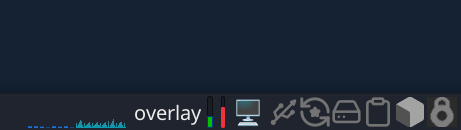
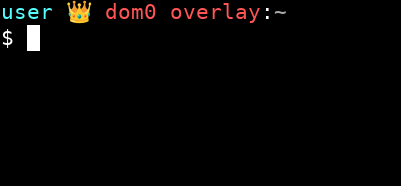
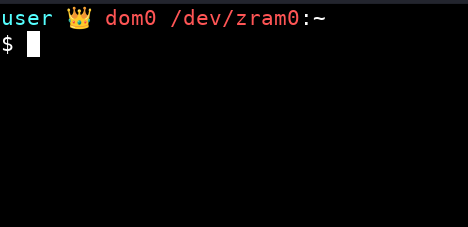
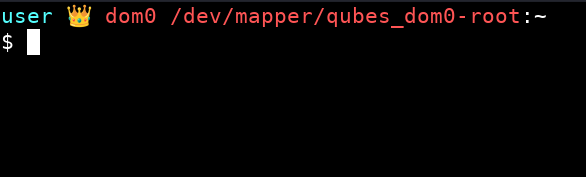
You can also use this terminal theme so can see which mode you’re currently in:
Click CTRL + H in thunar of dom0 and add this code into .bashrc instead of the default code:

# .bashrc

# Source global definitions
if [ -f /etc/bashrc ]; then
	. /etc/bashrc
fi

# User specific environment
if ! [[ "$PATH" =~ "$HOME/.local/bin:$HOME/bin:" ]]
then
    PATH="$HOME/.local/bin:$HOME/bin:$PATH"
fi
export PATH

###########################


export VIRTUAL_ENV_DISABLE_PROMPT=true


__qubes_update_prompt_data() {
	local RETVAL=$?

	__qubes_venv=''
	[[ -n "$VIRTUAL_ENV" ]] && __qubes_venv=$(basename "$VIRTUAL_ENV")

	__qubes_git=''
	__qubes_git_color=$(tput setaf 10)  # clean
	local git_branch=$(git --no-optional-locks rev-parse --abbrev-ref HEAD 2> /dev/null)
	if [[ -n "$git_branch" ]]; then
		local git_status=$(git --no-optional-locks status --porcelain 2> /dev/null | tail -n 1)
		[[ -n "$git_status" ]] && __qubes_git_color=$(tput setaf 11)  # dirty
		__qubes_git="‹${git_branch}›"
	fi

	__qubes_prompt_symbol_color=$(tput sgr0)
	[[ "$RETVAL" -ne 0 ]] && __qubes_prompt_symbol_color=$(tput setaf 1)


	return $RETVAL  # to preserve retcode
}


if [[ -n "$git_branch" ]]; then
	PROMPT_COMMAND="$PROMPT_COMMAND; __qubes_update_prompt_data"
else
	PROMPT_COMMAND="__qubes_update_prompt_data"
fi


PS1=''
PS1+='\[$(tput setaf 7)\]$(echo -ne $__qubes_venv)\[$(tput sgr0)\]'
PS1+='\[$(tput setaf 14)\]\u'
PS1+='\[$(tput setaf 15)\] đź‘‘ '
PS1+='\[$(tput setaf 9)\]\h'
PS1+=" $(findmnt -n -o SOURCE /)"
PS1+='\[$(tput setaf 15)\]:'
PS1+='\[$(tput setaf 7)\]\w '
PS1+='\[$(echo -ne $__qubes_git_color)\]$(echo -ne $__qubes_git)\[$(tput sgr0)\] '
PS1+='\[$(tput setaf 8)\]\[$([[ -n "$QUBES_THEME_SHOW_TIME" ]] && echo -n "[\t]")\]\[$(tput sgr0)\]'
PS1+='\[$(tput sgr0)\]\n'
PS1+='\[$(echo -ne $__qubes_prompt_symbol_color)\]\$\[$(tput sgr0)\] '
If you have limited memory, use this guide: Really disposable (RAM based) qubes

Also see these guide:
USB Kill Switch for Qubes OS

16 Likes

:smiling_imp: This script includes additional kernel parameters bootscrub=1 init_on_free=1 for paranoid protection against forensics, but it may reduce system performance by 5–15%!

#!/bin/bash

# Qubes Dom0 Live Boot and RAM-Wipe
# ⚠️ Make backup before running! Run as root: sudo ./live.sh

set -e  # Exit on any error

#BOOT_UUID
BOOT_UUID=$(findmnt -n -o UUID /boot 2>/dev/null || echo "AUTO_BOOT_NOT_FOUND")
if [ "$BOOT_UUID" = "AUTO_BOOT_NOT_FOUND" ]; then
    BOOT_UUID=$(blkid -s UUID -o value -d $(findmnt -n -o SOURCE /boot 2>/dev/null))
fi

# LUKS_UUID
LUKS_DEVICE=$(blkid -t TYPE="crypto_LUKS" -o device 2>/dev/null | head -n1 || echo "")
if [ -n "$LUKS_DEVICE" ]; then
    LUKS_UUID=$(sudo cryptsetup luksUUID "$LUKS_DEVICE" 2>/dev/null)
else
    LUKS_UUID="AUTO_LUKS_NOT_FOUND"
fi

# Latest XEN_PATH 
XEN_PATH=$(ls /boot/xen*.gz 2>/dev/null | sort -V | tail -1 | xargs basename 2>/dev/null || echo "/xen-4.19.4.gz")

# Latest kernel/initramfs
LATEST_KERNEL=$(ls /boot/vmlinuz-*qubes*.x86_64 2>/dev/null | grep -E 'qubes\.fc[0-9]+' | sort -V | tail -1 | xargs basename)
LATEST_INITRAMFS=$(echo "/initramfs-${LATEST_KERNEL#vmlinuz-}.img")

# Max memory dom0
system_total_mb=$(xl info | grep total_memory | awk '{print $3}')

if [ -n "$system_total_mb" ] && [ "$system_total_mb" -gt 0 ] 2>/dev/null; then
    # 80% total_memory
    DOM0_MAX_MB=$((system_total_mb * 80 / 100))
    DOM0_MAX_GB=$((DOM0_MAX_MB / 1024))
    DOM0_MAX_RAM="dom0_mem=max:${DOM0_MAX_MB}M"
    DOM0_MAX_GBG="${DOM0_MAX_GB}G"
else
    DOM0_MAX_RAM="dom0_mem=max:10240M"
    DOM0_MAX_GB="10"
    DOM0_MAX_GBG="10G"
fi

# qubes_dom0-root
Qubes_Root=$(findmnt -n -o SOURCE /)

echo "=== Qubes Dom0 Live Boot Setup ==="

# Disable Dom0 Swap:
sed -i '/[[:space:]]\+swap[[:space:]]\+/s/^/#/' "/etc/fstab"
swapoff -a

# Create Dracut directories
echo "Creating Dracut modules..."
mkdir -p /usr/lib/dracut/modules.d/90ramboot
mkdir -p /usr/lib/dracut/modules.d/90overlayfs-root

# Create 90ramboot/module-setup.sh
cat > /usr/lib/dracut/modules.d/90ramboot/module-setup.sh << 'EOF'
#!/usr/bin/bash
check() {
    return 0
}
depends() {
    return 0
}
install() {
    inst_simple "$moddir/zram-mount.sh"
    inst_hook cleanup 00 "$moddir/zram-mount.sh"
}
EOF

chmod 755 /usr/lib/dracut/modules.d/90ramboot/module-setup.sh

# Create 90overlayfs-root/module-setup.sh
cat > /usr/lib/dracut/modules.d/90overlayfs-root/module-setup.sh << 'EOF'
#!/bin/bash

check() {
    [ -d /lib/modules/$kernel/kernel/fs/overlayfs ] || return 1
}

depends() {
    return 0
}

installkernel() {
    hostonly='' instmods overlay
}

install() {
    inst_hook pre-pivot 10 "$moddir/overlay-mount.sh"
}
EOF

chmod 755 /usr/lib/dracut/modules.d/90overlayfs-root/module-setup.sh

# Create overlay-mount.sh
cat > /usr/lib/dracut/modules.d/90overlayfs-root/overlay-mount.sh << 'EOF'
#!/bin/sh
. /lib/dracut-lib.sh

if ! getargbool 0 rootovl ; then
    return
fi

modprobe overlay
mount -o remount,nolock,noatime $NEWROOT
mkdir -p /live/image
mount --bind $NEWROOT /live/image
umount $NEWROOT
mkdir /cow
mount -n -t tmpfs -o mode=0755,size=100%,nr_inodes=500k,noexec,nodev,nosuid,noatime,nodiratime tmpfs /cow
mkdir /cow/work /cow/rw
mount -t overlay -o noatime,nodiratime,volatile,lowerdir=/live/image,upperdir=/cow/rw,workdir=/cow/work,default_permissions,relatime overlay $NEWROOT
mkdir -p $NEWROOT/live/cow
mkdir -p $NEWROOT/live/image
mount --bind /cow/rw $NEWROOT/live/cow
umount /cow
mount --bind /live/image $NEWROOT/live/image
umount /live/image
EOF

chmod 755 /usr/lib/dracut/modules.d/90overlayfs-root/overlay-mount.sh

# Create zram-mount.sh
cat > /usr/lib/dracut/modules.d/90ramboot/zram-mount.sh << EOF
#!/bin/sh

. /lib/dracut-lib.sh

if ! getargbool 0 rootzram ; then
    return
fi

mkdir /mnt
umount /sysroot
mount -o ro $Qubes_Root /mnt
modprobe zram
echo $DOM0_MAX_GBG > /sys/block/zram0/disksize
/mnt/usr/sbin/mkfs.ext2 /dev/zram0
mount -o nodev,nosuid,noatime,nodiratime /dev/zram0 /sysroot
cp -a /mnt/* /sysroot
exit 0
EOF

chmod 755 /usr/lib/dracut/modules.d/90ramboot/zram-mount.sh

# Create ramboot dracut.conf
echo "Creating dracut configuration..."
cat > /etc/dracut.conf.d/ramboot.conf << 'EOF'
add_drivers+=" zram "
add_dracutmodules+=" ramboot "
EOF

echo "Creating dracut ram-wipe module..."

# Create module directory
mkdir /usr/lib/dracut/modules.d/40ram-wipe/

# Create module-setup.sh
cat > /usr/lib/dracut/modules.d/40ram-wipe/module-setup.sh << 'EOF'
#!/bin/bash
# -*- mode: shell-script; indent-tabs-mode: nil; sh-basic-offset: 4; -*-
# ex: ts=8 sw=4 sts=4 et filetype=sh

## Copyright (C) 2023 - 2025 ENCRYPTED SUPPORT LLC <adrelanos@whonix.org>
## See the file COPYING for copying conditions.

# called by dracut
check() {
   require_binaries sync || return 1
   require_binaries sleep || return 1
   require_binaries dmsetup || return 1
   return 0
}

# called by dracut
depends() {
   return 0
}

# called by dracut
install() {
   inst_simple "/usr/libexec/ram-wipe/ram-wipe-lib.sh" "/lib/ram-wipe-lib.sh"
   inst_multiple sync
   inst_multiple sleep
   inst_multiple dmsetup
   inst_hook shutdown 40 "$moddir/wipe-ram.sh"
   inst_hook cleanup 80 "$moddir/wipe-ram-needshutdown.sh"
}

# called by dracut
installkernel() {
   return 0
}
EOF

chmod +x /usr/lib/dracut/modules.d/40ram-wipe/module-setup.sh

# Create wipe-ram-needshutdown.sh
cat > /usr/lib/dracut/modules.d/40ram-wipe/wipe-ram-needshutdown.sh << 'EOF'
#!/bin/sh

## Copyright (C) 2023 - 2025 ENCRYPTED SUPPORT LLC <adrelanos@whonix.org>
## See the file COPYING for copying conditions.

type getarg >/dev/null 2>&1 || . /lib/dracut-lib.sh

. /lib/ram-wipe-lib.sh

ram_wipe_check_needshutdown() {
   ## 'local' is unavailable in 'sh'.
   #local kernel_wiperam_setting

   kernel_wiperam_setting="$(getarg wiperam)"

   if [ "$kernel_wiperam_setting" = "skip" ]; then
      force_echo "wipe-ram-needshutdown.sh: Skip, because wiperam=skip kernel parameter detected, OK."
      return 0
   fi

   true "wipe-ram-needshutdown.sh: Calling dracut function need_shutdown to drop back into initramfs at shutdown, OK."
   need_shutdown

   return 0
}

ram_wipe_check_needshutdown
EOF

chmod +x /usr/lib/dracut/modules.d/40ram-wipe/wipe-ram-needshutdown.sh

# Create wipe-ram.sh
cat > /usr/lib/dracut/modules.d/40ram-wipe/wipe-ram.sh << 'EOF'
#!/bin/sh

## Copyright (C) 2023 - 2025 ENCRYPTED SUPPORT LLC <adrelanos@whonix.org>
## See the file COPYING for copying conditions.

## Credits:
## First version by @friedy10.
## https://github.com/friedy10/dracut/blob/master/modules.d/40sdmem/wipe.sh

## Use '.' and not 'source' in 'sh'.
. /lib/ram-wipe-lib.sh

drop_caches() {
   sync
   ## https://gitlab.tails.boum.org/tails/tails/-/blob/master/config/chroot_local-includes/usr/local/lib/initramfs-pre-shutdown-hook
   ### Ensure any remaining disk cache is erased by Linux' memory poisoning
   echo 3 > /proc/sys/vm/drop_caches
   sync
}

ram_wipe() {
   ## 'local' is unavailable in 'sh'.
   #local kernel_wiperam_setting dmsetup_actual_output dmsetup_expected_output

   ## getarg returns the last parameter only.
   kernel_wiperam_setting="$(getarg wiperam)"

   if [ "$kernel_wiperam_setting" = "skip" ]; then
      force_echo "wipe-ram.sh: Skip, because wiperam=skip kernel parameter detected, OK."
      return 0
   fi

   force_echo "wipe-ram.sh: RAM extraction attack defense... Starting RAM wipe pass during shutdown..."

   drop_caches

   force_echo "wipe-ram.sh: RAM wipe pass completed, OK."

   ## In theory might be better to check this beforehand, but the test is
   ## really fast.
   force_echo "wipe-ram.sh: Checking if there are still mounted encrypted disks..."

   ## TODO: use 'timeout'?
   dmsetup_actual_output="$(dmsetup ls --target crypt 2>&1)"
   dmsetup_expected_output="No devices found"

   if [ "$dmsetup_actual_output" = "$dmsetup_expected_output" ]; then
      force_echo "wipe-ram.sh: Success, there are no more mounted encrypted disks, OK."
   elif [ "$dmsetup_actual_output" = "" ]; then
      force_echo "wipe-ram.sh: Success, there are no more mounted encrypted disks, OK."
   else
      ## dracut should unmount the root encrypted disk cryptsetup luksClose during shutdown
      ## https://github.com/dracutdevs/dracut/issues/1888
      force_echo "\\
wipe-ram.sh: There are still mounted encrypted disks! RAM wipe incomplete!

debugging information:
dmsetup_expected_output: '$dmsetup_expected_output'
dmsetup_actual_output: '$dmsetup_actual_output'"
      ## How else could the user be informed that something is wrong?
      sleep 5
   fi
}

ram_wipe
EOF

chmod +x /usr/lib/dracut/modules.d/40ram-wipe/wipe-ram.sh

# Create ram-wipe dracut.conf.d
cat > /usr/lib/dracut/dracut.conf.d/30-ram-wipe.conf << 'EOF'
add_dracutmodules+=" ram-wipe "
EOF

# Create ram-wipe-lib.sh
mkdir /usr/libexec/ram-wipe
cat > /usr/libexec/ram-wipe/ram-wipe-lib.sh << 'EOF'
#!/bin/sh

## Copyright (C) 2023 - 2025 ENCRYPTED SUPPORT LLC <adrelanos@whonix.org>
## See the file COPYING for copying conditions.

## Based on:
## /usr/lib/dracut/modules.d/99base/dracut-lib.sh
if [ -z "$DRACUT_SYSTEMD" ]; then
    force_echo() {
        echo "<28>dracut INFO: $*" > /dev/kmsg
        echo "dracut INFO: $*" >&2
    }
else
    force_echo() {
        echo "INFO: $*" >&2
    }
fi
EOF

chmod +x /usr/libexec/ram-wipe/ram-wipe-lib.sh

# Update INITRAMFS
dracut --verbose --force

# Create GRUB custom
echo "Creating GRUB custom ..."

cat > /etc/grub.d/40_custom << EOF
#!/usr/bin/sh
exec tail -n +3 \$0

menuentry 'Qubes Overlay-Live Mode (latest kernel)' --class qubes --class gnu-linux --class gnu --class os --class xen \$menuentry_id_option 'xen-gnulinux-simple-/dev/mapper/qubes_dom0-root' {
	insmod part_gpt
	insmod ext2
	search --no-floppy --fs-uuid --set=root $BOOT_UUID
	echo 'Loading Xen ...'
	if [ "\$grub_platform" = "pc" -o "\$grub_platform" = "" ]; then
	    xen_rm_opts=
	else
	    xen_rm_opts="no-real-mode edd=off"
	fi
	insmod multiboot2
	multiboot2 /$XEN_PATH placeholder console=none dom0_mem=min:1024M $DOM0_MAX_RAM ucode=scan smt=off gnttab_max_frames=2048 gnttab_max_maptrack_frames=4096 \${xen_rm_opts}
	echo 'Loading Linux $LATEST_KERNEL ...'
	module2 /$LATEST_KERNEL placeholder root=/dev/mapper/qubes_dom0-root ro rd.luks.uuid=$LUKS_UUID rd.lvm.lv=qubes_dom0/root rd.lvm.lv=qubes_dom0/swap plymouth.ignore-serial-consoles rhgb rootovl quiet kernel.sysrq=0 kernel.perf_event_paranoid=3 kernel.kptr_restrict=2 kernel.panic=5 fs.protected_regular=2 fs.protected_fifos=2 kernel.printk=3333 kernel.kexec_load_disabled=1 kernel.io_uring_disabled=2 lockdown=confidentiality module.sig_enforce=1 bootscrub=1 init_on_free=1 usbcore.authorized_default=0
	echo 'Loading initial ramdisk ...'
	insmod multiboot2
	module2 --nounzip $LATEST_INITRAMFS
}

menuentry 'Qubes Zram-Live Mode (latest kernel)' --class qubes --class gnu-linux --class gnu --class os --class xen \$menuentry_id_option 'xen-gnulinux-simple-/dev/mapper/qubes_dom0-root' {
	insmod part_gpt
	insmod ext2
	search --no-floppy --fs-uuid --set=root $BOOT_UUID
	echo 'Loading Xen ...'
	if [ "\$grub_platform" = "pc" -o "\$grub_platform" = "" ]; then
	    xen_rm_opts=
	else
	    xen_rm_opts="no-real-mode edd=off"
	fi
	insmod multiboot2
	multiboot2 /$XEN_PATH placeholder console=none dom0_mem=min:1024M $DOM0_MAX_RAM ucode=scan smt=off gnttab_max_frames=2048 gnttab_max_maptrack_frames=4096 \${xen_rm_opts}
	echo 'Loading Linux $LATEST_KERNEL ...'
	module2 /$LATEST_KERNEL placeholder root=/dev/mapper/qubes_dom0-root ro rd.luks.uuid=$LUKS_UUID rd.lvm.lv=qubes_dom0/root rd.lvm.lv=qubes_dom0/swap plymouth.ignore-serial-consoles rhgb rootzram quiet kernel.sysrq=0 kernel.perf_event_paranoid=3 kernel.kptr_restrict=2 kernel.panic=5 fs.protected_regular=2 fs.protected_fifos=2 kernel.printk=3333 kernel.kexec_load_disabled=1 kernel.io_uring_disabled=2 lockdown=confidentiality module.sig_enforce=1 bootscrub=1 init_on_free=1 usbcore.authorized_default=0
	echo 'Loading initial ramdisk ...'
	insmod multiboot2
	module2 --nounzip $LATEST_INITRAMFS
}
EOF

chmod 755  /etc/grub.d/40_custom

# Update GRUB
grub2-mkconfig -o /boot/grub2/grub.cfg

echo "âś… ALL STEPS COMPLETED SUCCESSFULLY!"
4 Likes

Update: Hardening dom0 live mode!

:sunglasses: Now launching dom0 in live mode provides additional protection.
New flags have been added to the overlay‑tmpfs live mode, enhancing security and slightly improving performance by minimizing data.:

nr_inodes=500k – limits the number of inodes (file descriptors) that the tmpfs can create to 500 000. Protection of temporary‑file DoS and fork‑bomb.
noexec – disables execution of binaries located on the mounted filesystem. Even if a malicious script is placed there, it cannot be run.
nodev – prevents the interpretation of device special files (e.g., /dev/null) inside the mount, blocking attacks that rely on creating device nodes.
nosuid – ignores set‑UID and set‑GID bits on files, so privileged executables cannot gain elevated rights.
noatime,nodiratime – disables updating a file’s “last‑access” timestamp on each read, eliminating unnecessary write operations. It reduces frequent metadata writes, saving I/O and RAM.
volatile – improves performance by completely disabling sync/fsync operations. It reduces frequent metadata writes, saving I/O and RAM.

It was added to these lines:

mount -n -t tmpfs -o mode=0755,size=70%,nr_inodes=500k,noexec,nodev,nosuid,relatime tmpfs /cow
mount -t overlay -o noatime,volatile,lowerdir=/live/image,upperdir=/cow/rw,workdir=/cow/work,default_permissions,relatime overlay $NEWROOT

It won’t affect your daily work. My tests show that everything works perfectly, apVMs launch correctly and apps install fine in the appVMs.

3 Likes

This doesn’t look very robust, have you tried using something like separate grub menu entries with different settings? Alternatively remove wildcards from your script to detect one character, not the whole string, but I’m not sure if this works with the way it receives input

This is the simplest way. I haven’t worked with grub. I’ve been studying the topic of porting grub‑live from Kicksecure, adding these two modules, but I couldn’t get it to work implement live boot by porting grub-live to Qubes - amnesia / non-persistent boot / anti-forensics · Issue #4982 · QubesOS/qubes-issues · GitHub
So any help improving the launch of live modes in grub is welcome

1 Like

The guide has been updated and heavily reworked! Now the live‑mode boot options are added to the GRUB menu.

I studied the GRUB documentation and found that it isn’t as complicated as I thought.

Launching live modes from GRUB is simpler and safer than starting them via initramfs!
I removed the script that creates the boot‑mode menu in dracut (Enter Boot Mode / Boot to RAM?) that was created by a forum user from an old topic. It was inconvenient and unsafe - for example, if the first letter of the password matched the letter used to launch the live mode, the live mode would always start automatically, and user would have to edit GRUB each time the system boots.

It completely solves the problem: implement live boot by porting grub-live to Qubes - amnesia / non-persistent boot / anti-forensics

Kernel parameter rootzram is added (activated when Zram‑Live is added to GRUB)

if ! getargbool 0 rootzram ; then
    return
fi

Overlay‑Live Mode have rootovl parameter (it’s used in native Kicksecure/Whonix to launch Live Mode).

if ! getargbool 0 rootovl ; then
    return
fi

A simple script has been created to automatically update /etc/grub.d/40_custom file - it adds new menu entries to GRUB and upgrades the kernels to the latest version.

The script for launching Zram‑Live dracut module has been changed - now this line will automatically insert the maximum dom0 memory:
old echo 10G > /sys/block/zram0/disksize > new echo $DOM0_MAX_GBG > /sys/block/zram0/disksize

Any suggestions for even better optimization and automation are welcome.

6 Likes

Zram versus the hardening used by Kicksecure or Whonix – does it provide the same security as running dom0 in Qubes with persistent mode?
If dom0 is secure because it is completely offline and resides within Qubes’ architecture, does that make it ultra‑secure, right?
If we run dom0 the way it normally works but mount it in RAM, will it become insecure just because it is 100 % in RAM? That doesn’t make sense!
Using Whonix’s hardening based on Overlay‑Live Mode inside operating systems that don’t share Qubes’ architecture—such as Tails and Whonix—clearly makes sense and is even mandatory to achieve more security than the Zram mode. However, mounting dom0 in RAM will not change Qubes’ security; it merely runs 100 % in memory, and everything that runs inside dom0 is “anti‑forensic” just like Tails and Whonix failsafe!Overlay‑Live Mode makes dom0 more secure, but is it really necessary? What proof exists that using dom0 in Zram mode would make Qubes insecure? Zram is unquestionably insecure for normal systems, but for dom0 in Qubes it seems that it does not lose any security by operating entirely in RAM…
Another point: if an attacker compromises a dom0 that is amnesic thanks to Zram or Overlay‑Live Mode, the original dom0 still resides on one of the SSD partitions. Thus, if the attacker has full control over the system, they could mount that original dom0 partition on the SSD and install something permanent. Then, when the user runs Qubes in persistent mode or in the next session with Qubes in live mode the attacker would regain access perhaps!
In Overlay‑Live Mode, does the hardening employed by Kicksecure prevent the attacker from mounting the original dom0 partition on the SSD and Trojan‑injecting it for later access in subsequent live or persistent sessions? In Zram mode it seems that it does, but what about Overlay‑Live Mode? If in Overlay‑Live Mode the attacker cannot modify the live dom0, will they instead modify the SSD partition where dom0 resides? All of this appears possible to me, which is why Zram would only be insecure if used on regular OSes such as Tails or Whonix that are monolithic…

1 Like

Of course, zram won’t break the basic isolation of dom0. I’ve written a theory - copying the root filesystem into zram has many more potential vulnerabilities in theory than the battle‑tested overlay. The theory is useful in case someone decides to experiment and run something questionable in dom0. In fact, zram is dangerous for dom0 not because of viruses or hackers, but because it can break the entire system - for example, a random updating of a dracut or grub could corrupt the base system (the system simply won’t boot after a reboot). A live mode is a good test environment, for instance. It’s handy for studying advanced guides from the Qubes forum (so that a reboot wipes out any possible damage if something goes wrong), but some guides won’t work on zram mode; certain guides can break the system after a reboot - that happened to me and my friends once.
Therefore, my comment is based not only on theory but also on experience. With overlay, breaking the system is virtually impossible because you’re working in the upper layer. I can’t even imagine what action could cause a failure when the base system is read‑only in overlay. So, in theory, if we take the default persistent dom0, a dom0 running in zram, and a dom0 running in overlay, the overlay mode would be the safest. But yes, it does require more physical memory. Then comes the zram mode, and then default dom0. Therefore, zram mode is still safer than default dom0 (it’s easiest to break something in default dom0)

2 Likes

The guide has been updated! Now Zram‑Mode also offers very high security and protection!

The root filesystem is now mounted read‑only (-o ro).

mount -o ro /dev/mapper/qubes_dom0-root /mnt

Additional parameters have been added for hardening and to reduce RAM/CPU load:

mount -o nodev,nosuid,noatime,nodiratime /dev/zram0 /sysroot

nodev – prevents the interpretation of device special files (e.g., /dev/null) inside the mount, blocking attacks that rely on creating device nodes.
nosuid – ignores set‑UID and set‑GID bits on files, so privileged executables cannot gain elevated rights.
noatime,nodiratime – reduces frequent metadata writes, saving I/O and RAM/CPU.

All code now:

#!/bin/sh

. /lib/dracut-lib.sh

if ! getargbool 0 rootzram ; then
    return
fi

mkdir /mnt
umount /sysroot
mount -o ro /dev/mapper/qubes_dom0-root /mnt
modprobe zram
echo $DOM0_MAX_GBG > /sys/block/zram0/disksize
/mnt/usr/sbin/mkfs.ext2 /dev/zram0
mount -o nodev,nosuid,noatime,nodiratime /dev/zram0 /sysroot
cp -a /mnt/* /sysroot
exit 0

:shield: Now both live modes have very high security!

4 Likes

It’s an amazing! I’m currently using the old version (which asks a question after entering the password) – how can I change it to the new version with GRUB menu?

@newqube Remove these modules:

sudo rm /usr/lib/dracut/modules.d/01ramboot
sudo rm /usr/lib/dracut/modules.d/90overlayfs-root

and start the guide again

2 Likes

Thanks!

The guide has been updated!

Now this scenario automatically sets the optimal amount of RAM for dom0 in live modes. My tests showed that 70 % of RAM is the best balance for performance and security.

Now you no longer need to edit /etc/default/grub - the memory size is changed only in custom GRUB configurations for dom0, and /etc/default/grub is never edited!
This makes the live‑mode launch script very safe, because you won’t break the default Qubes boot!

A command has also been added to automatically edit /etc/fstab to remove swap. The script will now prepend a # to any line containing the word “swap”!

Now this script will perform all actions automatically - just run it and it will create dracut modules, disable swap, custom GRUB entries, and set 70 % of memory for dom0‑live!

Additionally, Zram module has been moved from 01 to 90 - since it starts later, there’s less chance that other modules will interfere with this script.

upd: mount -o ro /dev/mapper/qubes_dom0-root /mnt has been changed to:

Qubes_Root=$(findmnt -n -o SOURCE /)
mount -o ro $Qubes_Root /mnt

Some users of Zram-Live scenario were worried in the old topic that this scenario might stop working after a dom0 update or in a new version of Qubes or in other file system. Now the updates will not affect the scenario at all, and the script will adapt to the system changes.

5 Likes

@linuxuser1

Not working properly for me with a fully updated fresh install of Qubes 4.3.

  • Automated live.sh script runs but upon reboot selecting either live mode in GRUB menu still just boots into normal persistent dom0 (non-live).

  • Manual install causes Overlay-Live mode to pass boot but only with 1.8GB of maximum usable in varlibqubes. As I have 256GB system RAM, 180GB would be 70%, so the script’s dividing by 100 may be the problem?
    DOM0_MAX_MB=$(( (DOM0_MAX_KB * 70) / (1024 * 100) ))

  • Manual install causes Zram-Live mode to fail boot with space full and I/O errors. May be related to same 1.8GB maximum usable varlibqubes space problem experienced with Overlay-Live mode.

Also could you provide the commands-or-script to fully uninstall this, and go back to clean stock state, including all parts (Dracut, GRUB, etc)?

Hope to get this working soon!

Hello!

Dom0 should boot in live mode because the rootovl and zramroot parameters are set. Verify this again using:
findmnt -n -o SOURCE /
I ran the script on my Qubes 4.3, and it correctly created the Dracut modules and the 40_custom GRUB entry. I use this every day and have tested everything on my own computer. My friend was also able to run it, and it works perfectly for him.

The formula is correct; it converts 70 % of the available memory into a RAM disk for dom0. It works great for me - out of 62 GB of RAM, 43 GB are allocated to the live disk. I’ve verified this on a friend’s computer running Qubes as well. You can replace $DOM0_MAX_GBG and $DOM0_MAX_RAM with your own values.

But your comment is very interesting. Provide additional details. I’ll also re‑check the script -maybe I made a typo somewhere. If you want to remove the live modules and the new GRUB options, just delete the Dracut modules 90overlayfs‑root and 90ramboot from /usr/lib/dracut/modules.d and clear out 40_custom in /etc/grub.d. Those files don’t affect the default boot, because the default boot entry lacks the necessary parameters to trigger them. So you can experiment freely without impacting the standard boot configuration.

upd: I ran the script just now for a test in overlay mode, having removed all the modules and the 40_custom GRUB entry. As I mentioned earlier, in live mode I’m using 70 % of the 62 GB of RAM, and after running the script the modules received 30 GB (70 % of 43 GB). So the formula should work correctly. Tomorrow I will final test again on another friend’s with Qubes 4.3.

1 Like

You’re sure 256 gb of RAM? or SSD? All your bugs are associated with a lack of disk space. Zram-mode shows a lot of errors if there is not enough free disk space to run (for example, you have 16 GB of memory, but dom0 after kernel updates takes up more space than ram-disk (70%). overlay-mode may not run live also due to lack of memory. Such problems are typical for those who have 8-16 GB of RAM.

1 Like

I experience the exact same symptoms on a clean install of Qubes 4.3

I ended up doing a manual install and as well I had only 2GB of ram set but my computer has 96.
In the end I modified 40_custom by hand with a correct value and updated GRUB with grub2-mkconfig -o /boot/grub2/grub.cfg

I can also confirm that on my computer zram is non functional. I didn’t dive much yet into it.

1 Like

@linuxuser1

Yes, absolutely certain about the 256GB of system RAM. SSD storage drive is over 1TB and free storage drive space is 800+GB after Qubes install & all updates.

Thanks for that confirmation @AxAxA, that the bugs I encountered are real and non-unique to my system. Saves me real diagnostic time to confirm this.

I don’t have the live.sh automated install environment setup right now, just the manual install environment. Within this manually installed environment, I checked the /etc/grub.d/40_custom file.

The couple “multiboot2” lines had a value set of dom0_mem=max:2867M, so only 2.867GB.

Further digging revealed that the method of getting the value for “DOM0_MAX_KB” is buggy.

# Max memory dom0
DOM0_MAX_KB=$(xenstore-read /local/domain/0/memory/hotplug-max 2>/dev/null \
           || xenstore-read /local/domain/0/memory/static-max 2>/dev/null \
           || echo 0)

Running these commands on their own in dom0 terminal (persistent mode), on system with 256GB of RAM…

xenstore-read /local/domain/0/memory/hotplug-max 2>/dev/null

xenstore-read: couldn't read path /local/domain/0/memory/hotplug-max
xenstore-read /local/domain/0/memory/static-max 2>/dev/null

4194304

Seems a different method is needed for determining the accurate total system RAM value.

Haven’t attempted to patch the RAM values yet.

Not sure if any other code bugs still exist.

Not sure what caused the live.sh automation script to not work for us.

@domdom0 @AxAxA Thank you for your feedback! I understood the source of the problem. This formula works if you previously set a high memory value for dom0. 2,867 is 70 % of the default dom0 4,096. A long time ago I manually assigned all of the laptop’s RAM to dom0, which is why the formula works for me and for my friend. Today I will work on finding a new formula that will reliably work on all laptops, otherwise it will have to be entered manually

1 Like

@domdom0 @AxAxA Thanks again for your tests. Formula has been updated!

I reset dom0 to its default memory settings and removed all modules. After that I ran the script with new formula:

system_total_mb=$(xl info | grep total_memory | awk '{print $3}')

if [ -n "$system_total_mb" ] && [ "$system_total_mb" -gt 0 ] 2>/dev/null; then
    # 70% total_memory
    DOM0_MAX_MB=$((system_total_mb * 80 / 100))
    DOM0_MAX_GB=$((DOM0_MAX_MB / 1024))
    DOM0_MAX_RAM="dom0_mem=max:${DOM0_MAX_MB}M"
    DOM0_MAX_GBG="${DOM0_MAX_GB}G"
else
    DOM0_MAX_RAM="dom0_mem=max:10240M"
    DOM0_MAX_GB="10"
    DOM0_MAX_GBG="10G"
fi

and now everything works perfectly!
In the default boot, my dom0 has the default 4096M of mem_max, and in both live modes dom0_mem=max uses 80% of my laptop’s total memory.

Please test the script from the second comment on your devices. You can run this script without deleting old configuration. The script will replace the old data to the new data.

Your comments once again underscore the importance of independent third‑party audits of any code!

4 Likes