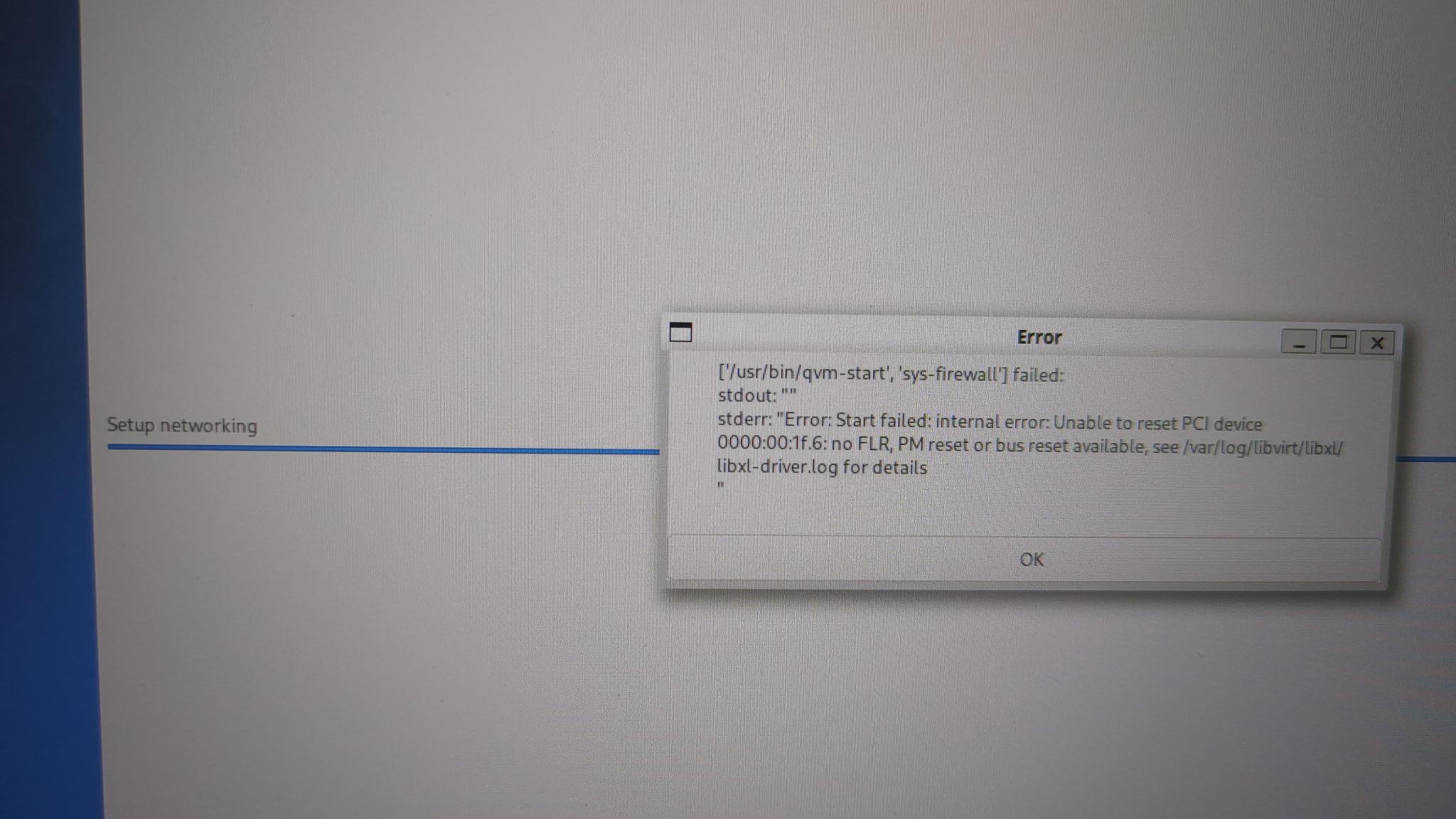
I’m trying to install Qubes on my Thinkbook 14 g8 IAL.
The media test shows an error and won’t proceed to the installation screen. Even if I skip the media test and proceed with the installation, an error occurs midway and it fails to install properly. I used GNOME Disk Tool to burn the ISO.
Maybe the Gnome Disk Tool is not the right tool for creating the installation media. The fact, that the media test won’t be successful, is another point in the right direction.
Additional question: Do you’ve test the downloaded iso file as recommended at Verifying signatures — Qubes OS Documentation?
An corrupted iso file can be the reason for such errors also.
Also make sure if you have a big enough USB pendrive.
I have found out that the 4.3 .iso can’t really fit on my 8GB pendrive. Thanks to the ‘fake’ units used by the marketing teams!
When I used the dd command to write an ISO file to a USB drive and booted from that USB, it didn’t proceed to the installation screen and stopped at GRUB.
Hmm, not sure, what you mean with “stopped at GRUB”.
The QUBES installation media boots via GRUB also, on the screen you have then the options to proceed with installation and verify the media or to proceed without verify.
If you mean your default GRUB screen (from your existing OS), then yes, it fails to boot from your installation media.
Sometimes, GRUB is a little bit picky, so maybe try to use another USB-Stick (if you have one more).
After the problem appears as you show in your screenshot are you able to reboot the computer and log into Qubes? If you can, then you could try the following. Otherwise, there should be a way to do this pre-boot?
Yes, I am able to log into Qubes. I’m sorry, but since I find it difficult to handle this issue myself, it would be helpful if you could create some sort of guide.
The error says, that the PCI device does not react properly to an reset. This is not a big problem and you can try to solve it in that way (according to PCI troubleshooting — Qubes OS Documentation):
Hmm, not completely sure, what you mean.
Is it, when you have Qubes installed and runs normally or is it during installation?
When you have Qubes installed and running normally, then app Qubes, based on both standard templates (Debian13 and fedora 42) supports alot of Filesystem types (ext3,4,ntfs,fat32,…) even windows encrypted filesystems (BitLocker).
If you have Qubes running normally:
insert your USB-Stick
start the App Qube, that you will mount the USB-Stick onto.
open the devices shortcut (top of screen, right side)
attach the filesystem (the complete USB-Stick like /dev/sdb, not /dev/sdb1!) to the App-Qube.
open a filemanager in the App Qube (for example thunar)
click on the USB filesystem (left side list) to mount it
don’t forget to unmount the mounted USB stick, before you pull it out from your computer (to prevent damages on the filesystems of the USB stick)