Step-by-step Guide on setting up an OpenVPN Gateway with multiple anti-leak features that make the connection fail closed should it be interrupted.
It has been tested with Debian 13 minimal on Qubes versions 4.2 and 4.3.
Security and privacy features included:
 anti-leak nftables rules applied to the VPN Gateway VM from inside the VM
- anti-leak dom0 rules applied to the VPN Gateway VM from outside
 optional random OpenVPN connection selection (requires multiple .ovpn files)
- optional no-logs OpenVPN client configuration
Before proceeding, you will need to download a copy of your VPN provider’s configuration file(s) and have your VPN login information handy.
Prepare the OpenVPN template
-
In dom0 terminal, install debian-13-minimal template
qvm-template install debian-13-minimal -
Clone the template to a dedicated OpenVPN template
qvm-clone debian-13-minimal debian-13-minimal-ovpn -
Start XTerm terminal in the OpenVPN template
qvm-run -u root debian-13-minimal-ovpn xterm -
In debian-13-minimal-ovpn terminal, edit XTerm terminal settings to allow copy-pasting
nano /etc/X11/app-defaults/XTerm -
scroll to the end, paste the following line
*selectToClipboard: true -
Save the file (
ctrl+x,y, andEnter) -
Close the terminal, then open it again (repeat step #3)
 Copy-Paste inside XTerm Terminal: to copy, select the text and press
 Ctrl+Shift+C, to paste press the mousewheel button -
Update and install OpenVPN and notification packages
apt update && apt install -y --no-install-recommends qubes-core-agent-networking qubes-notification-agent libnotify-bin openvpnNote: libnotify-bin package is present in debian-13 template, but missing in the minimal version. It is required for VPN status notifications.
-
Disable the auto-starting services that come with OpenVPN, then close the terminal.
systemctl stop openvpn.service
systemctl stop openvpn-client@client
systemctl stop openvpn-server@server
systemctl disable openvpn.service
systemctl disable openvpn-client@client
systemctl disable openvpn-server@server
Ignore warnings about locale settings
-
Shutdown the template. In dom0
qvm-shutdown debian-13-minimal-ovpn
Set up the OpenVPN Gateway VM
-
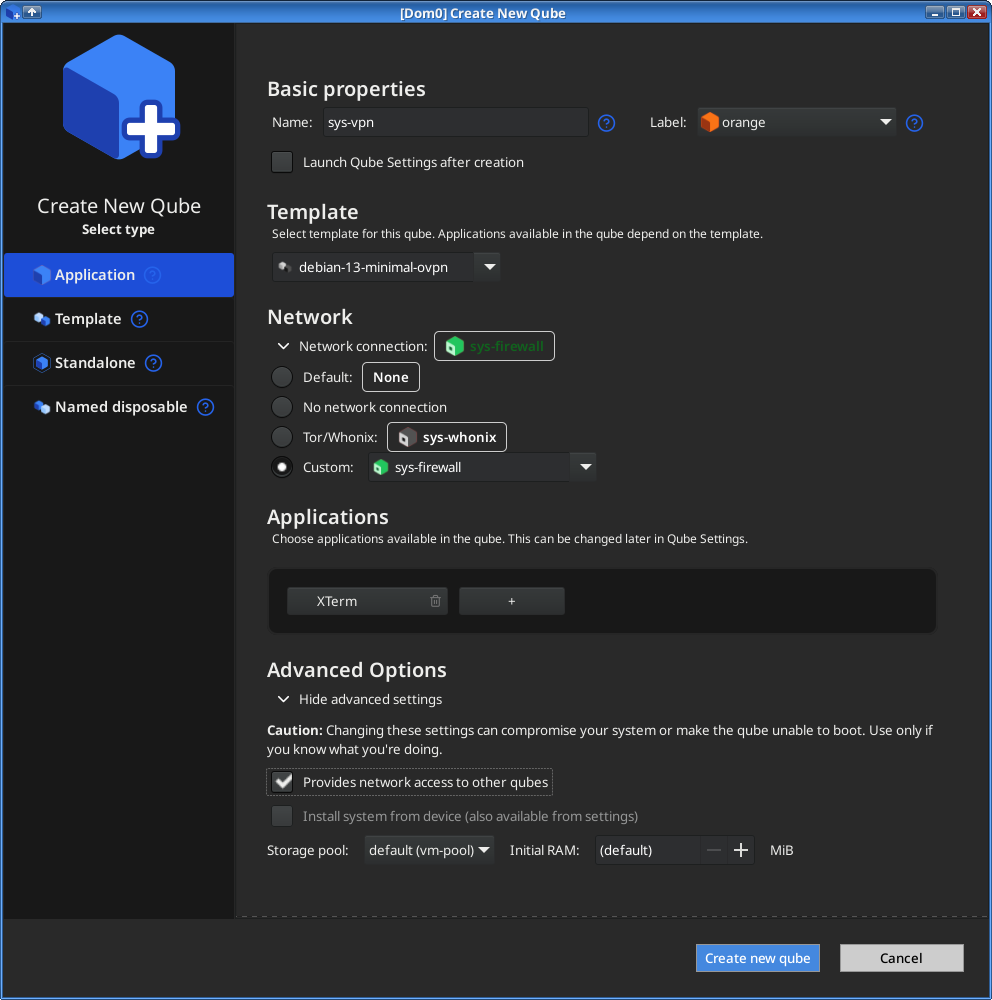
Create a new AppVM
- name it
sys-vpn - set the template to
debian-13-minimal-ovpn - set Network to
Custom ➝ sys-firewall— not
not Default ➝ sys-firewall - set
Provides network access to other qubeschecked in the Advanced Options section
- name it
-
Set up and test the OpenVPN client
Make sure the VPN template
debian-13-minimal-ovpnis not running, then start the VPN VM and launch XTerm terminal. From dom0 run
qvm-run -u root sys-vpn xtermSet up and test the VPN client. Create a new
/rw/config/vpnfolder
mkdir /rw/config/vpnCopy your VPN configuration files to
/rw/config/vpn. Your OpenVPN config file should be namedopenvpn-client.ovpnso you can use the scripts below as is without modification. Otherwise you would have to replace the file name. Files accompanying the main config such as*.crtand*.pemshould also be placed in the/rw/config/vpnfolder.Check or modify configuration file contents
nano /rw/config/vpn/openvpn-client.ovpnFiles referenced in
openvpn-client.ovpnshould not use absolute paths such as/etc/...The config should route all traffic through your VPN’s interface after a connection is created; For OpenVPN the directive for this is
redirect-gateway def1Make sure it already includes or add:
redirect-gateway def1Note: If your VPN provider did not supply credentials to use, you may skip the following
auth-user-passdirective andpass.txtfile creationThe VPN client may not be able to prompt you for credentials when connecting to the server, so we’ll add a reference to a file containing the VPN username and password, add or modify
auth-user-passlike so:auth-user-pass pass.txtSave the
/rw/config/vpn/openvpn-client.ovpnfile.nano /rw/config/vpn/pass.txtAdd:
username
password
Replace
usernameandpasswordwith your actual username and password.Test your client configuration: Run the client from the AppVM XTerm terminal in the ‘vpn’
openvpn --cd /rw/config/vpn --config openvpn-client.ovpnWatch for status messages that indicate whether the connection is successful (e.g.
Initialization Sequence Completed) and test from another VPN VM terminal window with ping.
ping 1.1.1.1pingcan be aborted by pressing the two key combinationCtrl+C. DNS may be tested at this point by replacing addresses in/etc/resolv.confwith ones appropriate for your VPN (although this file will not be used when setup is complete, therefore revert to your original qubes nameservers after testing the connection). Diagnose any connection problems using resources such as client documentation and help from your VPN service provider. Proceed to the next step when you’re sure the basic VPN connection is working. -
Create the DNS-handling script
nano /rw/config/vpn/qubes-vpn-handler.shAdd the following:
#!/bin/bash

set -e
export PATH="$PATH:/usr/sbin:/sbin"

case "$1" in

up)
# To override DHCP DNS, assign DNS addresses to 'vpn_dns' env variable before calling this script;
# Format is 'X.X.X.X  Y.Y.Y.Y [...]'
if [[ -z "$vpn_dns" ]] ; then
    # Parses DHCP foreign_option_* vars to automatically set DNS address translation:
    for optionname in ${!foreign_option_*} ; do
        option="${!optionname}"
        unset fops; fops=($option)
        if [ ${fops[1]} == "DNS" ] ; then vpn_dns="$vpn_dns ${fops[2]}" ; fi
    done
fi

nft flush chain inet user-vpn prerouting-nat
nft flush chain inet user-vpn forward-filter-dns
if [[ -n "$vpn_dns" ]] ; then
    # Set DNS address translation in firewall:
    for addr in $vpn_dns; do
		nft add rule inet user-vpn prerouting-nat iifgroup 2 udp dport 53 counter dnat ip to $addr
		nft insert rule inet user-vpn forward-filter-dns iifgroup 2 udp dport 53 ip daddr $addr counter accept

		nft add rule inet user-vpn prerouting-nat iifgroup 2 tcp dport 53 counter dnat ip to $addr
		nft insert rule inet user-vpn forward-filter-dns iifgroup 2 tcp dport 53 ip daddr $addr counter accept
    done
    su - -c 'notify-send "LINK IS UP." --icon=network-idle' user
else
    su - -c 'notify-send "LINK UP, NO DNS!" --icon=dialog-error' user
fi

;;
down)
su - -c 'notify-send "LINK IS DOWN !" --icon=dialog-error' user

# Restart the VPN automatically
sleep 5s
sudo /rw/config/rc.local
;;
esac
Save the script (
ctrl+x,y, andEnter). Make it executable.
chmod +x /rw/config/vpn/qubes-vpn-handler.sh -
Configure client to use the DNS handling script
nano /rw/config/vpn/openvpn-client.ovpnAdd the following under the
redirect-gateway def1line:script-security 2 up 'qubes-vpn-handler.sh up' down 'qubes-vpn-handler.sh down'Remove other instances of lines starting with
script-security,upordownshould there be any others.Save the script (
ctrl+x,y, andEnter) -
Create the nftables anti-leak rules script
nano /rw/config/vpn/qubes-vpn-firewall.shAdd the following:
#!/bin/bash

set -e

# Add the `qvpn` group to system. The sync and sleep were in the original script but might not be needed.
groupadd -rf qvpn; sync; sleep 2s

nft add table inet user-vpn

nft 'add chain inet user-vpn forward-filter { type filter hook forward priority filter - 1; policy accept; }'

# Block forwarding of connections through upstream network device (in case the vpn tunnel breaks or packets are routed
# directly between upstream and tunnel interface).
nft add rule inet user-vpn forward-filter meta iifgroup 1 counter drop
nft add rule inet user-vpn forward-filter meta oifgroup 1 counter drop
nft add rule inet user-vpn forward-filter meta mark set 3000 counter

nft add chain inet user-vpn forward-filter-dns
nft add rule inet user-vpn forward-filter jump forward-filter-dns

# The up script adds a DNAT rule to prerouting-nat and a corresponding accept rule to forward-filter-dns. If the accept
# rule is not hit then the DNAT was not applied and the packet should be dropped else it will go through the tunnel with
# the AppVM DNS (DNS leak). This could happen if the tunnel is created after a packet passes prerouting-nat but before
# the routing decision is made. If Qubes adds a higher priority DNAT DNS rule then DNS will stop working but not leak.
nft add rule inet user-vpn forward-filter iifgroup 2 udp dport 53 counter drop
nft add rule inet user-vpn forward-filter iifgroup 2 tcp dport 53 counter drop

nft 'add chain inet user-vpn postrouting-filter { type filter hook postrouting priority filter - 1; policy accept; }'
# Tunnel broke after forward-filter and the reroute check redirected packet to oifgroup 1.
nft add rule inet user-vpn postrouting-filter meta mark 3000 oifgroup 1 counter drop

# Drop all output through the tunnel interface and only allow traffic from the `qvpn` group to the uplink interface. Our
# VPN client will run with group `qvpn`.
nft 'add chain inet user-vpn output-filter { type filter hook output priority filter - 1; policy drop; }'
nft add rule inet user-vpn output-filter meta oifgroup 1 skgid qvpn counter accept
nft add rule inet user-vpn output-filter meta oifgroup 2 counter accept
nft add rule inet user-vpn output-filter meta oifname "lo" counter accept
nft add rule inet user-vpn output-filter counter

# Chain for up script.
nft 'add chain inet user-vpn prerouting-nat { type nat hook prerouting priority dstnat - 1; policy accept; }'

# Rely on Qubes rules for masquerade.
# Rely on Qubes rules for preventing inbound packets (they're dropped unless established,related).
Save the script (
ctrl+x,y, andEnter). Make it executable.
chmod +x /rw/config/vpn/qubes-vpn-firewall.sh -
Set up the VPN’s autostart
nano /rw/config/rc.localClear out the existing lines and add:
#!/bin/bash
export VPN_CLIENT='openvpn'
VPN_OPTIONS='--cd /rw/config/vpn/ --config openvpn-client.ovpn --daemon'

# Uncomment to randomly select a .ovpn config from /rw/config/vpn/
#VPN_OPTIONS='--cd /rw/config/vpn/ --config '$(find /rw/config/vpn/*.ovpn|shuf -n1|rev|cut -d/ -f1|rev)' --daemon'

groupadd -rf qvpn ; sleep 2s
sg qvpn -c "$VPN_CLIENT $VPN_OPTIONS"
su - --whitelist-environment=VPN_CLIENT -c 'notify-send "Starting $VPN_CLIENT..." --icon=network-idle' user
Optional: If you have multiple .ovpn configuration files inside /rw/config/vpn/and want to start a random VPN connection each time the VPN Gateway boots up, comment the 3rd line and uncomment the 6th lineSave the script (
ctrl+x,y, andEnter) and close the terminal. -
Shutdown the VPN VM. In dom0
qvm-shutdown sys-vpn -
Create a systemd service in VPN template
Start the OpenVPN template and spawn XTerm terminal
qvm-run -u root debian-13-minimal-ovpn xtermCreate the systemd service
nano /lib/systemd/system/qubes-vpn-firewall.serviceAdd the following:
[Unit]
Description=Qubes VPN firewall updater
After=qubes-firewall.service
Before=qubes-network.service

[Service]
type=oneshot
ExecStart=/rw/config/vpn/qubes-vpn-firewall.sh

[Install]
RequiredBy=qubes-network.service
Save the script (
ctrl+x,y, andEnter)Note: This system service ensures the nftables rules from
/rw/config/vpn/qubes-vpn-firewall.share in place after thequbes-firewall.serviceis active and before thequbes-network.servicehas started.Enable the service
systemctl enable qubes-vpn-firewall.serviceClose the terminal.
-
Shutdown the VPN template. In dom0
qvm-shutdown debian-13-minimal-ovpn -
Start your VPN Gateway VM. You should see VPN Notifications on the top right corner of your monitor.
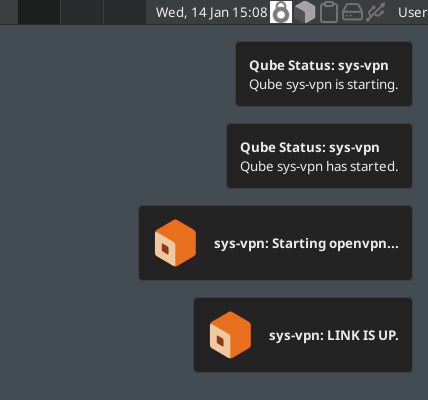
You can now use your VPN Gateway!  Set
Set sys-vpn as the Net Qube for your AppVMs.
Anti-leak dom0 firewall rules
A highly recommended extra layer of anti-leak firewall rules can be set in dom0 for the VPN Gateway VM.
These rules are outside the scope of the VPN VM and would require dom0 compromise in order to be tampered with.
Make sure the VPN Gateway (sys-vpn) is turned off before proceeding.
In dom0 terminal run the following commands — replace <> placeholders with the connection information of your OpenVPN configuration
qvm-firewall <VPN-Gateway-VM-Name> reset
qvm-firewall <VPN-Gateway-VM-Name> add accept <OpenVPN-server-IP>/32 <protocol> <port>
qvm-firewall <VPN-Gateway-VM-Name> add drop
qvm-firewall <VPN-Gateway-VM-Name> del --rule-no 0   # Delete default 'accept' rule
Example:
qvm-firewall sys-vpn reset
qvm-firewall sys-vpn add accept 123.45.67.89/32 udp 1194
qvm-firewall sys-vpn add drop
qvm-firewall sys-vpn del --rule-no 0
Check the firewall rules with
qvm-firewall sys-vpn list
It should look like
user@dom0:~$ qvm-firewall sys-vpn list
NO  ACTION  HOST             PROTOCOL  PORT(S)  SPECIAL TARGET  ICMP TYPE  EXPIRE  COMMENT
0   accept  123.45.67.89/32  udp       1194     -               -          -       -
1   drop    -                -         -        -               -          -       -
No-Logs configuration
To prevent recording OpenVPN (client) logs in the Gateway VM, add the following to your .ovpn configuration file:
log /dev/null
status /dev/null
verb 0
 Debug
Debug
To debug your OpenVPN connection, add the following to your .ovpn config:
verb 3
log /home/user/log
This will save the verbose connection log to the /home/user/log file.
Sources:
- @qubesfirewallbug
 did all the work for us. We must thank him.
- https://web.archive.org/web/20220515144004/https://github.com/Qubes-Community/Contents/blob/master/docs/configuration/vpn.md


