I’m using Google Translate to communicate with you.
After incorrectly following a tutorial on Qubes OS and how to access my X.com account, and having used this tutorial (Using Multi-factor Authentication), I shut down my Coreboot laptop with the Coreboot Heads firmware and my Nitrokey security key.
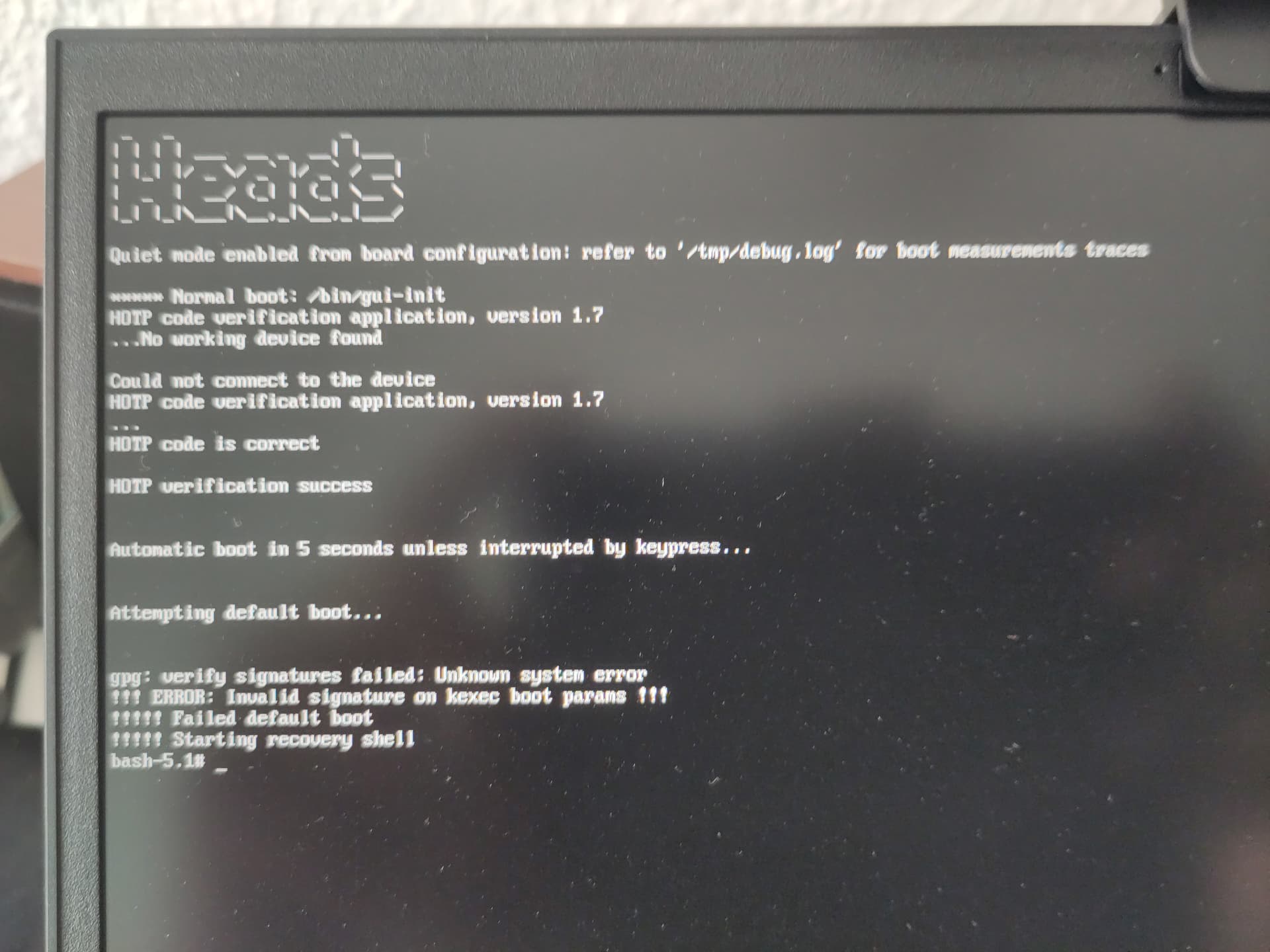
The next day, I turned on my laptop. And here’s the signature problem I’m having. See the attached image.
I think I understand that I need to sign again.
I just received my Qubes OS certified laptop from (https://novacustom.com/) with the Nitrokey.
I’m a novice with Qubes OS and Linux.
I initially started a discussion in my own language, but that didn’t provide a solution.
Can you help me?
Thank you very much.
Germain.
In french / En français:
Bonjour tout le monde.
J’utilise Google traduction pour communiquer avec vous.
Après avoir mal suivi un tutoriel sur Qubes Os et comment accéder à mon compte X.com et en ayant utilisé ce tutoriel: ( Using Multi-factor Authentication ), j’ai éteins mon Latop Coreboot avec le firmware Coreboot Heads et ma clé de sécurité Nitrokey.
Le lendemain, j’allume mon latop. Et voici le problème de signatures que j’ai. Regardez l’image en fichier joint.
Je crois comprendre que je dois signer de nouveau.
Je viens de recevoir mon Latop certifié Qubes Os de chez ( https://novacustom.com/ ) avec la Nitrokey.
Je suis un novice avec Qubes Os et avec Linux.
J’ai d’abord ouvert une discussion dans mon language mais cela ne m’a pas donné la solution.
English:
After updating Qubes OS, there will inevitably be signature issues detected by both the “Coreboot Heads” firmware and the Nitrokey USB dongle. When your PC boots with Coreboot Heads installed, the firmware will detect a change in the signatures. I think you should follow the Nitrokey tutorial here in french or in english:
Problème de signatures avec le dongle de sécurité Nitrokey after an update of systeme (OS).
French / Français:
Après la mise à jour de Qubes OS, des problèmes de signature seront inévitablement détectés par le firmware « Coreboot Heads » et la clé USB Nitrokey. Lorsque votre PC démarrera avec Coreboot Heads installé, le firmware détectera une modification des signatures. Je vous recommande de suivre le tutoriel Nitrokey ici : https://docs.nitrokey.com/fr/nitropad-nitropc/heads/system-updateProblème de signatures avec le dongle de sécurité Nitrokey après une mise à jour du système (OS)
Je testerai cela plus tard et vous tiendrai au courant.
Je n’utilise pas Coreboot, mais il me semble que c’est une mise à jour de Dom0 qui oblige de corriger les signatures au démarrage. Rien à voir avec tes efforts pour utiliser X.
L’idéal serait de faire les MàJ de Dom0 juste avant de redémarrer, afin de savoir que les changements viennent de ça, et non de quelqu’un qui a pu intervenir sur l’ordi à ton insu.
English summary: Looks like it is a Dom0 update that make it necessary to correct the boot signatures - nothing to do with X. The best thing is to update Dom0 right before a reboot, to have confidence that the changes don’t come from external interference with the pc.