im looking at this solution on fedora’s forum but i have no idea how to even create a vpn connection other than the protonvpn which is an app on my normal windows i buy… this here looks like i have to type in a gateway, port and etc when i click on vpn and it’s asking me what kind like ssh to ssh , open connection and etc
You can run a VPN client in the same qube that you are running applications that you want to have use that VPN. You can also run a VPN client in a qube that has provides network checked and be a NetVM for another qube.
An advantage of separate qube dedicated to running the VPN client is if something goes wrong where you are running Flatpak or something you want to run expects to run sudo $whatever then your VPN credentials won’t be compromised.
Whichever you do, you want to be sure that the Linux nftables will allow the VPN tunnel traffic out but also will not blindly send packets out the normal route.
Sometimes achieving this is as easy as running the VPN “app” in a qube that provides network and that VPN app’s access to the running Linux system in that qube handles all of the firewall stuff. Sometimes the VPN app does not do this. Whatever happens depends on the VPN app.
Many advanced users don’t run the VPN apps but have scripts for nftables and run scripts that call openvpn or wg (Wireguard), mostly Wireguard these days.
There is a need for some kind of standard framework for VPN clients to run in a qube or some Linux container, FreeBSD Jail, or whatever. But as far as I know that doesn’t exist today.
1 Like
so say for instance you see my personal is running on fedora 41 but not a templatevm … i clone a personal qube, then add sys-net or sys-firewall for connection and use that as a vpn connection , and in the settings check provides network ?how will that be a NetVM for my personal qube that’s on fedora ??
Don’t clone the qube named personal. Make a new AppVM qube named vpn-blue0 (where blue is a random name) or similar. The qube named vpn-blue0 should use sys-firewall as its NetVM which you can set when you create the AppVM qube named vpn-blue0.
You can change the NetVM of any qube by right-clicking on the qube in the Qube Manager, hovering the cursor over the submenu Network, and choosing which qube is to be used as a NetVM by the qube you right-clicked on. Under the Basic tab in the Settings window for a qube you will see Net qube.
Drawing the network path on a piece of paper for your own reference can help.
Stage your VPN client configuration in vpn-blue0. Test it out. Run some curl commands or open Chromium or Firefox and see what your IP address shows up as on websites that echo your IP address back to you. Run ip address show when the VPN is running and observe what network interfaces you see. Run cat /etc/resolv.conf and observe.
Given where you are at as indicated by the questions you are asking, I must emphasize the very serious pitfall you must watch out for which is a moment where your VPN client stops, the network rout table changes, and packets get forwarded to sys-firewall like normal instead of through the VPN tunnel. This is why you must be sure that the netfilter tables have rules in place to allow the VPN tunnel packets to exit through eth0 to sys-firewall but other packets are not allowed to exit through eth0.
The crude example below is in deprecated iptables and may be functionally incorrect (just off-the-cuff example) but conveys the idea:
iptables -P OUTPUT DROP
iptables -P FORWARD DROP

iptables -I OUTPUT -o eth0 -p udp --dport 1337  \
  --destination $vpn_provider_ip -j ACCEPT

iptables -I FORWARD -o myvpn0 -j ACCEPT
iptables -I OUTPUT -o myvpn0 -j ACCEPT
Sometimes you can rely on the app released by a VPN provider to not allow leaks. Sometimes you can’t.
1 Like
After you have vpn-blue0 configured and thoroughly tested then you will be ready for qube personal or qube personal2 or whatever to use vpn-blue0 as a Net qube.
1 Like
okay making the clone qubes now… while looking at a free proxy list on this site , trying to make sure i will not get no more errors like in the last picture i posted above, i keep getting warning: while downloading
http://ciscobinary.openh264.org/libopenh264-2.5.1-linux64.7.so.bz2: While fetching http://ciscobinary.openh264.org/libopenh264-2.5.1-linux64.7.so.bz2: [7] Could not connect to server
im thinking if it is not my wifi being slow to connect to my qubes right now my server is slow or something
You don’t need vpn to install things.
This error means that installer (flatpak) experienced connection stall and it waited some time for data to come and have enough and closing.
Just run this install command again.
In any case, VPN connection is another internet gateway for data to travel trough and if vpn server is congested it may be even slower and more prone to errors than without.
But why your connection is slow?
Default proxy for qubes is whonix, which is TOR, which is really slow.
If your qube have internet connection use flatpak without http_proxy set.
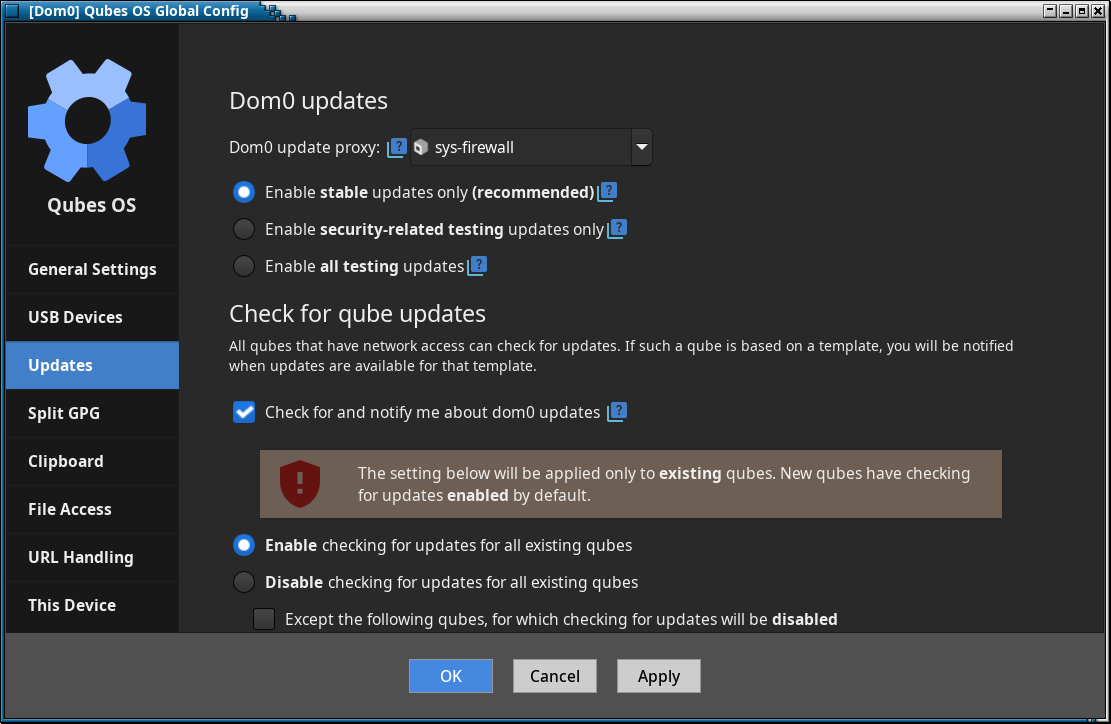
If your qube don’t have internet connection (as it seems, because without proxy it couldn’t install anything), then in Q menu, cogwheel, Qubes Tools run Qubes Global Config. In Updates section change Dom0 update proxy: from sys-whonix to sys-firewall.
Then every qubes updates and applications installations will be done by clearnet, not TOR and will be much faster.
1 Like
now that worked for the kde apps from flatpak helped me download it faster…
1 weird thing, yes this is an appvm right, but when i restart my computer all over again i just had to come back on here and type it again how you told me to , to install the same apps… why is that it says apps not found in template menu , may have to restart it to bring up my pycharm and kde kleopatra… it seems like everytime i restart it , i lose the apps i download… i use flatpak install --user command so why is that ?
like i have to use the flatpak run com.jetbrains.Rider command in terminal for it to show in my apps menu for the personal template on fedora .
Hi @Cosmic3ye ,
Flatpak installs the software (and some other things) to /var/lib/flatpak.
You have to make that folder persistent.
In your App-VM:
sudo mkdir -p /rw/bind-dirs/var/lib
sudo mv /var/lib/flatpak /rw/bind-dirs/var/lib/
sudo mkdir /rw/config/qubes-bind-dirs.d
create config file for persistence
sudo nano /rw/config/qubes-bind-dirs.d/50_user.conf
paste the following line to it:
binds+=( '/var/lib/flatpak' )
Now, all flatpak apps, that you install in that AppVM, will persistent and available after reboots or restarts of the App VM
see also the documentation for that feature:
https://qubes-doc-rst.readthedocs.io/en/latest/user/advanced-topics/bind-dirs.html
1 Like
When used with --user it install in /home/user/.local/share/flatpak/app/
In dom0 terminal check command:
qvm-prefs personal |grep -i klass
if it’s DispVM then it forget everything after it’s closed.
1 Like
Ahh, sorry, yes. The description will be valid only, if you use flatpak without --user.
But nevertheless, with both approaches will be flatpack apps persistent. And .desktop files are created automatically also, so you don’t have to worry about that annoying manual creation of .desktop files.
before i go check the dom0 terminal i’m on micahflee’s github the 1 who created a python script for all qube-apps right… and idk what i did wrong i copied the github code first, then install the dependencies after install the code … then it said make a package with ./build_rpm.sh and once i typed that code in after installing the fedora depend with
sudo dnf install -y python3-pyside2 rpm-build
my personal terminal went krazi and locked screen !
No. With --user it creates .desktop file inside flatpak user directory. And this .desktop is without path to executable.
But first thing first.
personal shouldn’t forget everything.
it went krazi wrong picture sorry… it just got me lost in the qubes-apps part i saw that it halfway installed it i guess . and i press ls, cd to make sure i was in the file with the directories .
i handled it correct all the way until
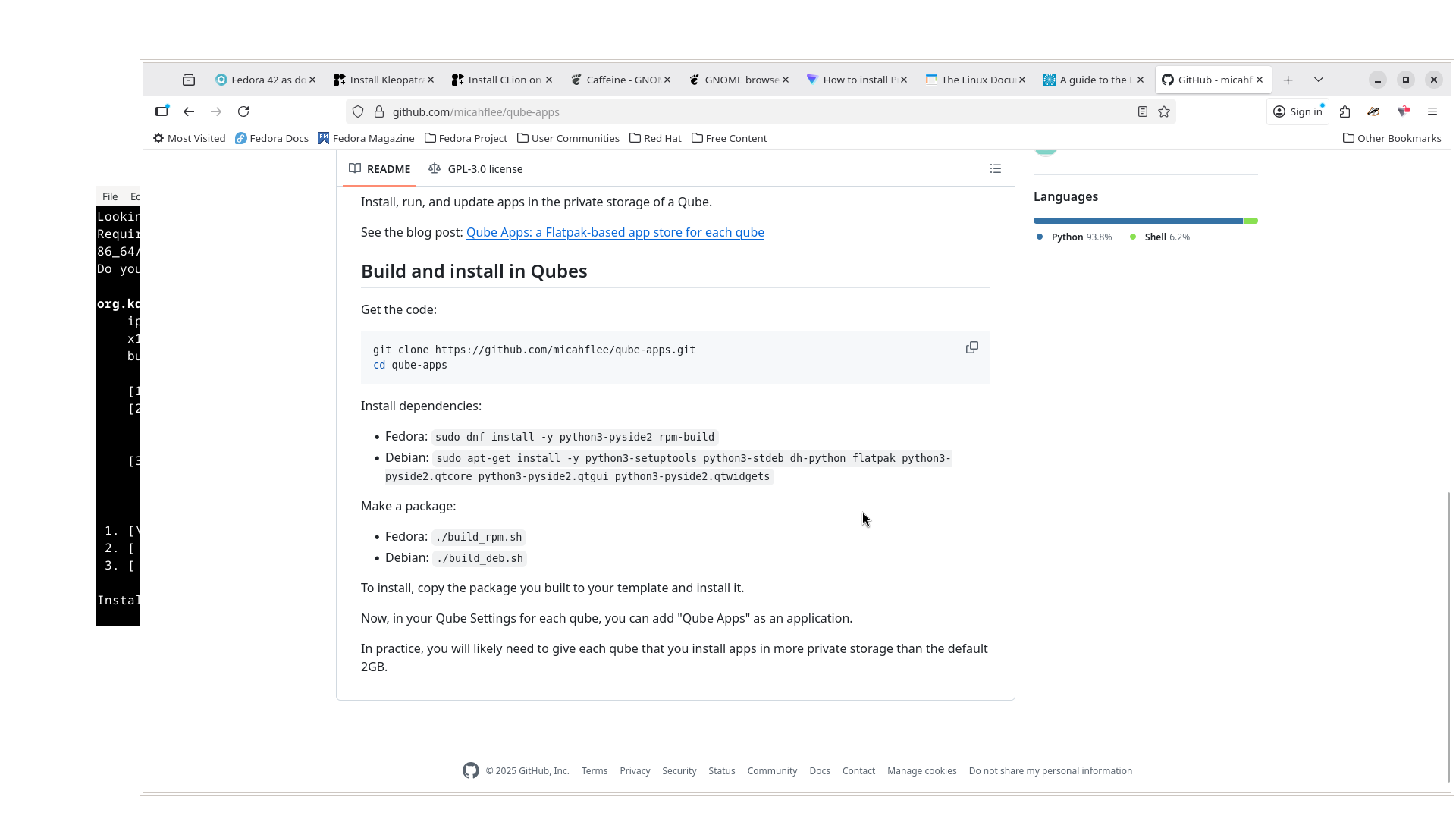
okay it got wrong on my end, with make a package and the command he put ./build_rpm.sh and wrong install , copy the package you build to your template and install it ??? how once i’m in the terminal i see the files build_rpm , and qube-apps inside the file itself in the terminal .
Don’t use it.
It’s very old app for QubesOS 3 or older.
It needs libraries from fedora EPEL9 which is old… really old.
There is no such package as python3-pyside2.
WIth python3-pyside6 it start build but then there is error with %changelog.
In sum - it don’t work.
Forget.
Go back to fix your personal qube. You can’t do 6 thing at the same time and with broken qube.
1 Like
Idk if it says it because it do have D AppVm? In the Dom0 terminal I can’t screenshot it with clear pictures like from my personal template terminal
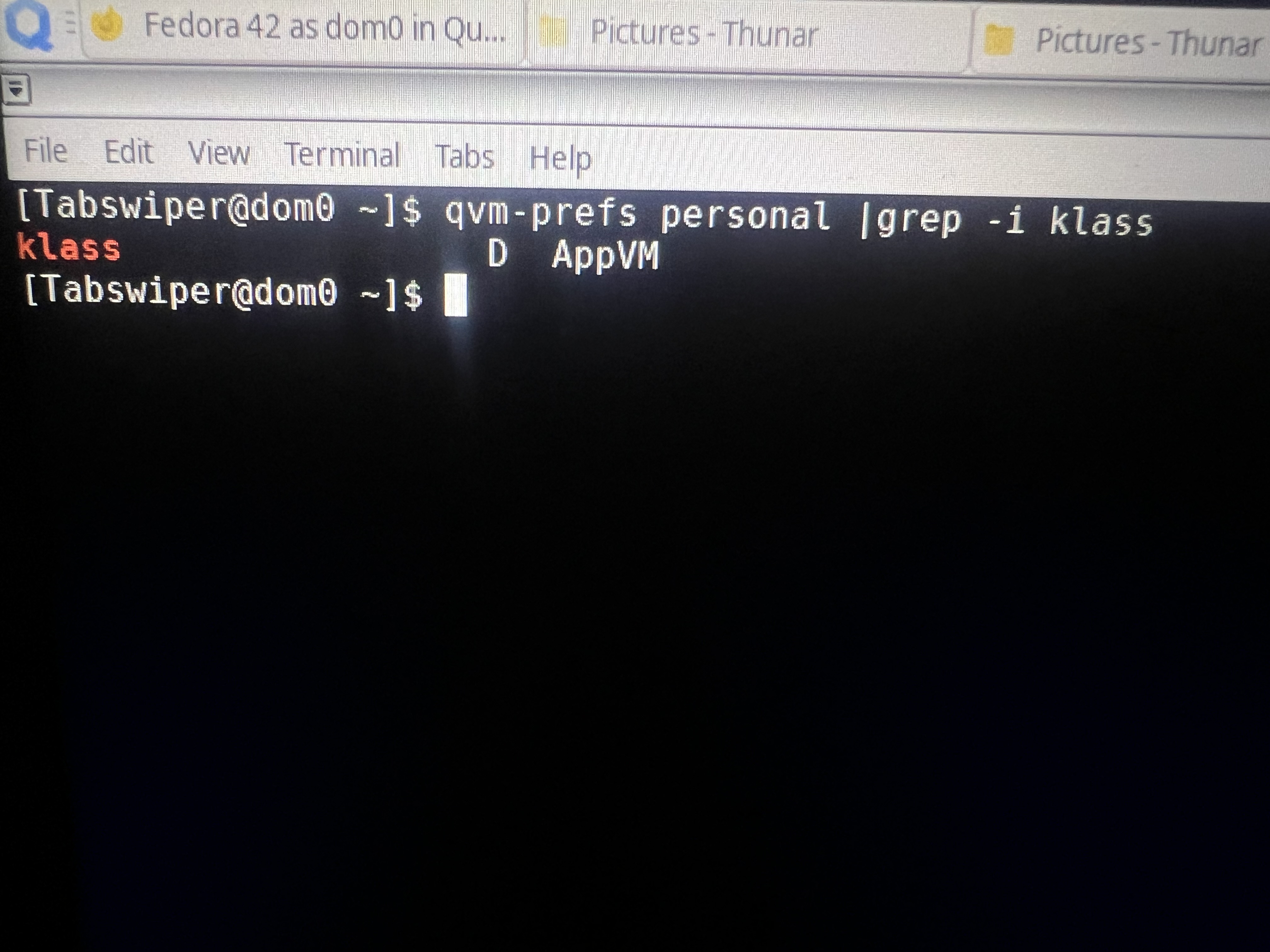
back to fixing my personal qube to make the apps persistent and stick i tried to get the clearest picture but why is the D so far spaced out if it’s disposable ? D AppVM