I started testing the new version 4.2.1-1 of Qubes Windows Tools, which was made available with the latest update to Qubes R4.3. So far, the initial results look quite promising, especially regarding the Qubes graphics driver. Here are some of them:
The new QWT version can be installed without problems in dom0. If the previous version 4.2.0-1 was installed, it is replaced. Installation works in Qubes R4.3 using sudo qubes-dom0-update qubes-windows-tools but is not necessary if the previous version was installed and a dom0 update was performed; in this case, QWT is updated automatically.
For Qubes R4.2.4, the .rpm file provided for R4.3 can be installed, as it was for the previous version, and it will replace that version if it was installed there.
QWT installation works for both Windows 10 and 11 in the usual way, by starting the VM with the parameter --install-windows-tools, and the VM will then show a CD-ROM drive containing the installer file qubes-tools-4.2.1.exe. Starting this file will start the installation, if necessary replacing the previous QWT version 4.2.0-1, and will use the options selected for that version as a default. It is advisable to perform several VM reboots after the installation to get the VM into a stable state.
The ReadMe file of the installation kit is somewhat misleading. It states that testsigning is required for the Qubes graphics driver. However, it is additionally needed for the Xen PV disk driver (and probably also for the Xen PV network driver), which will not run if testsigning is off.
For Windows 10, the Qubes graphics driver now runs quite reliably, both in seamless and non-seamless mode, and changing between these modes runs o.k. In non-seamless mode, the VM window comes up in the largest possible size (1920x1200 on my system), allowing no access to the Windows task bar. Changing the resolution to a smaller value brings the VM into a usable mode. Typing the Windows key on the keyboard now displays the Windows start menu correctly, but always shows a margin of the size used for the App panels right to me menu itself, whether there are any Apps there or not.
Windows 11 behaves roughly the same, but much slower and much more unreliable, and may put the VM into an unusable state if the screen resolution is changed or after switching to and from seamless mode. Also, the effect of doubling windows described above is present here and may make the use of a VM with Qubes graphics driver burdensome or even impossible. Futhermore, the Windows task bar may be missing. But this may vary from one VM boot to the next. A special problem for Windows 11 that does not occur for Windows 10 (and Windows 7 - if you remember what that is ) - is that the Qubes graphics driver in an AppVm is quite useless and does not work as it does in the template. Any windows are duplicated, even in non-seamless mode, and the Windows menu, if it is displayed at all, is not clickable. Also, switching to and from seamless mode does not work most of the time and probably will put the VM into a an unusable state.
When starting shutdown of a Windows VM (10 or 11), the main window is displayed at full screen, no matter if the VM was running in seamless mode or not. Often, a message is displayed that the VM tried to create a dangerous, huge window and that this should be disabled. The message is the obsolete message named in issue #8090, referring to the now unused file /etc/qubes/guid.conf. Instead, as the issue reclaims, it should reference the appropriate qvm-features commands. (@marmarek: When will this be fixed?)
Just for fun, here’s a screen shot of the new QWT running the Windows Explorer in Windows 7, 10, and 11. For Windows 7 and 10, it’s in an AppVM based on a template with QWT, and for Windows 11, it’s in the template itself, because the AppVM is quite unusable.
I know that when I run Windows 7 (in either 4.1 or 4.2) seamless mode is barely worth using because half the time the Windows windows are empty and transparent. It’s very glitchy.
Perhaps when I upgrade to 4.3 I should use XFCE for a little while just to see if have the problem, instead of going straight to installing/using KDE. (Of course I have to remember to do this…months from now.)
(I have no idea if my old windows 7 VM originally built on 4.1 will even work on 4.3 or whether I will have to rebuild it.)
I copied my Windows 7 VM from R4.1 to R4.2.4 and R4.3, and it works in both - with QWT 4.1.69-1 still better than W10/11 with the new QWT, as long as you stay in seamless mode.
Some more observations on using the new version 4.2.1-1 of Qubes Windows Tools in Qubes R4.2.4, both with Windows 10 and 11:
It is possible to start an application in a non-running Linux or Windows 7 (with QWT) VM by calling an entry in the Qubes menu. The VM is started, and when it is running, the application is started. For Windows 7 with QWT, this works both in seamless and non-seamless mode. With Windows 10 and 11, the VM will just start, but the application does not start. As soon as the VM is running, calling the Qubes menu entry will start the application. This happens with and without using the Qubes graphics driver, and in the latter case, in seamless and non-seamless mode.
In general, Windows 10 with the Qubes graphics driver will run quite reliably in both seamless and non-seamless mode. Sometimes, however, calling the Windows menu by pressing the Windows key may present a misbuilt, unusable menu. Pressing the Windows key again will normally show a good menu again.
The Qubes graphics driver does not seem to like Windows 11. It doubles application windows, both in seamless and non-seamless mode, when used in an AppVM, making this AppVM quite unusable. A TemplateVM will behave roughly the same way in non-seamless mode, but will show, most of the time, normal application windows in seamless mode. Without the Qubes graphics driver, Windows 11 will work o.k., as it did with the old QWT version 4.1.68-1 under Qubes R4.1.2.
With the Qubes graphics driver, Windows 10 will remember over boot whether it was running in seamless or non-seamless mode, and in non-seamless mode, it will come up with the screen resolution used in the previous run. Windows 11, however, will remember nothing and come up with a full window in both modes, and switching to seamless mode does not remove this window, most of the time.
So, the new graphics support no longer has many problems with Windows 10, contrary to Windows 11. In this respect, it is similar to many users forced by Microsoft to make the transition from Windows 10 to 11.
@GWeck I read your reports on windows on qubesos with great interest. I see that Win10 works a lot better than Win11, on qubesos. Should we stock up on Win10 ISO images before the october? Will we be able to find a Win10 installation image after then?
That’s a rather difficult question for which I have no simple answer, But here are some things to consider:
I guess that nobody can say currently if and how long Microsoft will provide Windows 10 installation images. So it is best to keep one or more around. Images you will find later on from other sources may be of dubious quality or even dangerous.
It is advisable to keep Windows 10 product keys, because it is unclear whether W11 keys will allow installation and use of W10 in the future, even if they may do so now.
Using Windows 10 in a properly configured Qubes environment should still be much more secure than using Windows 11 natively on bare metal.
On the other hand, the current QWT version provides all functions, except the Qubes graphics driver, and so seamless mode. This is comparable to the functionality available in Qubes R4.1 with QWT 4.1.68-1 and may be enough for daily work. Furthermore, there will probably be new QWT versions providing better graphical support for W11, but who knows when.
Currently, there are workarounds to install and use W11, despite the requirements for TPM 2.0 and a Microsoft account, but it is completely unclear how long they will work. So it could be that W11 may become unusable some time in the future. What should Qubes users do then? I have no idea.
Just installed QWT 4.2.1 in my Windows 10 (LTSC) VM which I’ve had running as a standalone for a couple years.
My experience with this version of QWT is pretty ordinary, and I’m testing in 4.3RC1 and 4.2.4:
Display defaults to 1280x1024, which is usable to a degree and the mouse response is now “seamless”
I’m getting multiple resolutions offered in display settings but changing to any of them results in garbage output and reversion to the default
Attempting to change to full screen mode results in an immediate crash of the VM!
In Device Manager I’m getting 2 “other devices” listed with warnings. I am unable to remove these. The display adaptor is still listed as Microsoft’s own and does not change.
Overall performance is limited as long as you don’t change any resolution parameters, but certainly not up to the standard that some here are lauding.
I have some minor differences, which may be caused by having somewhat different graphics hardware. I am using a standard Intel graphics controller with two monitors, each with a resolution of 1920x1080 and 1920x1200. Maybe also the Windows version I am using (22H2 Pro) plays a role in this.
My system defaults to 1920x1200 resolution, which has to be and can be changed to something like 1400x1050, as, with the higher resolution, the Windows task bar is hidden, because the Qubes task bar shifts the Windows window downward.
I can change the resolutions via the Windows App or by dragging the Window border. For a template, this sometimes - but not always - works quite well, but not for an AppVM based on that template, which may get into an unresponsive state, show only a blank window, and have to be killed. Sometimes this also happens for the template.
Setting the window to full screen does not crash my TemplateVM, but switches to the 1920x1200 resolution.
The two peculiar devices shown have something to do with the Xen interface. One (XENBUS CONS) seems to be part of the Xen BUS interface. The other one (XENVIF 0), only appears if the VM is running with a netVM, so this seems to be part of the Windows side of the Xen network interface. Some time ago, @marmarek stated that the new Qubes graphics driver does no longer define a Windows graphic device but uses Windows interface functions instead.
The performance of Windows 10 is acceptable, but only if I compare it to Windows 11. Compared to a Linux or even a Windows 7 VM, I would call it lousy, but then I have no suitable word for Windows 11 anymore! Just a remark: If you wish to have a lightning fast Windows, then you have to stay with Windows XP, but there, you won’t have QWT, but have to live with other restrictions, too.
Comparing my experience with yours, it just confirms that no two Windows installations are the same. Windows achieves the goal of being incompatible with itself!
Unfortunately I must use desktop versions of O365 software from time to time, and WINE/CrossOver by CodeWeavers never seems to work right. Win10 in an HVM has worked well for years with the older QWT, but there are rumors that MS are going to hobble O365 running on Win10, so a Win11 HVM was in order.
If you install GUI agent (experimental) from QWT 4.2.1-1 the graphics become very problematic. Moving windows causes ghosting effects, and windows often don’t fully draw until you select and move them. It’s essentially unusable. However, simply not installing GUI agent (experimental) in my setup resulted in a usable Win11 HVM. I’m not resizing the main window or looking to use a Template/AppVM, so this setup is working fine.
I hope the QWT improve so that I can comfortably use Win11 apps from a Template, but reports here seem to indicate that is not yet the case.
One more problem with the Qubes graphics driver in Windows 11, both under Qubes R4.2.4 and R4.3-rc1: No matter which screen size is selected, Windows 11 forgets to display its taskbar, making it impossible to start programs from within Windows or to tell it via its own menu to shut down.
I have now updated the documentation for Windows Qubes and Qubes Windows Tools to reflect the current state for Qubes R4.2.4 and R4.3-rc1, including the preliminary QWT version.
So, if you need to use Windows 7, 10, or 11 under Qubes (and have good nerves), you may have a look at the new texts. If you find any errors, please don’t hesitate to describe them!
@GWeck thank you for keeping tabs on windows support in qubes, and providing feedback, aiding the developers with issue reports. I appreciate your efforts.
 ) - is that the Qubes graphics driver in an AppVm is quite useless and does not work as it does in the template. Any windows are duplicated, even in non-seamless mode, and the Windows menu, if it is displayed at all, is not clickable. Also, switching to and from seamless mode does not work most of the time and probably will put the VM into a an unusable state.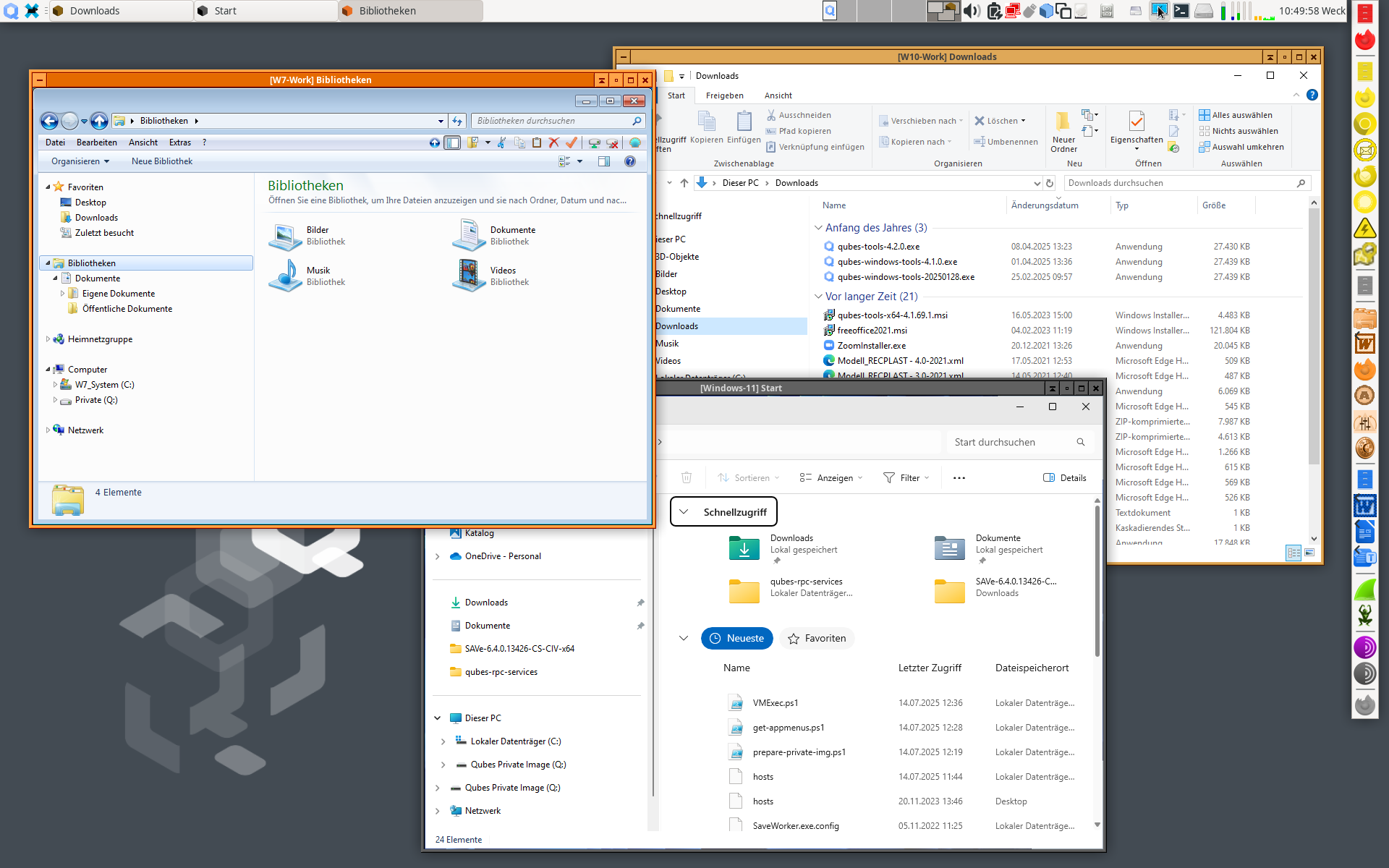

 Just a remark: If you wish to have a lightning fast Windows, then you have to stay with Windows XP, but there, you won’t have QWT, but have to live with other restrictions, too.