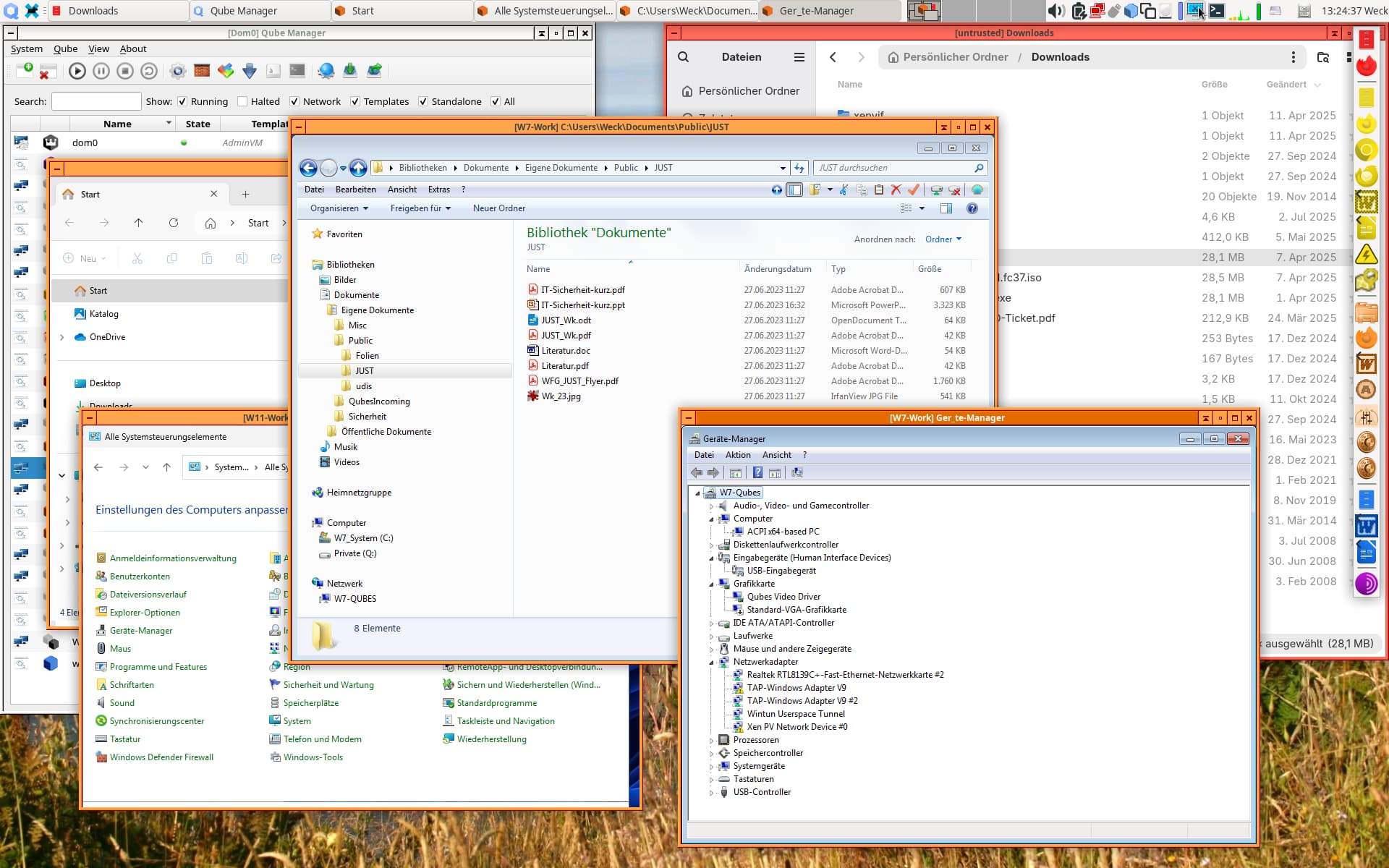
wait, I noticed that I am on QubesOS 4.2.4, so this tool is inaccessible to me?
You can manually download the RPM and extract the ISO to have it on Qubes OS R4.2.4. But please remember that it is still in testing phase.
2 Likes
All right, good enough. When’s the QubesOS 4.3 going to be released btw?
I tested both W10 and W11 on Qubes R4.2.4 with the new QWT. Both allow copying files to/from other VMs, and both allow access to USB devices, so that’s o.k.
My previous tests (see above) showed the same behavior for R4.3, but the QWT graphics driver there still has its problems.
3 Likes
When shutting down a Windows 11 AppVM in seamless mode from its own Windows menu, a full-screen window is shortly displayed, but then, during shutdown, a message “The GUI agent that runs in the VM ‘VMNAME’ implements outdated protocol (0:0), and must be updated.”
Afterwards, the VM can be started again without problems.
Is it only with Win11, or also with Win10?
Not yet tested - but I’ll try tomorrow.
The effect is not reproducible, but fits into a general, more or less chaotic pattern. I have checked several different combinations:
- Windows 10 / 11
- Qubes R4.2.4 / R4.3
- TemplateVM / AppVM
I’ll try to summarize the observations. But the following effects may occur in one test, and in the next test, the same or other effects may occur, so you’ll never know what happens next.
- No difference between TemplateVMs and AppVMs.
- At most minor differences between Qubes R4.2.4 and R4.3.
- Apart from some flickering, small, menu-like, but empty windows, W10 often behaves o.k. In this case, the menu is displayed and can be used to shut down the VM. During shutdown, a full-screen window may be displayed. Sometimes, however, it looks as if the VM was shut down, but instead it keeps running without showing a window and needs to be shut down via the Qube Manager.
- Windows 11 has problems with displaying the menu. Sometimes, it is displayed but may not be clickable, i.e., no submenu appears. Sometimes, the submenu appears but does not execute the shutdown command. Most of the time, however, one or two rectangles containing parts of the background image are shown instead of the menu.
- Switching to non-seamless mode and back again has a high probability of putting the VM into a non-reponsive state, were it only can be killed. This happens for both W10 and W11 and in both Qubes versions.
- During shutdown in all combinations, a message may appear that the VM tries to create a very large window.
I hope that this may help somewhat, although I see no clear structure in this behavior, but I don’t expect more from Windows, anyhow. 
4 Likes
No love lost anywhere around here!
I want to take this opportunity to thank you for all the work you do supporting something you despise.
1 Like
I desperately needs fully working Windows for my job (Visual Studio mainly) do you think it is possible to use Windows 10/11 via RDP only (so dont install QWT) and be able to work productively?
As productivity I mean mainly:
- copy paste text
- copy files from/to Windows
- good resolution (should be solved via RDP probably)
- no lagging
- no crashing
- no inability to use important stuff like GUI buttons
- be able to shutdown VM
- etc
I am not using Qubes now so I cannot try by myself.
Also if I understand it correctly, it is better to create golden image and this image clone and use, it should be better for Windows then trying to create custom template vm from hvm, right?
Thank you!!!
For the situation you described I might buy two computers. Preferably both ARM64. One to run Windows on and the other to act as a secure gateway. Personally I would find a way to put both together in a box I personally designed that is optimized for travel. OpenBSD on the gateway box with Wireguard configured to further protect RDP is what I would suggest.
For anything like Windows, default deny outbound and proactively observing network traffic is generally recommended.
Any OS should be run from a template or something that can do snapshots. More likely than not, I would run Windows in a VM even if it were the only VM on the box it ran on, if I really did want to run Windows.
With some DevOps patterns where you are now working, you may be able to significantly lessen the gravity of Windows and Microsoft there – if you do feel like fighting that battle someone else (somewhere) might also appreciate that.
No additional crashing, I think is what you mean. Qubes, nor any other open source hypervisor-centric project, can compensate for Windows being Windows.
2 Likes
What do you think @SteveC? I read on the forum that you are using VS too
I’m not using visual studio. I do use tethered shooting for a camera and a couple of other apps I can find no equivalent for in Linux (in one case it’s just incompatible file formats).
End of 10
I also gave the new QWT a try on R4.2.4 with Win11 (template)
The flickering i could reproduce to with the following effect, the qubes video driver captures the changed part of the screen/framebuffer to early. This is to what i saw because even with “Animations disabled”, the elements are still animated (or at least not shown instantly), so eg if the system is under load the video driver captures the area before the gui element is drawn. But the “animation” is quick enough to not trigger a something changed again. That results in eg. the dropdown menu/start menu is not shown.
The shutdown menu not reacting i could reproduce to “klick to open shutdown menu” → video driver captures to early → menu is there but not visible → user clicks again as nothing is visible → shutdown menu gets disabled by startmenu → video driver captures to early → the shutdown menu from the previous turn is visible as the area was captured on the onset of the menu close drawing/animation → user tries clicking shutdown → in reality there is no button anymore so nothing happens.
EDIT: a fix for making it usable (with some artifacts) is to enable Animations in Accessibility->visual->animations on, that triggers redrawing of the area multiple times due to the slow animation. EDIT END
(wild guessing, i usually only do very hardware near programing) if the capture is triggered via an interupt maybe it moves in front of the animation exec, and the animation only contiures after the interupt ends so waiting inside the interrupt might not help (when I increased the number of vcpus from 1 to 4 things got better)
A possible solution would be either capture after a few ms delay (and accept the lag), or capture after a few ms again if no new change was signaled and compare if the pixel value changed → re transmit.
maybe that helps a bit, or even just for a quick fix if you want to ship it with R4.3 soon.
Thanks a lot for the enormous effort!
I tried again in the last days and found a new effect with Windows 10, but not with Windows 11 (both in Qubes R4.2.4).
In non-seamless mode, all windows opened in the main Windows window are displayed twice. This effectively prevents changing the screen resolution of the Windows VM to something smaller than 1920 x 1200. Furthermore, after booting the Windows VM, some preliminary windows are shown, but then the main window is not displayed at all and must be activated by using the command qvm-start-gui VMNANE in dom0.
I tried Windows 10 without QWT on 4.2.4 and I have issues with Adobe software with mostly typing text, but not only. The text is just not typing many of the times. Can this be because I didn’t want to try the unfinished QWT?
Is QWT planned for the next release and will it work in seamless mode with windows 10?
1 Like
I have finally found a way to run Windows 7 in Qubes R4.2.4 and R4.3 in seamless mode. Although it is still very experimental, on my system, it runs much more stably and considerably faster than Windows 10 or 11.
The steps to get it running are as follows: both for R4.2.4 and R4.3:
- Install QWT 4.1.69-1 in Windows 7, as described in the documentation. Be sure not to select the Qubes graphics driver for installation.
- Reboot the VM.
- In the device manager, you will probably find one or more unknown devices. Uninstall these devices.
- Reboot the VM.
- Now, change the QWT installation, adding the Qubes graphics driver, but do not click on the “Finish” button in order to complete the installation.
- In the device manager, you will find a new display called “Qubes Video Driver”. Deactivate this device.
- Now, click on the “Finish” button to complete the QWT installation change.
- Reboot the VM.
- It may be necessary to start the GUI manually, by typing
qvm-start-gui VMNAMEindom0. (For me, this happened in Qubes R4.2.4, but not in R4.3). - The device “Qubes Video Driver” may show up as deactivated. In this case, you can now activate it again.
- Changing the screen resolution for this VM probably will not work and may lead to a crash, so it’s better to avoid it. But you can start any program, e.g., the Windows Explorer. In the Qube manager, you can now select seamless mode for this VM, and it works!
- In order to get seamless mode directly at boot time for this VM, set the DWORD value of
SeamlessModein the registry key
HKLM\Software\Invisible Things Lab\Qubes Tools\qga
to 1.
Here’s a screenshot showing something quite impossible in any other environment than Qubes: The upper two windows are PowerPoint and Explorer in Windows 7, and the lower window is the Explorer in Windows 11 - all on the same screen:
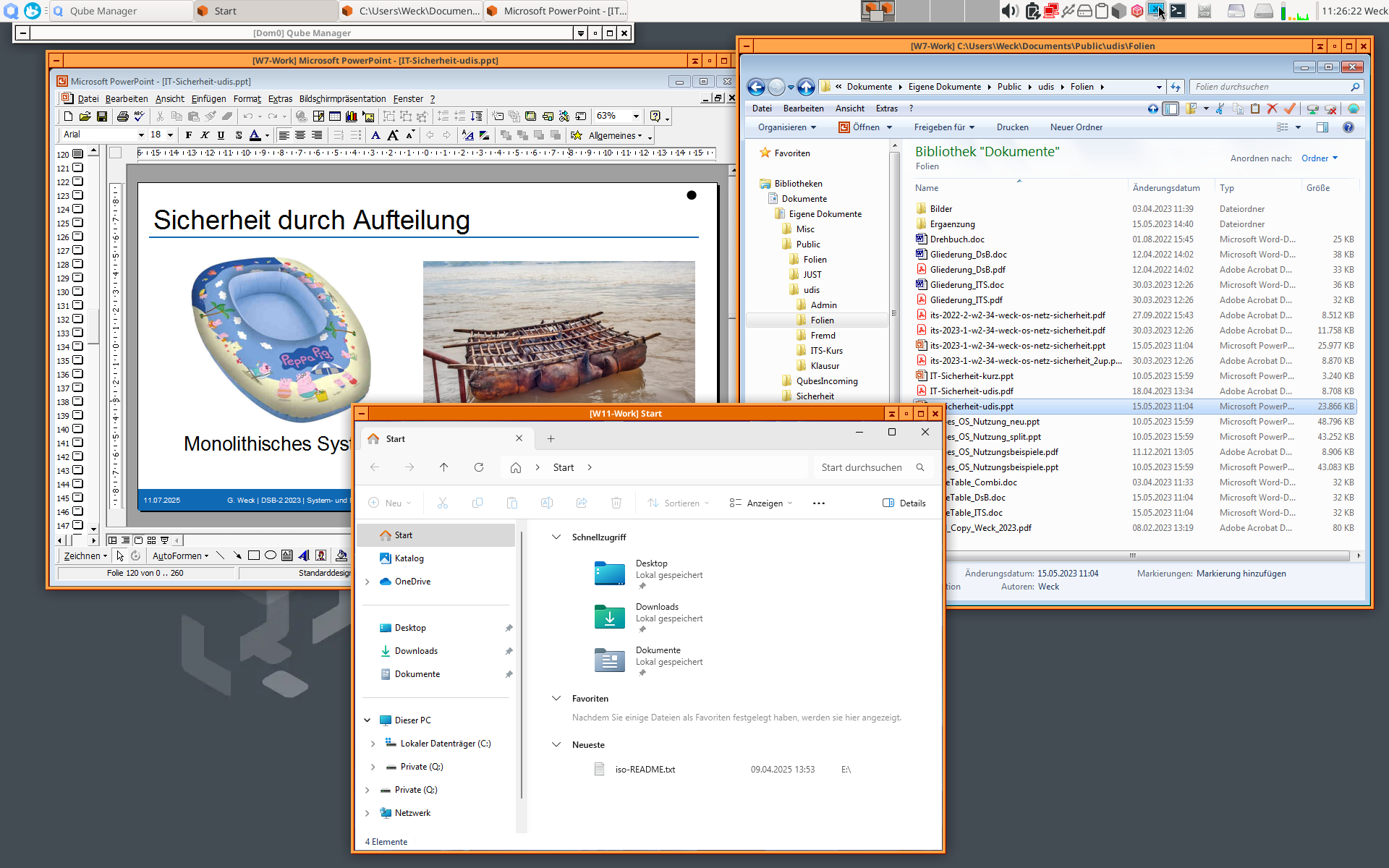
I hope that you can reproduce this way of getting decent support for Windows 7 under Qubes R4.2 and R4.3. @marmarek If this works, there is no need to put any more effort into QWT support for Windows 7 under the current versions of Qubes.
7 Likes