A new version 4.2.2 of Qubes Windows Tools is now available, which can be installed in both Qubes R4.3-rc3 and R4.2.4, just like the previous version 4.2.1. See the documentation for details.
The problematic part is still the new graphics driver, which may cause weird effects. It is enabled by setting the qvm-features parameter gui to 1.
- In Windows 11, this may cause all windows to be displayed twice, but this can be, at least partially, remedied by moving the second instance to another workspace.
- In Windows 10 under Qubes R4.2.4, trying to display the Windows menu via the keyboard button will probably result in a tiny, unusable menu.
- In all combinations of Qubes and Windows versions, the windows trying do display the Windows menu are larger than the area occupied by the menu, often don’t allow selection of a menu entry, and may even put the VM into an unusable state. So, it seems that Windows then creates something that is not really a window at all.
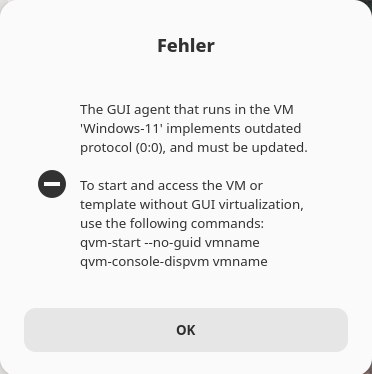
- In Windows 11, I observed a strange error message when trying to display the Windows menu, but this occurred only once:
If the behavior of the graphics driver is too annoying, it can be disabled by setting the qvm-festures parameters gui to an empty string and gui-emulated to 1. In this case, however, the possibility of setting seamless mode is lost.