After several years of using QubesOS, it seem I still don’t really understand how disposables work
Here’s the situation
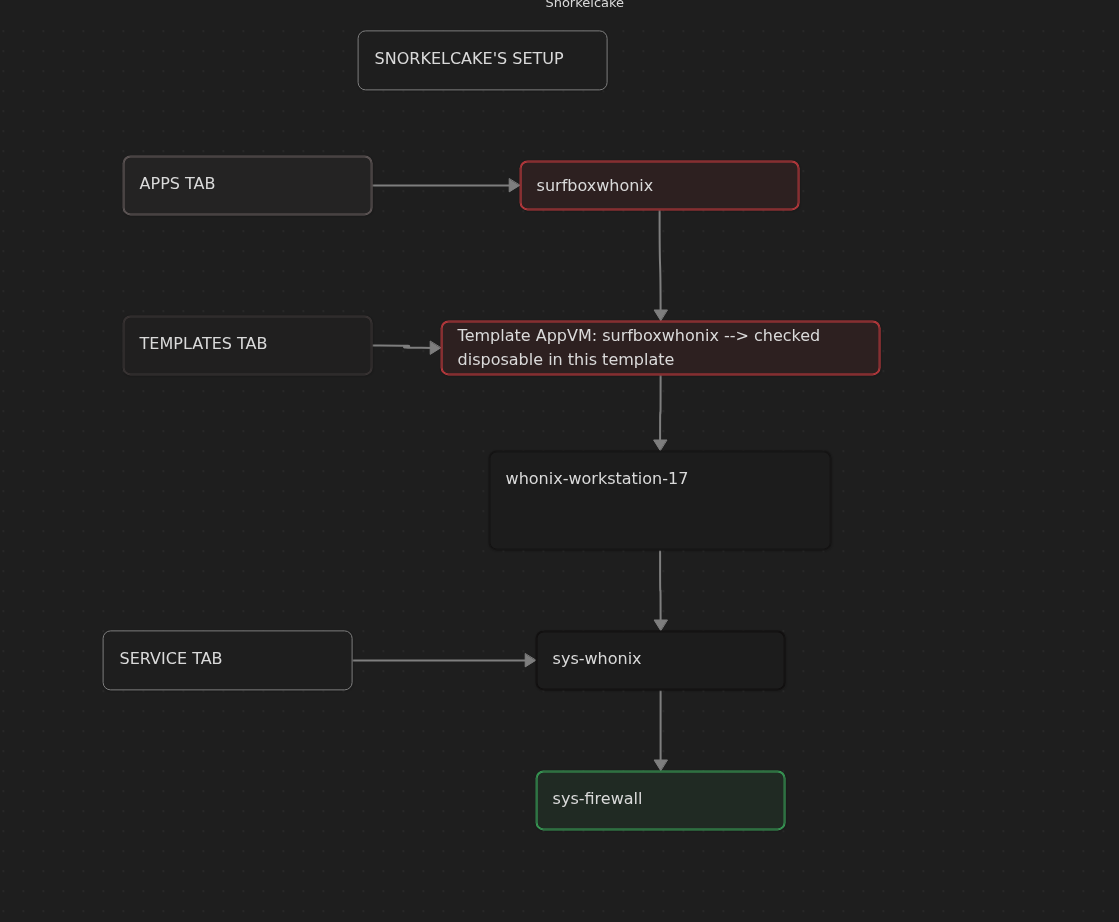
I have an AppVM called “SurfBoxWhonix” based on the “whonix-workstation-17” template, which accesses the internet via the “sys-whonix-login” VM. In the settings of the AppVM SurfBoxWhonix, I have now checked the box that it should be a template for disposables. Since then, I can see the AppVM in the Templates tab, but when I start SurfBoxWhonix under Apps, my QubesOS creates a disposable VM.
All templates are up to date.
The problem
When I start the AppVM SurfBoxWhonix under Templates, I find a TorBrowser version 15.0 there, including all my bookmarks and settings. However, when I open a DispVM based on SurfBoxWhonix, a completely empty, unconfigured TorBrowser version 14.0.3 opens.
Re-configuring a similar AppVM and restarting my QubesOS does not solve the problem; it always leads to the same result.
Interestingly, the files I store in the AppVM are also available in the disposable VMs.
My question
Why?!? For example, I set up a Firefox browser in a DebianApp app VM for surfing the Clearnet without Tor routing. When I start a disposable VM based on this, I also have my configured browser. I’m really stuck here and can’t see where I’m going wrong. Can anyone help me? Thanks in advance 0:)
(A somewhat similar question has already been asked here. But since it ultimately points in a different direction, I took the liberty of opening a new topic. I hope that’s okay.)
I’m terrible with Whonix but this sounds weird. So your bookmarks are in the template appvm under templates? If this is the case it seems like it’s the wrong way around and maybe a misconfiguration.
Have you tried reinstalling the template?
Maybe for other users to help you better it would be convenient if you could write down how you create the appvm?
Thanks @qubeboss for your reply. I’ll try again to describe my problem, which, by the way, can be reproduced on my system as often as I like. Maybe I’m missing something.
First, I downloaded and updated the “whonix-gateway-17” and “whonix-workstation-17” templates using the Qubes Template Manager.
Then I created an AppVM (name: sys-whonix-surf, template: whonix-gateway-17, Net qube: sys-firewall) and checked the box for “provides network” in Settings/Advanced. I want to use this Qube to access the Internet.
Now I have created another AppVM (name: SurfBoxWhonix, template: whonix-workstation-17, net qube: sys-whonix-surf). Here I have now checked the box for “Disposable template” under Settings/Advanced.
And now the problems start: When I start the AppVm SurfBoxWhonix, I can, for example, update and set up the TorBrowser in it. When I shut down AppVM and restart it later, all my changes are still there.
But when I now start a disposable based on the AppVM SurfBoxWhonix, I find an empty TorBrowser there. Both my updates and, for example, my bookmarks are missing.
How can this be? Similarly, I also built a SurfBox based on Fedora an one on Debian to have a disposable Firefox without Tor routing. That works as expected. All changes to the AppVm then also appear in the disposables based on it. Only everything based on the Whonix workstation doesn’t work for me. Why?
I was hoping a more advanced user would have answered your post by now. But as it stands
there seems to be a bit of a knowledge gap for Whonix related questions. I’m seeing a lot of unanswered posts relating to Whonix. So you’ll have to do with me. While I can’t help you on the technical side and the why and how I can check for you what my system does.
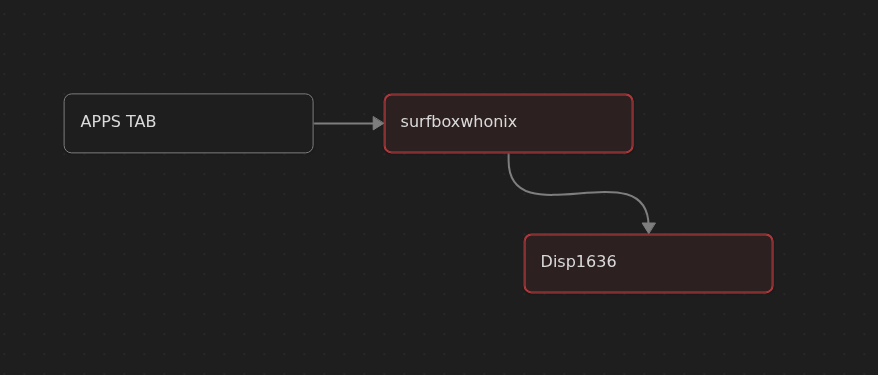
As you explain it the image below depicts your setup correct?
I saved a bookmark / printed a webpage / created a txt document inside the disposable
Shut down my internet (for safety)
Checked the Surfbox Whonix Template AppVM under Templates tab → NO FILES - EMPTY
Closed Surfbox Whonix AppVM
Restarted Surfbox whonix AppVM under apps - EMPTY
If your doing the same but get a different result, something inside your system is misconfigured. I run multiple machines on Qubes OS on multiple networks. They all behave like what I wrote above
This can only be the case if:
a. you created a named disposable
b. if you open up the firefox template and configure firefox inside the template and after that create a appvm on that template (because your template is persistent).
Note : I made the mistake of doing b - which is not so smart because this can infect your template worst case scenario but can also create privacy flaws.
If nobody else with sufficient knowledge can answer this post I suggest you either try
to find answers on the Whonix forum, rephrase your question on the forum or worst case scenario reinstall your Qubes OS.
Thank you very much for your detailed answer! It’s really great that you took so much time. Thank you!
In the aspects you described, my system behaves exactly like yours. My question was a different one, which can probably be summarized as follows:
How and where do I need to configure Tor Browser (e.g., bookmarks, add-ons, etc.) so that I can start dispVMs based on this customized browser?
Or to put it another way: If you open surfboxwhonix in the Templates tab in your example above and save a bookmark, will it also be in the DispVMs later? Ultimately, that’s what isn’t working for me, but what I would have expected from the system.
(Sorry for the awkward description. I find it frustratingly difficult to formulate this actually simple question precisely and comprehensibly.)
No worries, I hope you can fix it now! In any case the example above will always be helpful to other users dealing with some FUD if their Whonix is configured correctly or not.
To cut a long story short: I’ve now solved it very simply. I created a ‘normal’ AppVM based on a Debian template and connected to sys-firewall. In this, I downloaded the TorBrowser from the website and configured it. I now use the whole thing as a disposable template.
One final thought on the subject: Of course, you can also simply install the ‘torbrowser-launcher’ package in the Debian template, for example. Then create an AppVM based on this template, start the Tor browser in it and configure it. If you now activate this AppVM as a disposable template, you also have a customised Tor Browser without having to manually check the download signatures. (The only problem is that you cannot start the Tor Browser as a disp-vm via the icon in the bar, as the disp-vm closes immediately, but must start the disposable Tor Browser in the terminal. But then it works!)