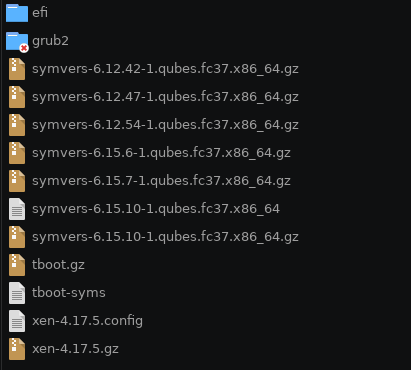
Running sudo qubes-dom0-update --action=reinstall $(rpm -qa --qf '%{NAME}\n') which results in reinstalling every package, completely destroyed my grub menu, again. Mostly worked with two exceptions related to kernel packages, but I don’t remember the exact error message. Didn’t cared much, as I had plenty of other kernels for booting if something fails. Well…
Because I already had some experience with grub related issues, I wrote the Qubes Iso to an USB, entered the grub rescue mode, mounted everything and tried to run grub2-mkconfig -o /boot/efi/EFI/qubes/grub.cfg though this didn’t helped. In second instance I tried reinstalling the packages again since they are still cached so that other kernels could write themselves into the grub menu. And actually I received the output that I got an new boot entry but when testing it, it still just shows one entry, the UEFI Firmware Settings instead of Qubes.
Honestly, I don’t think it will help, but running grub2-mkconfig -o /boot/efi/EFI/qubes/grub.cfg is not exactly the correct way to update the grub menu, so, maybe you can try the following?
#
# DO NOT EDIT THIS FILE
#
# It is automatically generated by grub2-mkconfig using templates
# from /etc/grub.d and settings from /etc/default/grub
#

### BEGIN /etc/grub.d/00_header ###
set pager=1

if [ -f ${config_directory}/grubenv ]; then
  load_env -f ${config_directory}/grubenv
elif [ -s $prefix/grubenv ]; then
  load_env
fi
if [ "${next_entry}" ] ; then
   set default="${next_entry}"
   set next_entry=
   save_env next_entry
   set boot_once=true
else
   set default="${saved_entry}"
fi

if [ x"${feature_menuentry_id}" = xy ]; then
  menuentry_id_option="--id"
else
  menuentry_id_option=""
fi

export menuentry_id_option

if [ "${prev_saved_entry}" ]; then
  set saved_entry="${prev_saved_entry}"
  save_env saved_entry
  set prev_saved_entry=
  save_env prev_saved_entry
  set boot_once=true
fi

function savedefault {
  if [ -z "${boot_once}" ]; then
    saved_entry="${chosen}"
    save_env saved_entry
  fi
}

function load_video {
  if [ x$feature_all_video_module = xy ]; then
    insmod all_video
  else
    insmod efi_gop
    insmod efi_uga
    insmod ieee1275_fb
    insmod vbe
    insmod vga
    insmod video_bochs
    insmod video_cirrus
  fi
}

terminal_output console
if [ x$feature_timeout_style = xy ] ; then
  set timeout_style=menu
  set timeout=5
# Fallback normal timeout code in case the timeout_style feature is
# unavailable.
else
  set timeout=5
fi
### END /etc/grub.d/00_header ###

### BEGIN /etc/grub.d/01_users ###
if [ -f ${prefix}/user.cfg ]; then
  source ${prefix}/user.cfg
  if [ -n "${GRUB2_PASSWORD}" ]; then
    set superusers="root"
    export superusers
    password_pbkdf2 root ${GRUB2_PASSWORD}
  fi
fi
### END /etc/grub.d/01_users ###

### BEGIN /etc/grub.d/08_fallback_counting ###
insmod increment
# Check if boot_counter exists and boot_success=0 to activate this behaviour.
if [ -n "${boot_counter}" -a "${boot_success}" = "0" ]; then
  # if countdown has ended, choose to boot rollback deployment,
  # i.e. default=1 on OSTree-based systems.
  if  [ "${boot_counter}" = "0" -o "${boot_counter}" = "-1" ]; then
    set default=1
    set boot_counter=-1
  # otherwise decrement boot_counter
  else
    decrement boot_counter
  fi
  save_env boot_counter
fi
### END /etc/grub.d/08_fallback_counting ###

### BEGIN /etc/grub.d/10_reset_boot_success ###
# Hiding the menu is ok if last boot was ok or if this is a first boot attempt to boot the entry
if [ "${boot_success}" = "1" -o "${boot_indeterminate}" = "1" ]; then
  set menu_hide_ok=1
else
  set menu_hide_ok=0
fi
# Reset boot_indeterminate after a successful boot
if [ "${boot_success}" = "1" ] ; then
  set boot_indeterminate=0
# Avoid boot_indeterminate causing the menu to be hidden more then once
elif [ "${boot_indeterminate}" = "1" ]; then
  set boot_indeterminate=2
fi
# Reset boot_success for current boot
set boot_success=0
save_env boot_success boot_indeterminate
### END /etc/grub.d/10_reset_boot_success ###

### BEGIN /etc/grub.d/12_menu_auto_hide ###
if [ x$feature_timeout_style = xy ] ; then
  if [ "${menu_show_once}" ]; then
    unset menu_show_once
    save_env menu_show_once
    set timeout_style=menu
    set timeout=60
  elif [ "${menu_auto_hide}" -a "${menu_hide_ok}" = "1" ]; then
    set orig_timeout_style=${timeout_style}
    set orig_timeout=${timeout}
    if [ "${fastboot}" = "1" ]; then
      # timeout_style=menu + timeout=0 avoids the countdown code keypress check
      set timeout_style=menu
      set timeout=0
    else
      set timeout_style=hidden
      set timeout=1
    fi
  fi
fi
### END /etc/grub.d/12_menu_auto_hide ###

### BEGIN /etc/grub.d/14_menu_show_once ###
if [ x$feature_timeout_style = xy ]; then
  if [ "${menu_show_once_timeout}" ]; then
    set timeout_style=menu
    set timeout="${menu_show_once_timeout}"
    unset menu_show_once_timeout
    save_env menu_show_once_timeout
  fi
fi
### END /etc/grub.d/14_menu_show_once ###

### BEGIN /etc/grub.d/19_linux_xen_tboot ###
### END /etc/grub.d/19_linux_xen_tboot ###

### BEGIN /etc/grub.d/20_linux_xen ###
### END /etc/grub.d/20_linux_xen ###

### BEGIN /etc/grub.d/30_os-prober ###
### END /etc/grub.d/30_os-prober ###

### BEGIN /etc/grub.d/30_uefi-firmware ###
if [ "$grub_platform" = "efi" ]; then
	menuentry 'UEFI Firmware Settings' $menuentry_id_option 'uefi-firmware' {
		fwsetup
	}
fi
### END /etc/grub.d/30_uefi-firmware ###

### BEGIN /etc/grub.d/35_fwupd ###
### END /etc/grub.d/35_fwupd ###

### BEGIN /etc/grub.d/40_custom ###
# This file provides an easy way to add custom menu entries.  Simply type the
# menu entries you want to add after this comment.  Be careful not to change
# the 'exec tail' line above.
### END /etc/grub.d/40_custom ###

### BEGIN /etc/grub.d/41_custom ###
if [ -f  ${config_directory}/custom.cfg ]; then
  source ${config_directory}/custom.cfg
elif [ -z "${config_directory}" -a -f  $prefix/custom.cfg ]; then
  source $prefix/custom.cfg
fi
### END /etc/grub.d/41_custom ###
Still just shows UEFI Firmware Settings after reinstalling grub, trying an older .cfg and regenerating the initramfs. To make it more easier, how can I add Qubes in Grub from another HostOS?
I will try it tomorrow though I think there is a communication mistake:
UEFI has a functioning Qubes entry. My Bootloader/Grub hasn’t. Usually there are three options, booting Qubes, booting Qubes but advanced and UEFi Firmware Settings. The first two are missing.
Well yes you are missing output of /etc/grub.d/20_linux_xen in your automatically generated grub config. You probably should check on it.
Whoever posts a link to qubes repository containing 20_linux_xen on github here would be really helpful, I cannot find it
It’s a generic fedora package file, I’m not sure which would be the best pick for you, search here: fedora build system - grub2-common. Probably any build for f37 will do (assuming you’re running qubes 4.2).
Oh no build 2.06-4 have been deleted. I suppose you could download qubes iso, mount it and get the file that way
The grub shell just resets itself. I’m close to giving up, but before I want to redo everything I tried so far in case of an misstake.
If you/anyone has any new idea, you’re welcome.
So fucking thank you, it appears that dnf reinstall deleted the vmlinuz files while not recreating them. Uninstalling and installing the kernel solved the issue.