You don’t understand how Qubes OS works. Of course, if you delete a persistent VM, it will be deleted permanently, even if dom0 was running in live mode. You need to study how Qubes works more thoroughly, and then you’ll understand how to work with live AppVMs and ephemeral encryption.
Imagine that dom0 is a flash drive with any live distro, for example, Live Linux Mint. You boot from a live USB of Linux Mint and then mount your SSD, then delete some files on SSD and shut down - why did the files disappear from my disk if Linux Mint was running in live mode?!
2 Likes
It seems that a large warning is needed at the beginning of the guide, to explain that it is not suitable for beginners who do not understand the full distinction between persistent changes in the dom0 filesystem and persistent changes of the lvm devices layout, and of the need to keep them consistent…
Some of the claims suggest the opposite:
- “full isolation from persistent storage: all operations occur in memory”
- “not touch the disk”
- “protects dom0 from user errors”
- “isolated from the default Qubes boot”
- …
These statements are likely to be misleading…
There are some good ideas in Live Mode, but it really does require awareness of its limitations, and is probably not suitable for beginners.
2 Likes
I’ve added comments explaining how dom0 works with persistent VMs in guide. It should bring clarity for beginning.
Other statements remain accurate - isolated boot is functioning, now impossible to break grub/dracut in a live dom0 environment. Everything will work perfectly fine if user doesn’t make changes to the persistent dom0 based on advice from GPT and Grok.
1 Like
Is there anyway to put Overlay itself into a storage disc and install just Overlay from that storage disc onto a different PC, and would it be possible use backup qubes to update live mode from persistant mode?
1 Like
@Shept Hi. No - Overlay in Qubes Live Mode works on top of an existing installation. The lowerdir is your actual Qubes root filesystem on disk, and the upperdir is a volatile tmpfs in RAM. Overlay is a kernel mount mechanism, not a standalone system you can package and install separately. Without the base Qubes installation as the lower layer, an overlay alone is useless. And also Zram mode - like Overlay, it is a boot-time mechanism, not a portable distribution.
About backups and updates: that doesn’t work because live mode is amnesic by design - everything lives in RAM and is gone after reboot. You can update templates in live modes, but update dom0 only in persistent mode.
1 Like


Hey guys, you can ask the Qubes team to add fully amnesic and ephemerally encrypted AppVMs in the poll at the top of the forum! I can see my guide has become very popular, so write in the poll that you want a similar feature in the new version of Qubes!
4 Likes
Done
1 Like
Done it too! I suggested they take ideas not just from this thread but also from
Madaidan’s Linux Hardening Guide and from this interesting Qubes hardening guide by @abdullah
Lately, I’ve been trying to harden my service qubes…
- sys-usb
- sys-net
- sys-whonix
- sys-mirage-firewall (replacing the default sys-firewall with mirage)
What have I done?
-
Changed
sys-usbandsys-net’s template tountrusted-ram-dvm -
Cloned
sys-usbandsys-netand put these new clones intovarlibqubes -
sys-mirage-firewallwas already created to be put intovarlibqubes -
Please note I have NOT made a
varlibsqubeclone ofsys-whonix(I thought I did until I made a thorough check) -
Ran the following commands
-
qvm-volume config sys-usb:root rw False
-
qvm-volume config sys-net:root rw False
-
qvm-volume config sys-whonix:root rw False
-
qvm-volume config sys-mirage-firewall:root rw False
-
qvm-volume config mirage-disposable:root rw False(The disposable template forsys-mirage-firewall)
-
Added all the aforementioned entries to
/etc/systemd/system/rw.service -
Ran
sudo systemctl daemon-reload
Result?
All of the service qubes seem to be running fine. I was able to connect my USB mouse and use it and I could connect to the internet as well as Tor but I had a few issues.
-
There is a noticeable delay when sys-net and sys-whonix starts up. The waiting time ranges from one to a few minutes before I see their icons show up on the taskbar and they start working properly. Sometimes, even when sys-net’s icon shows up, it takes considerably more time to actually connect to the internet (I’m using Ethernet, by the way)
-
I had a consistent error on sys-net that says "Preparation note done yet. More more information, see: sdwdate-gui → right click → Open sdwdate’s log
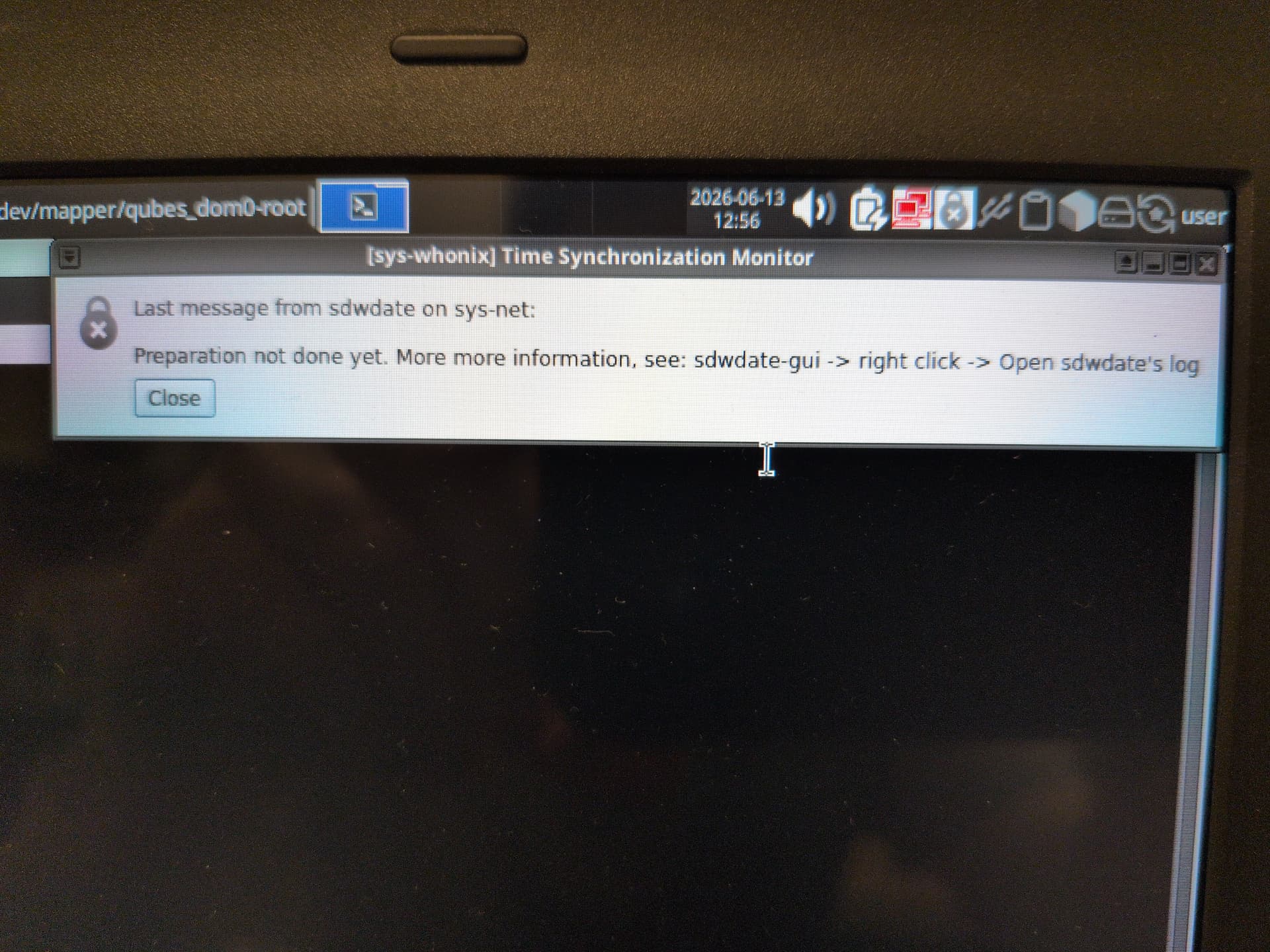
- Whenever I do try to open sdwdate’s log, it takes a long time for the output terminal to actually show up.
- When using my mouse, I notice an occasional or frequent lag in my mouse cursor as I move it around.
To address the sdwdate issue, I followed this guide to the letter. Although my error wasn’t a neverending cascade of error messages, only an X icon over the Time synchronization monitor icon, I followed the steps anyway. Sadly, the error described above still occurs.
Just in case it helps, I opened sys-net’s sdwdate log and it took several minutes to open. Sadly, for some reason, trying to interact with the terminal in anyway takes forever for the app to register. But I wasn’t able to copy the contents of the output anyway though I can show you a screenshot of it here.

Conclusion
I hoped I could use the fully Ephemeral and RAM-based disposability of the qubes made by the Live mode script to further enhance the security of my service qubes. But basically, using the Kicksecure-based untrusted-ram-dvm as a template for my service qubes seemed to cause more inconvenience than any good.
Any thoughts, anybody? @linuxuser1?
thsnks
Just create sys-whonix in the varlibqubes pool so that it runs in RAM. This is the simplest option. I use sys-whonix only with ephemeral encryption for root / because nothing is saved in /home - only journal logs need to be wiped. But you can copy sys-whonix to RAM and have maximum privacy without any whonix configuration issues.
2 Likes
Thanks but what about sys-net and sys-usb?
I could be wrong, but with amnesia mode, there seems to be no difference between dispvm and appvm if both are in varlibqubes. In my case, I put almost all my VMs there except for one for installing Windows games via Proton. Sys-ubs, sys-net, and all the others work perfectly as amnesia qubes. The only issue might be with Bluetooth, since it stores its data as system data, so it needs to be transferred to the VM template.
And I think all users should do this in light of mythos, prism, and other scary words about tracking and hacking. As long as there’s enough RAM, why not dump literally everything there?
P.S.: The only “bug” I noticed is that sing-box (nekobox, etc.)-based proxy utilities, for some reason, very quickly fill up all the RAM in amnesia mode, tens of GB.
Yes. And also with ephemeral encryption
Try ephemeral encryption
varlibqubes too. or ephemeral encryption only for root
Either one or the other? I shouldn’t do both?
sys-net and sys-usb in varlibqubes. or with ephemeral encryption only for root (without /rw)
Hello, can I remove SSD/HDD from my device with Qubes in RAM? Like Tails.
“Remove the hard drive — it’s easier than it sounds. If you buy the laptop, you can ask the store to do it and potentially save some money. If you search on youtube for “remove hard drive” for your specific laptop model, there will probably be an instructional video. Make sure you remove the laptop battery and unplug the power cord first. We remove the hard drive to completely eliminate the hard drive firmware, which has been known to be compromised by hackers. A hard drive is part of the attack surface and it is unnecessary on a live system like Tails that runs from a USB.”
(AnarSec | Tails Best Practices).
Thanks.
@hummy Hello! This is possible, but only under two conditions:
You must launch only Zram mode, and ALL your qubes must be pre-added to the varlibqubes pool. Then, after starting Zram mode and booting dom0 (disk is required for booting Grub and Zram module), you can try removing disk.
At minimum, you should create all appVMs in the varlibqubes pool (adding templates to this pool may not be necessary, which would save space). However, keep in mind that copying sys-usb to varlibqubes will create a conflict with two sys-usb instances - you will need to remove the first one and configure the second one in the global config files.
Make sure to create a full backup before experimenting. I added all qubes to the varlibqubes pool, and it worked well. However, I didn’t remove disk (removing the drive isn’t straightforward on my laptop), but Zram mode module should allow it, as you are working with a complete copy of the disk in a zram block device - meaning the original disk is still necessary.
I have added a script to update the dom0 kernel, Xen, and dracut without making changes to appVMs in guide - it is intended for those who have customized their anti-forensic qubes setups to preserve personal configurations. Don’t forget to update Live Modes after dom0 updates to ensure you aren’t working with outdated kernels.
And don’t forget to complete the anonymous poll for the Qubes team located at the top of the forum! You can request a similar built-in anti-forensic mode in the next version of Qubes OS!