rw False for the private volume resulted in apps not launching in appVM. If you have a working version - publish it. And don’t forget that rw False only works until dom0 reboot (that’s why I added a systemd service).
Hello. Do these commands work for Windows 11 appVM?
qvm-pool set vm-pool -o ephemeral_volatile=True
qvm-volume config appvm:root rw False
Does running only in the varlibqubes pool make Windows completely anti-forensic?
Yes, these commands will also work for Windows. However, you won’t be able to apply the commands for ephemeral encryption of a private volume on Windows. Therefore, for Windows and BSD, use only the varlibqubes pool.
By the way, I recommend using Kicksecure and Whonix appVMs for ephemeral encryption of a private volume with /rw isolation. I also recommend reviewing this guide before using mine guide Anonymize hostname hardened template automatic installation of browser
Woowie, first of all: Cool script! I like to break things and this would really help me! Secondly! While your script didn’t break my persistent boot (thanks), it’s zram and overlay option may boot, but no VM starts. Can you explain this to yourself? I only changed every /home/user in your script to /home/$USER. And my system language is German. Mhhh. 
Apr 03 07:48:34 dom0 kernel: audit: type=1302 audit(1775195314.191:414): item=6 name=(null) inode=31016 dev=00:08 mode=040755 ouid=0 ogid=0 rdev=00:00 nametype=PARENT cap_fp=0 cap_fi=0 cap_fe=0 cap_fver=0 cap_frootid=0
Apr 03 07:48:34 dom0 virtxend[3767]: Failed to write to '/sys/bus/pci/devices/0000:00:1c.0/config' : Die Operation ist nicht erlaubt
Apr 03 07:48:34 dom0 kernel: Lockdown: rpc-virtxend: direct PCI access is restricted; see man kernel_lockdown.7
Apr 03 07:48:34 dom0 virtxend[3767]: Failed to write to '/sys/bus/pci/devices/0000:00:1c.0/config' : Die Operation ist nicht erlaubt
Apr 03 07:48:34 dom0 kernel: Lockdown: rpc-virtxend: direct PCI access is restricted; see man kernel_lockdown.7
Apr 03 07:48:34 dom0 kernel: Lockdown: rpc-virtxend: direct PCI access is restricted; see man kernel_lockdown.7
Apr 03 07:48:34 dom0 virtxend[3767]: Failed to write to '/sys/bus/pci/devices/0000:03:00.0/config' : Die Operation ist nicht erlaubt
Apr 03 07:48:34 dom0 virtxend[3767]: Interner Fehler: Wiederherstellen des PCI-Konfigurationsraums für 0000:03:00.0 fehlgeschlagen
\\
\\ translation
\\ Apr 03 07:48:34 dom0 virtxend[3767]: Failed to write to '/sys/bus/pci/devices/0000:03:00.0/config' : The operation is not allowed
\\Apr 03 07:48:34 dom0 virtxend[3767]: Internal Error: Recovering the PCI Configuration Room for 0000:03:00.0 failed
\\
Apr 03 07:48:34 dom0 virtxend[3767]: Interner Fehler: PCI-Gerät 0000:03:00.0 kann nicht zurückgesetzt werden: Interner Fehler: Wiederherstellen des PCI-Konfigurationsraums für 0000:03:00.0 fehlgeschlagen
Apr 03 07:48:34 dom0 virtxend[3767]: Zurücksetzen von PCI-Gerät fehlgeschlagen: Interner Fehler: PCI-Gerät 0000:03:00.0 kann nicht zurückgesetzt werden: Interner Fehler: Wiederherstellen des PCI-Konfigurationsraums für 0000:03:00.0 fehlgeschlagen
Apr 03 07:48:34 dom0 qubesd[2915]: ERROR: vm.sys-net: Start failed: Interner Fehler: PCI-Gerät 0000:03:00.0 kann nicht zurückgesetzt werden: Interner Fehler: Wiederherstellen des PCI-Konfigurationsraums für 0000:03:00.0 fehlgeschlagen
Apr 03 07:48:34 dom0 qubesd[2915]: ERROR: vm.sys-firewall: Start failed: 'ascii' codec can't encode character '\xe4' in position 31: ordinal not in range(128)
Apr 03 07:48:34 dom0 qubesd[2915]: ERROR: vm.sys-mull: Start failed: 'ascii' codec can't encode character '\xe4' in position 31: ordinal not in range(128)
Apr 03 07:48:34 dom0 qubesd[2915]: ERROR: vm.personal-chat: Start failed: 'ascii' codec can't encode character '\xe4' in position 31: ordinal not in range(128)
Apr 03 07:48:34 dom0 qubesd[2915]: ERROR: unhandled exception while calling src=b'dom0' meth=b'admin.vm.Start' dest=b'personal-chat' arg=b'' len(untrusted_payload)=0
Apr 03 07:48:34 dom0 qubesd[2915]: Traceback (most recent call last):
Apr 03 07:48:34 dom0 qubesd[2915]:   File "/usr/lib/python3.13/site-packages/qubes/vm/qubesvm.py", line 1474, in start
Apr 03 07:48:34 dom0 qubesd[2915]:     self.libvirt_domain.createWithFlags(
Apr 03 07:48:34 dom0 qubesd[2915]:     ~~~~~~~~~~~~~~~~~~~~~~~~~~~~~~~~~~~^
Apr 03 07:48:34 dom0 qubesd[2915]:         libvirt.VIR_DOMAIN_START_PAUSED
Apr 03 07:48:34 dom0 qubesd[2915]:         ^^^^^^^^^^^^^^^^^^^^^^^^^^^^^^^
Apr 03 07:48:34 dom0 qubesd[2915]:     )
Apr 03 07:48:34 dom0 qubesd[2915]:     ^
Apr 03 07:48:34 dom0 qubesd[2915]:   File "/usr/lib/python3.13/site-packages/qubes/app.py", line 107, in wrapper
Apr 03 07:48:34 dom0 qubesd[2915]:     return getattr(self._vm, attrname)(*args, **kwargs)
Apr 03 07:48:34 dom0 qubesd[2915]:            ~~~~~~~~~~~~~~~~~~~~~~~~~~~^^^^^^^^^^^^^^^^^
Apr 03 07:48:34 dom0 qubesd[2915]:   File "/usr/lib64/python3.13/site-packages/libvirt.py", line 1415, in createWithFlags
Apr 03 07:48:34 dom0 qubesd[2915]:     raise libvirtError('virDomainCreateWithFlags() failed')
Apr 03 07:48:34 dom0 qubesd[2915]: libvirt.libvirtError: Interner Fehler: PCI-Gerät 0000:03:00.0 kann nicht zurückgesetzt werden: Interner Fehler: Wiederherstellen des PCI-Konfigurationsraums für 0000:03:00.0 fehlgeschlagen
Apr 03 07:48:34 dom0 qubesd[2915]: During handling of the above exception, another exception occurred:
Apr 03 07:48:34 dom0 qubesd[2915]: Traceback (most recent call last):
Apr 03 07:48:34 dom0 qubesd[2915]:   File "/usr/lib/python3.13/site-packages/qubes/api/__init__.py", line 339, in respond
Apr 03 07:48:34 dom0 qubesd[2915]:     response = await self.mgmt.execute(
Apr 03 07:48:34 dom0 qubesd[2915]:                ^^^^^^^^^^^^^^^^^^^^^^^^
Apr 03 07:48:34 dom0 qubesd[2915]:         untrusted_payload=untrusted_payload
Apr 03 07:48:34 dom0 qubesd[2915]:         ^^^^^^^^^^^^^^^^^^^^^^^^^^^^^^^^^^^
Apr 03 07:48:34 dom0 qubesd[2915]:     )
Apr 03 07:48:34 dom0 qubesd[2915]:     ^
Apr 03 07:48:34 dom0 qubesd[2915]:   File "/usr/lib/python3.13/site-packages/qubes/api/admin.py", line 970, in vm_start
Apr 03 07:48:34 dom0 qubesd[2915]:     await self.dest.start()
Apr 03 07:48:34 dom0 qubesd[2915]:   File "/usr/lib/python3.13/site-packages/qubes/vm/qubesvm.py", line 1446, in start
Apr 03 07:48:34 dom0 qubesd[2915]:     await self.netvm.start(
Apr 03 07:48:34 dom0 qubesd[2915]:     ...<2 lines>...
Apr 03 07:48:34 dom0 qubesd[2915]:     )
Apr 03 07:48:34 dom0 qubesd[2915]:   File "/usr/lib/python3.13/site-packages/qubes/vm/qubesvm.py", line 1446, in start
Apr 03 07:48:34 dom0 qubesd[2915]:     await self.netvm.start(
Apr 03 07:48:34 dom0 qubesd[2915]:     ...<2 lines>...
Apr 03 07:48:34 dom0 qubesd[2915]:     )
Apr 03 07:48:34 dom0 qubesd[2915]:   File "/usr/lib/python3.13/site-packages/qubes/vm/dispvm.py", line 988, in start
Apr 03 07:48:34 dom0 qubesd[2915]:     await super().start(**kwargs)
Apr 03 07:48:34 dom0 qubesd[2915]:   File "/usr/lib/python3.13/site-packages/qubes/vm/qubesvm.py", line 1446, in start
Apr 03 07:48:34 dom0 qubesd[2915]:     await self.netvm.start(
Apr 03 07:48:34 dom0 qubesd[2915]:     ...<2 lines>...
Apr 03 07:48:34 dom0 qubesd[2915]:     )
Apr 03 07:48:34 dom0 qubesd[2915]:   File "/usr/lib/python3.13/site-packages/qubes/vm/dispvm.py", line 988, in start
Apr 03 07:48:34 dom0 qubesd[2915]:     await super().start(**kwargs)
Apr 03 07:48:34 dom0 qubesd[2915]:   File "/usr/lib/python3.13/site-packages/qubes/vm/qubesvm.py", line 1500, in start
Apr 03 07:48:34 dom0 qubesd[2915]:     await self.fire_event_async(
Apr 03 07:48:34 dom0 qubesd[2915]:         "domain-start-failed", reason=str(exc)
Apr 03 07:48:34 dom0 qubesd[2915]:     )
Apr 03 07:48:34 dom0 qubesd[2915]:   File "/usr/lib/python3.13/site-packages/qubes/events.py", line 234, in fire_event_async
Apr 03 07:48:34 dom0 qubesd[2915]:     sync_effects, async_effects = self._fire_event(
Apr 03 07:48:34 dom0 qubesd[2915]:                                   ~~~~~~~~~~~~~~~~^
Apr 03 07:48:34 dom0 qubesd[2915]:         event, kwargs, pre_event=pre_event
Apr 03 07:48:34 dom0 qubesd[2915]:         ^^^^^^^^^^^^^^^^^^^^^^^^^^^^^^^^^^
Apr 03 07:48:34 dom0 qubesd[2915]:     )
Apr 03 07:48:34 dom0 qubesd[2915]:     ^
Apr 03 07:48:34 dom0 qubesd[2915]:   File "/usr/lib/python3.13/site-packages/qubes/events.py", line 169, in _fire_event
Apr 03 07:48:34 dom0 qubesd[2915]:     effect = func(self, event, **kwargs)
Apr 03 07:48:34 dom0 qubesd[2915]:   File "/usr/lib/python3.13/site-packages/qubes/api/admin.py", line 85, in vm_handler
Apr 03 07:48:34 dom0 qubesd[2915]:     self.send_event(subject, event, **kwargs)
Apr 03 07:48:34 dom0 qubesd[2915]:     ~~~~~~~~~~~~~~~^^^^^^^^^^^^^^^^^^^^^^^^^^
Apr 03 07:48:34 dom0 qubesd[2915]:   File "/usr/lib/python3.13/site-packages/qubes/api/__init__.py", line 441, in send_event
Apr 03 07:48:34 dom0 qubesd[2915]:     self.transport.write("{}\0{}\0".format(k, str(v)).encode("ascii"))
Apr 03 07:48:34 dom0 qubesd[2915]:                          ~~~~~~~~~~~~~~~~~~~~~~~~~~~~~~~~~~~^^^^^^^^^
Apr 03 07:48:34 dom0 qubesd[2915]: UnicodeEncodeError: 'ascii' codec can't encode character '\xe4' in position 31: ordinal not in range(128)
Apr 03 07:48:44 dom0 dmeventd[1112]: WARNING: Thin pool qubes_dom0-vm--pool-tpool data is now 81.33% full.
Apr 03 07:48:51 dom0 audit[8651]: USER_ACCT pid=8651 uid=1000 auid=1000 ses=2 msg='op=PAM:accounting grantors=pam_unix acct="schnur" exe="/usr/bin/sudo" hostname=dom0 addr=? terminal=/dev/pts/0 res=success'
Apr 03 07:48:51 dom0 kernel: kauditd_printk_skb: 2 callbacks suppressed
Hello. Thanks for the feedback!
The most common issue when launching zram is insufficient free space. The max memory for zram should exceed the size of dom0. Therefore, it often happens that zram works initially, but then stops functioning after a dom0 update - dom0 size has grown larger.
Check whether the zram memory size exceeds the dom0 size on disk.
I also recommend using overlay mode - this eliminates the problem of insufficient space on the ram-disk.
Have you tried launching the AppVM without modifying /home/user?
I haven’t seen similar errors on my friends’ devices yet.
@Schnur Perhaps I’ve figured out the problem. Boot dom0 in default mode. Then open this file: sudo nano /etc/grub.d/40_custom
and remove these kernel option: lockdown=confidentiality.
Then click ctrl + o and ctrl + x
It seems these kernel option are too restrictive for your device and are blocking certain actions. Perhaps I shouldn’t enable these options by default (since dom0 is already read-only in live modes anyway).
I’ve updated the script and removed those kernel option.
2 Likes
Hello. This also happens for overlay mode, not only zram.
I can’t use /home/user because my dom0 name is schnur and not user. Slight missunderstanding, sorry.
And nope, even after removing lockdown=confidentiality, both in overlay and zram mode vms won’t start. (same error message)
@Schnur Did you update GRUB after editing /etc/grub.d/40_custom?
By the way, did you enable ephemeral encryption for the private volume in all appVMs - even in sys-net? I don’t recommend doing it - do not edit /rw/config/rc.local in sys-vms.
Did you update GRUB after editing
/etc/grub.d/40_custom?
God dammit, I am an idiot. I even thought of this, but came to the conclusion to not do it.
Well, now everything works! Thanks again! Great script! 10/10
Slight critic though: It’s annoying that in overlay mode your Desktop files are untrusted again.
2 Likes

Thanks!
Desktop files are untrusted again? What do you mean?
Really great guide and script @linuxuser1 !!!
I want to ask something which probably many of us are looking for.
Can we have a scenario or two where the RAM division is clarified?
Scenario 1 - 32GB RAM, wants to run 5 low-memory read-only qubes (doesn’t matter ephermal or in-RAM, includes sys-net, sys-usb etc.), 1 whonix gateway (read-only or RAM), 1 whonix workstation (ephermal AND in RAM), 1 ephermal AND in-RAM VM for sensitive data, think veracrypt volume that would be saved/edited files in (would this even work?).
Would Overlay or Z-ram be better? What would consume more RAM? (I’m aware of the distinctions between the two, asking in this specific scenario)
What happens when VMs are powered up and shut down? What if I want to run several whonix workstations?
What about Standalone VMs (persistent)? Can those be ephermal read-only too or in RAM?
Where does the ratio of dom0 fit into this?
Scenario 2 - Same as 1 but with 16GB RAM.
Scenario 3 - Same as 1 but with 64GB RAM.
How much RAM is needed? Can there be a simple text or formula we can use to calculate this based on if we want ephermal or not, how many qubes, type of qubes etc?
I apologize to be asking in specifics but I find it important to understand what are the limits, what can be pushed.
@clarification_aaa Hello!
For overlay mode, the amount of RAM in the device is practically irrelevant - only operations take place in memory. You’ll be able to work in overlay mode even with 8 GB of RAM. AppVMs no longer consume extra memory by default thanks to ephemeral encryption - there are no restrictions, you can launch as many as your system can handle.
Zram requires at least as much memory as the full size of your dom0 on disk - for example, if your dom0 is 15 GB, you’ll need at least 16 GB of RAM to run it.
The default setup works like this: dom0 runs entirely in memory, while appVMs use fully ephemeral encryption. As a result, total memory usage is minimized, and dom0 itself doesn’t use too much RAM.
A standalone VM can be launched entirely in memory only - I described this in the guide, you’ll need a varlibqubes pool for that. However, this option requires a lot of memory, so I recommend using zram mode for large standalone VMs (for example, Windows or Kali).
Therefore, 16 GB of RAM is enough for working with appVMs, and 32-64 GB is recommended for standalone VMs
Desktop files are untrusted again? What do you mean?
If you have a .desktop file on your Desktop under xfce, in overlay mode it sets the file to untrusted again so that you get a prompt like this when opening.
(sorry for it not being in english)
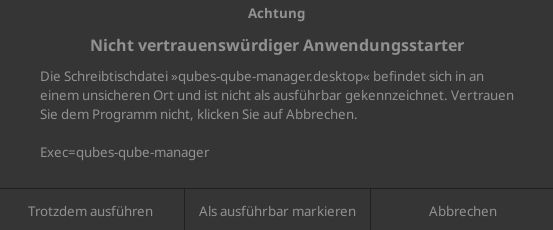
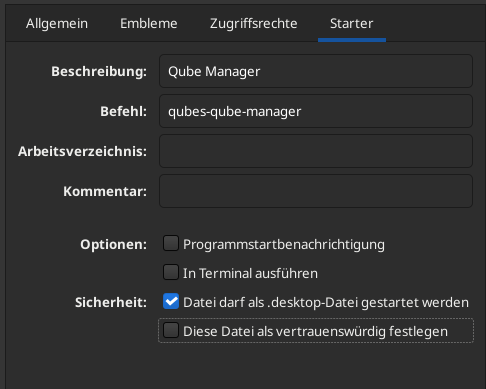
Yes, this behavior is specific to xfce in overlay in any linux distros 
Excuse me. I just ran the script and am testing it out. I first booted in Overlay FS mode and made a few small changes before booting into the regular persistent mode to find them gone. I made those same small changes and found they persisted once I booted into OverlayFS mode again. But once I shut down my computer, I found it stuck right here…
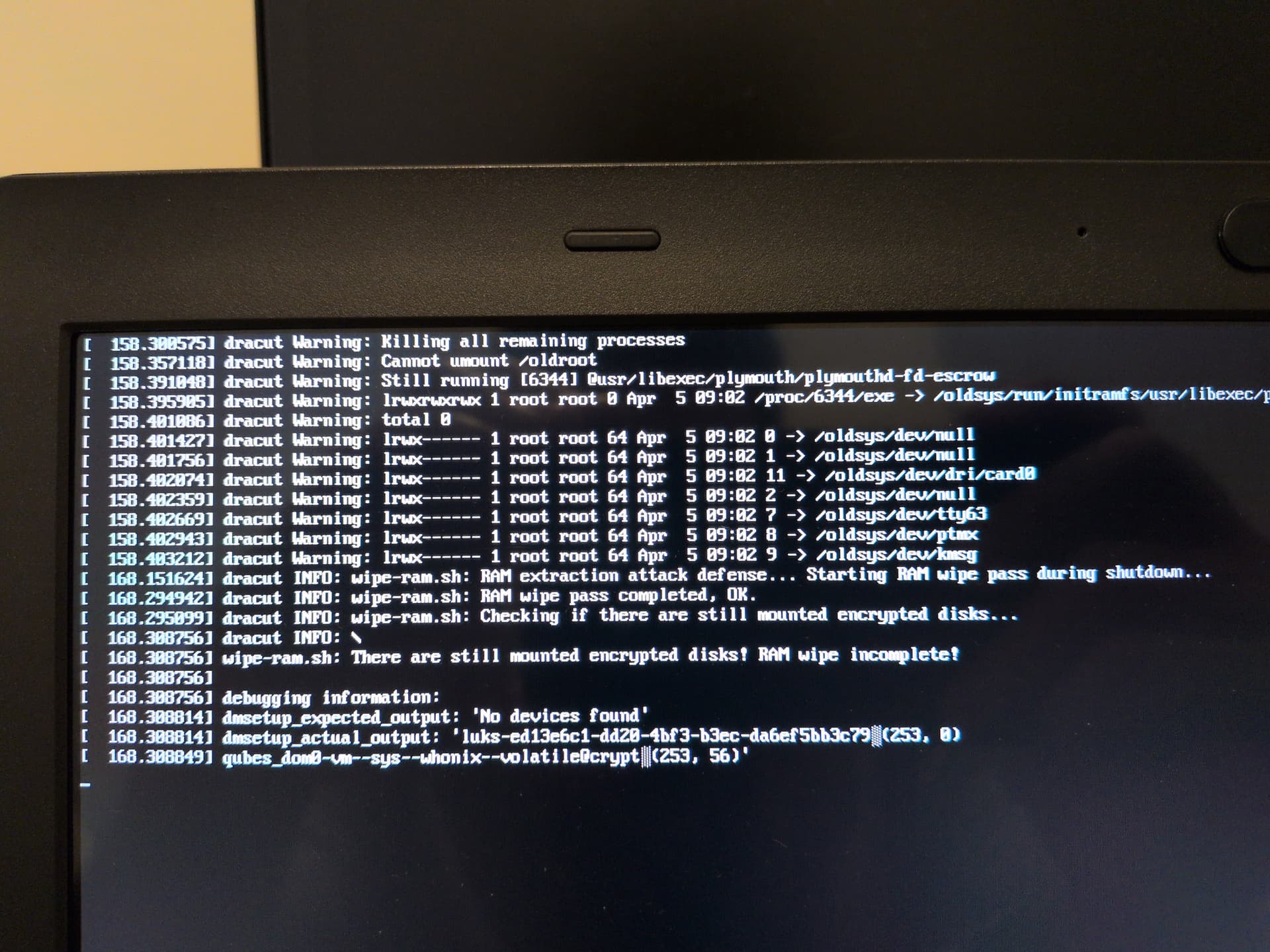
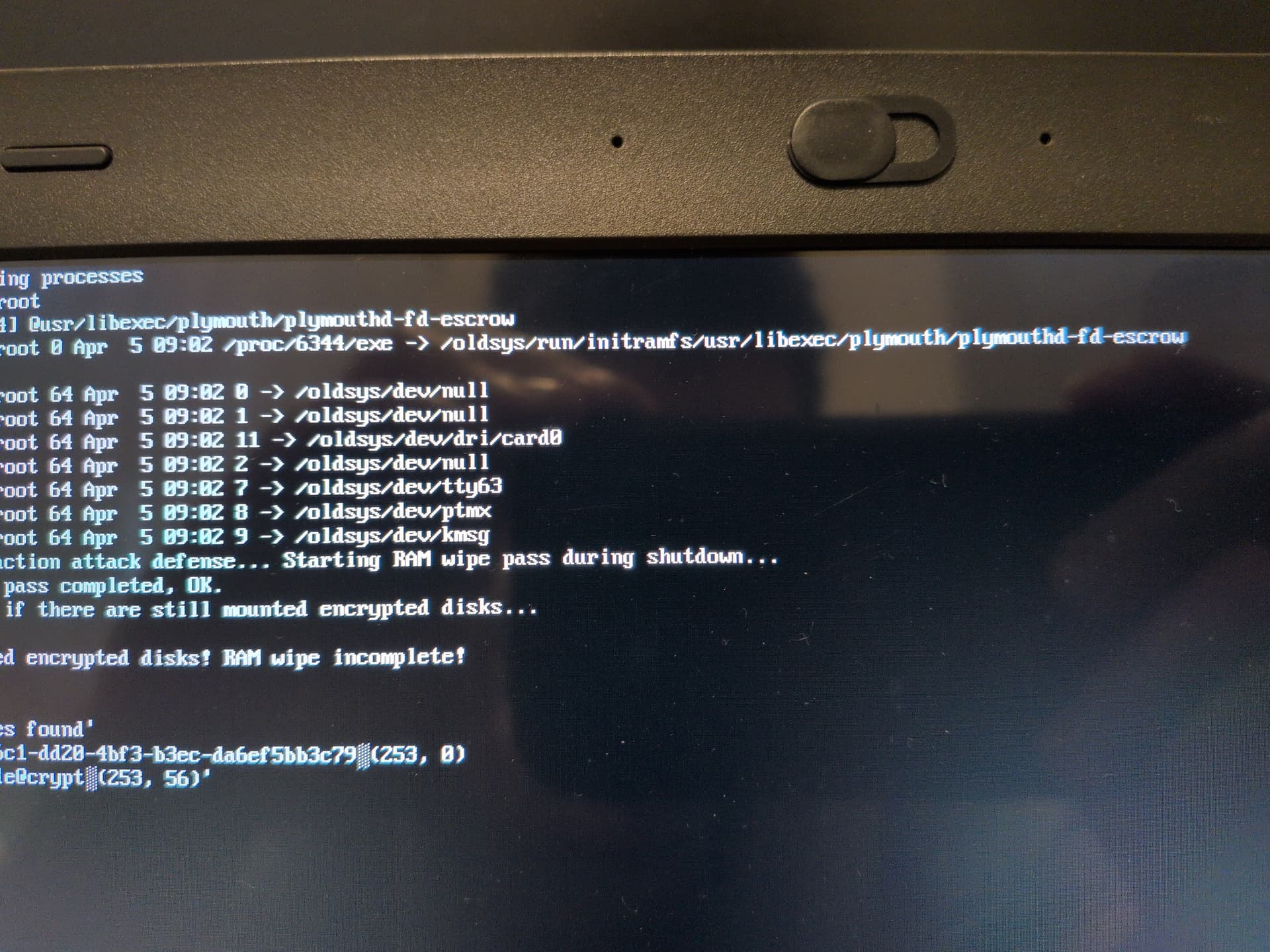
Does it normally take this long for the RAM wipe to complete or is there something wrong?
It’s still stalling as I post this.
@ledOnion wipe has already completed. Then module checks whether everything is unmounted, but it froze due to an unmounted Whonix volume. Possibly, you shutdown the system while Whonix was starting up, which led to this error. You can simply force-shutdown the computer - nothing bad will happen.
1 Like
Thanks @linuxuser1
So, if I got it right, with the newly added live modes (OverlayFS and ZRAM), the default boot option is still there and acts the Persistent mode?
As for the new Ephemeral DVMS, can I just delete the old ones they were based off of?
Yes. Overlay / Zram works only for dom0 and new DVMs. Default boot - persistent dom0, but new DVMs also include anti-forensics features, but metadata is still stored in dom0.
Yes. If you need to customize these new DVMs, open file /rw/config/rc.local and remove the code. Then reboot DVM, make your changes, and add code back to /rw/config/rc.local. This code can always be found here
Just to clarify @linuxuser1 ,
the RAM and any other data (like metadata, etc) will be wiped on both live and persistent modes when I shut down?