Lately, I’ve been trying to harden my service qubes…
- sys-usb
- sys-net
- sys-whonix
- sys-mirage-firewall (replacing the default sys-firewall with mirage)
What have I done?
-
Changed
sys-usbandsys-net’s template tountrusted-ram-dvm -
Cloned
sys-usbandsys-netand put these new clones intovarlibqubes -
sys-mirage-firewallwas already created to be put intovarlibqubes -
Please note I have NOT made a
varlibsqubeclone ofsys-whonix(I thought I did until I made a thorough check) -
Ran the following commands
-
qvm-volume config sys-usb:root rw False
-
qvm-volume config sys-net:root rw False
-
qvm-volume config sys-whonix:root rw False
-
qvm-volume config sys-mirage-firewall:root rw False
-
qvm-volume config mirage-disposable:root rw False(The disposable template forsys-mirage-firewall)
-
Added all the aforementioned entries to
/etc/systemd/system/rw.service -
Ran
sudo systemctl daemon-reload
Result?
All of the service qubes seem to be running fine. I was able to connect my USB mouse and use it and I could connect to the internet as well as Tor but I had a few issues.
-
There is a noticeable delay when sys-net and sys-whonix starts up. The waiting time ranges from one to a few minutes before I see their icons show up on the taskbar and they start working properly. Sometimes, even when sys-net’s icon shows up, it takes considerably more time to actually connect to the internet (I’m using Ethernet, by the way)
-
I had a consistent error on sys-net that says "Preparation note done yet. More more information, see: sdwdate-gui → right click → Open sdwdate’s log
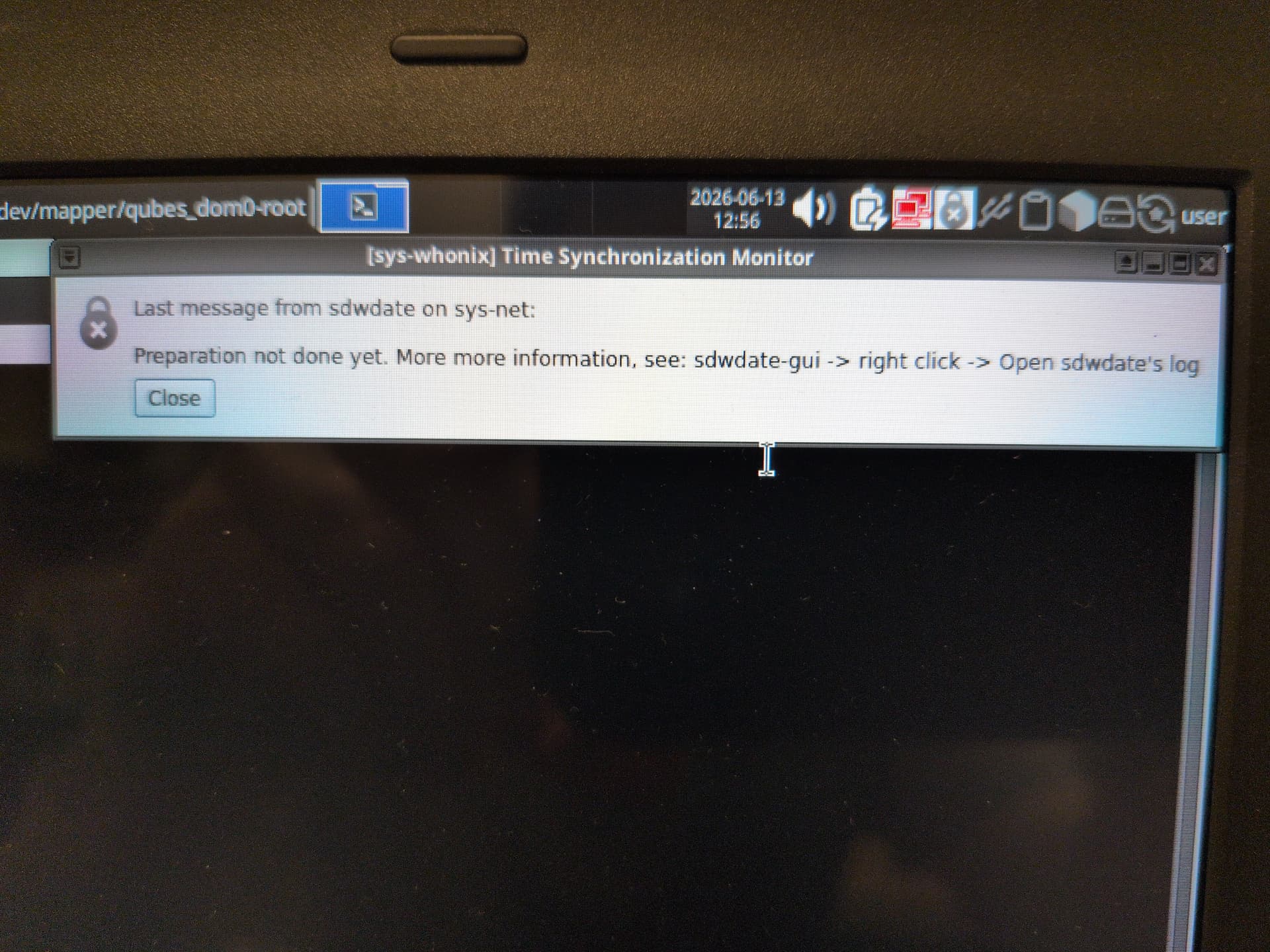
- Whenever I do try to open sdwdate’s log, it takes a long time for the output terminal to actually show up.
- When using my mouse, I notice an occasional or frequent lag in my mouse cursor as I move it around.
To address the sdwdate issue, I followed this guide to the letter. Although my error wasn’t a neverending cascade of error messages, only an X icon over the Time synchronization monitor icon, I followed the steps anyway. Sadly, the error described above still occurs.
Just in case it helps, I opened sys-net’s sdwdate log and it took several minutes to open. Sadly, for some reason, trying to interact with the terminal in anyway takes forever for the app to register. But I wasn’t able to copy the contents of the output anyway though I can show you a screenshot of it here.

Conclusion
I hoped I could use the fully Ephemeral and RAM-based disposability of the qubes made by the Live mode script to further enhance the security of my service qubes. But basically, using the Kicksecure-based untrusted-ram-dvm as a template for my service qubes seemed to cause more inconvenience than any good.
Any thoughts, anybody? @linuxuser1?