Qube Manager redesign (visual connections between qubes, drag & drop, zooming)

Hello Qubes Community,

I had the idea of redesigning the Qube Manager a while ago and just finished a mockup of the core change that my vision entails:
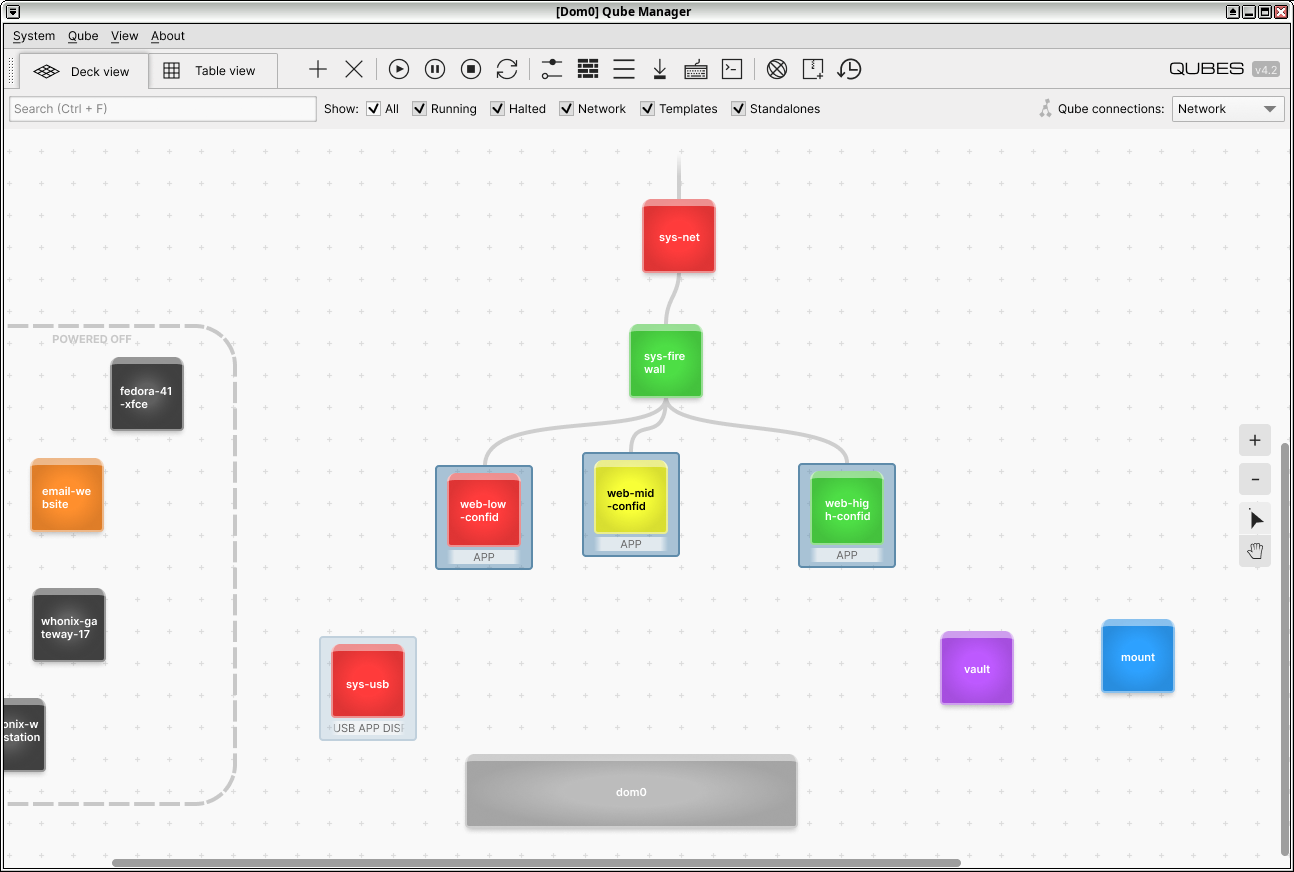
Please do enlarge the above mockup to view all details. The three “web-xxx” qubes are selected and sys-usb is being hovered on. A qube’s features are represented by a tag list on the bottom on being hovered on or selected (e…g., “APP” for app qube, “DISP” for disposable, “USB” for sys-usb). It says “Qubes” in the upper right-hand corner because Qubes OS is actually a trademark and I wasn’t sure whether I am allowed to use it in this way.

The core change is what I call “Deck view”. It’s the currently selected tab in the mockup and its features would be:

  1. Visual representation of relationships between qubes (see “Qube connections” dropdown in the upper right-hand corner). Not just the network – could also be, for example, policy permissions. Which qube is allowed to do what to another qube? This could be extended to be an editor as well. A real “under-the-hood” view.
  2. Drag and drop functionality. Launch or stop qubes simply by dragging them from the main area into the stopped area and the other way around.
  3. Free zooming in and out and moving around. Get an overview of your machine in seconds.

In addition to that, the familiar table view, as it is currently implemented in the Qube Manager, would always just be a click away.

What do you people think? Feedback is highly appreciated.

Warm regards,
Ferdinand Heinrich


Legal:

I would like to highlight that I currently do not want somebody else to implement the above scheme without my explicit permission.

Licenses of the assets used in the mockup:

Inter font license

Copyright (c) 2016 The Inter Project Authors (GitHub - rsms/inter: The Inter font family)

This Font Software is licensed under the SIL Open Font License, Version 1.1.
This license is copied below, and is also available with a FAQ at:
SIL Open Font License


SIL OPEN FONT LICENSE Version 1.1 - 26 February 2007

PREAMBLE
The goals of the Open Font License (OFL) are to stimulate worldwide
development of collaborative font projects, to support the font creation
efforts of academic and linguistic communities, and to provide a free and
open framework in which fonts may be shared and improved in partnership
with others.

The OFL allows the licensed fonts to be used, studied, modified and
redistributed freely as long as they are not sold by themselves. The
fonts, including any derivative works, can be bundled, embedded,
redistributed and/or sold with any software provided that any reserved
names are not used by derivative works. The fonts and derivatives,
however, cannot be released under any other type of license. The
requirement for fonts to remain under this license does not apply
to any document created using the fonts or their derivatives.

DEFINITIONS
“Font Software” refers to the set of files released by the Copyright
Holder(s) under this license and clearly marked as such. This may
include source files, build scripts and documentation.

“Reserved Font Name” refers to any names specified as such after the
copyright statement(s).

“Original Version” refers to the collection of Font Software components as
distributed by the Copyright Holder(s).

“Modified Version” refers to any derivative made by adding to, deleting,
or substituting – in part or in whole – any of the components of the
Original Version, by changing formats or by porting the Font Software to a
new environment.

“Author” refers to any designer, engineer, programmer, technical
writer or other person who contributed to the Font Software.

PERMISSION AND CONDITIONS
Permission is hereby granted, free of charge, to any person obtaining
a copy of the Font Software, to use, study, copy, merge, embed, modify,
redistribute, and sell modified and unmodified copies of the Font
Software, subject to the following conditions:

  1. Neither the Font Software nor any of its individual components,
    in Original or Modified Versions, may be sold by itself.

  2. Original or Modified Versions of the Font Software may be bundled,
    redistributed and/or sold with any software, provided that each copy
    contains the above copyright notice and this license. These can be
    included either as stand-alone text files, human-readable headers or
    in the appropriate machine-readable metadata fields within text or
    binary files as long as those fields can be easily viewed by the user.

  3. No Modified Version of the Font Software may use the Reserved Font
    Name(s) unless explicit written permission is granted by the corresponding
    Copyright Holder. This restriction only applies to the primary font name as
    presented to the users.

  4. The name(s) of the Copyright Holder(s) or the Author(s) of the Font
    Software shall not be used to promote, endorse or advertise any
    Modified Version, except to acknowledge the contribution(s) of the
    Copyright Holder(s) and the Author(s) or with their explicit written
    permission.

  5. The Font Software, modified or unmodified, in part or in whole,
    must be distributed entirely under this license, and must not be
    distributed under any other license. The requirement for fonts to
    remain under this license does not apply to any document created
    using the Font Software.

TERMINATION
This license becomes null and void if any of the above conditions are
not met.

DISCLAIMER
THE FONT SOFTWARE IS PROVIDED “AS IS”, WITHOUT WARRANTY OF ANY KIND,
EXPRESS OR IMPLIED, INCLUDING BUT NOT LIMITED TO ANY WARRANTIES OF
MERCHANTABILITY, FITNESS FOR A PARTICULAR PURPOSE AND NONINFRINGEMENT
OF COPYRIGHT, PATENT, TRADEMARK, OR OTHER RIGHT. IN NO EVENT SHALL THE
COPYRIGHT HOLDER BE LIABLE FOR ANY CLAIM, DAMAGES OR OTHER LIABILITY,
INCLUDING ANY GENERAL, SPECIAL, INDIRECT, INCIDENTAL, OR CONSEQUENTIAL
DAMAGES, WHETHER IN AN ACTION OF CONTRACT, TORT OR OTHERWISE, ARISING
FROM, OUT OF THE USE OR INABILITY TO USE THE FONT SOFTWARE OR FROM
OTHER DEALINGS IN THE FONT SOFTWARE.

Michroma font license

Copyright 2011 The Michroma Project Authors (GitHub - googlefonts/Michroma-font)

This Font Software is licensed under the SIL Open Font License, Version 1.1.
This license is copied below, and is also available with a FAQ at:
SIL Open Font License


SIL OPEN FONT LICENSE Version 1.1 - 26 February 2007

PREAMBLE
The goals of the Open Font License (OFL) are to stimulate worldwide
development of collaborative font projects, to support the font creation
efforts of academic and linguistic communities, and to provide a free and
open framework in which fonts may be shared and improved in partnership
with others.

The OFL allows the licensed fonts to be used, studied, modified and
redistributed freely as long as they are not sold by themselves. The
fonts, including any derivative works, can be bundled, embedded,
redistributed and/or sold with any software provided that any reserved
names are not used by derivative works. The fonts and derivatives,
however, cannot be released under any other type of license. The
requirement for fonts to remain under this license does not apply
to any document created using the fonts or their derivatives.

DEFINITIONS
“Font Software” refers to the set of files released by the Copyright
Holder(s) under this license and clearly marked as such. This may
include source files, build scripts and documentation.

“Reserved Font Name” refers to any names specified as such after the
copyright statement(s).

“Original Version” refers to the collection of Font Software components as
distributed by the Copyright Holder(s).

“Modified Version” refers to any derivative made by adding to, deleting,
or substituting – in part or in whole – any of the components of the
Original Version, by changing formats or by porting the Font Software to a
new environment.

“Author” refers to any designer, engineer, programmer, technical
writer or other person who contributed to the Font Software.

PERMISSION & CONDITIONS
Permission is hereby granted, free of charge, to any person obtaining
a copy of the Font Software, to use, study, copy, merge, embed, modify,
redistribute, and sell modified and unmodified copies of the Font
Software, subject to the following conditions:

  1. Neither the Font Software nor any of its individual components,
    in Original or Modified Versions, may be sold by itself.

  2. Original or Modified Versions of the Font Software may be bundled,
    redistributed and/or sold with any software, provided that each copy
    contains the above copyright notice and this license. These can be
    included either as stand-alone text files, human-readable headers or
    in the appropriate machine-readable metadata fields within text or
    binary files as long as those fields can be easily viewed by the user.

  3. No Modified Version of the Font Software may use the Reserved Font
    Name(s) unless explicit written permission is granted by the corresponding
    Copyright Holder. This restriction only applies to the primary font name as
    presented to the users.

  4. The name(s) of the Copyright Holder(s) or the Author(s) of the Font
    Software shall not be used to promote, endorse or advertise any
    Modified Version, except to acknowledge the contribution(s) of the
    Copyright Holder(s) and the Author(s) or with their explicit written
    permission.

  5. The Font Software, modified or unmodified, in part or in whole,
    must be distributed entirely under this license, and must not be
    distributed under any other license. The requirement for fonts to
    remain under this license does not apply to any document created
    using the Font Software.

TERMINATION
This license becomes null and void if any of the above conditions are
not met.

DISCLAIMER
THE FONT SOFTWARE IS PROVIDED “AS IS”, WITHOUT WARRANTY OF ANY KIND,
EXPRESS OR IMPLIED, INCLUDING BUT NOT LIMITED TO ANY WARRANTIES OF
MERCHANTABILITY, FITNESS FOR A PARTICULAR PURPOSE AND NONINFRINGEMENT
OF COPYRIGHT, PATENT, TRADEMARK, OR OTHER RIGHT. IN NO EVENT SHALL THE
COPYRIGHT HOLDER BE LIABLE FOR ANY CLAIM, DAMAGES OR OTHER LIABILITY,
INCLUDING ANY GENERAL, SPECIAL, INDIRECT, INCIDENTAL, OR CONSEQUENTIAL
DAMAGES, WHETHER IN AN ACTION OF CONTRACT, TORT OR OTHERWISE, ARISING
FROM, OUT OF THE USE OR INABILITY TO USE THE FONT SOFTWARE OR FROM
OTHER DEALINGS IN THE FONT SOFTWARE.

Breeze Icon Theme license

The Breeze Icon Theme in icons/

Copyright (C) 2014 Uri Herrera <uri_herrera@nitrux.in> and others

This library is free software; you can redistribute it and/or
modify it under the terms of the GNU Lesser General Public
License as published by the Free Software Foundation; either
version 3 of the License, or (at your option) any later version.

This library is distributed in the hope that it will be useful,
but WITHOUT ANY WARRANTY; without even the implied warranty of
MERCHANTABILITY or FITNESS FOR A PARTICULAR PURPOSE.  See the GNU
Lesser General Public License for more details.

You should have received a copy of the GNU Lesser General Public
License along with this library. If not, see <http://www.gnu.org/licenses/>.

Clarification:

The GNU Lesser General Public License or LGPL is written for
software libraries in the first place. We expressly want the LGPL to
be valid for this artwork library too.

KDE Breeze theme icons is a special kind of software library, it is an
artwork library, it’s elements can be used in a Graphical User Interface, or
GUI.

Source code, for this library means:

  • where they exist, SVG;
  • otherwise, if applicable, the multi-layered formats xcf or psd, or
    otherwise png.

The LGPL in some sections obliges you to make the files carry
notices. With images this is in some cases impossible or hardly useful.

With this library a notice is placed at a prominent place in the directory
containing the elements. You may follow this practice.

The exception in section 5 of the GNU Lesser General Public License covers
the use of elements of this art library in a GUI.

https://vdesign.kde.org/


	   GNU LESSER GENERAL PUBLIC LICENSE
                   Version 3, 29 June 2007

Copyright (C) 2007 Free Software Foundation, Inc. http://fsf.org/
Everyone is permitted to copy and distribute verbatim copies
of this license document, but changing it is not allowed.

This version of the GNU Lesser General Public License incorporates
the terms and conditions of version 3 of the GNU General Public
License, supplemented by the additional permissions listed below.

  1. Additional Definitions.

As used herein, “this License” refers to version 3 of the GNU Lesser
General Public License, and the “GNU GPL” refers to version 3 of the GNU
General Public License.

“The Library” refers to a covered work governed by this License,
other than an Application or a Combined Work as defined below.

An “Application” is any work that makes use of an interface provided
by the Library, but which is not otherwise based on the Library.
Defining a subclass of a class defined by the Library is deemed a mode
of using an interface provided by the Library.

A “Combined Work” is a work produced by combining or linking an
Application with the Library. The particular version of the Library
with which the Combined Work was made is also called the “Linked
Version”.

The “Minimal Corresponding Source” for a Combined Work means the
Corresponding Source for the Combined Work, excluding any source code
for portions of the Combined Work that, considered in isolation, are
based on the Application, and not on the Linked Version.

The “Corresponding Application Code” for a Combined Work means the
object code and/or source code for the Application, including any data
and utility programs needed for reproducing the Combined Work from the
Application, but excluding the System Libraries of the Combined Work.

  1. Exception to Section 3 of the GNU GPL.

You may convey a covered work under sections 3 and 4 of this License
without being bound by section 3 of the GNU GPL.

  1. Conveying Modified Versions.

If you modify a copy of the Library, and, in your modifications, a
facility refers to a function or data to be supplied by an Application
that uses the facility (other than as an argument passed when the
facility is invoked), then you may convey a copy of the modified
version:

a) under this License, provided that you make a good faith effort to
ensure that, in the event an Application does not supply the
function or data, the facility still operates, and performs
whatever part of its purpose remains meaningful, or

b) under the GNU GPL, with none of the additional permissions of
this License applicable to that copy.

  1. Object Code Incorporating Material from Library Header Files.

The object code form of an Application may incorporate material from
a header file that is part of the Library. You may convey such object
code under terms of your choice, provided that, if the incorporated
material is not limited to numerical parameters, data structure
layouts and accessors, or small macros, inline functions and templates
(ten or fewer lines in length), you do both of the following:

a) Give prominent notice with each copy of the object code that the
Library is used in it and that the Library and its use are
covered by this License.

b) Accompany the object code with a copy of the GNU GPL and this license
document.

  1. Combined Works.

You may convey a Combined Work under terms of your choice that,
taken together, effectively do not restrict modification of the
portions of the Library contained in the Combined Work and reverse
engineering for debugging such modifications, if you also do each of
the following:

a) Give prominent notice with each copy of the Combined Work that
the Library is used in it and that the Library and its use are
covered by this License.

b) Accompany the Combined Work with a copy of the GNU GPL and this license
document.

c) For a Combined Work that displays copyright notices during
execution, include the copyright notice for the Library among
these notices, as well as a reference directing the user to the
copies of the GNU GPL and this license document.

d) Do one of the following:

   0) Convey the Minimal Corresponding Source under the terms of this
   License, and the Corresponding Application Code in a form
   suitable for, and under terms that permit, the user to
   recombine or relink the Application with a modified version of
   the Linked Version to produce a modified Combined Work, in the
   manner specified by section 6 of the GNU GPL for conveying
   Corresponding Source.

   1) Use a suitable shared library mechanism for linking with the
   Library.  A suitable mechanism is one that (a) uses at run time
   a copy of the Library already present on the user's computer
   system, and (b) will operate properly with a modified version
   of the Library that is interface-compatible with the Linked
   Version. 

e) Provide Installation Information, but only if you would otherwise
be required to provide such information under section 6 of the
GNU GPL, and only to the extent that such information is
necessary to install and execute a modified version of the
Combined Work produced by recombining or relinking the
Application with a modified version of the Linked Version. (If
you use option 4d0, the Installation Information must accompany
the Minimal Corresponding Source and Corresponding Application
Code. If you use option 4d1, you must provide the Installation
Information in the manner specified by section 6 of the GNU GPL
for conveying Corresponding Source.)

  1. Combined Libraries.

You may place library facilities that are a work based on the
Library side by side in a single library together with other library
facilities that are not Applications and are not covered by this
License, and convey such a combined library under terms of your
choice, if you do both of the following:

a) Accompany the combined library with a copy of the same work based
on the Library, uncombined with any other library facilities,
conveyed under the terms of this License.

b) Give prominent notice with the combined library that part of it
is a work based on the Library, and explaining where to find the
accompanying uncombined form of the same work.

  1. Revised Versions of the GNU Lesser General Public License.

The Free Software Foundation may publish revised and/or new versions
of the GNU Lesser General Public License from time to time. Such new
versions will be similar in spirit to the present version, but may
differ in detail to address new problems or concerns.

Each version is given a distinguishing version number. If the
Library as you received it specifies that a certain numbered version
of the GNU Lesser General Public License “or any later version”
applies to it, you have the option of following the terms and
conditions either of that published version or of any later version
published by the Free Software Foundation. If the Library as you
received it does not specify a version number of the GNU Lesser
General Public License, you may choose any version of the GNU Lesser
General Public License ever published by the Free Software Foundation.

If the Library as you received it specifies that a proxy can decide
whether future versions of the GNU Lesser General Public License shall
apply, that proxy’s public statement of acceptance of any version is
permanent authorization for you to choose that version for the
Library.

9 Likes

Relational graphs would be a very natural addition to Qube Manager. It’s hard to not appreciate the graphs you see on the QubesOS website, in Qubes documentation, or in Qubes developer blogs, and then think “I want my system to be graphed like that!”. That’s what goes on in my head anyway, and I can’t be alone in that. So yeah, I’m supportive of the core idea. For inspiration we can look to ex. one of the several GUIs for pipewire, like pw-viz . Probably it would be better rolled into a much more general overhaul of Qubes Manager. Not sure what current plans are for QM, but the devs must have lots of ideas for changes already.

As to your specific example, I dislike that powered-off qubes are separated out spacially, because you’re giving the spacial information mixed semantics. To my mind the graph should only be describing network connectivity (or even relationships generally, but power state is not a relationship). Power state would be better expressed by changing the appearance of the icon, and of course you could also have the option to hide powered-off qubes if you wish.

Another thing I’d like integrated is qube groups:

  • The graph would show an obvious visual indication of qubes that are grouped together.
  • You’d have the ability to manipulate their properties as a single unit.
  • They’d share a tag that can be used in policies.
  • Qube groups could also be grouped or nested in the Start/App menu.
3 Likes

Does this solve a problem people are having? I ask this ingenuously. After all, I’ve perused this forum for quite some time and I’ve yet to come across any real gripes from users in regard to the Qube Manager layout. In fact, I’d say it’s rather intuitive and easy to control.

But also, you must consider the devs. Right now they’re struggling enough to find a way to get Fedora 42 to work with Q4.3’s sys-gui. Much less should we add to their work load completely revamping how we interact with, arguably, one of the least-used features of Qubes. (And by that I mean, once you configure it a certain way, you largely forget about it until you need to tweak something. At least, that has been my experience.)

2 Likes

This does not prevent people to contribute to ideas, or even implement them later themselves :slight_smile:

I think the deck view should offer multiple layers, because there is more than the netvm relationship:

  • relations between templates, appvm and disposables (named or not)
  • audiovm relationship
  • gui relationship

I’d be happy to have such a view because sometimes I struggle to have the big picture of my setup.

6 Likes

I see it more as a nice-to-have. When you’re designing or maintaining a network, it helps to be able to visualize it. Perhaps it’s hard to grasp the usefulness of it if your system only has sys-firewall and sys-net. Try to imagine a system with a tree-like structure of 10 or more netvms.

Qube Manager is super helpful if only because there’s nothing else like it for managing qubes. But to me it often feels clunky and primitive. Relational graphs aren’t the first nor the last thing I’d like to see changed with Qube Manager. Off the top of my head:

  • Allow reordering of columns

  • Access to the qube’s app menu

  • Column showing number of windows open. (Sometimes it’s hard to tell on my system if a qube still has windows open.)

  • Memory allocation column (or other memory metrics). Sometimes I’m running 30 qubes at once and need to find a qube to shut down to free up memory. Being able to see a list sorted by memory alloc would be nice here (no I don’t want to use xentop).

  • There should be a “Yes to all” button when ex. you hit restart with 5 qubes selected. Don’t pop up 5 separate “are you sure?” dialog windows. (Maybe if you have 5 qubes selected the buttons at the top should change to say like “Restart 5 qubes”?)

  • You should be able to save full sets of view parameters as a profile. This includes qube visibility filters, sort order, everything under “View” menu, column width and order, window size. I use Qube Manager for multiple different kinds of tasks but unfortunately it’s much slower to tailor all of these settings to the task every time, than it is to just leave everything enabled/defaults for every task. Profiles would let me make use of all of these settings and make QM much more comfortable.

  • Tbh the qube tooltray widget should share a common framework with Qube Manager. You should be able to configure its layout using the same view parameters as QM, saved as its own special profile. And reduce redundant code; it’s kinda silly that a bug causing disp-vms to not properly show its template was upgraded, affected the tray widget but not QM.

  • Take the aforementioned framework a step further-- convert the whole of Qube Manager to a framework first-and-foremost. That’ll allow users to easily write their own custom qube management guis, where they can add custom widgets or additional arbitrary columns etc… Maybe someone wants to add vm start time to the columns so they can see their qubes in the order in which they started them up, with most recent at the top? Like why not? The subject of this thread (graphs) could be implemented as a custom gui on this framework too (don’t need to bother the core dev team with it).

  • Add option to temporarily disconnect qube from its netvm. (related issue)

  • Other minor things like, if your selection is scrolled off the page there should still be some indication of what you have selected. And the window styling should be brought in line with modern qubes gui.

I don’t think anyone’s suggested the devs should reprioritize. Brainstorming ideas like this, even if they can’t be seriously considered in the next 5 years, is pretty harmless imo.

4 Likes

What do you people think? Feedback is highly appreciated.

“Designing with the Mind in Mind” is a good book.

2 Likes

As far as I can remember we are lucky to have Qube Manager at all, because the devs initially excluded it from the early (initial) 4.x versions. Only due to users’ “bounty” they brought it back. So, I don’t think it’s on their agenda at all to develop it further, out of its basic functionality as it is now. Too bad too, though…

There should be a mode for viewing template-appvm-dispvm connections.

I’m too lazy to drag, can’t we just right click or something? Ability to drag doesn’t affect the behavior (i.e. what would be the network qube, template qube, etc., there is nowhere to drag to). Even then, IMO dragging is unwieldy. I agree with likafox’s take on that:

As to your specific example, I dislike that powered-off qubes are separated out spacially, because you’re giving the spacial information mixed semantics. To my mind the graph should only be describing network connectivity (or even relationships generally, but power state is not a relationship). Power state would be better expressed by changing the appearance of the icon, and of course you could also have the option to hide powered-off qubes if you wish.

On that note, why bother with “deck view” at all? Something similar to a file manager tree view might be easier to work with as well as implement (and will take less space on screen).

On that note, why bother with GUI? Ability to copy text from terminal is great! This should be added to qvm-ls. Besides, it will take less space in long-term memory and can be used without monitor, gpu, or functional X / wayland session!

I’m taking this tangent too far.


p.s. I know qvm-ls already has network tree mode, I’m talking about other relationship trees.


p.p.s @Ferdinand_Heinrich Here’s an idea: in the network mode, don’t just display qubes, but also network devices, and allow controlling which qube handles which interface by “drawing” (maybe stretching is a better word) connections

2 Likes

I would want to see the ability of dragging devices such as usb and microphones (aka PipeWire e.g. qpwgraph) to the desired destinations. Perhaps creating a large temporary volume for transferring data to another, and then moving that volume and mounting it in a DVM for processing or inspection. Like when upgrading a template and you need temporary space to do the upgrade, just create a volume and drag it to the template to mount it, do the upgrade and then move it to the trash. Click on any VM and look at the space available, or have the VM’s color coded for % space remaining.

2 Likes

A big, big thanks for all the feedback so far. Especially @likeafox in reply #4.

Now I do see the potential of a unified interface for what are essentially three interfaces at the moment (application menu, Qube manager, tray icon menu) and that is, in addition, making heavy use of spatial design.

I think it is worth my effort to test whether this concept actually provides additional value compared to what there currently is. I am going to write a high-fidelity prototype of the interactive graph view (i.e., what I call deck view). It will be a KDE app (Plasma Desktop 6, more specifically) because I would like to provide easy access to theming and I prefer Qt 6.


On a side note and as to the question what problem I am trying to solve, I would like to mention that I see my PC and its OS as a digital, mobile home for myself. Therefore, I want to push on three very specific parameters that I think define the feeling of being at home:

  1. Security
  2. Comfort
  3. Ownership

The above concept is my attempt at increasing the comfort of using Qubes. I do realize that this is a difficult undertaking.


Ferdinand

3 Likes

I realize “Qubes Template Switcher” could be implemented as a subtype of QM too

You can already switch templates in bulk in Qubes Manager :slight_smile:

1 Like

Hi, the dev who does the UX stuff here :slight_smile:

I like the idea a lot and it really aligns with something I would love to see in Qubes one day. The problem I’ve seen when trying to test it out on a live system is that it’s very hard to make it readable/practical when someone has a lot of qubes (I’m at ~20 app qubes, and I don’t think it’s that much, the guy next to me has over a 100…), and even if you don’t have that many app qubes, even a couple of templates, whonix stuff and default system qubes is already a lot. It might get very hard to find the qube you want quite fast.

But the idea of showing a tree view, using drag-and-drop for some permissions/attachments is a great one (I’d love also to see devices integrated there, too, because they seem like a very natural fit - connected to the backend qube and dragged-and-dropped onto the frontend).

My own vision for Qubes Manager and the whole system management toolset is that right now it sucks AND is problematic to move forward to Wayland (because tray icons are apparently the devil?), so my soon-to-be-happening project is “rethink and redesign the way the user is managing the system in day-to-day operations in order to move away from the billion widgets”. I think it’s pretty clear that the idea to split system management from qubes manager to widgets was a failure (the widgets are bad to use with keyboard, not very discoverable, and while I tried to improve some things about it, I think it was just bandaging a dead horse), and we need to rethink the whole approach to it. One of my ideas is a re-designed Qubes Manager (keeping the current table view, but also having a dashboard-like view for current system state), but I still need to do more research and more thinking on it…

edit: soon to be happening means like “the moment I’m done with last 4.3 fixes”, so hopefully weeks

12 Likes

What do you people think? Feedback is highly appreciated.

Use the search before you re invent the wheel :wink:

No offfense, but your ‘legal notice’ triggered mee a little do that search for you:
https://groups.google.com/g/qubes-devel/c/64-WJIMY18A/m/-nwwAmhlBAAJ

6 Likes

I’ve not been able to see the Mockup, but from the discussion I’ve a
pretty good idea what is included.

I like the idea too - so much that we used to include something like
this for users. But in the end, it did not suit anyone, inn that it did
not solve any problems. (Of course, it might solve problems for OP,
and for some other people.)

@marmarta is right - as soon as you start to run diverse
templates/qubes this sort of representation becomes unwieldy. For
example, we regularly ship in excess of 30 templates, and in excess of
80 AppVM - that doesnt include disposables or standalones. We didnt find
a sensible way of easily incorporating this in to a GUI scheme.

Things you might like to consider:

  1. Template store - dragging from template to qube area creates new qube
    based on template. (This requires separating “running” target space from
    qube target space). Dragging an existing qube on to a template, changes
    the template used by that qube.
  2. Disposable template store - dragging a qube in to this store promotes it
    to Disposable template, and automagically generates entry in disposable
    store. Dragging from removes that property.
  3. Disposable store - dragging qube from here spawns disposable
  4. Standalone store - dragging to here creates a standalone. Dragging
    from here, starts standalone.
    You need to be able to select multiple items at the same time to change
    networking properties.
    Right click on network connection open qvm-firewall properties for
    editing.
    Right click on icon opens Qube settings for editing.
    It’s important to separate “running” space from “stores” - dragging
    from the running space should shut down the qube.But dragging to/from
    stores should change klass or properties.

There’s probably more, but I cant remember just now.

As I said, it didnt work for us. It may work for you.

The major objection that I had to this approach, (and I’ve said this
numerous times), is that it puts the focus on the implementation, but
for most users, they dont care about this. What they want to do is get
on with work, without bothering about templates, AppVMs, disposables.
The way to do this is to use Menus that put the focus on what a user
wants to do, rather than how they do that in Qubes. Helper scripts that
generate whole security domains and create grouped Menu items with an
emphasis on applications rather than qubes. Shortcuts that do all this
stuff in the background.
I’ve been banging this drum for a long time, and it doesnt seem to
appeal to many users in the Forum, (or in the mailing list before), but
I’m sure that it’s the way to get Qubes out of niche.

Incidentally there was a suggestion before that Qube Manager was
reinstated because of some “bounty” - this was just wrong. Qubes
development is not based on bounties - you cant pay to have some
feature that you want included in Qubes. (You can pay to have a
custom Qubes provided for you or your organisation but that’s
different.)
The Qube Manager was reinstated because user feedback to its removal
was overwhelmingly negative.

I never presume to speak for the Qubes team.
When I comment in the Forum I speak for myself.

6 Likes

I’m just using Qubes since a year ago, and it think it simplifies understanding the system. Some things I already understand, some things not yet. Looks good, especially for new users.

1 Like

Hahaha, that one was funny and weird,. I wanted to say “mutiny”. And if anyone asks theirsleves what on Earth these two have in common at all, well for a non-native English speaker it does… Apologize.

4 Likes

@unman puts a finger on it for me…

TLDR: The UI problem (for me) is that it doesn’t seem to map to my set of use-cases for the whole system.

the Too Long bit is here

The big list of AppVM, DispVm, maybe with templates and service VMs separated out is something I mostly try to hide from. Sometimes it is useful, but most of the time I want to be working in a limited “domain of activity” (e.g.general business admin, a specific client, project, in a personal or work library, general browsing, personal communication, archiving, etc). These domains very much do NOT map to single or multiple VMs, and often span multiple security contexts.

Most of the time, I want almost everything else just to disappear, until I switch “domain of activity” or need to add something to the current one.

I both agree and disagree with @marmarta here…

The Widgets are great and indispensable for having an always-on view of overall system state and for quick access to some global config and actions, but they cannot be the sole view of config and management. Old-style manager is sometimes the best tool, but lacks some functions, and the same for the new main menu… but all of them are very “global” - they show everything, which is often too much.

Most of the time, I’m actually a user of a restricted subset of AppVMs/dispVM/Templates/windows… and sometimes I really don’t want all that Dom0 power anywhere nearby. I need a whole range of different “splits”, but mostly they are not splits between simple classes of “implementation-y stuff”.

My current approach is a mix of workspaces, prefixes on VM names, labels… and self-discipline. Have considered/considering splitting my use cases with AdminVMs, separate virtual consoles, tags&RPC, and assorted other tricks… but mostly not brave enough.

I’ll shut up now, as it’s starting to sound like a job of trying to “tesseract the hypersphere”, and I seem to be repeating myself.

3 Likes

Your idea sounds neat. Here is related info on a previous attempt, but your idea looks better then this one:

Which ultimately comes from this:

One issue that happens with mermaid is that once your system has a lot of qubes (for example, qvm-ls | wc shows 170 qubes on my system), the automatic layout algorithm will sometimes try to put like 100 of them on one line next to each other, (going far “off the page”). (note: trying qvm-ls-mermaid now just gives me a “Maximum text size in diagram exceeded”, so I cannot confirm these things as I am saying them)

My point is:

  • Looking at this for ideas for kinds of relationships you may want to present may be a good thing
  • That the algorithm for laying out the nodes in a automatic way will probably become a focus point. You may want to see if someone already has a good automatic layout algorithm that’s part of a library that’s small enough for people to feel comfortable adding it to dom0

I notice he has a “Qube connections: Network” box in the upper right corner. I’m assuming the thinking is about only displaying one relationship at a time, where the user could change “Network” to “Template”, or “Policy Group” or whatever?

However, “power state” should be determinable from each graph, since when someone wants to know something about a VM, more then 80% of the time the VM will probably be currently running, making it a easy way to visually find the VM you want and not the many, many non-running VMs. It could be something as simple as greying it out.

Also note he was displaying the security label colors (which is probably a good idea)

My guess is that a KDE app would probably not get accepted for dom0 as it would pull in tons of kde libraries, however you can read the “visualize qube config without trust” on how to use the Qubes Admin API to run qubes-manager not in Dom0. (I.E. by putting your new qubes-manager in a qube and running it from there with enhanced, but restricted permissions)

And finally a rabbit hole to go down about information about expressing information beyond security label color: :slight_smile:

(tip: don’t try to handle every use case. at some point you have to give up reading about new use cases and actually do something, but it can be good to know what the issues that may come down the line are)

1 Like

Re: “the focus on the implementation” cc: @unman @phceac

The Qube Manager being implementation-focused is not a problem. Until proven otherwise, I don’t believe it’s possible to get away with not caring about implementation. Security in Qubes doesn’t happen by accident; beyond the most trivial of use you need some understanding of the underlying design to make effective use of Qubes. It’s like a password policy-- The policy can help guide a user in the right direction, but at some point you are relying on the user’s understanding of what a password is even for, lest they set it to ASDF;lkj1234 anyway. Likewise with setting up networking for their qubes etc… If you discourage users from thinking about implementation details by hiding all of it, while still expecting them to make decisions, you will have Windows-like pop-ups saying “this program is trying to access the internet. allow access?”, that the users will always click “yes” on because it’s just easier/lets them get on with their work faster.

Now for the part where I agree with you. There will always be a place for an implementation-focused interface like QM, but we need a use-focused interface too. Sometimes we are setting up/maintaining our qubes, and sometimes we are USING them. We need BOTH. That is where the start/app menu is supposed to come in, however I share all your concerns about it not being the use-focused interface we need. The main view area being an alphabetical list of all your qubes is just not it. We need something purpose-oriented, that shows more of what we want and less of what we don’t, and that takes into account relationships much like what @phceac describes as “domain of activity”:

I can relate. For example, I’m currently working on an embedded computing project, codenamed “bruno”, that I’ve made the following qubes for:

  • bruno-research mainly runs firefox for looking up documentation etc. and a notepad for taking notes.
  • bruno-dev has a dev environment for developing and compiling the embedded device’s board software package.
  • bruno-cache is bruno-dev’s netvm, which handles http proxying and perma-caching code repositories for reproducible builds.
  • bruno-test has a usb controller and serial console for doing live tests

I really wish there was a better organization method than giving all qubes the same prefix, which doesn’t do anything to slow the proliferation of start-menu submenus. I mentioned qube groups earlier, and groups would go a long way to making the start menu more comfortable than what we have now. It’d be nice if from the menu I could open a mini-manager window of the bruno group, where all the bruno app launchers are on-screen at once. I can launch 5 apps in one go, and then keep the window open while I work in case I need to restart anything. No fumbling around in the start menu over and over.

But I wonder if even groups is a half-baked idea, and we could do better. Would need to think on it more (and give it its own forum thread and keep this one to QM discussion).

btw I heard KDE is planned to be the default desktop in future versions of Qubes.

3 Likes