Answer: I have no idea what that image shows. Please summarise the content and quote any text.
[quote]
I never presume to speak for the Qubes team.
When I comment in the Forum I speak for myself.
Answer: I have no idea what that image shows. Please summarise the content and quote any text.
[quote]
I never presume to speak for the Qubes team.
When I comment in the Forum I speak for myself.
What fun. This is like those “make a sandwich” tests, except you are
cheating a little.
There is an inconsistency here:
Or is the " 800 GB VM backup" the same as “the qube VM-personal-files”?
I do not have any qube with a directory called “personal files” - how
did this appear if you did not create it in the qube?
This was very clever of you,
If you look at the Backup window, you will see:
Target qube - what is written there?Backup directory or command - what is written there?Open Qube settings for “the qube VM-personal-files”, and write
down in your reply the value under Disk storage for Private storage max size, and System storage max size.
I never presume to speak for the Qubes team.
When I comment in the Forum I speak for myself.
The brown screen / photo says:
Default boot device is missing or the boot process failed.
Insert the recovery media and press any key.
Then select “Boot Manager” to
select a new boot device or
start the recovery media
These VMs are to be backed up:
=> VM personal-png => 180 GiB (with files and contents)
=> VM personal-jpg => 170 GiB (with file contents)
=> VM personal-odt => 126 GiB (with file contents)
Target Qube => personal-Backup
Backup directory or command => /home/user
=> VM personal-Backup (this VM is empty, with no contents)
Maximum size of private storage => 800.0 GiB
Maximum size of system storage => 30.0 GiB
Thank you.
The screen/photo suggests that there is something seriously wrong with
your install, as I said before.
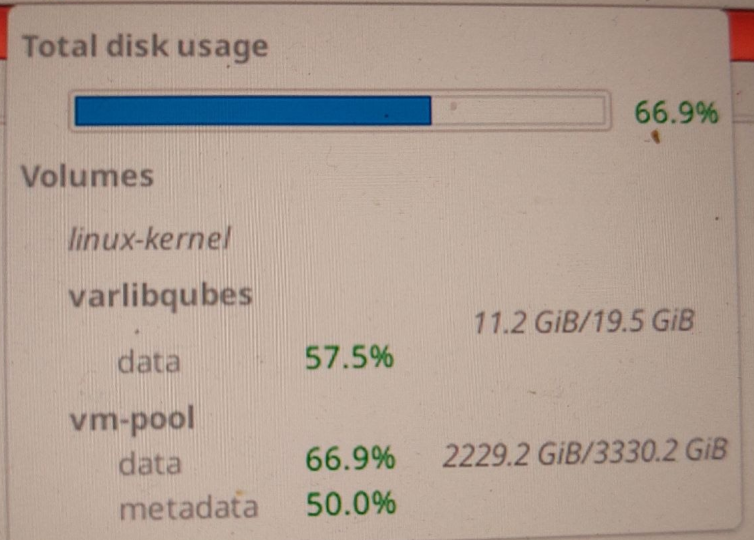
In the tool bar, click on the Qubes Disk Space Monitor widget and
write in your reply what it shows.
I never presume to speak for the Qubes team.
When I comment in the Forum I speak for myself.
I never suggested that you should type backup_location, much less try to enter it as a command. That is not expected to work.
Again, please provide the exact qvm-backup command you’re trying to use.
@unman cannot see pics…
Total disk usage: 66.9%
Volumes
   varlibqubes 11.2 GiB / 19.5 GiB
   data 2229.2 GiB / 3330.2 GiB
Thank you @ephile - apparently my request to “write in your reply what it
shows” was difficult to understand.
I never presume to speak for the Qubes team.
When I comment in the Forum I speak for myself.
@Melanie - open a terminal in dom0, type in this command, and press
enter.
qvm-backup --verbose --dest-vm personal-Backup /home/user/ personal-odt
Report back the results, quoting exactly the output.
I never presume to speak for the Qubes team.
When I comment in the Forum I speak for myself.
qvm-backup --verbose --dest-vm personal-Backup /home/user/ personal-odt
Do you want to proceed? [y/N] y
Please enter the passphrase that will be used to encrypt and verify the backup
Enter again for verification:
2026-05-26 17:54:52,134 [MainProcess selector_events._init: 4] asyncio: Using selector: EpollSelector
Making a backup… 0.00%
The brown screen / photo says:
Default boot device is missing or the boot process failed.
Insert the recovery media and press any key.
Then select “Boot Manager” to
select a new boot device or
start the recovery media
qubes-backup-2026-05-26T175453
4.378.853.376
=> VM personal-odt => 126 GiB (including file contents)
=> The target is 126 GiB, but only 4.1 GiB was processed.
This makes me wonder if the target vm is using the FAT file system, which restricts file transfers to 4GB or less
How is that possible? Especially since there were already large files, such as 600 GiB, stored on this VM for personal-backups!
Why have you inserted this here? It surely did not come between the
“Making a backup… 0.00%” and the “qubes-backup-2026-05-26T175453”.
Identify the largest qube that CAN be backed up. How large is
that qube?
Incidentally, you have never said what you do when you are faced with
this mysterious message. Do you insert recovery media? How do you reboot in to
Qubes?
I never presume to speak for the Qubes team.
When I comment in the Forum I speak for myself.
Why did you put this here?
It certainly didn’t belong between
“Creating a backup… 0.00%” and “qubes-backup-2026-05-26T175453”.
Identify the largest Qube that can be backed up.
=> I don’t understand this!
How big is it?
=> VM personal-png 180 GiB (including file contents)
this cube?
By the way, you never said what you do when you’re faced with the following
=> I don’t understand this!
This mysterious message.
Should I insert a recovery medium?
=> My goal is to create a backup file.
How do I restart the system?
=> The system has been restarting on its own anyway whenever there’s a backup failure for about 2–3 months now.
Qubes?
=> I don’t understand this!
You have posted an image that appears to show a major problem wit your
Qubes install.
Do you see this only when the machine reboots after a failed backup?
What do you do? The screenshot tells you to do sonme things - do you do
them?
If you do not, how do you get back in to Qubes? Do you ignore the
message and hit “Enter”? Do you just wait?
Now to the backup problem.
You have said that there are some large qubes that you cannot back up:
the smallest of these was 126GB
I want you to look in Qube Manager, and sort the qubes by size by
clicking on the “Disk Usage” label.
Take the qube with size less than 126GB: try to back up that qube.
If that fails, try with the next smaller. At some stage the backup will
succeed. Write in your reply the size of that qube.
If you think this will take to long, skip a qube. I mean this - if you
qubes are:
A 126GB
B 100GB
C 80GB
D 75GB
E 70GB
You have said that backing up A will fail. Instead of testing every
qube, try with qube C, then qube E - every 2nd qube by size.
You have said before that you cannot backup this qube.
I never presume to speak for the Qubes team.
When I comment in the Forum I speak for myself.
You posted a screenshot that appears to show a serious problem with your
Qubes installation.
=> Yes
Does this problem only occur when the computer restarts after a failed backup?
=> Yes, you can tell because nothing works anymore—you can’t type, move the mouse, etc.
What do you do?
=> Stop and wait about 3 minutes until this brown screen appears on the monitor.
=> Turn off the laptop, then turn it back on, enter your password, and wait until everything has booted up again.
The screenshot prompts you to do a few things—what do you do?
them?
=> The same as above!
If not, how do you get back into Qubes?
=> The same as above!
Do you ignore the message and press “Enter”? Or just wait?
=> The same as above!
Now for the backup problem.
=> Okay
Identify the largest Qube that can be backed up.
=> I don’t understand that!
You said there are some large Qubes
that you can’t back up:
=> Can’t back up???
The smallest one had 126 GB (140 GiB).
=> Yes, that’s one of the many for which a backup isn’t possible.
I’d like you to check Qube Manager and sort the Qubes by size
by clicking on the “Disk Usage” label.
=> Yes, that is possible
Take the Qube with a size of less than 126 GB: Try to back up this Qube.
=> 114842.62 MiB (130 GiB) cannot be backed up.
=> Question: Do you need any more VMs where a backup isn’t possible?
If that doesn’t work, try the next smallest one.
=> 82,575.36 (400 GiB) MiB
Eventually, the backup will work.
=> Yes, 49698.82 MiB (60 GiB) worked with the backup software
=> Question: Does that mean no VM can be larger than 49000 MiB?
Success.
Please specify the size of this Qube in your reply.
=> Yes
If you think that takes too long, skip a Qube.
=> Yes,
Here’s what I mean: If you
=>
Qubes are:
A 126 GB
B 100 GB
C 80 GB
D 75 GB
E 70 GB
=> Above
You said that backing up A will fail.
=>
Instead of testing every single qube, try qube C, then qube E—every other qube in order of size.
=>
How big is it?
=> VM personal-png 180 GiB (including file contents)
=> (200 GiB)
You said earlier that you can’t back up this qube.
=> Yes
I’ve already turned my laptop on and off seven times today. I’m about to give up on trying to back it up again. Everything you create on the laptop disappears in just a second.
How much longer is this going to go on?
I think the conclusion is that in your system the largest qube you
can back up is 60GiB. You can back up qubes smaller than this. But you
cannot back up any qubes with disk usage larger than this.
Select a number of smaller qubes for backup, where the total is greater
than 60Gib, and try to back those up. What is the result?
I never presume to speak for the Qubes team.
When I comment in the Forum I speak for myself.
I interrupt quickly to ask if there is precious data here which does not have any proper backup on a completely separate disk?
Because it seems there is either bad hardware or very bad corruption of dom0, it seems important to save on external media.
Even a simple copy of the directories on a usb disk… I would consider it an emergency action.
Such problems can sometimes get rapidly a lot worse, not better.
Okay, then I’ll make a copy on the USB hard drive.