That’s not a lot of space when it comes to backups, especially if you are including templates. Space on the hard drive is not where you should be looking. If you are backing up to a directory in a vm, for example, you will want to make sure you’ve allocated enough private storage to that vm.
I’m not aware of an open issue about such a thing.
Can you explain in more detail?
Yes, of course!
Does this happen on every qube?
No, it works on some Qubes but not on others.
Does it happen on specific qubes?
It varies.
Does it happen on specific qubes of particular sizes?
That varies as well.
Or particular provenance?
It’s a mix: “personels, works, debians, fedoras”
If you have not tested this, please do so: backup qubes individually or
in small groups, and report back.
personel, errors occur here
work, errors occur here
debian, errors occur here
fedora, errors occur here
Before raising an issue we will need more information - at least enough
to reproduce.
Error message:
Default Boot Device Missing or
Boot Failed.
Insert Recovery Media and Hit any
key
Then Select 'BootManager‘ to
choose a new Boot Device or to
Boot Recovery Media
The error message suggests that there is an issue with your Qubes
install. You should not see such a message. I suspect it is unrelated to
your backup problems, unless there is something broken in the computer
you are using.
What you seem to have (from memory, not for the first time) is an issue
that is peculiar to you. Other people do report issues with Backup
stopping but they are usually specific to backups of specific qubes.
What are your specification?
Where are you attempting to back up?
Have you tried to back up to a different medium?
What I would like you to do is to backup your qubes one by one. Note
which ones fail.
Shutdown the computer and leave it for a while.
Start the computer and backup your qubes one by one, but in reverse
order. Note which ones fail.
Change the medium that you are backing up to. Repeat the above
testing. Report back with your findings.
You have not stated where you are writing the backup currently.
Is it the same disk where Qubes is installed? What partition and how did
you create it and mount it?
Is it a qube?
Is it a disk attached to a qube?
Is it a disk attached to dom0?
If you wont provide this information no one can help you.
I never presume to speak for the Qubes team.
When I comment in the Forum I speak for myself.
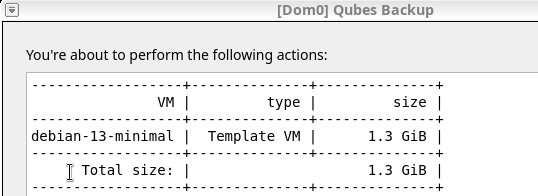
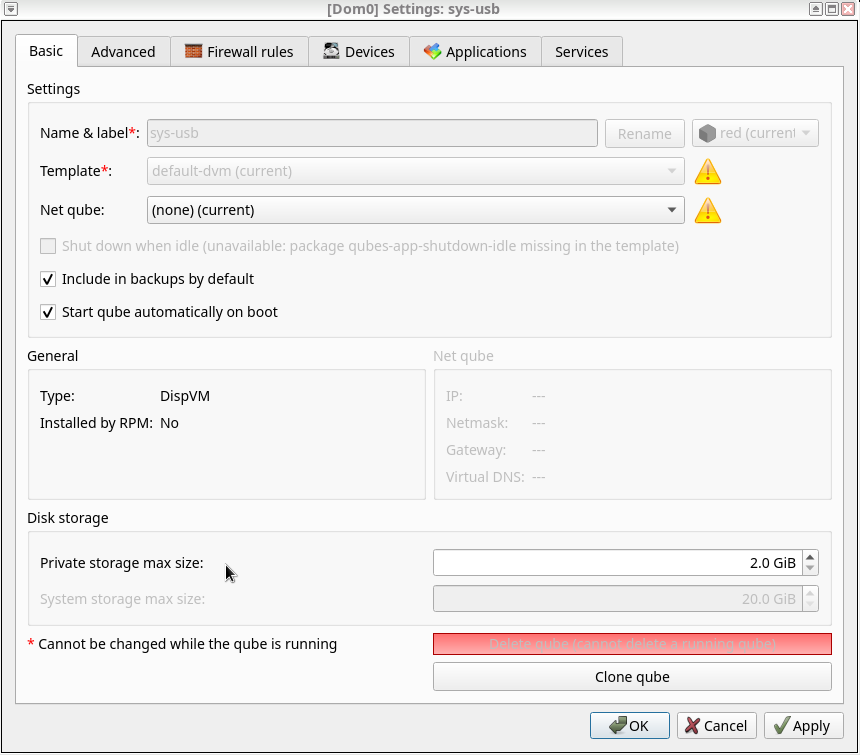
just to add a visual example to unman’s questions: The following backup should be successful because the total size of the backup (1.3GB) does not exceed the private storage allocated to the destination qube (2GB in sys-usb, in this example). However, if I added more templates to the backup, without increasing private storage, the backup would certainly fail.