Help needed: CPU Performance, USB/GPU Passthrough on Intel Ultra 2 (Arrow Lake)

Hey everyone,

I haven’t used Qubes OS in some time and recently decided to go for it again.

I’ve read about consistent SMT vulnerabilities plus AMDs bad track record on Microcode updates.
And the HCL did have good reports too of Asus Z890 plus Intel 265K/285K.

So I built an Asus z890 + Intel 265k based machine.

So far I’ve tried Qubes 4.2.4 and hit a problem with being unable to passthrough my USB controller. Weirdly enough I was able to pass one of them but I don’t know which port it is connected to. The ports on the motherboard plus the USB3 header ain’t it.
There are a few Type-C ports though and perhaps it’s one of those. Will try. But then again it could be a USB2 header.

This problem was reported here by someone else:

(exact same USB controller address)

I am connecting two monitors via the motherboard’s Thunderbolt port which work perfectly (via daisy chain).

In Dom0, I can’t really see the CPU temps or Fan RPMs. Trying to use XenPM I don’t have the option of changing the CPU governor.

I did try running Geek Bench 6, making a VM with the max amount of cores and 32 GB of RAM. The resulting score was very low. The CPU didn’t stay at a high frequency either, it didn’t have time to ramp up.

Doing lspci shows a lot of unidentified Intel parts.

Also restarting doesn’t work (had to shutdown and turn on). Suspend/Resume works.

Tomorrow I will try the 4.3RC since it has Xen 4.19 (note that my current 4.2.4 has a new kernel but the Xen is 4.17).

Ideally I want to add two Nvidia 3090s to run AI inference and Stable Diffusion AI. I haven’t added a discrete GPU yet.

My questions are as follows:

  1. What options do I have to get USB passthrough?
    (besides trying to add a USB 2.0 port to the motherboard header which would be slow or trying the Type-C ports)
  2. Is my configuration good for GPU passthrough?
  3. How should I benchmark my CPU performance to make sure it’s close to bare metal?

Ideas I am contemplating:

  1. Replacing the CPU/Motherboard with an AMD Ryzen 9 9950X3D and X870E (cons - AMD microcode, SMT, more idle power usage) or Intel 13900K/Z690 or Intel 14900K/Z790 (cons - older, more power usage, SMT)
  2. Turning an M.2 slot into PCI-E and getting a USB controller out of it (motherboard has only dual PCI-E which I both need for GPUs).
  3. Since I have two Ethernet NICs, in theory I could use one to forward USB devices in, emulating sys-usb via raspberry PI or so (right now all are in sys-net, should try splitting them).
  4. Swapping my Z890 for a W880, extra x4 PCI-E 4.0 which can become a nice USB controller.
    Ideally I could want a webcam and Bluetooth headphones, but as it stands I don’t see how to do it.
  5. Build Xen 4.20/4.21 and try with it.

Thanks in advance!
2 Likes

Quick Update for anyone interested:
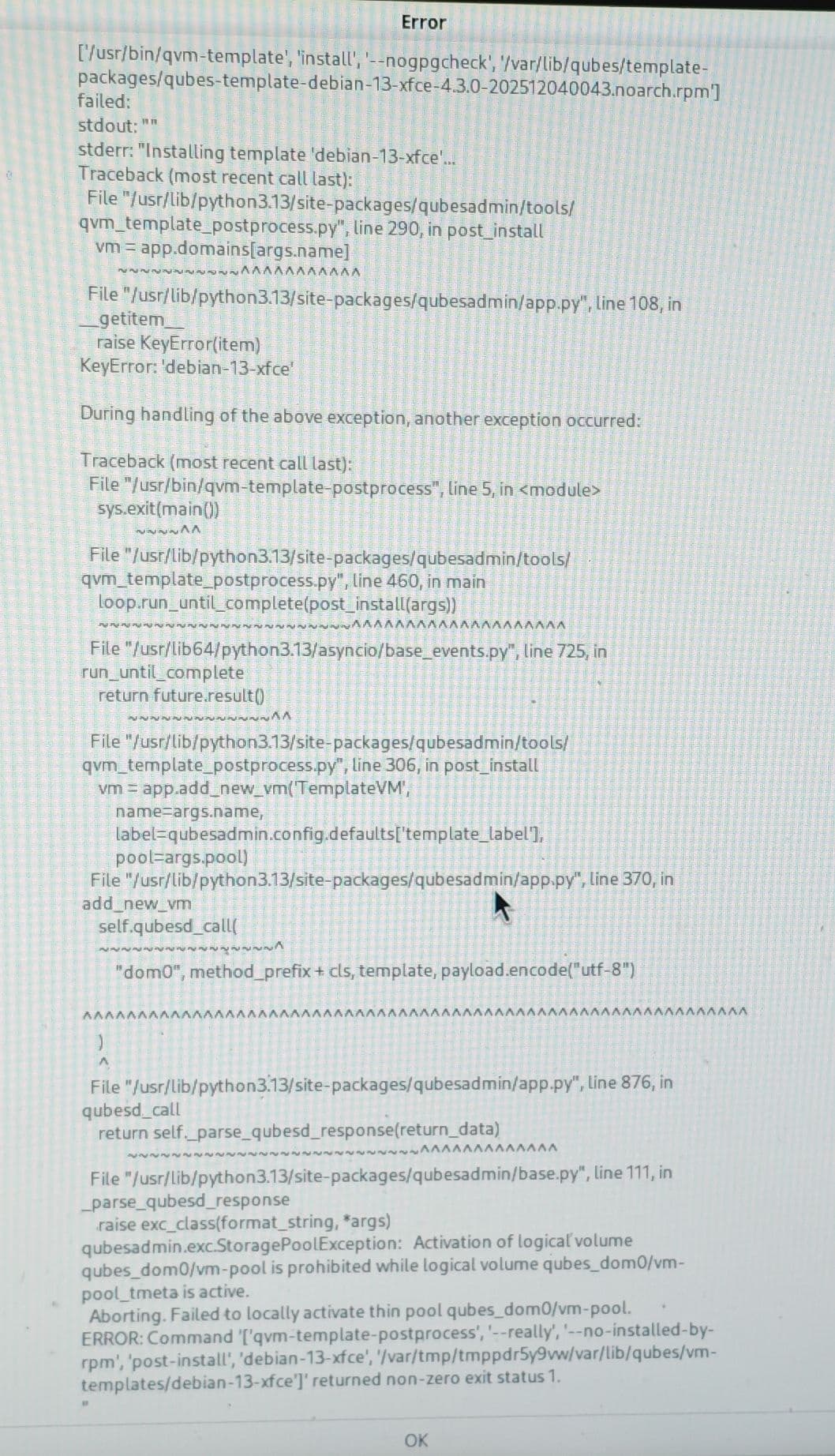
Installation of 4.3.0-RC4 failed…
Got error related to thin LVM pools during template installation.
I was able to login though. But without templates. Just an empty Dom0.

I did check the lspci. Got a bit better but still a lot of unrecognized stuff.

Couldn’t test USB passthrough sadly.

Again, sensors didn’t show CPU temperature or fans.

Here’s a screenshot of the problem.

The qubes-issues GitHub repository seems to already have it:

I will try reinstalling once just to see if it’s a fluke.

Next thing on the way would be to try 4.2.4 again but with newer Xen (this sounds like it will take time) - ideally, 4.21, not sure how tricky it would be to get vmm-xen to build.
Also I think perhaps I need to try passing the Thunderbolt controller together with the USB could maybe work. I need to get a USB C to USB A.
According to the motherboard manual, it should have two Thunderbolt 5 ports and one Thunderbolt 4. Right now, my monitors are hooked to the Thunderbolt 4.

I am still considering swapping the CPU/Motherboard, either AMD 9950X3D/7950X3D and X670E/X870E or Intel 13900K/14900K and Z690/Z790.

What’s everyone’s take on GPU passthrough with 265K and Z890?

Thanks in advance.

1 Like

Is it the 0000:80:14.0 that is the same or even the identifier [8086:7f6e]?

To update what is displayed by lspci, you can run the command update-pciids in a normal Qubes, and copy the file /usr/local/share/pci.ids to the same place in dom0. This will give you the latest version of the PCI ids database. This database has no link with the fact that your Linux kernel is able or not to drive your devices.

Bertrand

1 Like

Try it with btrfs as well, it works quite well.

I can confirm that this exact combination works very well with Qubes and with GPU passthrough specifically. It’s actually the config (with a 3080) I used when making this topic: Modern games in ultra 2K quality on qubes? It's more likely than you think!

I’d expect the Z790/Z890 to work as well, but I have not tested that.

1 Like

I was able to install 4.3.0-RC4 on the second attempt, standard install. Will check xenpm to see if I can set the CPU freqs/governor. sensors doesn’t show CPU temps or fans.

@bertrand
I think it’s 8086:7f6e indeed. Will check back and post. Same error on 4.3.0-RC4 as 4.2.4. No logs in /var/log/libvirt.

Thanks for the PCI IDs suggestion. Makes sense the older Xen shouldn’t be the reason for them missing.
In comparison, the built-in Wi-Fi went to sys-net (name was recognized in dom0) after 4.3.0-RC4 install. Perhaps that’s just related to more recent PCI id database in Dom0 and not actual drivers as I did use Linux kernel 6.17 on 4.2.4 too.

@Atrate
Thanks for the confirmation. I wonder if I can find a dual GPU motherboard for Z690.
AFAIK Z690 can run either 13900K/14900K so there shouldn’t be a major difference in either CPU. Not sure if I can run 4 DIMMs of RAM on the Z690 though, AFAIK DDR5 is problematic in this regard. Do you have an opinion on the AMD alternative?

Meanwhile I did try passing all the other USB controllers. I seem to have 2 Thunderbolt controllers, 4 PCIe devices:

  • TB5 NIH
  • TB5 USB
  • TB4 NIH
  • TB4 USB

The motherboard has two Thunderbolt 5 ports and one Thunderbolt 4 port. There’s also a Type-C header which I connected to the computer case.

I was able to pass all 4 of these TB devices (NIH/USB), after setting no flreset.

However, whatever device I try to connect to the TB4/TB5/C port connects to Dom0. Doing lspci in sys-usb shows the 4 PCIe devices. Super frustrating. Nothing works.

I don’t have a discrete GPU to slap on yet, but hopefully I will get one this week. Adding a second GPU is even trickier because I will need a special kit to mount it vertically (including a riser cable), and I will possibly need to modify my AIO setup.

Supposing I do get GPUs running, what about performance? Xen 4.19 was released before Arrow Lake and according to some very shallow understanding of their docs, it seems likely that CPU performance would be bad on < 4.20.

Btw I can’t seem to find a confirmed working USB passthrough on the Z890. I did follow another forum user’s - @Dutch HCL but after checking the provided screenshots, I realized they never show sys-usb either. I know it’s a Desktop, but still. GPUs are shown but there’s no mention of passthrough.

1 Like

In that lspci case, it’s Fedora 41 that is the culprit. For my understanding, there is no link with the Xen version used.

In my case, the Ethernet interface and the WiFi one were both able to be passthroughed to sys-net and they work well. Here again, no link with the PCI ids database. This database is just for display, an id being there does not indicates that a given Linux kernel will handle it.
I have not found any way to look at which are the devices really handled by a given kernel, even by looking at the kernel source code. I am probably not looking at the right place.

Bertrand

1 Like

You’re correct that the dom0 kernel doesn’t have to handle the device if passthrough is used. Instead the specific domU VM’s kernel would handle it. And then not even the kernel itself, but usually a dynamically loaded kernel module (driver) as a .ko file.

As for the list of what can be handled, I think it should be part of the Kernel modules tree. Since many years most Kernels don’t have statically compiled drivers but instead dynamically load these .ko files, modprobe configuration should have info on this. I think perhaps it’s there the config matching PCI IDs to drivers or so.

I haven’t dealt with drivers for a long time and C was never my forte anyway. Giant files with too much macros and magical hardcoded numbers. That’s part of my frustration with Xen. I am really not used to low-level hardware code, outside of basic x86 assembly or an Arduino.
That said, back when I used Qubes years ago, I did play with compiling newer kernels and Xen versions. And I did reboot like 50 times a day or so sometimes.

I’d expect that Xen 4.19 is at fault for the lack of CPU temperature and fan speed. I am thinking of doing more experiments too.

Like just going with some Fedora and adding Xen 4.21 to test there.

A good idea would be to pull Xen’s 4.21 branch and look for commits mentioning Arrow Lake and Intel. I will do that too.

If 4.21 works and gets me USB passthrough, perhaps I could try to backport Qubes patches on it. However my time is limited and if I don’t get to speed fast, I will probably return the motherboard and CPU and get an AMD or a 13900K.

Without USB VM I can never have Bluetooth, plus I won’t necessarily want to plug random storage devices either.

1 Like

Quick update:
Tried Fedora 43 Live
lspci looks roughly the same
however CPU temps show
performance seems high
(however it seems to throttle, despite AIO, perhaps I need to reseat the cooler and repaste. Checking the pump too. Idle is 35 C, but with Prime 95 it got to 100 C and throttled.)

***
88:00.0 USB controller: Intel Corporation JHL9580 Thunderbolt 5 80/120G NHI [Barlow Ridge Host 80G 2023] (rev 84)
9b:00.0 USB controller: Intel Corporation JHL9580 Thunderbolt 5 80/120G USB Controller [Barlow Ridge Host 80G 2023]
00:0d.0 USB controller: Intel Corporation Meteor Lake-P Thunderbolt 4 USB Controller (rev 10)
00:0d.2 USB controller: Intel Corporation Meteor Lake-P Thunderbolt 4 NHI #0 (rev 10)

80:14.0 USB controller: Intel Corporation Device 7f6e (rev 10)
***

Here’s what I have, the first 4 I could passthrough but then connecting stuff to whatever ports still leaves my USB devices in dom0.

And this one 80:14.0 USB controller: Intel Corporation Device 7f6e (rev 10) fails all the time of passthrough is attempted.

Geek Bench performance on 4.2.4 is 85% of baremetal performance on Live Fedora. Will try Geek Bench ln 4.3.0-RC4 too.

Next parts of the plan:

  • GeekBench 4.3.0-RC4 to compare Xen 4.19 performance
  • BIOS update to see if it could fix the problem
  • ACS workaround (only if secure, can’t grasp yet if I need ACS provided every PCI-E device has its own IOMMMU group anyway?)
  • Fedora with Xen 4.21 to test if 4.21 fixes it

If else fails, I am leaning towards replacing the motherboard/CPU.

1 Like

I have a Fedora 43 with Xen running but do you have a reference to see how I can create a VM with a PCI passthrough…?

Bertrand

1 Like

Will look into instructions.

Since you’re on laptop, I assume you don’t lose keyboard access when you mess with the USB controller like I do, correct?

Btw I just found a different solution which however seems kinda crappy.

This time I connected the monitors via a Type-C dock. I passed only the Thunderbolt 5 controller to sys-vm and et’voila. Working passthrough for the USB controller and hub on the Thunderbolt dock.

Previously I used MST, meaning I daisy-chained monitors through DisplayPort and then via Type-C to Thunderbolt port via Dock.

Perhaps you can also do this with your laptop, using the Thunderbolt on it since it’s bound to have it. What controllers do you see when you filter for USB?

Btw I redid GeekBench on 4.3.0-RC4 after using xenpm to tune CPU frequency and enable Turbo (not sure if that worked, will recheck).

  • 85% on Single core performance
  • 90% on Multi core performance

Now, the single core, probably because it doesn’t know which core to use, performance or efficiency. But the multicore, 90% isn’t super good. Can’t see CPU temps yet. Tried sensors-detect. No improvement.

Also meanwhile I did re-inspect my lspci for ACS support (everything is on its own IOMMMU group but still).
So everything but one PCI bridge says ACS is enabled. Weirdly enough, said bridge in the tree is for Thunderbolt 5 and has only one connection to another bridge which has ACS and devices connected to it.

Today I read Intel’s manual and they claim full ACS on Ultra 2.

I will look for more info. First thing I am thinking, a BIOS update.

Meanwhile I have to get a GPU too and test passthrough, because that would be the true deal breaker if it fails.

BTW one question that’s really messing with my head…

Assuming I have Thunderbolt 5, connect a Dock to it, connect monitors via HDMI to Dock, and then I do passthrough of Thunderbolt 5 NIH (uses a kernel module called thunderbolt) and Thunderbolt 5 USB controllers… how do my monitors stay in Dom0 themselves?

Shouldn’t the VM hijack them together with the controllers?

Any experts on TB, please chime in.

1 Like

In case you didn’t see this guide on upgrading AMD microcode yourself.

I’ve been surprised how well my new AMD system works though we are at opposite ends of spectrum of what we want out of our machine. If you do try AMD, I recommend MSI boards. Mine works well. Also checkout renehoj HCL on his 9950x build.

What’s the issue with AMD SMT? Isn’t it off in Qubes anyway? A 9950x has so many cores, don’t think you’ll miss out. My 9600x is so fast and cool, can’t imagine it is using much power

1 Like

I am contemplating AMD as an alternative. Thanks for the microcode guide, makes things pretty equal to older Intel

If I can’t passthrough a GPU, I will be replacing the CPU/motherboard I have right now.

I am also worried about hitting thermal throttling on Prime 95 despite having a huge AIO cooler and many fans, but perhaps reseating the cooler would fix it. Idling at 35 C.

The USB problem I will spend more time on, but considering I can use a Thunderbolt dock, it’s not the end of the world. The motherboard has an option to disable USB ports, so I can leave just one enabled for a keyboard/mouse. And everything else will go into the Dock so I can have Bluetooth headset (alternatively, using the 3.5mm and just converting the audio signal to Bluetooth is fine too. Thinking about it, the USB controller that’s in Dom0 has a Bluetooth adapter but I will just ignore it).

My Intel CPUs doesn’t have SMT, Hyper-threading got slashed at Ultra 2. So I am not losing any performance right now, but would do with any alternative. Performance is already around 90% of baremetal, so if I lose 20-30% more it would be annoying I guess.

Comparing an Intel 14900K to an AMD 9955X3D, they would both lose performance by disabling SMT. Perhaps the Intel would lose less because it doesn’t have SMT for all cores anyway.

As an alternative, what if I always pin both a threads of a core to the same VM? I wonder if that would make SMT safe. Then again, multiple VMs would still share those.

One of my use cases is compilation, and it would make for high CPU loads which do need lots of cores. Being unable to check CPU temps on Qubes is frustrating, will look into that too.

2 Likes

I’m able to check the CPU temp in sensors. It’s not individual CPU temps but the aggregate number used for fan control

1 Like

I have an air cooler and when I compile (using about 80% of cores) the temps is about 75-80C, brief spikes to low 80s. Maxing out one core seems worse for temps

1 Like

I want to try the ACS workaround patch so I will make a build VM and test the performance building the kernel.

1 Like

Actually @Bloged seems to have solved the USB issue:

I am going to apply the patch written there and report back.

1 Like

I did build libvirt but still got errors. Will try again when I can.

Reading lots on TB, it seems TB4/TB5 works weirdly on purpose. I don’t need a TB dock to use the USB controller, I need a USB hub with a Type C port.
Trying to passthrough TB otherwise is a PITA and unstable for me.

I need a Type C USB hub asap. Will report back when I get one.

I did reseat the cooler and got better temps.

Also I found a way to show CPU temps and Fan speed for my motherboard:
modprobe nct6775

CPU temp was called something else though, some weird name, but it’s easy to see it.

Will try controlling the fans too via pwmcontrol, that’s very important because otherwise speed cannot depend on GPU temps in case you do have a GPU. On that front, I will need to create some small service to bring GPU temps back to dom0. I will probably do something dumb first(a simple loop using qvm-run to cat the temps). I wonder if anyone has done that already.

1 Like

Alright, finally tested my Thunderbolt hypothesis.
If more people chime in, we should add a docs page on it. It’s actually very important and overlooked.

Anyhow:
There seem to be 3 versions of Thunderbolt.

TB4 and TB5 are the newest and both behave the same way, a bit different from TB3.

All 3 versions use Type C ports. However TB is not USB despite using a Type C port. More on how they interoperate bellow.

To make things more confusing there’s also USB4 which uses the same port but is just USB with more bandwidth. Any USB protocol can go over a Type C port.

You don’t even need a Type C port for USB3-4 or so. USB can always use the bulky ports.

Only Thunderbolt strictly uses Type C (nowadays at least).

So all Type C ports which support Thunderbolt can double as USB ports.
But most Type C ports don’t support Thunderbolt, they are just USB ports.

And to make things more confusing - there are Docks which are USB based. Monitors can still be run over USB, especially USB4. The bandwidth is less than TB4 though.

To summarize:

  • Type A USB port must support one or more of USB1, 2, 3, 4 or so (backwards compatibility implied, if USB4, then supports also 1,2,3)
  • Type C USB port must always support one or more of USB1, 2, 3, or 4 but could also support Thunderbolt

How does that work?
A TB Type C port is connected to a TB controller which is in fact two controllers.
A TB controller is composed of two PCI devices:
NIH controller and USB controller
Now the key part:
Putting a USB device inside a TB Type C port will connect the device to the USB controller.
However putting a Dock device would establish a Thunderbolt connection.

So the conclusion so far:
Passing through your TB USB controllers to a VM works as long as you plug USB devices in them. Plugging a Thunderbolt dock would usually not work and it will not appear inside the VM.

Anyhow, for TB, we need usually need a Docking station.
Some monitors have such a built in Docking station.

Now to explain the TB3 vs TB4/TB5.

TB3 basically is mostly PCI tunneling plus DP tunneling. A TB3 dock would have a built in USB controller for the USB ports it has that appears as PCI device inside the host. TB3 cannot tunnel USB directly.

This would in fact mean that it’s maybe possible to passthrough this new USB controller to a VM.
However afaik, hotplug PCI passthrough is not enabled.
So it will stay in Dom0.

Meaning Dom0 would get a new PCI USB controller, which would be connected to the ports on the Dock. Not good.

A TB4/TB5 dock behaves a bit differently.
Instead of adding a new PCI controller to Dom0, it knows how to tunnel USB traffic. And that means it won’t add a new PCI controller to Dom0, instead it will add new USB Hub connected to the motherboard’s USB controller.

What’s the value of all this?

You have a TB4/5 port, you get NIH and USB controller in Dom0.
You pass the USB controller to a sys-usb VM.

  1. You plug a TB4/5 Dock, USB ports on the Dock stay in Dom0, monitors stay in Dom0. If you have stuff like Ethernet or card reader they might appear in sys-usb.
  2. Instead of a TB Dock, you plug a USB hub,
    now the Hub appears inside sys-usb, and then ports it has too
    Problem is you don’t get monitors, because it’s a USB hub

You have a TB3 port, you get NIH and USB controller in Dom0.

  1. You plug a TB3 Dock, a new PCI USB controller appears in Dom0. Monitors stay in Dom0. If you have stuff like Ethernet or card reader they would probably stay in Dom0.(but could go to sys-usb).
  2. … Same as 1. above

The conclusion being each TB port can be used either for monitors or for USB passthrough.

TB Docks in TB port allow monitors but don’t allow USB passthrough to a VM.
USB hubs in TB port allow USB passthrough but don’t allow monitors.

There are some TB controllers with multiple ports on which you can do both.

The interesting thing would be… is there a way to tell Dom0 to tunnel the Dock to sys-usb. I haven’t found a way. The problem here would be if you have a single Type C port and no charger port in a laptop. Even worse if there’s no HDMI or DP port.
In this case, a TB dock would become absolutely needed. But that way every USB port attaches to the main USB controller of the motherboard.

Alternatively, TB with hotplug could allow all kinds of PCI devices being passthroughed, but it seems not supported.

4 Likes

it is hard to follow, because you mentioned so many parallel topics.

Regarding CPUTemps based on coretemp:
Xen removes support for Intel MSR (security issues)
So coretemp found no devices, and can not show any temps.

For details look at:

https://xenbits.xen.org/xsa/advisory-351.html
Maybe there will come a solution with
https://lore.kernel.org/xen-devel/cover.1761752801.git.teddy.astie@vates.tech/#t

2 Likes

A workaround to see some sensors, if you have something similar to nuvoton

modprobe nct6683 force=1

1 Like