Hallow all.
I used to install the Fedora 40 and it was all the features, so I installed the latest version of the Fedora 42XFCE after receiving advice from this forum. However, this Fedora 42XFCE was also unable to use all functions immediately after installation, and after that, I did {application refrresh} and became able to use it except {application}.
{applicaton} is written as {application missing in template}, and the app cube cannot be used. How can I fully install Fedora? What is the problem that causes this to happen?
dom0 stores the list of applications of each qube. If the template change, the list is not automatically updated. Maybe the application was included in Fedora 40 but removed from 42?
Without the name of the application it is hard to tell. Is it something you manually installed?
1 Like
Hallow
This is a standard message you will see in templates - Qubes uses a
standard list of applications with the template builds. If you install
a template that does not include that application or does not include
it using that desktop file, then this message will appear. It is very
common in Debian templates, and with Firefox.
Usually it is enough to refresh the application list, and then the
application you want may appear on the LHS pane and can be transferred
to the RHS to appear in the menu.
If the application is not included in the template, you will have to
install it.
1 Like
Thank you both for your answers.
This is a manual installation of Fedora. The app name is an application, and I think it is the application used to use appQube.
I also have a question for unman. You said you need to install the application, but how do you install only the application? I have never tried that method.
Are you asking for these instructions?
No, I don’t think this instruction can solve it. There is an item in the default repositories called {application missing in template}. I think that is the role of creating appQube.
My Fedora currently doesn’t have appQube. Also, even if I install a new Fedora, all the default repositories apps will be missing or in this state. I only tried Fedora 40 Xfce and Fedora 42 Xfce.
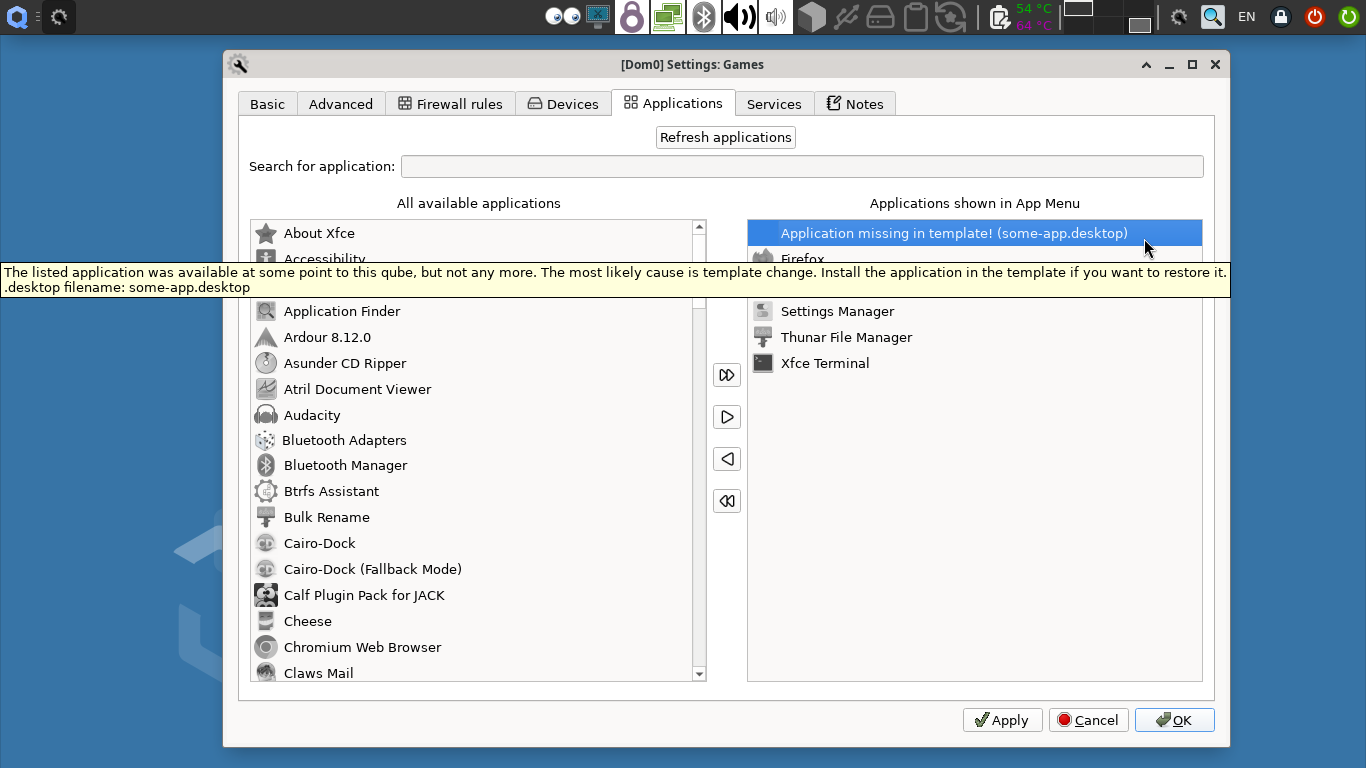
Isn’t it similar to the screenshot? With the highlighted icon and the tooltip?
While the above screenshot is from development branch (with minor changes to the icons and search function), your original problem is what is mentioned by parulin and unman. You could take note of the missing App Name, installing it in the TemplateVM associated to the target qube. Then the issue will be solved.
2 Likes
Yes! That’s exactly what it is.
However, in your screenshot, it says application missing in template(some-app.desktop), but on my screen it is application missing in template(ag.mageia. ~~) It says , and the letters in () still continue, but they are cut off and invisible.
How do I know the name of a missing application?
Also, Where and what commands should I enter? (Same as installing normal software?)
I have never installed an application that exists by default on its own. Please tell me how.
1 Like
Do this in dom0:
qvm-features QUBENAME menu-items
It will print the list of all App Menu shortcuts associated with the qube. And hopefully you could find the missing one easily.
And after that, using some search engines (DuckDuckGo, Google, …) might help to find the exact application name which should be installed in the template. But if you have problems, mention the missing one in this thread and we will try to help you.
2 Likes
Thank you so much alimirjamali.
It may be slower to try. But if something goes wrong, I’ll write in this thread, so thank you in that case. 
I tried it as you advised. The {application missing} text has disappeared and now works properly. Thank you.
However, no matter how many times I install a fedra other than that cube, all applications (including the terminal) of this phenomenon are lost and cannot be used. Since there is no terminal, measures like this cannot be used.
So far, I’ve tried Fedora42, Fedora40Xfce, and Fedora42Xfce, but all of them are completely absent except for one that was successful. What could be the cause of such installation problems? Is there a solution? If possible, I would like to increase the number o Fedora templates by copying templates that have not been modified for increase anonymity.