I was impressed by Fortifying sys-net: A Shift to OpenBSD .
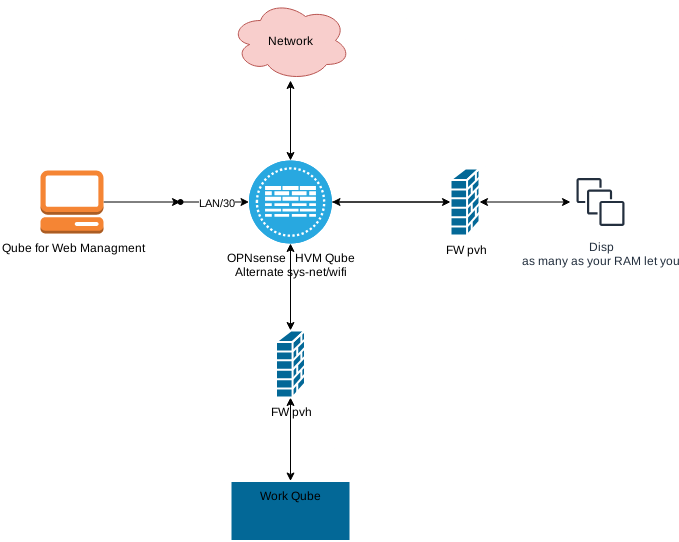
Basic diagram of goal:
So I just check and it very easy to install OPNsense as HVM, it recognize Ethernet without any additional drivers and manipulations, same work should be done to recognize wifi module. also to setup dedicated management qube for OPNsense webui access.
OPNsense qube should replace also vpn qubes and run Suricata as additional security layer for device.
Someone can share the right way to implement networking part between fw-pvh and OPNsense qube?
1 Like
This guide may fit installation of OPNsense as sys-net?
Solution:
opened 03:53PM - 05 Oct 21 UTC
Setback: It looks like R4.1 has broken this, throwing an error complaining of a … loop in sys-firewall...
The QubesOS (Qubes) sys-net is limited as a first line defense facing the internet. Since Qubes is a virtualization platform, it is reasonable to implement a more secure machine on the external interface instead.
This guide and script will get you a CLI instance of either pfSense or OPNsense servicing the WAN hardware port whereby you can then choose what functionality you want to install, such as firewall, IDPS, etc., via the web management interface.
Originally I developed this for OpenBSD and so the documentation references such. This has been in production for almost two years now and works with pfSense and OPNsense (both FreeBSD) with either Snort or Suricata packages. Supposedly it would also work with an OpenBSD distro.
Expressions of appreciation for my hard work are welcomed. Constructive feedback is also welcomed. I'm not a programmer. Some things that could use some work are: my github organization, the script in terms of Qubes internals and network discovery, and probably other things.
Credit to notes **[1]** and comments **[2]** from @unman.
I highly recommend following these steps in the order presented. (See discussion at bottom for details.):
1. Preparations:
a. Shutdown all VMs.
b. Backup dom0, sys-net, and sys-firewall.
c. All steps can be performed in the GUI except:
-- i. Step 5, creating the openbsd-21 HVM TemplateVM, and
-- ii. Step 10, running the script in sys-firewall.
2. In the sys-firewall VM change these settings:
a. Confirm "Provides network" is set to "True".
b. Set NetVM, aka "Networking", to none.
c. Add in "Services" the following:
-- i. "clocksync" daemon.
-- ii. "qubes-update-check".
-- iii. "qubes-updates-proxy".
-- iv. "qubes-yum-proxy".
3. In the sys-net VM settings:
a. Remove all hardware devices.
b. Confirm "Provides network" is "True".
c. Set NetVM, aka "Networking", to "sys-firewall".
d. Change virtualization mode to "PVH".
e. Change the following "Services":
-- i. Remove "clock-sync".
-- ii. Add "qubes-yum-proxy".
-- iii. Add "qubes-updates-proxy".
-- iv. Add "qubes-update-check".
4. Start the sys-firewall VM.
5. Create a HVM as a class of TemplateVM **[3]** **[4]** with these settings:
a. Keeping the naming convention, my example uses the name "openbsd-21".
b. dom0 command line (note that the kernel property is set to two single tick marks, aka, "none"):
`qvm-create openbsd-21 --class TemplateVM --property virt_mode=HVM --property kernel='' --label purple`
c. Set NetVM, aka "Networking", to "sys-firewall".
d. Set "Start qube automatically on boot" to "False".
e. Add network hardware "Devices". (For me it's 00:19.0 Ethernet controller: Intel Corp...)
f. Confirm the kernel is set to "none".
6. Create a new HVM with class of AppVM using the openbsd-21 HVM TemplateVM in Step 5 above with these settings:
a. Name "openbsd-21-sysnet".
b. Set NetVM, aka "Networking", to "sys-firewall".
c. Set "Start qube automatically on boot" to "False".
d. Add network hardware "Devices". (For me it's 00:19.0 Ethernet controller: Intel Corp...)
7. Note the static IP assignment to "openbsd-21-sysnet" by Qubes.
a. From Qubes Manager find the IP address assigned to the "openbsd-21-sysnet" VM.
-- i. For me, it is 10.137.0.16
b. If you have any trouble with this step then try this:
-- i. Reboot Qubes OS.
-- ii. Start "openbsd-21-sysnet" VM.
-- iii. Let it run until it at least identifies the Xen virtual ethernet interface "xn0".
-- iv. Stop "openbsd-21-sysnet" VM.
8. Install OpenBSD in the "openbsd-21" HVM TemplateVM.
a. Assign interfaces. Your LAN interface to sys-firewall is going to be xn? For me, LAN is xn0 and WAN is em0.
b. Assign the static IP address from Step 7 above. For me it is 10.137.0.16 to the "xn0" interface.
c. Change root password.
d. Shutdown the "openbsd-21" TemplateVM.
9. Now start "openbsd-21-sysnet" and confirm the above settings copied from the parent "openbsd-21" TemplateVM:
a. Interface assignments. (Again, my LAN is xn0 and WAN is em0).
b. Interfaces' IP addresses.
-- i. For me, WAN is set by DHCP and the LAN static is 10.137.0.16/24.
-- ii. Note that this LAN static IP address was set by Qubes when openbsd-21-sysnet was instantiated in Step 7.
c. For some reason I had to repeat the OpenBSD configuration in "openbsd-21" TemplateVM twice to make the root password change.
10. In "sys-firewall", create a script to route traffic to "openbsd-21-sysnet":
a. The script needs to set the gateway, allow other VMs access, and identify the DNS server. For me it is like this:
```
# Updated 202307010
#!/usr/bin/sh
#
# Logging Function
sysidps_log () { echo -e "$(date "+%F %T")" "$1" | tee -a >&1 "$log_file"; }
log_msg_rfail="Timed out waiting on IDPS router reply."
log_msg_wfail="Timed out waiting on IDPS WAN gateway reply."
log_msg_rchk="Checking IDPS router for ICMP echo reply..."
log_msg_wchk="Checking IDPS WAN gateway for name resolution & ping reply..."
log_msg_rup="IDPS router replying to ping requests!"
log_msg_wup="IDPS WAN gateway name resolved and reply received!"
log_msg_fwrtr="IDPS router set as the default route."
log_msg_vifrtr="Virtual ifaces now routing through IDPS router."
log_msg_ns="IDPS name servers added to routing table."
log_file="/var/log/qubes/sys-idps"
#
# Hard code static IP addresses. You need at least one name server.
gw_ip=10.137.0.14
ns1_ip=10.137.251.1
#ns2_ip=10.137.1.1
#
# Wait for idps router to come up.
# Maximum wait time is 8 hrs before exits with failure.
# Your idps router MUST NOT Block/Drop ICMP Echo Requests!
up_reply="0% packet loss,"
ping_chk="false"
declare -i time_out=0
time_base=$(date "+%s")
while [ "$ping_chk" != "$up_reply" ] ; do
if [ $time_out -lt 300 ] ; then sleep 1 ;
elif [ $time_out -lt 600 ] ; then sleep 3 ;
elif [ $time_out -lt 1200 ] ; then sleep 5 ;
elif [ $time_out -lt 1800 ] ; then sleep 8 ;
elif [ $time_out -lt 3600 ] ; then sleep 15 ;
elif [ $time_out -lt 14400 ] ; then sleep 30 ;
elif [ $time_out -lt 28800 ] ; then sleep 60 ;
else sysidps_log "$log_msg_fail" && exit 1 ;
fi ;
sysidps_log "$log_msg_rchk" ;
ping_chk=$(ping -c 1 -r $gw_ip | grep "0% packet loss" | cut -d ' ' -f 6-8);
time_out=$(date "+%s")-$time_base ;
done
sysidps_log "$log_msg_rup"
#
# Set idps router ip as default route.
# Running "ip route add" first makes discovering gw_vif easy.
ip route add default via $gw_ip
gw_vif=$(ip route show default | cut -d ' ' -f 5)
sysidps_log "$log_msg_fwrtr"
#
# Add all VMs vif routing to/from idps router.
iptables --insert FORWARD --in-interface vif+ --out-interface $gw_vif --jump ACCEPT
iptables -t raw --insert PREROUTING --in-interface $gw_vif --jump ACCEPT
sysidps_log "$log_msg_vifrtr"
#
# Add routing to name server resolution. Call Qubes name server script.
rm -f /etc/resolv.conf
if [ "X$ns1_ip" != "X" ] ; then echo "nameserver $ns1_ip" >> /etc/resolv.conf ; fi
if [ "X$ns2_ip" != "X" ] ; then echo "nameserver $ns2_ip" >> /etc/resolv.conf ; fi
/usr/lib/qubes/qubes-setup-dnat-to-ns
sysidps_log "$log_msg_ns"
#
# Discover if ipds wan gateway is operational.
# Maximum wait time is 4 hours before exit with failure.
# Note that both name resolution and next hop g/w are tested here.
resolve_host="google.com"
time_out=0
time_base=$(date "+%s")
ping $resolve_host -c1 -q
while [ $? != 0 ] ; do
if [ $time_out -lt 600 ] ; then sleep 1 ;
elif [ $time_out -lt 1200 ] ; then sleep 3 ;
elif [ $time_out -lt 1800 ] ; then sleep 5 ;
elif [ $time_out -lt 3600 ] ; then sleep 8 ;
elif [ $time_out -lt 14400 ] ; then sleep 15 ;
else sysidps_log "$log_msg_wfail" && exit 1 ;
fi ;
sysidps_log "$log_msg_wchk" ;
time_out=$(date "+%s")-$time_base ;
ping $resolve_host -c1 -q
done
sysidps_log "$log_msg_wup"
#
exit 0
```
11. You could make this a background process in /rw/config/rc.local. If so, then set openbsd-21-sysnet to "Start qube automatically at boot". I sometimes tail /var/log/qubes/sys-idps.
a. For me, it looks like this:
```
# Poll for and then set up system gateway:
/rw/config/qubes-openbsd-sysnet-script &
```
12. Set the "fedora-32-dvm" "NetVM" to "sys-net".
a. This works around Qubes' 10.138.0.0/24 networking on disposable VMs.
b. Repeat for all your DisposableVMs.
c. Note: In Step 3 the "sys-net" Networking was set to "sys-firewall".
13. Thoughts and concerns:
a. You have to manually manage a few of things:
-- i. Match the LAN static IP address for "openbsd-21-sysnet" to what Qubes auto-assigns; conceivably, your actions could inadvertently change it.
-- ii. Setting your static IP values used in the script.
b. This requires editing the "openbsd-21" TemplateVM to make changes that persist in "openbsd-21-sysnet".
-- i. My OpenBSD instance in the "openbsd-21" didn't save my root account changes until the third try. Just triple check that all your changes were saved if your "openbsd-21-sysnet" AppVM has issues.
c. Several steps given above are only cautionary, or good practice.
d. A couple of things that Qubes hard codes:
-- i. TemplateVM updates to proxy via "sys-net". So I had to enable some services on "sys-net".
-- ii. Disposable templates route through "sys-net". So, "sys-net" here forwards to "sys-firewall".
e. During initial testing occasionally the hypervisor backend wouldn't release the PCI ethernet controller. Hence, Step 7.b. I haven't has any trouble since.
f. This is a working integration guide and shell script. Edits are welcomed.
[1] https://github.com/unman/notes/blob/master/openBSD_as_netvm
[2] https://groups.google.com/g/qubes-users/c/MpXLhz5COvM/m/smHA6a0VBgAJ
[3] https://www.qubes-os.org/doc/standalones-and-hvms/
[4] https://dev.qubes-os.org/projects/core-admin-client/en/latest/manpages/qvm-create.html
But:
Installation of OPNsense as full replacement for sys-net still in progress, I share solutions that I found in order to get same feedback and advice.Don’t follow those steps as guide!
Set your networking as followed:
Base on: Integrate pfSense/OPNsense VM on QubesOS · Issue #1 · jcholsap/freemod · GitHub
# Updated for opnsense testing, 4.3.0rc1.
#!/usr/bin/sh
#
# Logging Function
sysidps_log () { echo -e "$(date "+%F %T")" "$1" | tee -a >&1 "$log_file"; }
log_msg_rfail="SKIP!!! Timed out waiting on IDPS router reply."
log_msg_wfail="SKIP!!! Timed out waiting on IDPS WAN gateway reply."
log_msg_rchk="SKIP!!! Checking IDPS router for ICMP echo reply..."
log_msg_wchk="SKIP!!! Checking IDPS WAN gateway for name resolution & ping reply..."
log_msg_rup="SKIP!!! IDPS router replying to ping requests!"
log_msg_wup="SKIP!!! IDPS WAN gateway name resolved and reply received!"
log_msg_fwrtr="IDPS router set as the default route."
log_msg_vifrtr="Connection between sys-manage and OPNsense allowed."
log_msg_ns="IDPS name servers added to routing table."
log_file="/var/log/qubes/sys-idps"
#
#FAQ: https://www.qubes-os.org/doc/firewall/#enabling-networking-between-two-qubes
#Done within sys-firewall-switch
#Allow access to opnsense gui from sys-manage qube behind of sys-fw-switch
sudo nft add rule ip qubes custom-forward ip saddr <IP address of sys-managment> ip daddr <IP address of OPNsense> ct state new,established,related counter accept
sysidps_log "$log_msg_vifrtr"
# Hard code static IP addresses. You need at least one name server.
gw_ip=<IP address of OPNsense>
ns1_ip=10.137.251.1
ns2_ip=10.137.1.1
#
sysidps_log "$log_msg_rup"
#
# Set idps router ip as default route.
# Running "ip route add" first makes discovering gw_vif easy.
ip route add default via $gw_ip
gw_vif=$(ip route show default | cut -d ' ' -f 5)
sysidps_log "$log_msg_fwrtr"
#
# Add routing to name server resolution. Call Qubes name server script.
rm -f /etc/resolv.conf
if [ "X$ns1_ip" != "X" ] ; then echo "nameserver $ns1_ip" >> /etc/resolv.conf ; fi
if [ "X$ns2_ip" != "X" ] ; then echo "nameserver $ns2_ip" >> /etc/resolv.conf ; fi
/usr/lib/qubes/qubes-setup-dnat-to-ns
sysidps_log "$log_msg_ns"
#
sysidps_log "$log_msg_wup"
#
exit 0
At the moment:
OPNsense GUI reachable from lan.
OPNsense running well as HVM, networking interfaces attacked to it but missing of iwlwifi prevent it from see wifi card.
dmesg | grep wifi

**a lot errors about missing of iwlwifi support**
OPNsense inform about:
xn1: performing interface reset due to feature change
Source: OPNSense with XEN: Performing interface reset on every reboot and OPNsense as VM in Xen: Network interfaces down after Debian dom0 updates
Lock LAN interface
Disable hardware checksum offload