Backup Restore fails, causes hard system freeze with multiple and/or large (50gb+) VMs?

Hello,

I am trying to restore my backup from 4.2 onto a fresh 4.3.1 install. Backup total size is a bit under 300gb. It is located on an external drive mounted to the stock vault qube. The first attempt completely froze the system and required a hard shutdown. Upon restart, I found all my qubes there, but most of them did not run. I only found one that successfully restored. I also noticed that dom0 only had about 500mb of space remaining. It appears that the backup file chunks are filling dom0’s root volume and may be freezing the system.

When re-attempting, the restore program (gui) would just give an error about the tmp files in the QubesIncoming/backup#restore/ directory within dom0. Unsure how to proceed, I simply deleted the directory and then painstakingly deleted each restored qube so as not to make a further mess.

I then tried to restore qubes individually and had enough success to get a rough working copy of my 4.2 install. I was even able to restore a vault qube that was about 45gb, but my largest qube (150gb) simply fails and freezes the system, requiring hard shutdowns, with 2 failed attempts so far.

here is the final output before the last freeze from journalctl:

Jul 22 15:26:46 dom0 systemd[9258]: Created slice background.slice - User Background Tasks Slice.
Jul 22 15:26:46 dom0 systemd[9258]: Starting systemd-tmpfiles-clean.service - Cleanup of User’s Temporary Files and Directories…
Jul 22 15:26:46 dom0 systemd[9258]: Finished systemd-tmpfiles-clean.service - Cleanup of User’s Temporary Files and Directories.
Jul 22 15:28:46 dom0 dmeventd[3611]: WARNING: Thin pool qubes_dom0-root–pool-tpool data is now 80.99% full.
Jul 22 15:29:26 dom0 dmeventd[3611]: WARNING: Thin pool qubes_dom0-root–pool-tpool data is now 85.02% full.
Jul 22 15:30:16 dom0 dmeventd[3611]: WARNING: Thin pool qubes_dom0-root–pool-tpool data is now 91.31% full.
Jul 22 15:35:58 dom0 systemd[6961]: Started dbus-:1.1-org.xfce.Xfconf@1.service.

Currently dom0 has about 13gb available. I can watch the disk space go down during the process with watch df -k and fluctuate between 400-650mb of avail space. This lasts for about 30 mins, and then the system completely freezes.

Searching the forum didn’t produce too many similar issues to mine, the closest one I found is Q 4.3 Backup Restore process running out of space, but where/why? but his marked solution was to reinstall the OS using btrfs? which I am really not keen on experimenting with right now. And unlike his system mine has not shown any gracefulness in handling this issue lol.

I have not applied any dom0 or template updates yet, nor completed the 4.2 → 4.3 qubes-dist-upgrade etc final steps, so I consider it a half completed install for now.

Any help is greatly appreciated!

I don’t know much about backups but if you don’t have enough space on dom0 home directory, increase it:

% df -Th /home/user
Filesystem                  Type  Size  Used Avail Use% Mounted on
/dev/mapper/qubes_dom0-root ext4   50G   33G   15G  70% /

I don’t think you need to increase to the size of your home dir to be the same as the backup size, try just increasing to 50G first and see how it goes. Don’t extend too much if you don’t have too much disk available, as LVM volumes can’t shrink safely.

Another thing you could try is editing /usr/lib/python3.13/site-packages/qubesadmin/backup/restore.py in dom0 to reserve more than currently 500 MiB of free space during restore:

(In case you’re initiating the restore from Qube Manager, you’d need to restart the latter to pick up the change.)

LVM is innocent for once :wink: It can shrink its volumes fine. But the filesystem on the volume has to be shrunk first (before running the lvresize shrink command), and ext4 can’t do that live while it is mounted - it can only extend in that case. Since this is the main dom0 filesystem, it might be necessary to boot into e.g. the Qubes OS installer environment and run the resize2fs shrink command from there.
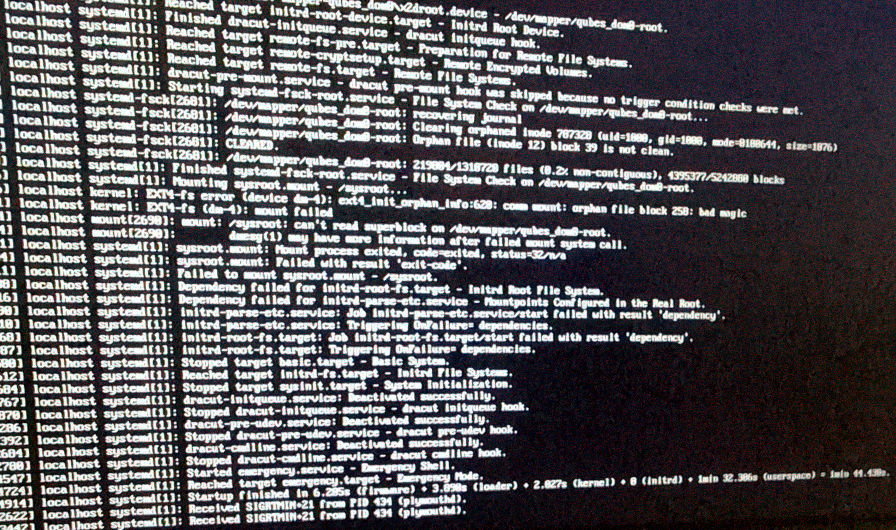
Thanks. I set a 2gb minimum buffer in restore.py, and while the disk space didn’t drop below 2.0gb, the system froze once again about 10 minutes into it. Then after reboot and entering disk password I was greeted with this

Fortunately, after restarting again the system recovered and everything is fine (journalctl reports fsck clearing an orphan file). But this is about the 8th hard system freeze and I’m really not sure what to do now.

Any other logs or system files to investigate besides journalctl? The VM that is failing to restore gives this error when trying to start it: Import operation in progress on qubes_dom0/vm-vault-1-private so some part of the system is aware of it.

To reiterate:
attempting to restore all VMs in one go = system freeze
attempting to restore multiple random VMs = system freeze
attempting to restore a few smaller qubes = ok
attempting to restore one 45gb vault qube = ok
attempting to restore one 150gb vault qube = system freeze

I’m mystified and have no idea where I should look next. Also wondering how such a critical process can be so unreliable. Been using qubes full time since 3.1 but never made use of the backup feature. I thought I’d give it a try and now I’m kicking myself for not just sticking with my tried and true methods.

Thanks. But to clarify, the vault AppVM I am trying to restore is 150gb and shares the same template (debian-12) as the 45gb AppVM that I successfully restored the other day. It is also failing fairly quickly into the process given its size, so I am thinking there is something else going on.

I’d go for extending the dom0 LVM volume and filesystem to 50 GiB, and editing restore.py to set aside 10 GiB of free space.

If that still fails, maybe give Btrfs (or XFS) a try after all? The installer can automatically create a layout for either one (with the XFS one called “Standard Partition”). This would avoid the rigid division between dom0 filesystem space and VM storage space.

Actually don’t do the XFS / “Standard Partition” layout! I just remembered that the installer creates a separate large XFS partition mainly for VM storage at /var/lib/qubes/, with everything else on a smaller ext4 root filesystem.

With the Btrfs layout though it truly is just one big dom0 filesystem for everything, which should work around your problem.

Update: I was about to reinstall with a different file system as suggested, but decided to try one last thing. I created an AppVM with 300gb and copied the backup to it, then started the restore process from there rather than the external drive. Thankfully this worked without issues. I noticed the CPU temps reach as high as 86C during the first 15 minutes of my largest VM’s restore, but then it dropped to the low 70s and stayed there. None of the other VMs taxed my system this hard, so from this experience I’d say that the tool has an issue restoring very large VMs from external spinning drives.

Thank you both for your help even though I found a different solution. I do wonder if the same issue would still arise from an external SSD, but I have none to test with.

Interesting. Could the previous failures have been due to overheating to an even higher temperature? Maybe there are still some old kernel messages in the journal about temperature and/or throttling, towards the end of journalctl -k -b -1 (and -2, -3, …)

Going through this thread again: You never actually posted any error message about completely running out of free space in dom0. I had assumed that was due to such a message not being able to persist in the journal through a system crash. But after two recent threads in the forum where running out of free LVM space for the dom0 filesystem really was the cause of restore problems, I was probably just too focused on that possibility.

Experimented over the weekend and yes this does appear to be a CPU temp issue. My system simply runs hotter restoring backups from external HDD vs internal SSD. I was rushing last week and didn’t keep an eye on temps initially. Sorry to cause concern over nothing. There were just no kernel temp warnings and it’s not a problem I’ve had with this machine (thermals done 3 years ago so should theoretically be fine, though I will be reappyling after this).

Going through this thread again: You never actually posted any error message about completely running out of free space in dom0. I had assumed that was due to such a message not being able to persist in the journal through a system crash.

Ya, that’s what I figured too. It didn’t make sense that it was filling dom0’s entire pool, but the final messages before freezing were always WARNING: Thin pool qubes_dom0-root–pool-tpool data is now 91.31% full etc, so it threw me off. But on reboots, there was still enough space left. When watching the storage it would sometimes dip slightly below the buffer set in restore.py, but that’s all. I was more worried there was a caching issue (?) with the VM size exceeding a limit somewhere during decompression and being unrecoverable without some serious tinkering.

To rule out file system issues, I retried the operation from the same external drive, with the same large VM giving me trouble, and just made sure the temps didn’t rise above 85C with a fan and indoor AC (previous area was not warm but maybe a bit stuffy, but like I said, never had temp issues before, and on 4.2 my temps rarely exceeded 80C). I was able to keep the temps below 82C this time and it successfully restored after about 3 hours as expected. Overall it runs much hotter than restoring from the internal SSD, which stayed in the 70s after the initial spike. My BIOS does not show the temperature limit but I would assume it’s around 90C.

To conclude, I do not believe there is any inherent problem with the Qubes native backup/restore functionality (other than causing high temps in certain scenarios), my backups are all restored and I’m on a working and updated 4.3.1 install now. Again I hope this didn’t cause any alarm to others. Going to mark it as solved.

A silly issue, but thanks to both of you for your help. It is much appreciated.

Huh, strange. I would have assumed the opposite.

Even just vacuuming vents clogged with dust can make a huge difference. I do it every few months.