Wireguard VPN w/ namespace killswitch

Introduction

I found this interesting article about using wireguard’s integration with network namespaces to provide a simple but rock solid “killswitch” that prevents network leaks.

The idea is that you can create the wireguard device (wg0 here) in one network namespace(physical) and then move it to another(init) and it “remembers” the original namespace as the one to send ciphertext.
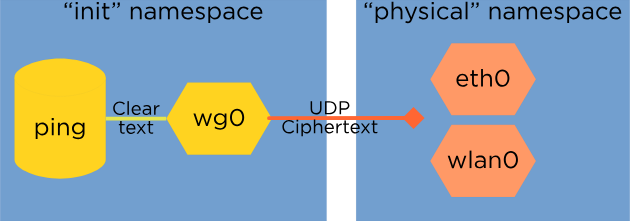
Now because the plaintext network devices are in another namespace, nothing other than the wireguard device can communicate with applications in the “init” namespace.

Here’s how I setup a vpn qube using this method.

Setup

Create a new qube providing network

Menu » Qubes Tools » Create Qubes VM:

  • name: my-cool-vpn
  • template: fedora-42
  • type: AppVM
  • networking: sys-firewall
  • :ballot_box_with_check: Launch settings after creation
  • advanced (tab) » Provides network access to other qubes

And then OK. Then the qube settings window should show up (proceed to the next step).

Enable service qubes-firewall

In the qube settings window enable the qubes-firewall service.

Acquire a wireguard config

Get a wireguard config for your vpn. Here is an example of a typical wg-quick config file. Comment out everything except the uncommented fields in the example. This is necessary because we are going to setup the wireguard device directly, rather than use wg-quick. Here I’m commenting out the Address, MTU and DNS fields.

[Interface]
#Address = 192.168.71.2/24,fdc9:3c6b:21c7:e6bd::2/64
PrivateKey = yAnz5TF+lXXJte14tji3zlMNq+hd2rYUIgJBgB3fBmk=
ListenPort = 51821
#MTU = 1320
#DNS = 88.66.44.23

[Peer]
PublicKey = TrMvSoP4jYQlY6RIzBgbssQqY3vxI2Pi+y71lOWWXX0=
PresharedKey = /UwcSPg38hW/D9Y3tcS1FOV0K1wuURMbS0sesJEP5ak=
Endpoint = 88.66.44.22:51820
AllowedIPs = 0.0.0.0/0,::/0

Put this file in /rw/config/wg0.conf.

Create setup_vpn.bash script

Next, create a shell script that implements the steps from the linked article. You’ll have to set the three variables at the top.

  • PHYSICAL_IP: ; The address of eth0 in the vpn qube
$ ip add show eth0
2: eth0: <BROADCAST,MULTICAST,UP,LOWER_UP> mtu 1500 qdisc mq state UP group 1 qlen 1000
    link/ether 00:16:3e:5e:6c:00 brd ff:ff:ff:ff:ff:ff
    inet 10.137.0.17/32 scope global eth0
       valid_lft forever preferred_lft forever
    inet6 fe80::216:3eff:fe5e:6c00/64 scope link proto kernel_ll 
       valid_lft forever preferred_lft forever
  • PHYSICAL_ROUTE: The default route for the vpn qube
$ ip route
default via 10.138.32.193 dev eth0 onlink 
  • WG_IP: the ip from the commented out Address field of your wireguard config
#!/bin/bash

set -eux

PHYSICAL_IP="10.137.0.17/32"
PHYSICAL_ROUTE="10.138.32.193"
WG_IP="192.168.72.2/32"

# create netns named "physical", move eth0 and create wg0
ip netns add physical 
ip link set eth0 netns physical
ip -n physical link add wg0 type wireguard
# move wg0 to default netns
ip -n physical link set wg0 netns 1

# eth0 lost its configuration when we moved it to the 
# physical namespace so reconfigure it
ip -n physical addr add "$PHYSICAL_IP" dev eth0
ip -n physical link set eth0 up
ip -n physical route add default via "$PHYSICAL_ROUTE" dev eth0 onlink

# setup wireguard
wg setconf wg0 /rw/config/wg0.conf
ip addr add "$WG_IP" dev wg0 
ip link set wg0 up
ip route add default dev wg0

Place this file in /rw/config/setup_vpn.bash.

Call setup_vpn.bash

Add this line to the bottom of (the currently empty except for comments) /rw/config/qubes-firewall-user-script:

bash /rw/config/setup_vpn.bash

Now if you restart the vpn qube, you should see wireguard configured with wg show and qubes configured to use the vpn qubes for networking should be able to ping ip addresses. Getting DNS to work is our final step.

Fix DNS

Finally we need to fix DNS by replacing the DNS nat rules. This isn’t necessary for the killswitch, just to allow AppVMs using the vpn qubes from having to change their dns configuration.

Write this file to /rw/config/nftables.conf and set the two variables at the top:

  • virtualif: this is the same as the PHYSICAL_IP from the setup_vpn.bash script
  • vpndns1: this is the dns server commented out in your wireguard config. Alternatively, you can use any dns you want, eg 8.8.8.8 .
#!/usr/sbin/nft -f

# Set variables
define virtualif = 10.137.0.17/32
define vpndns1 = 88.66.44.23

# Flush existing rules
flush chain qubes dnat-dns

# Table for NAT and PR-QBS chain
table ip nat {
    chain PR-QBS {
        type nat hook prerouting priority -100; policy accept;
	ip daddr 10.139.1.1 udp dport 53 dnat to $vpndns1
	ip daddr 10.139.1.1 tcp dport 53 dnat to $vpndns1
    }
}

# Mangle table (for MSS clamping)
table ip mangle {
    chain forward {
        type filter hook forward priority 0; policy accept;
	tcp flags syn tcp option maxseg size set rt mtu;
    }
}

Configure nftables from the bottom of /rw/config/rc.local:

nft -f /rw/config/nftables.conf

All done!

Now if you restart your vpn qube, wireguard should be configured and qubes using it for networking should have network and dns access.

Caveats

I’m pretty familiar with Linux networking and networking in general but I’m new to Qubes.

4 Likes

Hi, thanks for writing this guide.

As cool as it is for a single system with its own WireGuard client, this adds too much complexity in Qubes OS without benefit.

In Qubes OS, you create a qube that will act as a WireGuard client and provide network to other qubes, put a firewall rule to limit traffic to the WireGuard server endpoint only, and you are done.

If someone want to improve this "all-in-one" script using namespace, here is the PROTOTYPE.

Features

  • Usage: sys-net ↔ sys-firewall ↔ sys-vpn ↔ appvms
  • Network isolation via namespaces
  • Killswitch-like protection when VPN is down
  • VPN-only connectivity for all traffic
  • DNS leak protection through NAT rules
  • AppVM DNS NAT compatibility
  • IPv6 disabled

wireguard-namespace-qube.sh

#!/bin/bash

################################################################################
# File Name    : wireguard-namespace-qube.sh
# Description  : Advanced WireGuard setup with network namespace as killswitch
#                for Qubes OS. This setup uses network namespace isolation to
#                prevent leaks, NFTables killswitch that blocks all non-VPN
#                traffic, IPv6 disabled and automatic connection verification
#                at the end.
# Usage        : • Transfer this script from appvm to dom0 with:
#                [user@dom0 ~]$ qvm-run --pass-io appvm 'cat ~/wireguard-namespace-qube.sh' > ~/wireguard-namespace-qube.sh
#                • Make the script executable with:
#                [user@dom0 ~]$ chmod +x ~/wireguard-namespace-qube.sh
#                • Comment Address, DNS and MTU, then Place your WireGuard config
#                file named wg0.conf to wireguard folder in dom0:
#                [user@dom0 ~]$ qvm-run --pass-io appvm 'cat ~/wg0.conf' > ~/wireguard/wg0.conf
#                • Run the script with:
#                [user@dom0 ~]$ bash ~/wireguard-namespace-qube.sh
# Author       : Me and the bois
# License      : Free of charge, no warranty
# Last edited  : 2025-10-03
################################################################################

# Configurationz
BASE_TEMPLATE="debian-12-minimal"
CUSTOM_TEMPLATE="debian-vpn-template"
VPN_SERVICE="sys-vpn"
WG_CONFIG_SOURCE="/home/user/wireguard" # Comment Address, DNS and MTU of wg0.conf

# Function to get VM IP address
get_vm_ip() {
    local vm="$1"
    qvm-ls -n | grep "^$vm" | awk '{print $3}' | grep -E '^[0-9]+\.[0-9]+\.[0-9]+\.[0-9]+$' | head -n1
}

# Strategy to create script content in a temporary file and transfer it
create_script_in_vm() {
    local script_name="$1"
    local script_content="$2"
    local temp_file="/tmp/$(basename "$script_name")"

    echo -e "$script_content" > "$temp_file"
    qvm-copy-to-vm "$VPN_SERVICE" "$temp_file"
    qvm-run -p -u root "$VPN_SERVICE" "mv '/home/user/QubesIncoming/dom0/$(basename "$temp_file")' '$script_name' && chown root:root '$script_name' && chmod 755 '$script_name'"
    rm -f "$temp_file"
}

# Step 1: Verify and create base template
create_custom_template() {
    echo -e "\nStep 1: Verifying and creating base template: $BASE_TEMPLATE..."

    if ! qvm-check "$BASE_TEMPLATE"; then
        echo -e "\nInstalling $BASE_TEMPLATE..."
        sudo qubes-dom0-update "qubes-template-$BASE_TEMPLATE"
    fi

    qvm-shutdown --wait "$BASE_TEMPLATE"

    if qvm-check "$BASE_TEMPLATE"; then
        echo -e "\nUpdating $BASE_TEMPLATE..."
        sudo qubesctl --show-output --skip-dom0 --targets="$BASE_TEMPLATE" state.sls update.qubes-vm
    fi

    echo -e "\nBase template setup complete"
}

# Step 2: Verify and create custom template with packages (change as needed)
install_packages() {
    echo -e "\nStep 2: Creating and installing required packages in $CUSTOM_TEMPLATE..."

    if ! qvm-check "$CUSTOM_TEMPLATE"; then
        echo -e "\nCreating $CUSTOM_TEMPLATE by cloning from $BASE_TEMPLATE..."
        qvm-clone "$BASE_TEMPLATE" "$CUSTOM_TEMPLATE"
        qvm-prefs "$CUSTOM_TEMPLATE" label orange

        echo -e "\nStarting $CUSTOM_TEMPLATE for package installation..."
        qvm-start "$CUSTOM_TEMPLATE"

        echo -e "\n Configuring template..."
        qvm-run -p -u root "$CUSTOM_TEMPLATE" "echo 'TERM=xterm' >> /etc/environment"
        qvm-run -p -u root "$CUSTOM_TEMPLATE" "sed -i 's/^# *\(en_US.UTF-8\)/\1/' /etc/locale.gen"
        qvm-run -p -u root "$CUSTOM_TEMPLATE" "locale-gen en_US.UTF-8"

        echo -e "\nInstalling packages in $CUSTOM_TEMPLATE..."
        qvm-run -u root "$CUSTOM_TEMPLATE" "
apt update -y && apt install -y --no-install-recommends \
qubes-core-agent-passwordless-root \
qubes-core-agent-networking \
wireguard-tools \
nftables \
iproute2 \
dnsutils \
less \
psmisc \
curl \
xfce4-terminal
"

        echo -e "\nCustom template $CUSTOM_TEMPLATE created successfully"
    else
        echo -e "\nCustom template $CUSTOM_TEMPLATE already exists"
    fi

    qvm-shutdown --wait "$CUSTOM_TEMPLATE"
}

# Step 3: Create VPN qube service
create_vpn_qube() {
    echo -e "\nStep 3: Verifying and creating VPN qube service: $VPN_SERVICE..."

    if qvm-check "$VPN_SERVICE"; then
        qvm-shutdown --wait "$VPN_SERVICE"
        qvm-remove "$VPN_SERVICE"
        sleep 2
    fi

    echo -e "\nCreating $VPN_SERVICE..."
    qvm-create \
      --class AppVM \
      --template "$CUSTOM_TEMPLATE" \
      --label orange \
      --property netvm=sys-firewall \
      --property provides_network=True \
      --property vcpus=1 \
      --property memory=300 \
      --property maxmem=400 \
      --property autostart=False \
      --property include_in_backups=False \
      "$VPN_SERVICE"

    qvm-features "$VPN_SERVICE" ipv6 ''
    echo -e "\nDisabled IPv6 in $VPN_SERVICE"

    qvm-service "$VPN_SERVICE" qubes-firewall on

    echo -e "\nStarting $VPN_SERVICE to apply configuration..."
    qvm-start "$VPN_SERVICE"

    echo -e "\nVPN qube created and configured"
}

# Step 4: Copy the configuration file from dom0 to the VPN service qube
transfer_config() {
    echo -e "\nStep 4: Transferring WireGuard configuration to the VPN service qube..."

    if [[ ! -f "$WG_CONFIG_SOURCE/wg0.conf" ]]; then
        echo -e "\nError: Config file not found at $WG_CONFIG_SOURCE/wg0.conf"
        return 1
    fi

    echo -e "\nCopying..."
    qvm-copy-to-vm "$VPN_SERVICE" "$WG_CONFIG_SOURCE/wg0.conf"
    sleep 2

    qvm-run -u root "$VPN_SERVICE" "mkdir -p '/rw/config/vpn'"
    qvm-run -u root "$VPN_SERVICE" "mv '/home/user/QubesIncoming/dom0/wg0.conf' '/rw/config/vpn/'"
    qvm-run -u root "$VPN_SERVICE" "chmod 600 '/rw/config/vpn/wg0.conf'"
    echo -e "\nConfig file moved to: /rw/config/vpn/wg0.conf"
}

# Step 5: Configure network namespace scripts
configure_namespace_scripts() {
    echo -e "\nStep 5: Configuring network namespace scripts in $VPN_SERVICE..."

    qvm-run -u root $VPN_SERVICE "mkdir -p /rw/config /rw/config/vpn"

    VPN_IP=$(get_vm_ip "$VPN_SERVICE")
    echo -e "\nVPN qube IP: $VPN_IP"

SETUP_SCRIPT_CONTENT='#!/bin/bash

echo -e "\nStarting WireGuard namespace setup"

sleep 5

INTERFACE="eth0"
echo -e "\nUsing interface: $INTERFACE"

# Get basic network configuration
PHYSICAL_IP=$(ip -4 addr show "$INTERFACE" | grep -oP '\''(?<=inet\s)\d+(\.\d+){3}/\d+'\'')
PHYSICAL_ROUTE=$(ip route | grep default | awk '\''{print $3}'\'')
WG_CONFIG="/rw/config/vpn/wg0.conf"

# Extract DNS from WireGuard config (handle both commented and uncommented)
DNS_LINE=$(grep -E "^(#\s*)?DNS" "$WG_CONFIG" | head -1)
if [ -n "$DNS_LINE" ]; then
    # Remove comment characters if present and extract value
    CLEAN_DNS_LINE=$(echo "$DNS_LINE" | sed -E '\''s/^#\s*//'\'')
    DNS_SERVERS=$(echo "$CLEAN_DNS_LINE" | cut -d= -f2 | sed '\''s/^[[:space:]]*//;s/[[:space:]]*$//'\'' | tr "," " ")

    # Take the first DNS server for endpoint resolution
    WG_DNS=$(echo "$DNS_SERVERS" | cut -d" " -f1)
    echo -e "\nUsing DNS from WireGuard config: $DNS_SERVERS"
else
    echo -e "\nWarning: No DNS found in WireGuard config"
    # Use fallback DNS for endpoint resolution only
    WG_DNS="9.9.9.9"
    DNS_SERVERS=""
fi

echo -e "\nPhysical IP: $PHYSICAL_IP"
echo -e "\nPhysical route: $PHYSICAL_ROUTE"
echo -e "\nWG config: $WG_CONFIG"
echo -e "\nWG DNS: $WG_DNS"

# Extract only the WireGuard IP
WG_IP=$(grep -E '\''^(#)?Address'\'' "$WG_CONFIG" | head -n1 | cut -d'\''='\'' -f2 | cut -d'\''/'\'' -f1 | tr -d '\'' '\'')
WG_IP="${WG_IP}/32"
echo -e "\nUsing WG_IP: $WG_IP"

# Resolve endpoint BEFORE moving interfaces
echo -e "\nStep 1: Resolving WireGuard endpoint..."
ENDPOINT=$(grep '\''^Endpoint'\'' "$WG_CONFIG" | cut -d'\''='\'' -f2 | tr -d '\'' '\'' | cut -d: -f1)
PORT=$(grep '\''^Endpoint'\'' "$WG_CONFIG" | cut -d'\''='\'' -f2 | tr -d '\'' '\'' | cut -d: -f2)

RESOLVED_IP=""
if [ -n "$ENDPOINT" ]; then
    echo -e "\nResolving endpoint: $ENDPOINT"

    # Use multiple DNS servers for reliability
    for dns_server in $WG_DNS 10.139.1.1 9.9.9.9; do
        echo "Trying DNS: $dns_server"
        IP=$(dig +short +time=2 +tries=2 "$ENDPOINT" @"$dns_server" 2>/dev/null | grep -E '\''^[0-9]+\.[0-9]+\.[0-9]+\.[0-9]+$'\'' | head -1)
        if [ -n "$IP" ] && [ "$IP" != "127.0.0.1" ]; then
            echo -e "\nSuccessfully resolved $ENDPOINT to $IP using DNS $dns_server"
            RESOLVED_IP="$IP"
            break
        else
            echo "Failed to resolve with $dns_server"
        fi
    done
fi

if [ -z "$RESOLVED_IP" ]; then
    echo -e "\nError: Could not resolve endpoint $ENDPOINT with any DNS server"
    echo "Please check your network connection and DNS configuration"
    exit 1
fi

# Create temporary config with resolved IP
cp "$WG_CONFIG" /tmp/wg-config-temp.conf
if [ -n "$RESOLVED_IP" ]; then
    sed -i "s/$ENDPOINT:[0-9]*/$RESOLVED_IP:$PORT/g" /tmp/wg-config-temp.conf
else
    echo -e "\nWarning: Could not resolve endpoint, using original config"
fi

echo -e "\nCreating netns named physical..."
ip netns add physical
ip link set "$INTERFACE" netns physical
ip -n physical link add wg0 type wireguard

echo -e "\nMoving wg0 to default netns..."
ip -n physical link set wg0 netns 1

echo -e "\nReconfigure eth0, because of it lost its settings after moving to the physical namespace."
ip -n physical addr add "$PHYSICAL_IP" dev "$INTERFACE"
ip -n physical link set eth0 up
ip -n physical route add default via "$PHYSICAL_ROUTE" dev eth0 onlink

echo -e "\nConfiguring WireGuard..."
# Remove conflicting lines from config
sed -i '\''/^Address/d'\'' /tmp/wg-config-temp.conf
sed -i '\''/^DNS/d'\'' /tmp/wg-config-temp.conf
sed -i '\''/^MTU/d'\'' /tmp/wg-config-temp.conf

wg setconf wg0 /tmp/wg-config-temp.conf
rm -f /tmp/wg-config-temp.conf
ip addr add "$WG_IP" dev wg0
ip link set wg0 up

echo -e "\nSetting up routing..."
ip route add default dev wg0

echo -e "\nConfiguring DNS for sys-vpn itself..."

# Backup original resolv.conf for sys-vpn itself
cp /etc/resolv.conf /etc/resolv.conf.backup

# Extract DNS from WireGuard config for sys-vpn itself
DNS_LINE=$(grep -E "^(#\s*)?DNS" "$WG_CONFIG" | head -1)
if [ -n "$DNS_LINE" ]; then
    # Remove comment characters if present and extract value
    CLEAN_DNS_LINE=$(echo "$DNS_LINE" | sed -E '\''s/^#\s*//'\'')
    DNS_SERVERS=$(echo "$CLEAN_DNS_LINE" | cut -d= -f2 | sed '\''s/^[[:space:]]*//;s/[[:space:]]*$//'\'' | tr "," " ")

    # Create new resolv.conf using only the DNS from WireGuard config for sys-vpn itself
    cat > /etc/resolv.conf </dev/null 2>&1; then
    ip link set "$INTERFACE" up
    PHYSICAL_ROUTE=$(ip route | grep default | awk '\''{print $3}'\'')
    if [ -n "$PHYSICAL_ROUTE" ]; then
        ip route add default via "$PHYSICAL_ROUTE" dev "$INTERFACE" onlink
    fi
fi

echo -e "\nWireGuard namespace removal complete"'

# NFTables dynamic generation script
NFT_CONFIG_SCRIPT_CONTENT='#!/bin/bash

# Extract DNS from WireGuard config - handle commented lines
WG_CONFIG="/rw/config/vpn/wg0.conf"

# First, uncomment DNS line if it exists commented
if grep -q "^#\s*DNS" "$WG_CONFIG"; then
    echo "Uncommenting DNS line in WireGuard config"
    sudo sed -i '\''s/^#\s*DNS/DNS/'\'' "$WG_CONFIG"
fi

# Extract DNS servers
DNS_LINE=$(grep "^DNS" "$WG_CONFIG" | head -1)

if [ -n "$DNS_LINE" ]; then
    # Extract DNS servers and clean them
    DNS_SERVERS=$(echo "$DNS_LINE" | cut -d= -f2 | sed '\''s/ //g'\'' | tr "," " ")
    VPNDNS1=$(echo "$DNS_SERVERS" | awk '\''{print $1}'\'')
    VPNDNS2=$(echo "$DNS_SERVERS" | awk '\''{print $2}'\'')

    echo "Using DNS from WireGuard config: $DNS_SERVERS"

    # Create NFTables config with STATIC DNS IPs (no variables)
    if [ -n "$VPNDNS1" ] && [[ "$VPNDNS1" =~ ^[0-9]+\.[0-9]+\.[0-9]+\.[0-9]+$ ]]; then
        cat > /rw/config/nftables.conf < /rw/config/nftables.conf </dev/null || true"
    qvm-run -u root "$VPN_SERVICE" "rmdir '/home/user/QubesIncoming' 2>/dev/null || true"
    qvm-run -u root "$VPN_SERVICE" "/rw/config/removal-wireguard-namespace.sh"
    sleep 2

    echo -e "\nGenerating NFTables configuration..."
    qvm-run -u root "$VPN_SERVICE" "/rw/config/generate-nftables.sh"

    echo -e "\nConfiguring NFTables rules..."
    if qvm-run -u root "$VPN_SERVICE" "nft -c -f /rw/config/nftables.conf && nft -f /rw/config/nftables.conf"; then
        echo -e "\nNFTables configured successfully"
    else
        echo -e "\nNFTables configuration failed"
        return 1
    fi
    sleep 2

    echo -e "\nTesting VPN setup"
    if qvm-run -u root "$VPN_SERVICE" "/rw/config/setup-wireguard-namespace.sh"; then
        echo -e "\nWireGuard setup successful"
        sleep 2
        qvm-run -u root "$VPN_SERVICE" "/rw/config/manage-vpn.sh status"

        echo -e "\nTesting connectivity"
        qvm-run -p -u root "$VPN_SERVICE" "ping -c 3 -W 5 9.9.9.9 && echo 'VPN IP connectivity working' || echo 'VPN IP connectivity failed'"

        echo -e "\nTesting DNS with public resolver"
        qvm-run -p -u root "$VPN_SERVICE" "nslookup duckduckgo.com 9.9.9.9 && echo 'DNS resolution working' || echo 'DNS resolution failed'"

        echo -e "\nTesting DNS with internal resolver"
        qvm-run -p -u root "$VPN_SERVICE" "nslookup duckduckgo.com 10.139.1.1 && echo 'DNS resolution working' || echo 'DNS resolution failed'"

        echo -e "\nSetup complete! $VPN_SERVICE is ready."
    else
        echo -e "\nSetup failed"
        qvm-run -p -u root "$VPN_SERVICE" "/rw/config/removal-wireguard-namespace.sh"
        return 1
    fi
}

# Main function
main() {
    echo -e "\nStarting WireGuard VPN setup..."

    create_custom_template
    install_packages
    create_vpn_qube
    transfer_config
    configure_namespace_scripts
    configure_autostart
    create_management_script
    finalize

    echo -e "\nSetup completed successfully!"
}

# Run
main


Dynamic NFTables ruleset generation

# Dynamic DNS configuration

# Flush Qubes DNS chain to avoid conflicts
flush chain qubes dnat-dns

# Table for NAT and PR-QBS chain
table ip nat {
    chain PR-QBS {
        type nat hook prerouting priority -100; policy accept;
        ip daddr 10.139.1.1 udp dport 53 dnat to $VPNDNS1
        ip daddr 10.139.1.1 tcp dport 53 dnat to $VPNDNS1
$(if [ -n "$VPNDNS2" ] && [[ "$VPNDNS2" =~ ^[0-9]+\.[0-9]+\.[0-9]+\.[0-9]+$ ]]; then echo "        ip daddr 10.139.1.1 udp dport 53 dnat to $VPNDNS2"; fi)
$(if [ -n "$VPNDNS2" ] && [[ "$VPNDNS2" =~ ^[0-9]+\.[0-9]+\.[0-9]+\.[0-9]+$ ]]; then echo "        ip daddr 10.139.1.1 tcp dport 53 dnat to $VPNDNS2"; fi)
    }

    chain postrouting {
        type nat hook postrouting priority 100; policy accept;
        oifname "wg0" masquerade
    }
}

# Filter table for forwarding
table ip filter {
    chain forward {
        type filter hook forward priority 0; policy drop;
        iifname "vif*" oifname "wg0" accept
        iifname "wg0" oifname "vif*" ct state related,established accept
    }
}

# Mangle table (for MSS clamping)
table ip mangle {
    chain forward {
        type filter hook forward priority 0; policy accept;
        tcp flags syn tcp option maxseg size set rt mtu;
    }
}

PROTOTYPE V2:

wireguard-namespace-qube.sh

#!/bin/bash

################################################################################
# File Name    : wireguard-namespace-qube.sh
# Description  : WireGuard VPN setup for Qubes OS that routes all internet traffic
#                through the wg0 interface using network namespace isolation to
#                prevent DNS and IP leaks. Configures WireGuard directly via ip
#                commands instead of wg-quick, implements minimal NFTables rules
#                to block non-VPN traffic and enable DNS NAT, with IPv6 disabled.
# Usage        : • Transfer this script from appvm to dom0 with:
#                [user@dom0 ~]$ qvm-run -p appvm 'cat ~/wireguard-namespace-qube.sh' > ~/wireguard-namespace-qube.sh
#                • Place your WireGuard config to the desired folder
#                [user@dom0 ~]$ mkdir -p wireguard
#                [user@dom0 ~]$ qvm-run -p appvm 'cat ~/wg0.conf' > ~/wireguard/wg0.conf
#                • Make the script executable with:
#                [user@dom0 ~]$ chmod +x ~/wireguard-namespace-qube.sh
#                • Run the script with:
#                [user@dom0 ~]$ bash ~/wireguard-namespace-qube.sh
# Author       : Me and the bois
# License      : Free of charge, no warranty
# Last edited  : 2025-10-18
################################################################################

# Safety first
set -euo pipefail

# Configuration (set default values here)
WG_CONFIG_NAME="wg0.conf"
WG_CONFIG_SOURCE="/home/user/wireguard"
BASE_TEMPLATE="debian-12-minimal"
CUSTOM_TEMPLATE="debian-vpn-template"
VPN_SERVICE="sys-vpn"

# Step 1: Verify and create base template
create_custom_template() {
    echo -e "\nStep 1: Verifying and creating: $BASE_TEMPLATE..."

    if ! qvm-check "$BASE_TEMPLATE"; then
        echo -e "\nInstalling $BASE_TEMPLATE..."
        sudo qubes-dom0-update "qubes-template-$BASE_TEMPLATE"
    fi

    qvm-shutdown --wait "$BASE_TEMPLATE" 2>/dev/null || true

    if qvm-check "$BASE_TEMPLATE"; then
        echo -e "\nUpdating $BASE_TEMPLATE..."
        sudo qubesctl --show-output --skip-dom0 --targets="$BASE_TEMPLATE" state.sls update.qubes-vm
    fi

    echo -e "\nSetup complete"
}

# Step 2: Verify and create custom template with packages (change as needed)
install_packages() {
    echo -e "\nStep 2: Creating and installing required packages in $CUSTOM_TEMPLATE..."

    if qvm-check "$CUSTOM_TEMPLATE"; then
        echo -e "\n$CUSTOM_TEMPLATE already exists"
        echo -e "\nContinuing to $VPN_SERVICE creation..."
    else
        echo -e "\nCreating $CUSTOM_TEMPLATE by cloning from $BASE_TEMPLATE..."
        qvm-clone "$BASE_TEMPLATE" "$CUSTOM_TEMPLATE"
        qvm-prefs "$CUSTOM_TEMPLATE" label orange

        echo -e "\nStarting $CUSTOM_TEMPLATE for package installation..."
        qvm-start "$CUSTOM_TEMPLATE"

        echo -e "\nConfiguring template..."
        qvm-run -p -u root "$CUSTOM_TEMPLATE" "echo 'TERM=xterm' >> /etc/environment"
        qvm-run -p -u root "$CUSTOM_TEMPLATE" "sed -i 's/^# *\(en_US.UTF-8\)/\1/' /etc/locale.gen"
        qvm-run -p -u root "$CUSTOM_TEMPLATE" "locale-gen en_US.UTF-8"

        echo -e "\nInstalling packages in $CUSTOM_TEMPLATE..."
        qvm-run -p -u root "$CUSTOM_TEMPLATE" "apt update -y"
        qvm-run -p -u root "$CUSTOM_TEMPLATE" "apt install -y --no-install-recommends \
            qubes-core-agent-passwordless-root \
            qubes-core-agent-networking \
            wireguard-tools \
            nftables \
            iproute2 \
            dnsutils \
            less \
            psmisc \
            xfce4-terminal"

        echo -e "\n$CUSTOM_TEMPLATE created successfully"
    fi

    qvm-shutdown --wait "$CUSTOM_TEMPLATE" 2>/dev/null || true
}

# Step 3: Create qube service
create_vpn_qube() {
    echo -e "\nStep 3: Verifying and creating qube service: $VPN_SERVICE..."

    if qvm-check "$VPN_SERVICE"; then
        echo -e "\n$VPN_SERVICE already exists"
        echo -e "\nExiting"
        exit 1
    else
        echo -e "\nCreating $VPN_SERVICE..."

        qvm-create \
          --class AppVM \
          --template "$CUSTOM_TEMPLATE" \
          --label orange \
          --property netvm=sys-firewall \
          --property provides_network=True \
          --property vcpus=1 \
          --property memory=300 \
          --property maxmem=400 \
          --property autostart=False \
          --property include_in_backups=False \
          "$VPN_SERVICE"

        qvm-features "$VPN_SERVICE" ipv6 ''
        echo -e "\nDisabled IPv6 in $VPN_SERVICE"

        qvm-service "$VPN_SERVICE" qubes-firewall on

        echo -e "\nStarting $VPN_SERVICE to apply configuration..."
        qvm-start "$VPN_SERVICE"

        echo -e "\n$VPN_SERVICE created and configured"
    fi
}

# Step 4: Comment out to configure via ip commands instead of wg-quick
comment_wg_config() {
    echo -e "\nStep 4: Commenting out Address, DNS, and MTU in WireGuard config..."

    local temp_config=$(mktemp)
    cp "$WG_CONFIG_SOURCE/$WG_CONFIG_NAME" "$temp_config"

    # Comment out the lines
    sed -i 's/^Address/#Address/g' "$temp_config"
    sed -i 's/^DNS/#DNS/g' "$temp_config"
    sed -i 's/^MTU/#MTU/g' "$temp_config"

    # Overwrite the original
    mv "$temp_config" "$WG_CONFIG_SOURCE/$WG_CONFIG_NAME"
    echo "WireGuard config automatically commented"
}

# Step 5: Copy the configuration file from dom0 to the VPN service qube
transfer_config() {
    echo -e "\nStep 5: Transferring WireGuard configuration to the VPN service qube..."

    if [[ ! -f "$WG_CONFIG_SOURCE/$WG_CONFIG_NAME" ]]; then
        echo -e "\nError: Config file not found at $WG_CONFIG_SOURCE/$WG_CONFIG_NAME"
        return 1
    fi

    echo -e "\nCopying..."
    qvm-copy-to-vm "$VPN_SERVICE" "$WG_CONFIG_SOURCE/$WG_CONFIG_NAME"
    sleep 2

    qvm-run -p -u root "$VPN_SERVICE" "mkdir -p /rw/config"
    qvm-run -p -u root "$VPN_SERVICE" "mkdir -p /rw/config/vpn"
    qvm-run -p -u root "$VPN_SERVICE" "mv '/home/user/QubesIncoming/dom0/$WG_CONFIG_NAME' '/rw/config/vpn/'"
    qvm-run -p -u root "$VPN_SERVICE" "chmod 600 '/rw/config/vpn/$WG_CONFIG_NAME'"
    echo -e "\nConfig file moved to: /rw/config/vpn/$WG_CONFIG_NAME"
}

# Create WireGuard namespace setup script
create_wireguard_setup_script() {
    echo -e "\nCreating WireGuard namespace setup script..."

    local temp_script=$(mktemp)
    cat > "$temp_script" </dev/null | grep -E "^[0-9]+\\\\.[0-9]+\\\\.[0-9]+\\\\.[0-9]+\$" | head -1)
        if [ -n "\$IP" ] && [ "\$IP" != "127.0.0.1" ]; then
            echo -e "\nResolved \$ENDPOINT to \$IP using DNS \$dns_server"
            RESOLVED_IP="\$IP"
            break
        fi
    done
fi

if [ -z "\$RESOLVED_IP" ]; then
    echo -e "\nError: Could not resolve endpoint \$ENDPOINT"
    exit 1
fi

echo -e "\nSetting up network namespace..."

# Clean up any existing namespace
ip netns delete physical 2>/dev/null || true

# Create namespace and move interface
ip netns add physical
ip link set "\$INTERFACE" netns physical
ip -n physical link add wg0 type wireguard
ip -n physical link set wg0 netns 1

# Reconfigure physical interface in namespace
ip -n physical addr add "\$PHYSICAL_IP" dev "\$INTERFACE"
ip -n physical link set "\$INTERFACE" up
ip -n physical route add default via "\$PHYSICAL_ROUTE" dev "\$INTERFACE" onlink

# Create temporary config with resolved IP
cp "\$WG_CONFIG" /tmp/wg-config-temp.conf
sed -i "s/\$ENDPOINT:[0-9]*/\$RESOLVED_IP:\$PORT/g" /tmp/wg-config-temp.conf

# Configure WireGuard (remove conflicting lines)
sed -i "/^Address/d;/^DNS/d;/^MTU/d" /tmp/wg-config-temp.conf
wg setconf wg0 /tmp/wg-config-temp.conf
rm -f /tmp/wg-config-temp.conf

ip addr add "\$WG_IP" dev wg0
ip link set wg0 up

# Set up routing - all traffic through WireGuard
ip route del default 2>/dev/null || true
ip route add default dev wg0

echo -e "\nWireGuard namespace setup complete - all traffic routed through VPN"
EOF

    qvm-copy-to-vm "$VPN_SERVICE" "$temp_script"
    qvm-run -p -u root "$VPN_SERVICE" "mv '/home/user/QubesIncoming/dom0/$(basename $temp_script)' '/rw/config/setup-wireguard-namespace.sh'"
    qvm-run -p -u root "$VPN_SERVICE" "chown root:root '/rw/config/setup-wireguard-namespace.sh'"
    qvm-run -p -u root "$VPN_SERVICE" "chmod 755 '/rw/config/setup-wireguard-namespace.sh'"
    rm -f "$temp_script"
    echo "WireGuard namespace setup script created successfully"
}

# Create NFTables configuration (variable expansion with mktemp strategy) (using echo commands to avoid heredoc issues and complexity)
create_nftables_generator_script() {
    echo -e "\nStep 5: Creating NFTables configuration..."

    local temp_script=$(mktemp)
    cat > "$temp_script" < /rw/config/nftables.conf

echo "NFTables configuration created successfully"
EOF

    qvm-copy-to-vm "$VPN_SERVICE" "$temp_script"
    qvm-run -p -u root "$VPN_SERVICE" "mv '/home/user/QubesIncoming/dom0/$(basename $temp_script)' '/rw/config/nftables-generator.sh'"
    qvm-run -p -u root "$VPN_SERVICE" "chown root:root '/rw/config/nftables-generator.sh'"
    qvm-run -p -u root "$VPN_SERVICE" "chmod 755 '/rw/config/nftables-generator.sh'"
    rm -f "$temp_script"
    echo "NFTables generator script created successfully"
}

# Create nftables rc autostart script
create_nftables_rc_autostart() {
    echo -e "\nCreating NFTables RC autostart script..."

    local temp_script=$(mktemp)
    cat > "$temp_script" </dev/null 2>&1; then
    echo -e "\nWireGuard is already running"
    exit 0
fi

echo -e "\nRunning WireGuard setup..."
export WG_CONFIG_NAME="$WG_CONFIG_NAME"
/rw/config/setup-wireguard-namespace.sh
echo -e "\nWireGuard setup completed"
sleep 5
EOF

    qvm-run -p -u root "$VPN_SERVICE" "mkdir -p /rw/config/rc.local.d"
    qvm-copy-to-vm "$VPN_SERVICE" "$temp_script"
    qvm-run -p -u root "$VPN_SERVICE" "mv '/home/user/QubesIncoming/dom0/$(basename $temp_script)' '/rw/config/rc.local.d/nftables-rc-autostart.rc'"
    qvm-run -p -u root "$VPN_SERVICE" "chown root:root '/rw/config/rc.local.d/nftables-rc-autostart.rc'"
    qvm-run -p -u root "$VPN_SERVICE" "chmod 755 '/rw/config/rc.local.d/nftables-rc-autostart.rc'"

    rm -f "$temp_script"
    echo "NFTables RC autostart script created successfully"
}

# Step 6: Finalize with DNS test
finalize() {
    echo -e "\nStep 6: Finalizing setup..."

    # Clean up
    qvm-run -p -u root "$VPN_SERVICE" "rmdir '/home/user/QubesIncoming/dom0' 2>/dev/null || true"
    qvm-run -p -u root "$VPN_SERVICE" "rmdir '/home/user/QubesIncoming' 2>/dev/null || true"

    # Generate NFTables config (using export to make the variable available to the script)
    echo -e "\nGenerating NFTables DNS configuration..."
    qvm-run -p -u root "$VPN_SERVICE" "export WG_CONFIG_NAME='$WG_CONFIG_NAME'; /rw/config/nftables-generator.sh"

    # Apply NFTables config
    echo -e "\nApplying DNS redirection rules..."
    qvm-run -p -u root "$VPN_SERVICE" "nft -f /rw/config/nftables.conf"

    # Setup WireGuard (using export to make the variable available to the script)
    echo -e "\nSetting up WireGuard namespace..."
    qvm-run -p -u root "$VPN_SERVICE" "export WG_CONFIG_NAME='$WG_CONFIG_NAME'; /rw/config/setup-wireguard-namespace.sh"
}

# Main function
main() {
    echo -e "\nStarting WireGuard VPN setup..."

    create_custom_template
    install_packages
    create_vpn_qube
    comment_wg_config
    transfer_config
    create_wireguard_setup_script
    create_nftables_generator_script
    create_nftables_rc_autostart
    finalize

    echo -e "\nSetup completed successfully!"
}

# Run
main "$@"

The Qubes forum does not render HTML correctly in complex scripts! Then I anexed it below.

PROTOTYPE V3:

wireguard-namespace-qube.sh

#!/bin/bash

################################################################################
# File Name    : wireguard-namespace-qube.sh
# Description  : WireGuard VPN setup for Qubes OS that routes all internet traffic
#                through the wg0 interface using network namespace isolation to
#                prevent DNS and IP leaks. Configures WireGuard directly via ip
#                commands instead of wg-quick, implements minimal NFTables rules
#                to block non-VPN traffic and enable DNS NAT, with IPv6 disabled.
# Usage        : • Transfer this script from appvm to dom0 with:
#                [user@dom0 ~]$ qvm-run -p appvm 'cat ~/wireguard-namespace-qube.sh' > ~/wireguard-namespace-qube.sh
#                • Place your WireGuard config to the desired folder
#                [user@dom0 ~]$ mkdir -p wireguard
#                [user@dom0 ~]$ qvm-run -p appvm 'cat ~/wg0.conf' > ~/wireguard/wg0.conf
#                • Make the script executable with:
#                [user@dom0 ~]$ chmod +x ~/wireguard-namespace-qube.sh
#                • Run the script with:
#                [user@dom0 ~]$ bash ~/wireguard-namespace-qube.sh
# Author       : Me and the bois
# License      : Free of charge, no warranty
# Last edited  : 2025-10-18
################################################################################

# Safety first
set -euo pipefail

# Configuration (set default values here)
WG_CONFIG_NAME="wg0.conf"
WG_CONFIG_SOURCE="/home/user/wireguard"
BASE_TEMPLATE="debian-12-minimal"
CUSTOM_TEMPLATE="debian-vpn-template"
VPN_SERVICE="sys-vpn"

# Step 1: Verify and create base template
create_custom_template() {
    echo -e "\nStep 1: Verifying and creating: $BASE_TEMPLATE..."

    if ! qvm-check "$BASE_TEMPLATE"; then
        echo -e "\nInstalling $BASE_TEMPLATE..."
        sudo qubes-dom0-update "qubes-template-$BASE_TEMPLATE"
    fi

    qvm-shutdown --wait "$BASE_TEMPLATE" 2>/dev/null || true

    if qvm-check "$BASE_TEMPLATE"; then
        echo -e "\nUpdating $BASE_TEMPLATE..."
        sudo qubesctl --show-output --skip-dom0 --targets="$BASE_TEMPLATE" state.sls update.qubes-vm
    fi

    echo -e "\nSetup complete"
}

# Step 2: Verify and create custom template with packages (change as needed)
install_packages() {
    echo -e "\nStep 2: Creating and installing required packages in $CUSTOM_TEMPLATE..."

    if qvm-check "$CUSTOM_TEMPLATE"; then
        echo -e "\n$CUSTOM_TEMPLATE already exists"
        echo -e "\nContinuing to $VPN_SERVICE creation..."
    else
        echo -e "\nCreating $CUSTOM_TEMPLATE by cloning from $BASE_TEMPLATE..."
        qvm-clone "$BASE_TEMPLATE" "$CUSTOM_TEMPLATE"
        qvm-prefs "$CUSTOM_TEMPLATE" label orange

        echo -e "\nStarting $CUSTOM_TEMPLATE for package installation..."
        qvm-start "$CUSTOM_TEMPLATE"

        echo -e "\nConfiguring template..."
        qvm-run -p -u root "$CUSTOM_TEMPLATE" "echo 'TERM=xterm' >> /etc/environment"
        qvm-run -p -u root "$CUSTOM_TEMPLATE" "sed -i 's/^# *\(en_US.UTF-8\)/\1/' /etc/locale.gen"
        qvm-run -p -u root "$CUSTOM_TEMPLATE" "locale-gen en_US.UTF-8"

        echo -e "\nInstalling packages in $CUSTOM_TEMPLATE..."
        qvm-run -p -u root "$CUSTOM_TEMPLATE" "apt update -y"
        qvm-run -p -u root "$CUSTOM_TEMPLATE" "apt install -y --no-install-recommends \
            qubes-core-agent-passwordless-root \
            qubes-core-agent-networking \
            wireguard-tools \
            nftables \
            iproute2 \
            dnsutils \
            traceroute \
            less \
            psmisc \
            xfce4-terminal"

        echo -e "\n$CUSTOM_TEMPLATE created successfully"
    fi

    qvm-shutdown --wait "$CUSTOM_TEMPLATE" 2>/dev/null || true
}

# Step 3: Create qube service
create_vpn_qube() {
    echo -e "\nStep 3: Verifying and creating qube service: $VPN_SERVICE..."

    if qvm-check "$VPN_SERVICE"; then
        echo -e "\n$VPN_SERVICE already exists"
        echo -e "\nExiting"
        exit 1
    else
        echo -e "\nCreating $VPN_SERVICE..."

        qvm-create \
          --class AppVM \
          --template "$CUSTOM_TEMPLATE" \
          --label orange \
          --property netvm=sys-firewall \
          --property provides_network=True \
          --property vcpus=1 \
          --property memory=300 \
          --property maxmem=400 \
          --property autostart=False \
          --property include_in_backups=False \
          "$VPN_SERVICE"

        qvm-features "$VPN_SERVICE" ipv6 ''
        echo -e "\nDisabled IPv6 in $VPN_SERVICE"

        qvm-service "$VPN_SERVICE" qubes-firewall on

        echo -e "\nStarting $VPN_SERVICE to apply configuration..."
        qvm-start "$VPN_SERVICE"

        echo -e "\n$VPN_SERVICE created and configured"
    fi
}

# Step 4: Comment out to configure via ip commands instead of wg-quick
comment_wg_config() {
    echo -e "\nStep 4: Commenting out Address, DNS, and MTU in WireGuard config..."

    local temp_config=$(mktemp)
    cp "$WG_CONFIG_SOURCE/$WG_CONFIG_NAME" "$temp_config"

    # Comment out the lines
    sed -i 's/^Address/#Address/g' "$temp_config"
    sed -i 's/^DNS/#DNS/g' "$temp_config"
    sed -i 's/^MTU/#MTU/g' "$temp_config"

    # Overwrite the original
    mv "$temp_config" "$WG_CONFIG_SOURCE/$WG_CONFIG_NAME"
    echo "WireGuard config automatically commented"
}

# Step 5: Copy the configuration file from dom0 to the VPN service qube
transfer_config() {
    echo -e "\nStep 5: Transferring WireGuard configuration to the VPN service qube..."

    if [[ ! -f "$WG_CONFIG_SOURCE/$WG_CONFIG_NAME" ]]; then
        echo -e "\nError: Config file not found at $WG_CONFIG_SOURCE/$WG_CONFIG_NAME"
        return 1
    fi

    echo -e "\nCopying..."
    qvm-copy-to-vm "$VPN_SERVICE" "$WG_CONFIG_SOURCE/$WG_CONFIG_NAME"
    sleep 2

    qvm-run -p -u root "$VPN_SERVICE" "mkdir -p /rw/config"
    qvm-run -p -u root "$VPN_SERVICE" "mkdir -p /rw/config/vpn"
    qvm-run -p -u root "$VPN_SERVICE" "mv '/home/user/QubesIncoming/dom0/$WG_CONFIG_NAME' '/rw/config/vpn/'"
    qvm-run -p -u root "$VPN_SERVICE" "chmod 600 '/rw/config/vpn/$WG_CONFIG_NAME'"
    echo -e "\nConfig file moved to: /rw/config/vpn/$WG_CONFIG_NAME"
}

# Create WireGuard namespace setup script
create_wireguard_setup_script() {
    echo -e "\nCreating WireGuard namespace setup script..."

    local temp_script=$(mktemp)
    cat > "$temp_script" </dev/null | grep -E "^[0-9]+\.[0-9]+\.[0-9]+\.[0-9]+\$" | head -1)
        if [ -n "$IP" ] && [ "$IP" != "127.0.0.1" ]; then
            echo -e "\nResolved $ENDPOINT to $IP using DNS $dns_server"
            RESOLVED_IP="$IP"
            break
        fi
    done
fi

if [ -z "$RESOLVED_IP" ]; then
    echo -e "\nError: Could not resolve endpoint $ENDPOINT"
    exit 1
fi

echo -e "\nSetting up network namespace..."

# Clean up any existing namespace
ip netns delete physical 2>/dev/null || true

# Create namespace and move interface
ip netns add physical
ip link set "$INTERFACE" netns physical
ip -n physical link add wg0 type wireguard
ip -n physical link set wg0 netns 1

# Reconfigure physical interface in namespace
ip -n physical addr add "$PHYSICAL_IP" dev "$INTERFACE"
ip -n physical link set "$INTERFACE" up
ip -n physical route add default via "$PHYSICAL_ROUTE" dev "$INTERFACE" onlink

# Create temporary config with resolved IP
cp "$WG_CONFIG" /tmp/wg-config-temp.conf
sed -i "s/$ENDPOINT:[0-9]*/$RESOLVED_IP:$PORT/g" /tmp/wg-config-temp.conf

# Configure WireGuard (remove conflicting lines)
sed -i "/^Address/d;/^DNS/d;/^MTU/d" /tmp/wg-config-temp.conf
wg setconf wg0 /tmp/wg-config-temp.conf
rm -f /tmp/wg-config-temp.conf

ip addr add "$WG_IP" dev wg0
ip link set wg0 up

# Set up routing - all traffic through WireGuard
ip route del default 2>/dev/null || true
ip route add default dev wg0

echo -e "\nWireGuard namespace setup complete - all traffic routed through VPN"
EOF

    qvm-copy-to-vm "$VPN_SERVICE" "$temp_script"
    qvm-run -p -u root "$VPN_SERVICE" "mv '/home/user/QubesIncoming/dom0/$(basename $temp_script)' '/rw/config/setup-wireguard-namespace.sh'"
    qvm-run -p -u root "$VPN_SERVICE" "chown root:root '/rw/config/setup-wireguard-namespace.sh'"
    qvm-run -p -u root "$VPN_SERVICE" "chmod 755 '/rw/config/setup-wireguard-namespace.sh'"
    rm -f "$temp_script"
    echo "WireGuard namespace setup script created successfully"
}

# Create NFTables configuration (variable expansion with mktemp strategy) (using echo commands to avoid heredoc issues and complexity)
create_nftables_generator_script() {
    echo -e "\nCreating NFTables generator script..."

    local temp_script=$(mktemp)
    cat > "$temp_script" < /rw/config/nftables.conf

echo "NFTables configuration created successfully"
EOF

    qvm-copy-to-vm "$VPN_SERVICE" "$temp_script"
    qvm-run -p -u root "$VPN_SERVICE" "mv '/home/user/QubesIncoming/dom0/$(basename $temp_script)' '/rw/config/nftables-generator.sh'"
    qvm-run -p -u root "$VPN_SERVICE" "chown root:root '/rw/config/nftables-generator.sh'"
    qvm-run -p -u root "$VPN_SERVICE" "chmod 755 '/rw/config/nftables-generator.sh'"
    rm -f "$temp_script"
    echo "NFTables generator script created successfully"
}

# Create nftables rc autostart script
create_nftables_rc_autostart() {
    echo -e "\nCreating NFTables RC autostart script..."

    local temp_script=$(mktemp)
    cat > "$temp_script" </dev/null 2>&1; then
    echo -e "\nWireGuard is already running"
    exit 0
fi

echo -e "\nRunning WireGuard setup..."
export WG_CONFIG_NAME="$WG_CONFIG_NAME"
/rw/config/setup-wireguard-namespace.sh
echo -e "\nWireGuard setup completed"
sleep 5
EOF

    qvm-run -p -u root "$VPN_SERVICE" "mkdir -p /rw/config/rc.local.d"
    qvm-copy-to-vm "$VPN_SERVICE" "$temp_script"
    qvm-run -p -u root "$VPN_SERVICE" "mv '/home/user/QubesIncoming/dom0/$(basename $temp_script)' '/rw/config/rc.local.d/nftables-rc-autostart.rc'"
    qvm-run -p -u root "$VPN_SERVICE" "chown root:root '/rw/config/rc.local.d/nftables-rc-autostart.rc'"
    qvm-run -p -u root "$VPN_SERVICE" "chmod 755 '/rw/config/rc.local.d/nftables-rc-autostart.rc'"

    rm -f "$temp_script"
    echo "NFTables RC autostart script created successfully"
}

# Step 6: Finalize with DNS test
finalize() {
    echo -e "\nStep 6: Finalizing setup..."

    # Clean up
    qvm-run -p -u root "$VPN_SERVICE" "rmdir '/home/user/QubesIncoming/dom0' 2>/dev/null || true"
    qvm-run -p -u root "$VPN_SERVICE" "rmdir '/home/user/QubesIncoming' 2>/dev/null || true"

    # Generate NFTables config (using export to make the variable available to the script)
    echo -e "\nGenerating NFTables DNS configuration..."
    qvm-run -p -u root "$VPN_SERVICE" "export WG_CONFIG_NAME='$WG_CONFIG_NAME'; /rw/config/nftables-generator.sh"

    # Apply NFTables config
    echo -e "\nApplying DNS redirection rules..."
    qvm-run -p -u root "$VPN_SERVICE" "nft -f /rw/config/nftables.conf"

    # Verify the rules were applied
    echo -e "\nVerifying NFTables rules..."
    qvm-run -p -u root "$VPN_SERVICE" "nft list chain ip qubes dnat-dns"

    # Setup WireGuard (using export to make the variable available to the script)
    echo -e "\nSetting up WireGuard namespace..."
    qvm-run -p -u root "$VPN_SERVICE" "export WG_CONFIG_NAME='$WG_CONFIG_NAME'; /rw/config/setup-wireguard-namespace.sh"

    # Test connection
    echo -e "\nTesting connection..."
    sleep 5
    qvm-run -p "$VPN_SERVICE" "ping -c 9.9.9.9"
    echo -e "\nTesting connection with MTU 1420..."
    qvm-run -p "$VPN_SERVICE" "ping -M do -s 1420 9.9.9.9"
}

# Main function
main() {
    echo -e "\nStarting WireGuard VPN setup..."

    create_custom_template
    install_packages
    create_vpn_qube
    comment_wg_config
    transfer_config
    create_wireguard_setup_script
    create_nftables_generator_script
    create_nftables_rc_autostart
    finalize

    echo -e "\nSetup completed successfully!"
}

# Run
main "$@"

wireguard-namespace-qube.log (15.1 KB)


Note about the the VPN isolation:

sys-net ↔ sys-firewall ↔ sys-vpn ↔ appvms

If sys-vpn is compromised the kill-switch can be bypassed or altered.

Note about extra firewall:

sys-net ↔ sys-firewall1 ↔ sys-vpn ↔ sys-firewall2 ↔ appvms

Smaller attack surface, you can keep the firewall minimal and auditable.


References

Core References

DNS References

Wireguard

NFTables

Qubes network

Other topics

Other Qubes References

Other Network References

Bash References

Regular expressions

Heredoc, escaping and quoting pitfalls

1 Like

For proper load balancing of nftables and to avoid duplicated ports, should I use rules like these?

ip daddr 10.139.1.1 udp dport 53 dnat to { XX.XX.XX.XX, YY.YY.YY.YY }

ip daddr 10.139.1.1 tcp dport 53 dnat to { XX.XX.XX.XX, YY.YY.YY.YY }

I think Im duplicating ports for each DNS.

This should work fine IMO.

This rule:

ip daddr 10.139.1.1 udp dport 53 dnat to { XX.XX.XX.XX, YY.YY.YY.YY }

Is the same as these rules:

ip daddr 10.139.1.1 udp dport 53 dnat to XX.XX.XX.XX
ip daddr 10.139.1.1 udp dport 53 dnat to YY.YY.YY.YY

So only the first rule will work, second rule won’t ever be triggered (if XX.XX.XX.XX != 10.139.1.1).
You need to add rules for 10.139.1.1/10.139.1.2 DNS servers:

ip daddr 10.139.1.1 meta l4proto {tcp, udp} th dport 53 dnat to XX.XX.XX.XX
ip daddr 10.139.1.2 meta l4proto {tcp, udp} th dport 53 dnat to YY.YY.YY.YY
1 Like

It’s more complex than I think.

Things to do as mentioned here.

  • No protection against DoH (DNS over HTTPS port 443)

  • No protection against DoT (DNS over TLS port 853)

  • No blocking of direct DNS queries to non-VPN servers

  • Race condition issues, network up before NFTables rules applied

  • Template updates can introduce leaks

  • NFTables chains can be overwritten by Qubes Firewall service

1 Like

The dnat-dns chain uses prerouting hook, which only processes incoming packets. I dont know if its causing timeout troubles, intermittent DNS failures, in my connection that is not related to MTU issues.

NFTables DNS redirection only should work for traffic coming from AppVMs to sys-vpn, but not for DNS queries originating INSIDE sys-vpn itself.

When sys-vpn makes DNS queries itself, they don’t go through the prerouting chain.

The question:

Does sys-vpn need DNS resolution itself?

We need to add output chain rules to redirect DNS queries that originate in sys-vpn itself?

From the sys-vpn journal there is some calls:

Temporary failure resolving 'deb.debian.org'
Temporary failure resolving 'deb.qubes-os.org'
user@sys-vpn:~$ sudo cat /etc/resolv.conf 
nameserver 10.139.1.1
nameserver 10.139.1.2

The nftable rules here are only a convenience to give the downstream appvm dns access. You could omit the nftables rules and simply change the servers in /etc/resolv.conf in the appvm without affecting the vpn isolation.

I’m not sure what your concerns are with DNS over HTTPS or DNS over TLS. The namespace should prevent leaks, so those will be forced over the vpn as well.

1 Like

BETA RELEASE

Waiting for the Linux Gurus review. Looks good but not fully tested.

Features

  • Killswitch-like protection when VPN is down
  • VPN-only connectivity for all traffic
  • DNS leak protection via namespace isolation
  • AppVM DNS NAT compatibility
  • IPv6 disabled

Usage

  • Transfer the script from appvm to dom0 with:
    [user@dom0 ~]$ qvm-run -p appvm 'cat ~/wireguard-namespace-qube.sh' > ~/wireguard-namespace-qube.sh
  • Place your WireGuard config to the desired folder:
    [user@dom0 ~]$ mkdir -p wireguard
    [user@dom0 ~]$ qvm-run -p appvm 'cat ~/wg0.conf' > ~/wireguard/wg0.conf
  • Make the script executable with:
    [user@dom0 ~]$ chmod +x ~/wireguard-namespace-qube.sh
  • Run the script with:
    [user@dom0 ~]$ bash ~/wireguard-namespace-qube.sh
  • Usage diagram:
    sys-net ↔ sys-firewall ↔ sys-vpn ↔ appvms
  • Set the VPN target:
    [user@dom0 ~]$ qvm-prefs appvm netvm sys-vpn
  • Start the VPN service:
    [user@dom0 ~]$ qvm-start sys-vpn
  • Start the VPN target, e. g.:
    [user@dom0 ~]$ qvm-run -q -a --service -- work qubes.StartApp+org.mozilla.firefox

NOTE: To create other services with different WireGuard configs, update the WG_CONFIG_NAME and VPN_SERVICE variables at the beginning of the script and rerun it.

wireguard-namespace-qube.sh

#!/bin/bash

################################################################################
# File Name    : wireguard-namespace-qube.sh
# Description  : WireGuard VPN setup for Qubes OS that routes all internet
#                traffic through the wg0 interface using network namespace
#                isolation to prevent IP and DNS leaks. Below set the desired
#                values for your variables, note that you can rerun the
#                script to create other VPN services.
# Usage        : • Transfer this script from appvm to dom0 with:
#                [user@dom0 ~]$ qvm-run -p appvm 'cat ~/wireguard-namespace-qube.sh' > ~/wireguard-namespace-qube.sh
#                • Place your WireGuard config to the desired folder:
#                [user@dom0 ~]$ mkdir -p wireguard
#                [user@dom0 ~]$ qvm-run -p appvm 'cat ~/wg0.conf' > ~/wireguard/wg0.conf
#                • Make the script executable with:
#                [user@dom0 ~]$ chmod +x ~/wireguard-namespace-qube.sh
#                • Run the script with:
#                [user@dom0 ~]$ bash ~/wireguard-namespace-qube.sh
# Author       : Me and the bois
# License      : Free of charge, no warranty
# Last edited  : 2025-10-28
################################################################################

# Safety first
set -euo pipefail

# Configuration (set default values here)
WG_CONFIG_NAME="wg0.conf"
VPN_SERVICE="sys-vpn"
WG_CONFIG_SOURCE="/home/user/wireguard"
BASE_TEMPLATE="debian-12-minimal"
CUSTOM_TEMPLATE="debian-vpn-template"

# Step 1: Verify and create base template
create_custom_template() {
  echo -e "\nStep 1: Verifying and creating: $BASE_TEMPLATE..."

  if ! qvm-check "$BASE_TEMPLATE"; then
    echo -e "\nInstalling $BASE_TEMPLATE..."
    sudo qubes-dom0-update "qubes-template-$BASE_TEMPLATE"
  fi

  qvm-shutdown --wait "$BASE_TEMPLATE" 2>/dev/null || true

  if qvm-check "$BASE_TEMPLATE"; then
    echo -e "\nUpdating $BASE_TEMPLATE..."
    sudo qubesctl --show-output --skip-dom0 --targets="$BASE_TEMPLATE" state.sls update.qubes-vm
  fi

  echo -e "\nSetup complete"
}

# Step 2: Verify and create custom template with packages (change as needed)
install_packages() {
  echo -e "\nStep 2: Creating and installing required packages in $CUSTOM_TEMPLATE..."

  if qvm-check "$CUSTOM_TEMPLATE"; then
    echo -e "\n$CUSTOM_TEMPLATE already exists"
    echo -e "\nContinuing to $VPN_SERVICE creation..."
  else
    echo -e "\nCreating $CUSTOM_TEMPLATE by cloning from $BASE_TEMPLATE..."
    qvm-clone "$BASE_TEMPLATE" "$CUSTOM_TEMPLATE"
    qvm-prefs "$CUSTOM_TEMPLATE" label orange

    echo -e "\nStarting $CUSTOM_TEMPLATE for package installation..."
    qvm-start "$CUSTOM_TEMPLATE"

    echo -e "\nConfiguring template..."
    qvm-run -p -u root "$CUSTOM_TEMPLATE" "echo 'TERM=xterm' >> /etc/environment"
    qvm-run -p -u root "$CUSTOM_TEMPLATE" "sed -i 's/^# *\(en_US.UTF-8\)/\1/' /etc/locale.gen"
    qvm-run -p -u root "$CUSTOM_TEMPLATE" "locale-gen en_US.UTF-8"

    echo -e "\nInstalling packages in $CUSTOM_TEMPLATE..."
    qvm-run -p -u root "$CUSTOM_TEMPLATE" "
    apt install -y --no-install-recommends \
      qubes-core-agent-passwordless-root \
      qubes-core-agent-networking \
      wireguard-tools \
      nftables \
      iproute2 \
      dnsutils \
      less \
      psmisc \
      xfce4-terminal"

    echo -e "\n$CUSTOM_TEMPLATE created successfully"
  fi

  qvm-shutdown --wait "$CUSTOM_TEMPLATE" 2>/dev/null || true
}

# Step 3: Create qube service
create_vpn_qube() {
  echo -e "\nStep 3: Verifying and creating qube service: $VPN_SERVICE..."

  if qvm-check "$VPN_SERVICE"; then
    echo -e "\n$VPN_SERVICE already exists"
    echo -e "\nExiting"
    exit 1
  else
    echo -e "\nCreating $VPN_SERVICE..."

    qvm-create \
      --class AppVM \
      --template "$CUSTOM_TEMPLATE" \
      --label orange \
      --property netvm=sys-firewall \
      --property provides_network=True \
      --property vcpus=1 \
      --property memory=300 \
      --property maxmem=400 \
      --property autostart=False \
      --property include_in_backups=False \
      "$VPN_SERVICE"

    echo -e "\nDisabling IPv6 in $VPN_SERVICE"
    qvm-features "$VPN_SERVICE" ipv6 ''

    echo -e "\nEnabling qubes-firewall service in $VPN_SERVICE"
    qvm-service "$VPN_SERVICE" qubes-firewall on

    echo -e "\nStarting $VPN_SERVICE to apply configuration..."
    qvm-start "$VPN_SERVICE"

    echo -e "\n$VPN_SERVICE created and configured"
  fi
}

# Step 4: Comment out to configure via ip commands instead of wg-quick
comment_wg_config() {
  echo -e "\nStep 4: Commenting out Address, DNS, and MTU in WireGuard config..."

  local temp_config=$(mktemp)
  cp "$WG_CONFIG_SOURCE/$WG_CONFIG_NAME" "$temp_config"

  # Comment out the lines
  sed -i 's/^Address/#Address/g' "$temp_config"
  sed -i 's/^DNS/#DNS/g' "$temp_config"
  sed -i 's/^MTU/#MTU/g' "$temp_config"

  # Overwrite the original
  mv "$temp_config" "$WG_CONFIG_SOURCE/$WG_CONFIG_NAME"
  echo "WireGuard config automatically commented to configure via ip commands"
}

# Step 5: Copy the configuration file from dom0 to the VPN service qube
transfer_config() {
  echo -e "\nStep 5: Transferring WireGuard configuration to the VPN service qube..."

  if [[ ! -f "$WG_CONFIG_SOURCE/$WG_CONFIG_NAME" ]]; then
    echo -e "\nError: Config file not found at $WG_CONFIG_SOURCE/$WG_CONFIG_NAME"
    return 1
  fi

  echo -e "\nCopying..."
  qvm-copy-to-vm "$VPN_SERVICE" "$WG_CONFIG_SOURCE/$WG_CONFIG_NAME"
  sleep 2

  qvm-run -p -u root "$VPN_SERVICE" "mkdir -p /rw/config"
  qvm-run -p -u root "$VPN_SERVICE" "mkdir -p /rw/config/vpn"
  qvm-run -p -u root "$VPN_SERVICE" "mv '/home/user/QubesIncoming/dom0/$WG_CONFIG_NAME' '/rw/config/vpn/'"
  qvm-run -p -u root "$VPN_SERVICE" "chmod 600 '/rw/config/vpn/$WG_CONFIG_NAME'"
  echo -e "\nConfig file moved to: /rw/config/vpn/$WG_CONFIG_NAME"
}

# Create WireGuard namespace setup script
create_wireguard_setup_script() {
    echo -e "\nCreating WireGuard namespace setup script..."

    local temp_script=$(mktemp)
    cat > "$temp_script" </dev/null | grep -E "^[0-9]+\.[0-9]+\.[0-9]+\.[0-9]+\$" | head -1)
        if [ -n "$IP" ] && [ "$IP" != "127.0.0.1" ]; then
            echo -e "\nResolved $ENDPOINT to $IP using DNS $dns_server"
            RESOLVED_IP="$IP"
            break
        fi
    done
fi

if [ -z "$RESOLVED_IP" ]; then
    echo -e "\nError: Could not resolve endpoint $ENDPOINT"
    exit 1
fi

echo -e "\nSetting up network namespace..."

# Clean up any existing namespace
ip netns delete physical 2>/dev/null || true

# Create namespace and move interface
ip netns add physical
ip link set "$INTERFACE" netns physical
ip -n physical link add wg0 type wireguard
ip -n physical link set wg0 netns 1

# Reconfigure physical interface in namespace
ip -n physical addr add "$PHYSICAL_IP" dev "$INTERFACE"
ip -n physical link set "$INTERFACE" up
ip -n physical route add default via "$PHYSICAL_ROUTE" dev "$INTERFACE" onlink

# Create temporary config with resolved IP
cp "$WG_CONFIG" /tmp/wg-config-temp.conf
sed -i "s/$ENDPOINT:[0-9]*/$RESOLVED_IP:$PORT/g" /tmp/wg-config-temp.conf

# Configure WireGuard (remove conflicting lines)
sed -i "/^Address/d;/^DNS/d;/^MTU/d" /tmp/wg-config-temp.conf
wg setconf wg0 /tmp/wg-config-temp.conf
rm -f /tmp/wg-config-temp.conf

ip addr add "$WG_IP" dev wg0
ip link set wg0 up

# Set up routing - all traffic through WireGuard
ip route del default 2>/dev/null || true
ip route add default dev wg0

echo -e "\nWireGuard namespace setup complete - all traffic routed through VPN"
EOF

    qvm-copy-to-vm "$VPN_SERVICE" "$temp_script"
    qvm-run -p -u root "$VPN_SERVICE" "mv '/home/user/QubesIncoming/dom0/$(basename $temp_script)' '/rw/config/setup-wireguard-namespace.sh'"
    qvm-run -p -u root "$VPN_SERVICE" "chown root:root '/rw/config/setup-wireguard-namespace.sh'"
    qvm-run -p -u root "$VPN_SERVICE" "chmod 755 '/rw/config/setup-wireguard-namespace.sh'"
    rm -f "$temp_script"
    echo "WireGuard namespace setup script created successfully"
}

# Create NFTables generator script that uses exported variables
create_nftables_generator_script() {
    echo -e "\nCreating NFTables generator script..."

    local temp_script=$(mktemp)
    cat > "$temp_script" < /rw/config/nftables.conf < "$temp_script" < "$temp_script" </dev/null || true"
    qvm-run -p -u root "$VPN_SERVICE" "rmdir '/home/user/QubesIncoming' 2>/dev/null || true"

    # Generate NFTables config (using export to make the variable available to the script)
    echo -e "\nGenerating NFTables DNS configuration..."
    qvm-run -p -u root "$VPN_SERVICE" "export WG_CONFIG_NAME='$WG_CONFIG_NAME'; /rw/config/nftables-generator.sh"

    # Apply NFTables config
    echo -e "\nApplying DNS redirection rules..."
    qvm-run -p -u root "$VPN_SERVICE" "nft -f /rw/config/nftables.conf"

    # Verify the rules were applied
    echo -e "\nVerifying NFTables rules..."
    qvm-run -p -u root "$VPN_SERVICE" "nft list chain ip nat vpn-dns-redirect"

    # Setup WireGuard (using export to make the variable available to the script)
    echo -e "\nSetting up WireGuard namespace..."
    qvm-run -p -u root "$VPN_SERVICE" "export WG_CONFIG_NAME='$WG_CONFIG_NAME'; /rw/config/setup-wireguard-namespace.sh"

    # Verify WireGuard is running
    echo -e "\nVerifying WireGuard connection..."
    qvm-run -p -u root "$VPN_SERVICE" "wg show"

    # Configure menu items
    qvm-features "$CUSTOM_TEMPLATE" menu-items "xfce4-terminal.desktop"
    qvm-features "$VPN_SERVICE" menu-items "xfce4-terminal.desktop"

    # Shutdown
    qvm-shutdown --wait "$VPN_SERVICE" 2>/dev/null || true
}

# Main function
main() {
    echo -e "\nStarting WireGuard VPN setup..."

    create_custom_template
    install_packages
    create_vpn_qube
    comment_wg_config
    transfer_config
    create_wireguard_setup_script
    create_nftables_generator_script
    create_main_startup_script
    create_rclocal_entry
    finalize

    echo -e "\nSetup completed!"
}

# Run
main "$@"

⚠️ Because of rendering issues of html and markdown in complex scrips, here is ony the NFTables function:

create_nftables_generator_script

# Create NFTables generator script that uses exported variables
create_nftables_generator_script() {
    echo -e "\nCreating NFTables generator script..."

    local temp_script=$(mktemp)
    cat > "$temp_script" < /rw/config/nftables.conf << NFTEOF
#!/usr/sbin/nft -f

# Set variables
define virtualif = $VIRTUALIF
define vpndns1 = $VPNDNS1

# Flush existing rules in qubes dnat-dns chain
flush chain qubes dnat-dns

# Table for NAT and vpn-dns-redirect chain
table ip nat {
    chain vpn-dns-redirect {
        type nat hook prerouting priority -100; policy accept;
        ip daddr 10.139.1.1 udp dport 53 dnat to \$vpndns1
        ip daddr 10.139.1.1 tcp dport 53 dnat to \$vpndns1
    }
}

# Mangle table (for MSS clamping)
table ip mangle {
    chain forward {
        type filter hook forward priority 0; policy accept;
        tcp flags syn tcp option maxseg size set rt mtu;
    }
}
NFTEOF

echo "NFTables configuration generated successfully at /rw/config/nftables.conf"
EOF

    qvm-copy-to-vm "$VPN_SERVICE" "$temp_script"
    qvm-run -p -u root "$VPN_SERVICE" "mv '/home/user/QubesIncoming/dom0/$(basename $temp_script)' '/rw/config/nftables-generator.sh'"
    qvm-run -p -u root "$VPN_SERVICE" "chown root:root '/rw/config/nftables-generator.sh'"
    qvm-run -p -u root "$VPN_SERVICE" "chmod 755 '/rw/config/nftables-generator.sh'"
    rm -f "$temp_script"
    echo "NFTables generator script created successfully"
}

⚠️And here is the complete script:

wireguard-namespace-qube.sh.log (16.1 KB)


References

Core References

DNS References

DNSCrypt References

Wireguard

NFTables

Other Qubes Network References

Other Generic Network References

Other topics

Other Qubes References

Bash References

Regular expressions

Heredoc, escaping and quoting pitfalls