I still look at the Windows 7 seamless mode screenshots on QubesOS documentation with a sense of yearning. It must’ve been really cool to be able to use Windows 7 in seamless way in QubesOS.
Is such a thing possible in the near future with Windows 11? Or has windows 11 made some breaking changes to its OS that the seamless mode won’t be working in QubesOS, and we will have to use HVM Standalones with Win11?
1 Like
“Must have been” is not what I’d say myself - seamless mode still works for Windows 7.
Yes, please see here:
Windows 7/11 compatibility (11 seems to mostly work without issues)
It’s a matter of implementation. The old QWT graphics-related stuff, that works on my end, appear to just be incompatible with the WDDM version shipped with Windows 8 and newer.
What’s the “graphics-related stuff” contain in this context? Is this GPU-passthrough? Can’t you watch videos (or something) under Windows 8+ in QubesOS now?
I’d rather answer, what’s the “graphics-related stuff, that works on my end” I wrote about.
Without diving deep into technical terms, it’s the component, that makes seamless mode work as part of my Windows 7 AppVMs.
It could be the Windows driver, the GUI agent, or something else, about which I’m not sure, but hinted as part of the “Opening the source and the future” section of this article.
Can you be more specific and maybe give concrete examples on:
Seamsless mode for MS Office windows is impossible without additional questionable (from the security perspective) tweaks (on the window manager level MS Office apps are NOT single windows but rather weird composites that tell wm not to draw intermediate borders. Qubes forces those borders around them and everything gets very ugly)
1 Like
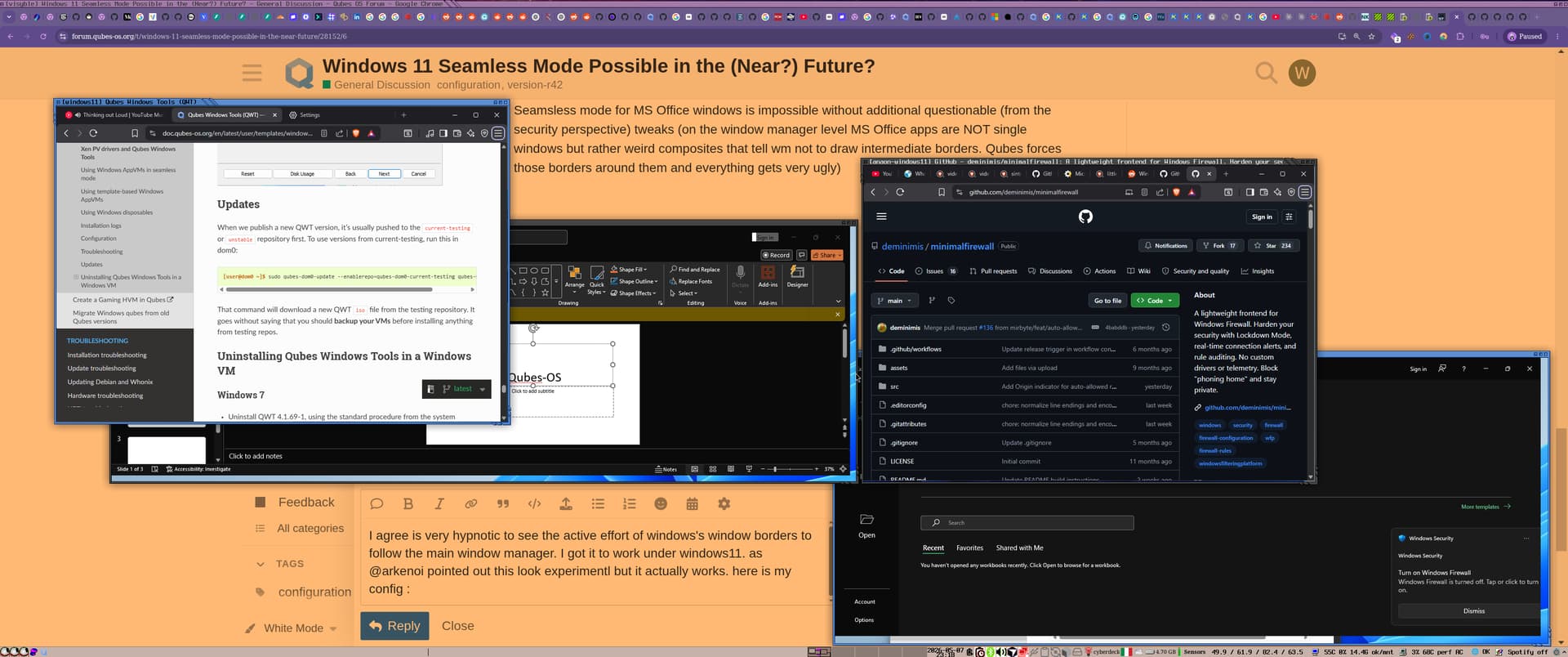
I agree is very hypnotic to see the active effort of windows’s window borders to follow the main window manager. I got it to work under windows11. as @arkenoi pointed out this look experimental but it actually works.
The base was a proper Windows 11 TemplateVM: I installed Windows 11 there first, installed Qubes Windows Tools in the template, enabled the usual private-disk/user-profile setup, and then based my normal AppVM on that template.
For the AppVM itself, I used:
qvm-features windows11 gui 1
qvm-features windows11 gui-emulated 1
qvm-features windows11 stubdom-qrexec 1
qvm-features windows11 rpc-clipboard 1
qvm-features windows11 audio-model ich6
qvm-features windows11 no-monitor-layout 1
What those do, in practice:
gui 1 enables the experimental Qubes GUI path for Windows.gui-emulated 1 keeps the emulated GUI/display path enabled too.stubdom-qrexec 1 enables qrexec support through the stubdomain, which helps normal Qubes integration features work in an HVM.rpc-clipboard 1 enables Qubes clipboard integration.audio-model ich6 selects the emulated audio device model.no-monitor-layout 1 prevents Qubes from trying to push monitor layout information into the guest.
Then, inside the Windows template, I set:
reg add "HKLM\SOFTWARE\Invisible Things Lab\Qubes Tools" /v SeamlessMode /t REG_DWORD /d 1 /f
reg add "HKLM\SOFTWARE\Invisible Things Lab\Qubes Tools\qga" /f
reg add "HKLM\SOFTWARE\Invisible Things Lab\Qubes Tools\qga" /v SeamlessMode /t REG_DWORD /d 1 /f
What those do:
HKLM\SOFTWARE\Invisible Things Lab\Qubes Tools\SeamlessMode=1 tells Qubes Windows Tools to enable seamless mode globally.HKLM\SOFTWARE\Invisible Things Lab\Qubes Tools\qga\SeamlessMode=1 enables seamless mode specifically for the Qubes GUI agent.- Creating the
qga key first is just to make sure the per-component setting exists before writing the value.
After shutting down the template and rebooting the AppVM, seamless mode started working for me. Launching apps from dom0 also worked with:
qvm-run -a windows11 "cmd /c start \"\" notepad.exe"
qvm-run -a windows11 "cmd /c start \"\" explorer.exe"
qvm-run -a windows11 "cmd /c start \"\" calc.exe"
In seamless mode, those windows can appear as individual windows integrated into the Qubes desktop instead of being stuck inside one big VM window.
here are 2 windows11 AppVMs running in seamless mode.