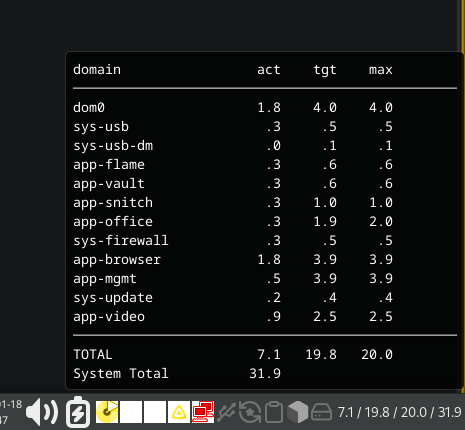
Since I was irritated by the qubes gui regarding the memory usage of its qubes as well as the outputs of xentop I had a look into the topic and ended up with qmemman and xenstore.
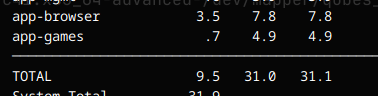
The widget displays the actual memory used by each domain as well as the dynamic targeted value for memory allocation by qmemman and the max value.
Since “new users can not upload attachments” - I put it on pastebin
(thanks and hate to Claude for creating it with me)
Edit: widget.tar.gz (1.1 KB)
5 Likes
@balder86 thanks!
Script from pastebin
#!/bin/bash
# Qubes Memory Monitor for XFCE Generic Monitor
# Displays memory allocation via xenstore paths

# Convert KB to GB with one decimal
kb_to_gb() {
    local kb=$1
    if [ -z "$kb" ] || [ "$kb" = "0" ]; then
        echo ".0"
    else
        local result=$(awk "BEGIN {printf \"%.1f\", $kb/1048576}")
        echo "$result" | sed 's/^0\./\./'
    fi
}

mb_to_gb() {
    local mb=$1
    if [ -z "$mb" ] || [ "$mb" = "0" ]; then
        echo ".0"
    else
        local result=$(awk "BEGIN {printf \"%.1f\", $mb/1024}")
        echo "$result" | sed 's/^0\./\./'
    fi
}

# Initialize totals
total_meminfo=0
total_target=0
total_static_max=0

# Build tooltip
tooltip=""

# Get all running domains including dom0
while read vm_name domid rest; do
    if [ -z "$vm_name" ] || [ -z "$domid" ]; then
        continue
    fi

    if [ "$domid" = "0" ]; then
        vm_name="dom0"
    fi

    # Read xenstore memory values
    meminfo_kb=$(xenstore-read /local/domain/$domid/memory/meminfo 2>/dev/null || echo "0")
    target_kb=$(xenstore-read /local/domain/$domid/memory/target 2>/dev/null || echo "0")
    static_max_kb=$(xenstore-read /local/domain/$domid/memory/static-max 2>/dev/null || echo "0")

    # Convert to GB
    meminfo_gb=$(kb_to_gb $meminfo_kb)
    target_gb=$(kb_to_gb $target_kb)
    static_max_gb=$(kb_to_gb $static_max_kb)

    # Add to totals (skip if values are 0)
    if [ "$meminfo_kb" != "0" ]; then
        total_meminfo=$((total_meminfo + meminfo_kb))
    fi
    if [ "$target_kb" != "0" ]; then
        total_target=$((total_target + target_kb))
    fi
    if [ "$static_max_kb" != "0" ]; then
        total_static_max=$((total_static_max + static_max_kb))
    fi

    # Add to tooltip with column alignment
    tooltip="${tooltip}$(printf '%-20s %5s  %5s  %5s' "$vm_name" "$meminfo_gb" "$target_gb" "$static_max_gb")\n"
done < <(xl list | tail -n +2)

# Get system total memory
system_total_mb=$(xl info | grep total_memory | awk '{print $3}')
system_total_gb=$(mb_to_gb $system_total_mb)

# Convert totals to GB
total_meminfo_gb=$(kb_to_gb $total_meminfo)
total_target_gb=$(kb_to_gb $total_target)
total_static_max_gb=$(kb_to_gb $total_static_max)

# Add header and footer to tooltip
header="<span font_desc='monospace'>"
header="${header}$(printf '%-20s %5s  %5s  %5s' 'domain' 'act' 'tgt' 'max')\n"
header="${header}$(printf '%s' '────────────────────────────────────────────────')\n"

footer="$(printf '%s' '────────────────────────────────────────────────')\n"
footer="${footer}$(printf '%-20s %5s  %5s  %5s' 'TOTAL' "$total_meminfo_gb" "$total_target_gb" "$total_static_max_gb")\n"
footer="${footer}$(printf '%-20s %5s' 'System Total' "$system_total_gb")"
footer="${footer}</span>"

tooltip="${header}${tooltip}${footer}"

# Output for genmon
echo "<txt> $total_meminfo_gb / $total_target_gb / $total_static_max_gb / $system_total_gb </txt>"
echo -e "<tool>$tooltip</tool>"
@balder86 Write how to create a widget for XFCE
@alimirjamali Hello. What command/script qui‑domains use for CPU monitoring? I will try to create a conky theme from this ram script and qui‑domains
I made a slight improvement and updated the attachment and pastebin link.
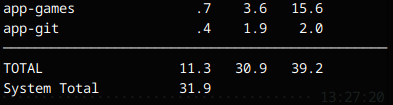
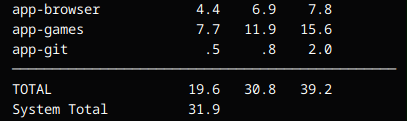
The old version would report the qmemman max value as max. But the real max is the one set by qubes
With the change the real max value of 16G gets reported. Showing off the over provisioning of the available memory
And if looking app-browser, the dynamic change of the target value from 7.8 → 6.9
2 Likes
newqube
January 21, 2026, 12:19pm
6
#!/bin/bash
# Qubes Memory Monitor for XFCE Generic Monitor
# Displays memory allocation via xenstore paths

# Convert KB to GB with one decimal
kb_to_gb() {
    local kb=$1
    if [ -z "$kb" ] || [ "$kb" = "0" ]; then
        echo ".0"
    else
        local result=$(awk "BEGIN {printf \"%.1f\", $kb/1048576}")
        echo "$result" | sed 's/^0\./\./'
    fi
}

mb_to_gb() {
    local mb=$1
    if [ -z "$mb" ] || [ "$mb" = "0" ]; then
        echo ".0"
    else
        local result=$(awk "BEGIN {printf \"%.1f\", $mb/1024}")
        echo "$result" | sed 's/^0\./\./'
    fi
}

# Initialize totals
total_act=0
total_tgt=0
total_max=0

# Build tooltip
tooltip=""

# Get all running domains including dom0
while read vm_name domid rest; do
    if [ -z "$vm_name" ] || [ -z "$domid" ]; then
        continue
    fi

    if [ "$domid" = "0" ]; then
        vm_name="dom0"
    fi

    # Read xenstore memory values
    tgt_kb=$(xenstore-read /local/domain/$domid/memory/target 2>/dev/null || echo "0")
    act_kb=$(xenstore-read /local/domain/$domid/memory/meminfo 2>/dev/null)
    static_max_kb=$(xenstore-read /local/domain/$domid/memory/static-max 2>/dev/null)
    hotplug_max_kb=$(xenstore-read /local/domain/$domid/memory/hotplug-max 2>/dev/null)
    act_kb="${act_kb:-${tgt_kb:-0}}"
    max_kb="${hotplug_max_kb:-${static_max_kb:-0}}"

    # Convert to GB
    act_gb=$(kb_to_gb $act_kb)
    tgt_gb=$(kb_to_gb $tgt_kb)
    max_gb=$(kb_to_gb $max_kb)

    # Add to totals (skip if values are 0)
    if [ "$act_kb" != "0" ]; then
        total_act=$((total_act + act_kb))
    fi
    if [ "$tgt_kb" != "0" ]; then
        total_tgt=$((total_tgt + tgt_kb))
    fi
    if [ "$max_kb" != "0" ]; then
        total_max=$((total_max + max_kb))
    fi

    # Add to tooltip with column alignment
    tooltip="${tooltip}$(printf '%-20s %5s  %5s  %5s' "$vm_name" "$act_gb" "$tgt_gb" "$max_gb")\n"
done < <(xl list | tail -n +2)

# Get system total memory
system_total_mb=$(xl info | grep total_memory | awk '{print $3}')
system_total_gb=$(mb_to_gb $system_total_mb)

# Convert totals to GB
total_act_gb=$(kb_to_gb $total_act)
total_tgt_gb=$(kb_to_gb $total_tgt)
total_max_gb=$(kb_to_gb $total_max)

# Add header and footer to tooltip
header="<span font_desc='monospace'>"
header="${header}$(printf '%-20s %5s  %5s  %5s' 'domain' 'act' 'tgt' 'max')\n"
header="${header}$(printf '%s' '────────────────────────────────────────────────')\n"

footer="$(printf '%s' '────────────────────────────────────────────────')\n"
footer="${footer}$(printf '%-20s %5s  %5s  %5s' 'TOTAL' "$total_act_gb" "$total_tgt_gb" "$total_max_gb")\n"
footer="${footer}$(printf '%-20s %5s' 'System Total' "$system_total_gb")"
footer="${footer}</span>"

tooltip="${header}${tooltip}${footer}"

# Output for genmon
echo "<txt> $total_act_gb / $total_tgt_gb / $total_max_gb / $system_total_gb </txt>"
echo -e "<tool>$tooltip</tool>"
1 Like