Why am I being told that Fedora-41-xfce is obsolete?

The updater is now telling me that the fedora-41-xfce template is obsolete and needs replacement. How can this be? Is this how its announced now? I see nothing in the News section.

By the gui route, Qubes Updater lists the current fedora-41-xfce template as ‘OBSOLETE’. It allows me to launch Qubes Template Manager, which shows an ‘upgradeable’ Fedora-41-xfce 4.2.0.202501300253 from January 30.

However, selecting the new January template and clicking “apply” doesn’t seem to actually do anything - it seems to immediately report 100% on a progress bar (nothing on this machine can be that quick, trust me…), then “refresh” just shows the same panel of options, with the January template still available for upgrade.

I am very careful with my updates. Why has it taken so long? This update/obsolescence seems a bit of a surprise since I’ve applied many other updates to fedora-41-xfce, but only in May am I getting news of an updated template from January… What’s going on? Has something else failed on my machine?

And if this new process doesn’t work, what should I be doing? The old manual updates described in the docs?

1 Like

In dom0, what is the output of qvm-features fedora-41-xfce

4 Likes
$ qvm-features fedora-41-xfce
default-menu-items                          xfce4-terminal.desktop thunar.desktop org.mozilla.firefox.desktop xfce-settings-manager.desktop
menu-items                                  xfce4-terminal.desktop org.mageia.dnfdragora.desktop xfce-settings-manager.desktop
netvm-menu-items                            xfce4-terminal.desktop
selinux                                     1
qrexec                                      1
os                                          Linux
supported-service.qubes-update-check        1
supported-service.gui-agent-clipboard-wipe  1
supported-service.qubes-network             1
supported-service.updates-proxy-setup       1
supported-service.network-manager           1
supported-service.blueman                   1
supported-service.guivm-gui-agent           1
supported-service.meminfo-writer            1
supported-service.pipewire                  1
supported-service.qubes-updates-proxy       1
supported-service.clocksync                 1
supported-service.modem-manager             1
supported-service.qubes-firewall            1
supported-feature.keyboard-layout           1
supported-feature.memory-hotplug            1
supported-rpc.qubes.SuspendPreAll           1
supported-rpc.qubes.SuspendPostAll          1
supported-rpc.qubes.VMExecGUI               1
supported-rpc.qubes.ShowInTerminal          1
supported-rpc.qubes.OpenInVM                1
supported-rpc.qubes.PdfConvert              1
supported-rpc.qubes.SuspendPost             1
supported-rpc.qubes.GuiVMSession            1
supported-rpc.qubes.GetAppmenus             1
supported-rpc.qubes.SelectDirectory         1
supported-rpc.qubes.GetImageRGBA            1
supported-rpc.qubes.SetMonitorLayout        1
supported-rpc.qubes.Filecopy                1
supported-rpc.qubes.DetachPciDevice         1
supported-rpc.qubes.TemplateSearch          1
supported-rpc.qubes.GpgImportKey            1
supported-rpc.qubes.SuspendPre              1
supported-rpc.qubes.Backup                  1
supported-rpc.qubes.Restore                 1
supported-rpc.qubes.TemplateDownload        1
supported-rpc.qubes.SetDateTime             1
supported-rpc.qubes.VMShell                 1
supported-rpc.qubes.USBAttach               1
supported-rpc.qubes.Gpg                     1
supported-rpc.qubes.VMRootShell             1
supported-rpc.qubes.SyncAppMenus            1
supported-rpc.qubes.InstallUpdatesGUI       1
supported-rpc.qubes.VMExec                  1
supported-rpc.qubes.USBDetach               1
supported-rpc.qubes.WaitForSession          1
supported-rpc.qubes.PostInstall             1
supported-rpc.qubes.GetDate                 1
supported-rpc.qubes.USB                     1
supported-rpc.qubes.UpdateAppMenusFor       1
supported-rpc.qubes.RemoveAppMenusFor       1
supported-rpc.qubes.RegisterBackupLocation  1
supported-rpc.qubes.StartApp                1
supported-rpc.qubes.SaltLinuxVM             1
supported-rpc.qubes.ResizeDisk              1
supported-rpc.qubes.RestoreById             1
supported-rpc.qubes.SelectFile              1
supported-rpc.qubes.OpenURL                 1
os-distribution                             fedora
os-version                                  40
os-eol                                      2025-05-13
qubes-agent-version                         4.2
gui                                         1
qubes-firewall                              1
vmexec                                      1
template-name                               fedora-41-xfce
template-epoch                              0
template-version                            4.2.0
template-release                            202409070311
template-reponame                           qubes-templates-itl
template-buildtime                          2024-09-07 04:49:44
template-installtime                        2024-10-08 07:08:47
template-license                            GPLv3+
template-url                                http://www.qubes-os.org
template-summary                            Qubes OS template for fedora-40-xfce
template-description                        Qubes OS template for fedora-40-xfce.
updates-available                           1
last-updates-check                          2025-05-16 09:30:20
last-update                                 2025-05-09 17:02:19
3 Likes

Seems the template is not actually fedora-41 according to dom0. What is the output of sudo cat /etc/fedora-release within “fedora-41-xfce”

3 Likes

Huh. Says its Fedora release 40.

I must have downloaded the wrong template and renamed it as 41 last time I tried to update the templates by the instructions. That sounds like exactly the kind of mistake I would make.

And it explains why its obsolete now.

Would very much like to have the gui replacement work, then.

Thanks

2 Likes

Then try the in-place upgrade again and see if it completes successfully this time.

1 Like

out of curiosity/stubbornness, I’m trying the gui Template Manager again - it seems to be downloading now, fingers crossed.

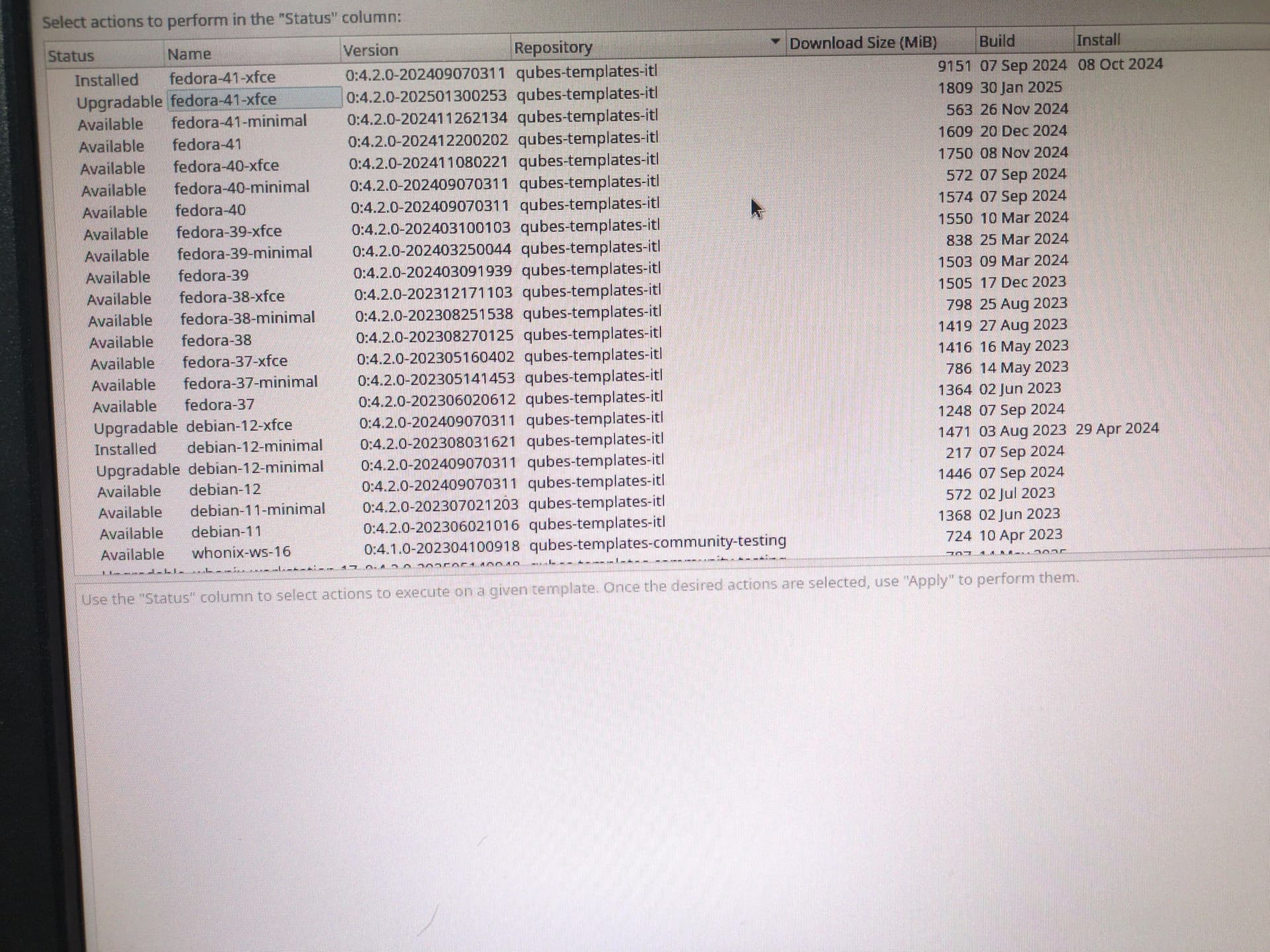
I don’t understand the names its using, and how it distinguishes between my erroneous 41 (‘40-41’) and the real. See the image below - is the 2024 fedora-41-xfce listed as “installed” actually my ‘erroneous-40-41’, i.e. really fedora-40-xfce, OR a previous version of fedora-41-xfce that is now obsolete? (I note that the version number of fedora-40-xfce is different).

Once it downloads, it will be interesting to see how it installs over something that it shares a name with.

Also, what is “upgradeable”? For example, debian-12-minimal is listed in two separate lines as “Installed” and “Upgradable”, but it doesn’t show that in the Update Manager.

2 Likes

Weirdness: Template Manager has installed a template called fedora-41-xfce with the January serial number, but its now listed as coming from the qubes-templates-itl-testing repository. It didn’t say ‘testing’ before!

However, sudo cat /etc/fedora-release returns 41, so that’s reassuring.
1 Like

Note also, download took between 3-4 hours.

1 Like

I upgraded my templates from F40 to F41, alltogether succesfully but now updater says “OBSOLETE” on these…

cat /etc/fedora-release says 41 but when I run qvm-features on this template I get os-version 40.
Do I have a problem now?

Edit:

In my example I did a:

qvm-features fedora-41-xfce-veracrypt template-name fedora-41-xfce-veracrypt

Would this be correct instead:

qvm-features fedora-41-xfce-veracrypt template-name fedora-41-xfce

?

1 Like

Is there any solution for the “obsolete” problem?

Thank you for help…

1 Like

There is a dnf hook that updates the version values for the template, but it only runs when new packages are updated.

You can try running the following command in dom0 to do it manually:

qvm-run -p -u root --service fedora-41-xfce-veracrypt qubes.PostInstall
2 Likes

Thank you very much, tested on one cube and it updated the os-version to 41!

Now my last question is if the template-name is the one of the base template?

So if I copied fedora-41-xfce-veracrypt from fedora-41-xfce should template-name be “fedora-41-xfce”?

1 Like

This is correct. template-name keeps the original value.

2 Likes

Thanks, you saved me!

1 Like