Weird notification -- Denied: whonix.newstatus

I’m new to this and trying to learn the ropes so bear with me.

I’ve gotten whonix 15 installed and connecting to tor but there are a few instances where I will get a notification in dom0 saying something along the lines of “Denied: whonix.newstatus from sys-whonix to sys-whonix”

This happens in the following situations:

  • Networking a workstation through a gateway with a name other than sys-whonix
  • shutting down the workstation
  • shutting down the gateway

Again I have no issue connecting to the Tor network but I’m not sure what this message means or means for the anonymity of whonix. Any help appreciated!

Hi there. This question may be better asked on the Whonix forum:

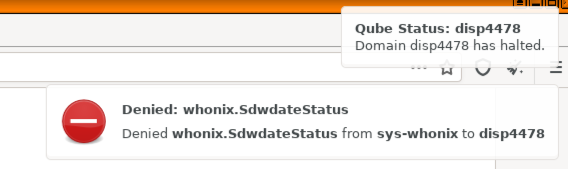
I have what it’s look like an equivalent problem with the following error on Qubes 4.1

 denied whonix.Sdwdate status
 denied whonix.Sdwdate status from sys-whnix to disp4478

Screenshot_2021-06-29_04-57-10

Maybe it’s related too ?

Sounds similar to [Qubes] Ignore qrexec to self during vm shutdown by icequbes1 · Pull Request #3 · Whonix/sdwdate-gui · GitHub. Perhaps that fix was incomplete and is a starter for additional investigation.

Same issue here. The tor works but the notification is annoying.

This might be caused by your VM “disp4478” not being tagged as anon-vm.

/etc/qubes-rpc/policy/whonix.SdwdateStatus in dom0 basically states that if tag:anon-vm is not connected on the other end it will be denied.

To add tag to your VM, you can use qvm-tags commands:
[@dom0]$ qvm-tags VMNAME add anon-vm

Also before you add, you might want to check the tag list of a VM:
[@dom0]$ qvm-tags VMNAME list

Indeed some of my whonix dvms are not marked as anon-vm. How do I fix that?

I’ve also be getting some of these for a while now.

@deeplow @arkenoi

onion:
http://forums.dds6qkxpwdeubwucdiaord2xgbbeyds25rbsgr73tbfpqpt4a6vjwsyd.onion/t/qubes-os-4-1-denied-whonix-newstatus-dom0-permission/12954

I experience this issue in Qubes 4.2 as well with a Kicksecure App-VM, the solution [@dom0]$ qvm-tags VMNAME add anon-vm posted above solved the problem.