Umbrell OS on a qube

I have been running OS for several months, I don’t really know how qubesOS works but I think it will be managed enough to be able to follow directions to install-run umbrell OS. If this is not the most appropriate place to raise this question I will understand, just direct to the place where it is most appropriate to raise it.

I use the latest version 4.3.0

I want to use Umbrell OS as an operating system in a qube, but I’m not able to do it the same way other operating systems are installed.

I downloaded the ISO image of Umbrell OS, verified its provenance, and made sure that the ISO has not been tampered with. I then added it to the path home/user/Documents/umbrelo-amd64-usb-installer.iso in the default qube “Vault”.

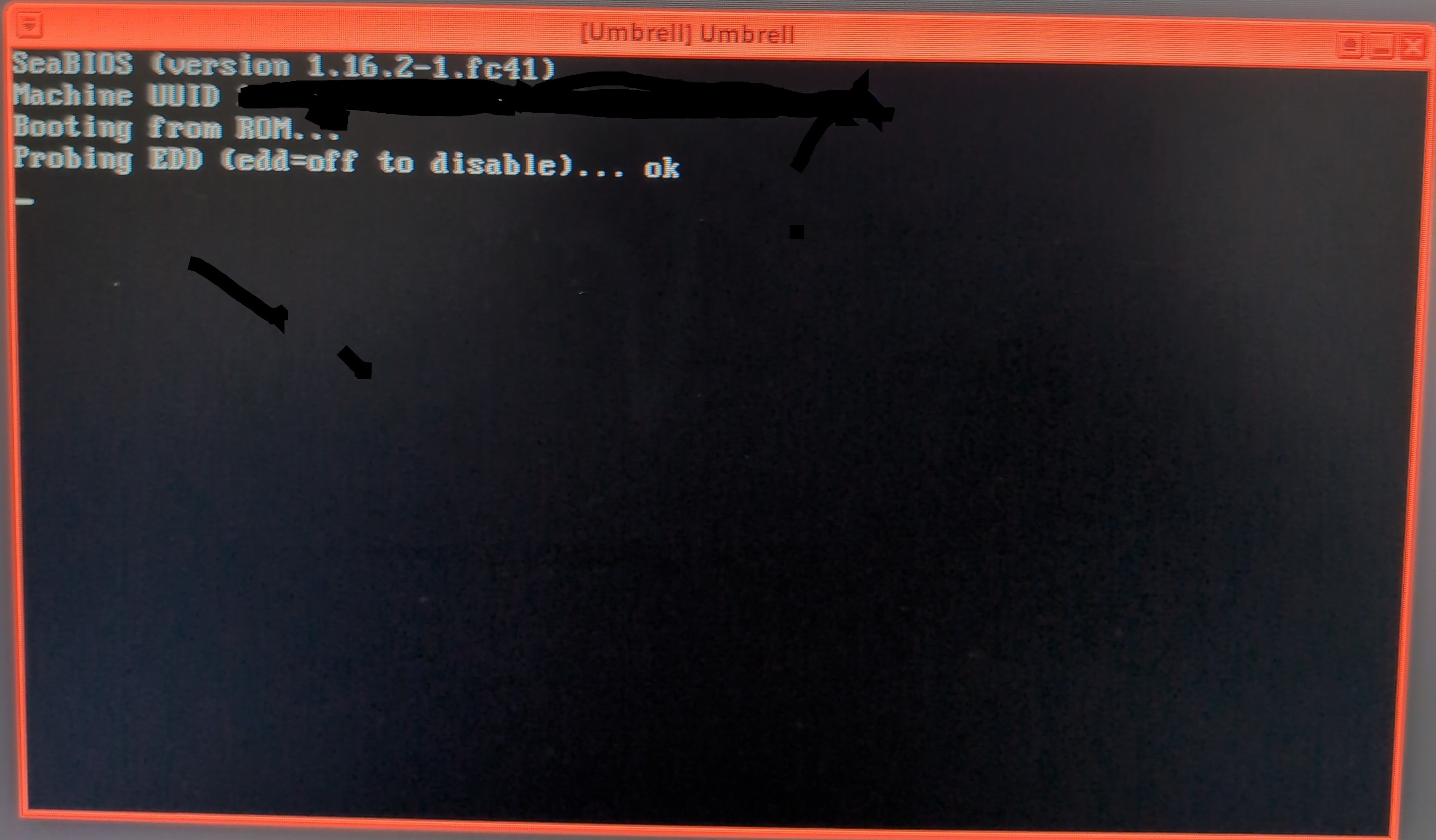
I created a qube “Standalone”, without a Template, and upon creation the window appeared saying “Boot Umbrell from device.” Here I entered the path where I previously stored the ISO: home/user/Documents/umbrelo-amd64-usb-installer.iso and marked the qube “Vault”. When pressing “OK” the newly created qube “Umbrell” automatically boots, but it displays the image text.

Image 01

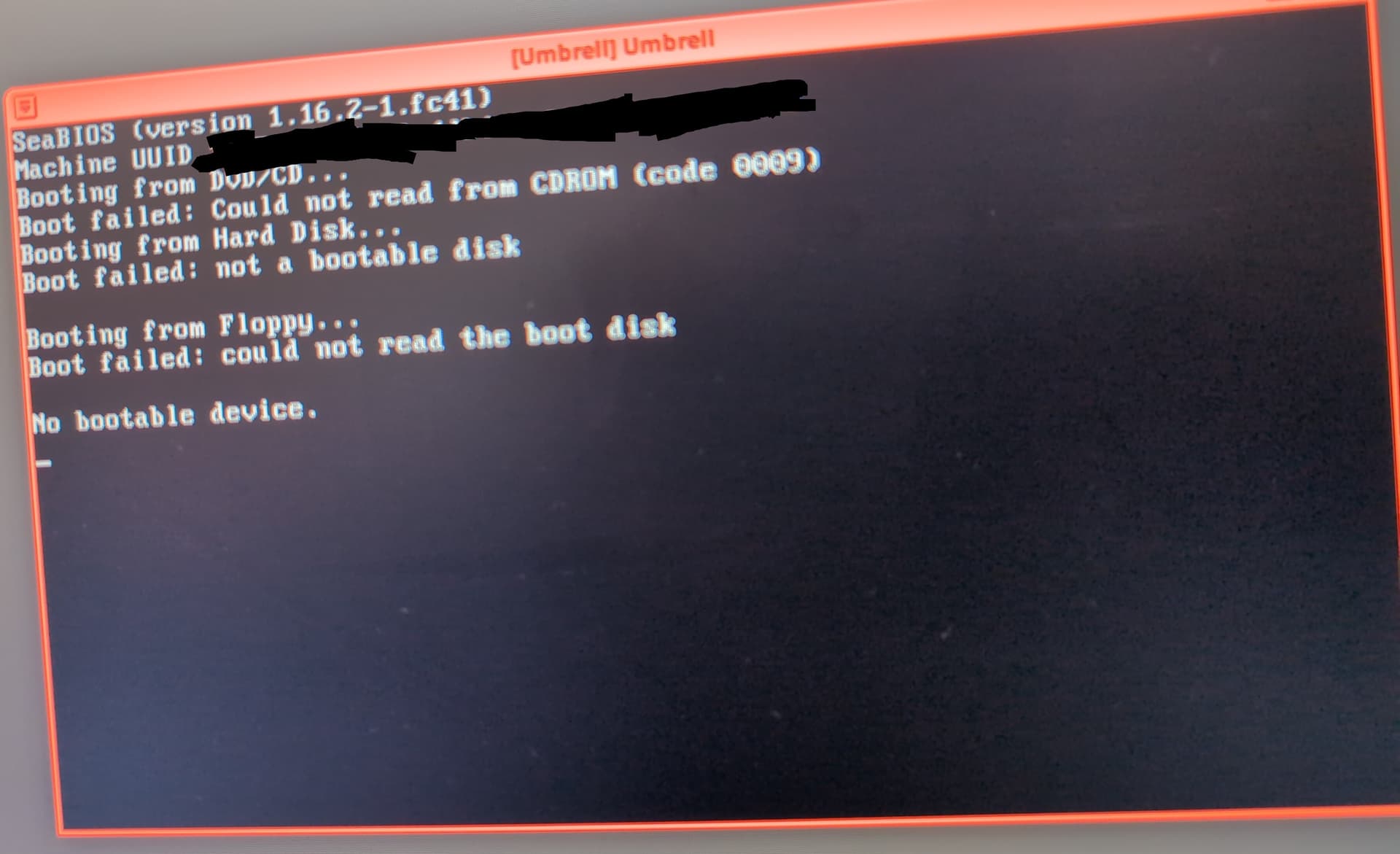
I tried changing the kernel from “Provided by qube” to “6.12.64-1.fc41 (current)” and now this appears for a moment before the qube shuts down on its own.

Image 02

I have tried all kernel versions, but it still does not work. I also tried changing the mode from “HVM” to “PVH”, and the qube only starts and then shuts down in less than 3 seconds. When choosing “Standalone” at creation time, it automatically sets to “HVM”.

The ISO works correctly because when I try booting the ISO on my PC as if configuring any other operating system, the Umbrell ISO boots normally. I tried creating a qube in the same way (Standalone, /home/user/Documents/umbrelo-amd64-usb-installer.iso qube “Vault”) with the Debian 13 trixie ISO and it works correctly. I don’t know what else to do.

Image 01
"
SeaBIOS (version 1.16.2-1.fc41)
Booting from DVD/CD
Bolt failed: Could not read from CDROM (codd 0009)
Booting from hard disk…
Booting failed: not a bootable disk

Booting from Floppy…
Booting failed: could not the bolt disk

Not booteable device.
"

Image 02
"
SeaBIOS (version 1.16.2-1.fc41)
Booting from ROM…
Probing EDD (edad=off to disable)… ok
"

Thank you for reading me.

the “Boot Umbrell from device.” direction was the right way on a Standalone qube and probably should work in the end. Problems may be, that you’ve choosen less of RAM under it’s settings. I would go for 4096 (min) and 8192 (max) and try again to boot from that iso in Vault… ‘HVM’ also is the usual choice.
You later can turn down the RAM counts if that’s needed for your device. Any other place where you can get such an iso.file?

1 Like

It would be helpful if you could at least summarise the content of your
images. This makes your post searchable by other users who may face
similar issues, and available to users who cannot see the images.

It’s unlikely that you would want to use a Qubes kernel here - keep the
setting as provided by qube.

I never presume to speak for the Qubes team.
When I comment in the Forum I speak for myself.

1 Like

I have tried to put a value of 8192 mb of RAM in the maximum memory and 4096 in the initial memory I have even tried to put more RAM than that and it still does not work. I know that the iso works perfectly since I have tried to start the iso in a pc in the traditional way (USB and F8) and if the OS umbell configuration starts so I have ruled out a failure in the iso. I also downloaded the image umbrelos-amd64.img and it still does not start.

“it still does not work” is not helpful.
Not summarising the content of your images is not helpful.
Help us to help you by writing some detail about what has not worked for
you.

I never presume to speak for the Qubes team.
When I comment in the Forum I speak for myself.

1 Like

I have edited the first message and now the content of the images transcribed in text appears.
When you add 4096 mb of start memory and 8192 mb to the RAM, almost the same text of the “image 01” appears, but with 2 less lines, this appears:
"
SeaBIOS (version 1.16.2-1.fc41)
Booting from hard disk…
Booting failed: not a bootable disk

Booting from Floppy…
Booting failed: could not the bolt disk

Not bootable device.
"

On the other hand I can not find another side to lower the iso, I have downloaded it from the official umbrell github.

Here is the configuration of the qube:

-Basic
“Shut down when idle (unavalable: qubes-app-shutdown-idle missing a the qube)
Installed by RPM: No
“System storage max size” = 50 GiB
*Private storage maz size” = 50 GiB

-Advanced
Initial memory 4000 MiB
Maximum memory 8000 MiB
“Include in memory compensation” disabled

Other
“Run in debugging mode” Off"
“Prohibit start” disabled
“Provaides network” disabled
“Available template” disabled
Preload available=0
Default available template=(default-dvm)
Boot qube from DISC by block device=/route/where/I have/the/iso in “Vault”
kernel: (provide by qube)
Boot measures: default [no other option than “default”] appears
Virtualization = HVM
Firewall intact
Devices: intact
Applications: intact
Services: intact

Run qvm-features YOUR_QUBE uefi 1 in dom0
replacing “YOUR_QUBE” with the name of the standalone.

Revert the change you made to kernel, and
ensure you have adequate space on system storage.

retry install,making sure you install to xvda

I never presume to speak for the Qubes team.
When I comment in the Forum I speak for myself.

2 Likes

Oh if he started, I really appreciate it, I was looking at many places before I came to ask here.
I leave a note for the future readers:
I ran “qvm-features YOUR_QUBE uefi 1” in dom0 and start the qube, this started with a SHELL terminal, I just turned off the qube, I went to settings, I clicked on “Boot qube from DISC by block device” in the “Advanced” section and re-entered the /route/where/I have/the/iso in “Vault”

Glad it worked now… had thoughts the OS probably couldn’t be installed, because it could be build for ARM processors only.

Thanks for this topic… Very interesting by finding the Umbrel Pro | Home Cloud with up to 32TB storage device. Maybe the next level for me after the Synology era.