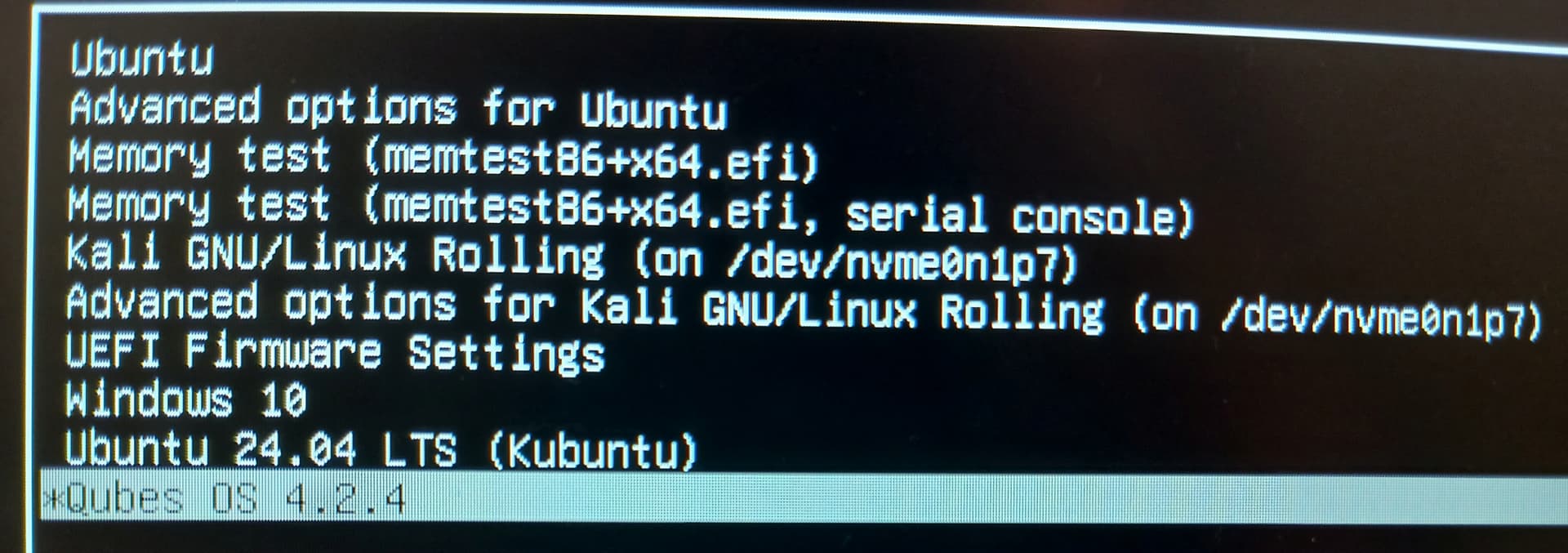
Multiboot on my HP ZBook Fury 15 G8 workstation
1 Like
Hello,
I am wondering how did you install them like the picture above. Could you give out the details for this type of installation so the Community will know and understand the process?
– Howard Chen
1 Like
Chatgpt and gemini a.i. helped me alot, here’s my rough notes and instructions i saved for the multiboot:
I had to put kubuntu, windows and kali on ventoy.
Install qubes last, you will have to install/load qubes onto the multiboot using rufus.
 Multiboot Setup Guide (Windows + Ubuntu/Kubuntu + Kali + Qubes OS)
1. Preparing the Drive
-
Started with a 1TB NVMe drive.
-
Created partitions:
-
Windows 10 (already installed).
-
Ubuntu/Kubuntu (main Linux base).
-
Kali Linux (for pentesting).
-
Qubes OS (separate 250GB partition).
-
-
Ensured there was an existing EFI System Partition (ESP) on /dev/nvme0n1p2.
2. Installing Each OS
 Windows
-
Pre-installed in its own partition.
-
Provided the original EFI entry at \EFI\Microsoft\Boot\bootmgfw.efi.
 Ubuntu/Kubuntu (24.04 LTS)
-
Installed alongside Windows.
-
Chose manual partitioning to select its root partition and the existing EFI partition.
-
This installation gave us the primary GRUB bootloader (\EFI\ubuntu\grubx64.efi).
 Kali Linux
-
Installed into its own 250GB partition.
-
During installation, pointed the bootloader to the existing EFI partition instead of overwriting MBR.
-
Result: created \EFI\kali\grubx64.efi.
 Qubes OS
-
Installed into the last 250GB partition.
-
Initially, it overwrote GRUB and took over the boot process (\EFI\qubes\grubx64.efi).
-
We later fixed this (see below).
3. Fixing Bootloader After Qubes Took Over
Qubes overwrote GRUB, so the machine always booted into its boot menu instead of showing all OS options.
Steps Taken:
- Booted into a Kubuntu live USB.
Mounted the Kubuntu root and EFI partitions:
sudo mount /dev/nvme0n1p6 /mnt
sudo mount /dev/nvme0n1p2 /mnt/boot/efi
Bound system dirs and entered chroot:
for i in /dev /dev/pts /proc /sys /run; do
sudo mount --bind $i /mnt$i
done
sudo chroot /mnt
Ensured os-prober was enabled:
sudo nano /etc/default/grub
Confirmed GRUB_DISABLE_OS_PROBER=false
sudo update-grub
- Verified that Windows, Ubuntu, Kali, Qubes all appeared in GRUB.
4. Cleaning Up EFI Entries
We had duplicate Ubuntu entries in the firmware menu.
Steps Taken:
Listed EFI entries:
sudo efibootmgr
- Found two pointing to \EFI\ubuntu\grubx64.efi.
Deleted the unnecessary one:
sudo efibootmgr -b 0000 -B
Renamed the remaining one:
sudo efibootmgr -b 0007 -L “Kubuntu 24.04 LTS”
Adjusted boot order so Kubuntu’s GRUB loads first:
sudo efibootmgr -o 0000,0006,0003,0004,…
5. Final Boot Flow
-
On power-on:
-
Kubuntu GRUB loads first.
-
GRUB menu shows:
-
Kubuntu 24.04 LTS
-
Windows Boot Manager
-
Kali Linux
-
Qubes OS
-
-
-
F9 (firmware boot menu) still works as a backup.
 Result
You now have a stable 4-way multiboot setup:
-
Windows 10 for general use.
-
Kubuntu 24.04 LTS as the main Linux OS and GRUB manager.
-
Kali Linux for pentesting.
-
Qubes OS for security-focused compartmentalization.
For having >2 multiboot OSes, I heavily recommend The rEFInd Boot Manager, it really simplifies dealing with GRUB (as you don’t have to deal with it almost at all  )
)
1 Like
i have no idea “The rEFInd Boot Manager” existed, thanks!
You’re nuts, I love it! 
Add an intel build of MacOS and Android x86 on there too to cover all ecosystems!
1 Like
Android x86? great idea! i currently use bluestack on windows 10.
I see no benefits of using macOS, i’ve never been a user of Mac/apple or iphones.
Cool! but what to point of such setup?
- QubesOS - hypervisor type-1 OS, it can run any of those OS’s.
- Windows 10 is near to EOL, unless you use LTSC version of it.
- Kali linux for pentesting better practice to run it as named dispossible qube inside QubesOS to prevent malware spreading across your clients via your device.
- Ubuntu isn’t work well in Qubes, but Debian isn’t much better choice from security perspective?!
3 Likes
“but whats the point of such setup?”
For practice and in case there are any issues with running any of these in a VM, sometimes there are driver issues when using any of these OS’s in a VM,etc.