I am currently stuck in a situation where two independent but conflicting constraints leave me without a clear upgrade path, and I would appreciate advice from users or developers who might have encountered something similar.
Background:
Whonix 17 has officially reached end of security support and all users are strongly encouraged to migrate to Whonix 18. I fully understand and agree with this recommendation.
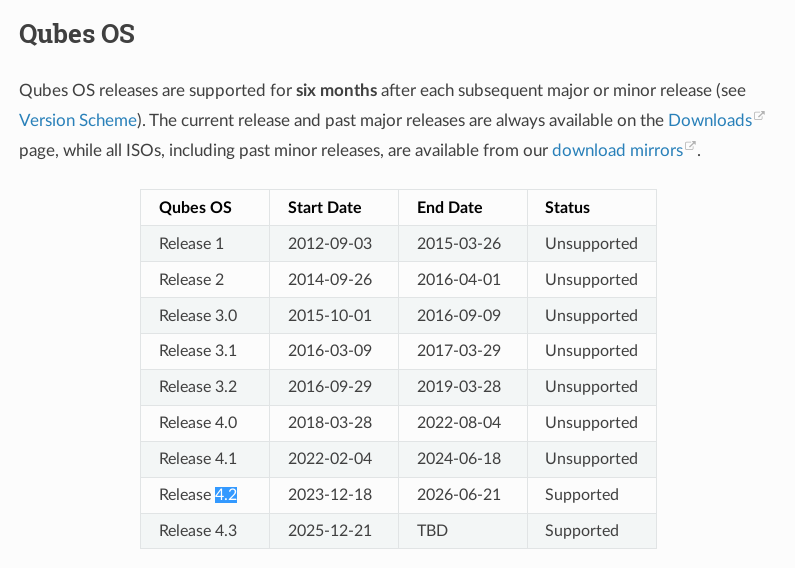
However, Whonix 18 templates are only available starting with Qubes OS 4.3. On Qubes OS 4.2, Whonix 18 cannot be installed.
The problem is that upgrading to Qubes 4.3 is currently not feasible on my system due to kernel-related issues.
Kernel constraint:
On my hardware, kernels newer than 6.6 cause reproducible and serious problems under Qubes:
Kernels above 6.6 (for example 6.12.x) lead to system instability.
Issues include unreliable VM behavior and, in some cases, boot or runtime problems that make the system unsuitable for daily or security-relevant use.
Kernel 6.6 is the last version that is stable and fully usable on this machine.
Because of this, I intentionally avoid kernel updates beyond 6.6, even if they are officially provided.
As far as I understand, Qubes 4.3 relies on newer kernel versions and does not support staying on 6.6 long-term, which effectively blocks the upgrade path for me.
Resulting dilemma:
Staying on Qubes 4.2 means staying on Whonix 17, which is now deprecated and no longer receives security updates.
Upgrading to Qubes 4.3 would allow Whonix 18, but requires kernel versions that are not usable on my hardware.
There is currently no supported combination that gives me both a secure Whonix version and a stable kernel.
My questions:
Is there any supported or semi-supported way to run Whonix 18 on Qubes 4.2?
Is it realistic to run Qubes 4.3 while pinning or otherwise constraining the kernel to 6.6?
Are there known workarounds, alternative kernel branches, or long-term kernel strategies for cases like this?
Or is the only realistic option to accept running a deprecated Whonix version until the hardware is replaced?
I am not looking for unsafe hacks, but for a clear understanding of what the least-bad option is in this situation.
Thanks in advance for any guidance or shared experience.
I’d be inclined to believe running an outdated Qubes version is a tremendous security risk, and would focus all resources on finding a way to upgrade to 4.3
In the meantime, I’ve found a workaround. In addition to the NVIDIA GPU (RTX 4060), I can use the onboard graphics via the Intel CPU. I hadn’t thought of that at all before.
So I “hide” the NVIDIA GPU during the initial installation of Qubes 4.3 by manually modifying the GRUB boot parameters and adding:
You could remove it entirely if you do not use it. I’m not sure qubes os is able to manage it correctly, it might be using a lot of electricity for nothing.
I didn’t read properly either and unfortunately thought I had to upgrade and did just that. My impression is that Qubes 4.3 hasn’t been tested enough by a diverse crowd on different hardware yet based on multiple issues multiple users are experiencing, including myself. I would have not upgraded, but now I would be throwing away around 24 hours of work if I went back.
I hope the system is now stable and functional enough for every day work until updates fix reported issues.
So why is this happening when I try and update my whonix qube?
Updating whonix-gateway-17
Refreshing package info
Refreshing available packages.
Fail to refresh InRelease: tor+https://deb.whonix.org bookworm InRelease from tor+https://deb.whonix.org/dists/bookworm/InRelease
Fail to refresh InRelease: Index of /r4.2/vm/ bookworm InRelease from https://deb.qubes-os.org/r4.2/vm/dists/bookworm/InRelease
Fail to refresh InRelease: tor+https://deb.kicksecure.com bookworm InRelease from gpgv:/var/lib/apt/lists/partial/deb.kicksecure.com_dists_bookworm_InRelease
Fail to refresh InRelease: tor+https://deb.whonix.org bookworm InRelease from gpgv:/var/lib/apt/lists/partial/deb.whonix.org_dists_bookworm_InRelease
Refreshed.
W:An error occurred during the signature verification. The repository is not updated and the previous index files will be used. GPG error: tor+https://deb.kicksecure.com bookworm InRelease: The following signatures were invalid: EXPKEYSIG CB8D50BB77BB3C48 Patrick Schleizer adrelanos@kicksecure.com, W:An error occurred during the signature verification. The repository is not updated and the previous index files will be used. GPG error: tor+https://deb.whonix.org bookworm InRelease: The following signatures were invalid: EXPKEYSIG CB8D50BB77BB3C48 Patrick Schleizer adrelanos@kicksecure.com, E:Failed to fetch tor+https://deb.kicksecure.com/dists/bookworm/InRelease The following signatures were invalid: EXPKEYSIG CB8D50BB77BB3C48 Patrick Schleizer adrelanos@kicksecure.com, E:Failed to fetch tor+https://deb.whonix.org/dists/bookworm/InRelease The following signatures were invalid: EXPKEYSIG CB8D50BB77BB3C48 Patrick Schleizer adrelanos@kicksecure.com, E:Some index files failed to download. They have been ignored, or old ones used instead.
Hit:1 tor+https://deb.debian.org/debian bookworm InRelease
Hit:2 tor+https://fasttrack.debian.net/debian-fasttrack bookworm-fasttrack InRelease
Hit:3 Index of /r4.2/vm/ bookworm InRelease
Get:4 tor+https://deb.whonix.org bookworm InRelease [61.2 kB]
Get:5 tor+https://deb.kicksecure.com bookworm InRelease [62.0 kB]
Hit:6 tor+https://deb.debian.org/debian bookworm-updates InRelease
Hit:7 tor+https://fasttrack.debian.net/debian-fasttrack bookworm-backports-staging InRelease
Err:4 tor+https://deb.whonix.org bookworm InRelease
The following signatures were invalid: EXPKEYSIG CB8D50BB77BB3C48 Patrick Schleizer adrelanos@kicksecure.com
Hit:8 tor+https://deb.debian.org/debian-security bookworm-security InRelease
Err:5 tor+https://deb.kicksecure.com bookworm InRelease
The following signatures were invalid: EXPKEYSIG CB8D50BB77BB3C48 Patrick Schleizer adrelanos@kicksecure.com
Hit:9 tor+https://deb.debian.org/debian bookworm-backports InRelease
Reading package lists…
W: An error occurred during the signature verification. The repository is not updated and the previous index files will be used. GPG error: tor+https://deb.whonix.org bookworm InRelease: The following signatures were invalid: EXPKEYSIG CB8D50BB77BB3C48 Patrick Schleizer adrelanos@kicksecure.com
W: An error occurred during the signature verification. The repository is not updated and the previous index files will be used. GPG error: tor+https://deb.kicksecure.com bookworm InRelease: The following signatures were invalid: EXPKEYSIG CB8D50BB77BB3C48 Patrick Schleizer adrelanos@kicksecure.com
E: Failed to fetch tor+https://deb.kicksecure.com/dists/bookworm/InRelease The following signatures were invalid: EXPKEYSIG CB8D50BB77BB3C48 Patrick Schleizer adrelanos@kicksecure.com
E: Failed to fetch tor+https://deb.whonix.org/dists/bookworm/InRelease The following signatures were invalid: EXPKEYSIG CB8D50BB77BB3C48 Patrick Schleizer adrelanos@kicksecure.com
E: Some index files failed to download. They have been ignored, or old ones used instead.
Verify it (fingerprint 916B 8D99 C38E AF5E 8ADC 7A2A 8D66 066A 2EEA CCDA) and then place it in /usr/share/keyrings/derivative.asc in your template or your Standalone.