GitHub still shows the old version???
2 Likes
ATM it does not. But it will eventually. There are actually TWO update mechanisms: one is DISM-derived (fast, granular but incomplete) and fallback WU-native (gated both to update process and time window to prevent other applications from seeing the proxy, but for whatever yet undiagnosed reason network transfers are painfully slow). The second one process gate could be made more permissive and include other updaters.
I tested this version using Windows-11 25H2. So far, not too successful:
- On the first boot after the install, the inactive black window reappeared, but after about half a minute, applications could be started from the Qubes menu. On the second and subsequent boots, this window no longer appeared.
- The Windows keypad key is now deactivated. Neither the Windows nor the Open-Shell menu can be used at all.
- Trying to deactivate the IDD driver did not work, neither from the command line nor from
qrexec. (On the latter, I am not too sure - I may have misspelled something in theqvm-runcommand.) - When giving the command
install.cm /iddoff, Windows complained about not being elevated, although I am running from an administrator account, and the aborted with the following message:
\~\~\~
C:\Users\Weck>c:\QWT-NG\install.cmd /iddoff
Not elevated - requesting administrator rights…
Start-Process : Dieser Befehl kann aufgrund des folgenden Fehlers nicht ausgeführt werden: Das System kann die
angegebene Datei nicht finden.
In Zeile:1 Zeichen:1
- Start-Process -FilePath ‘C:\iddoff’ -ArgumentList ‘/iddoff’ -Verb Run …
  + CategoryInfo          : InvalidOperation: (:) [Start-Process], InvalidOperationException
  + FullyQualifiedErrorId : InvalidOperationException,Microsoft.PowerShell.Commands.StartProcessCommand
There is qvm-feature to enable the menu back. will check.
both are my bugs, sorry.
win key is blocked by design in seamless mode. there is qvm-feature to turn it back: qvm-features <vm> service.enableWinKey 1, then restart the qube. open-shell works after that. it was not documented anywhere, my fault.
/iddoff did not run at all. our installer relaunch under UAC builds broken path (C:\iddoff), so nothing happens. for now run it from already elevated cmd, that path works. same bug was behind your D:\idd in post 35, i said it was user error, it was not. sorry. all my rigs run with UAC off, so this branch never executes here, that is why it survived three releases.
first boot black window, still no idea. if it happens again i need Q:\Qubes Logs\gui-agent-*.log from that boot, it can be pulled over qrexec without display.
2 Likes
After enabling the Windows key, both the Windows and the OpenShell menus are working. Open Shell looks like that:
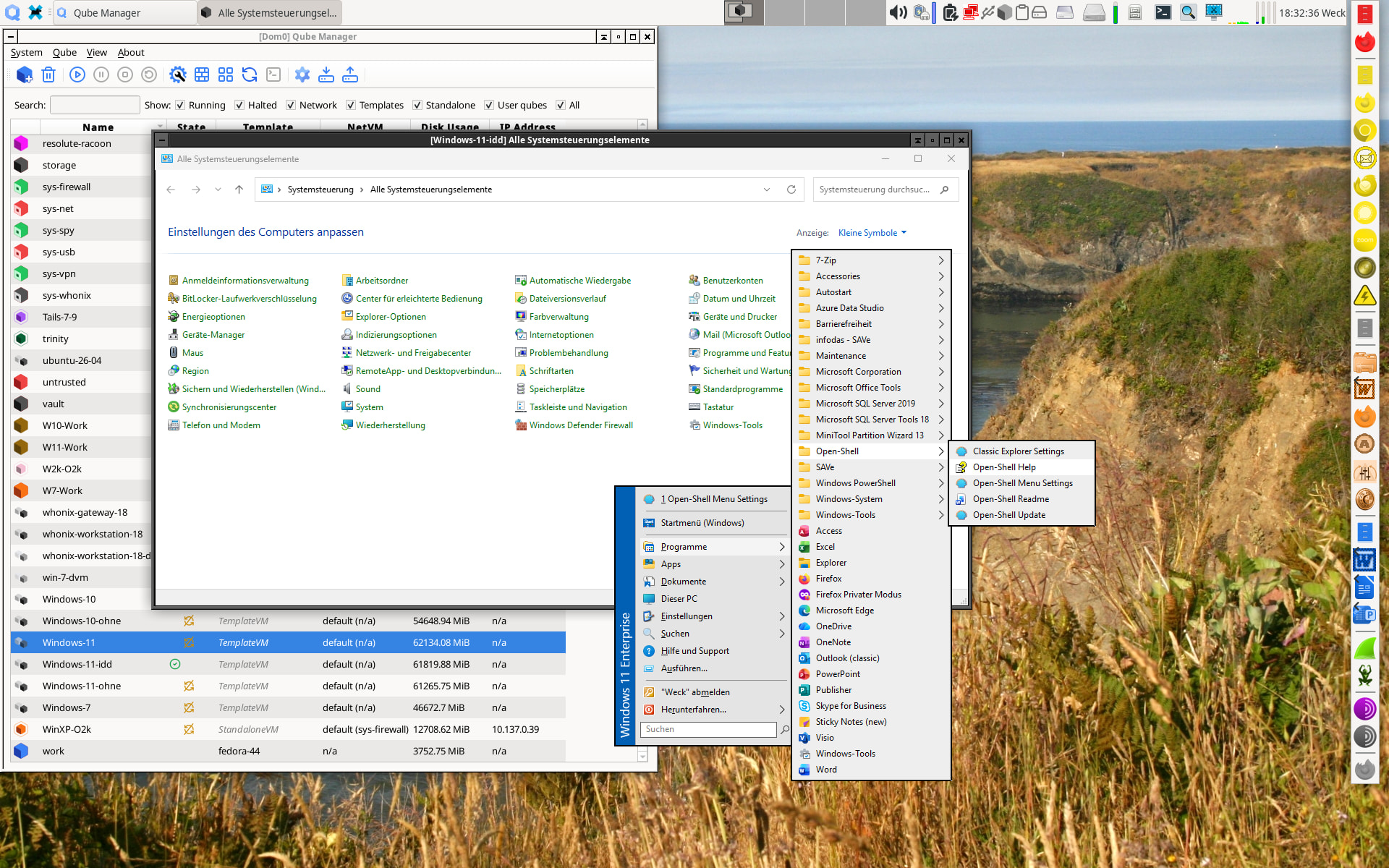
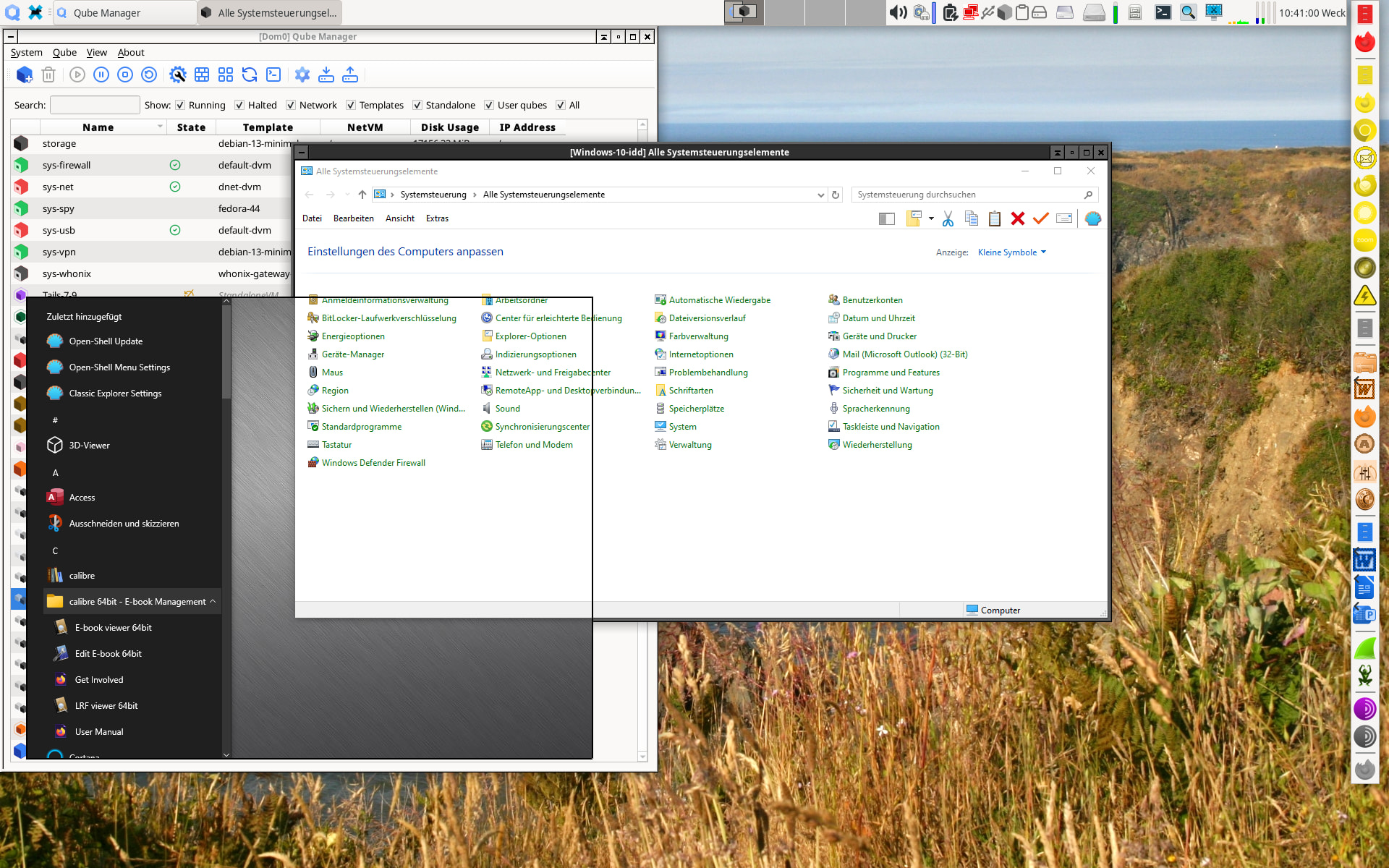
The Windows menu looks like that, no matter if it was called from OpenShell or directyly from Windows, without OpenShell:

That’s a great achievement Thank you!
Now I’ll try if I could break Windows 10. 
1 Like
Yes, native menu is ugly. I did a few passes to make it look properly but gave up to more urgent tasks 
..trying to design a new abstraction layer before composition, closer to how Linux integration works. I do not like the current one at all.
2 Likes
That’s a good decision. Trying to make the Windows native menu less ugly cannot work, because it needs to be ugly and uncomfortable to be compatible with the rest of the system.
My tests with Windows 10 22h2 were quite promising, but showed some unexpected results:
- The installation of QWT, including the IDD driver, went without problems and resulted in a working system, showing even the native Windows menu when the Windows key was activated, and it works correctly, even opening its submenus. The menu no longer shows the small left column containing the icon to start the shutdown. This is quite good, because it avoids the problems caused by that submenu and its commands. The OpenShell menu works correctly, too, and also allows opening the original, working Windows menu.
- When restarting the Windows 10 qube, it keeps attaching the CDROM drive, no matter if it is started from the Qubes menu or via
qvm-startwithout the qualifier--install-windows-tools. Unmounting this drive does not affect the next boot; the CDROM reappears. This behavior occurs just for Windows 10, not for Windows 11. - When opening the command window with administrator rights,
install /iddoffworks correctly, confirming your analysis. After the next boot, you have a working QWT but using the basic display driver instead of the IDD driver. The menus keep working correctly.
One problem remains: While everything is working well for templates, AppVMs based on these templates will start normally but then just shut down silently. This does not happen if the templates are based on the old QWT or have no QWT at all.
1 Like
WIll investigate. After how long?
Shut down after about one minute after the log on screen has closed.
Ah, see it. Stupid leftover from the install script, will fix.
2 Likes
Ugly upstream bug, actually: before being converted to TemplateVM, it needs netvm briefly to initialize network device drivers, otherwise it wants a reboot when seeing them the first time – and it becomes a loop that never completes because of non-persistent system voulme. Trying to work around this properly, pre-populating device nodes without actually connecting the device is non-trivial. Original qvm-create-windows-qube did not bother. I did not see it because my TemplateVMs already passed this phase and had device nodes pre-propulated from previous run.
2 Likes
I officially give up for this iteration, I spent whole two days chasing it down trying to do a “transplant” the driver state from post-initialized AppVM to make it part of the installer, and obvious methods did not work. I will give it one more pass later, but apparently your “black screen” problem is related, I was able to reproduce it trying to attach network on previously non-networked qube, but everything is fine if I create Windows AppVM networked as original instructions guide us. So far the known and documented workaround is: create all Windows AppVMs networked (even with all-deny firewall), detach after qwt install is finished.
I now have an AppVM based on Windows 10 22H2 with IDD driver running, provided the following is true:
- The template had
sys-firewallas netVM (with appropriate block-all remote rules) running when QWT was installed. sys-firewallis still running after the inatall has finished and the system has been rebooted and shut down again.- The AppVM has no netVM.
But I get repeated errors that policy prohibits access from the AppVM to the update proxy.
If I add a policy allowing that, the AppVM does not shut down, even if I remove the netVM from the template and connect a netVM to the AppVM.
Normal AppVM is not supposed to update via proxy, so it is a bug, will look into that.
Speaking of network driver priming, I think i found a way around reboots (never say never!) but it costs about 5-10s extra at boot time, which is already long enough.
Doesn’t matter… Windows boot is so slooow
Some new observations, most from both Windows 10 22H2 and Windows 25H2:
- There is no need to have a netVM connected to the template during installation of QWT_NG in order to keep AppVMs running later on. It is sufficient to connect the template to a netVM some time later on and start the template. This time, the template will shut down automatically, and Windows 10 will show a short message that this is necessary to complete installation of the PV network driver, while Windows 11 will just shut down silently. If the template is started again, it will run normally. After shutting down the template, its connection to the network driver can be removed. Starting an AppVM based on that template will succeed now, and the AppVM will keep running.
- The AppVM will complain repeatedly that it is not allowed to access the update service. These error messages can be avoided by adding a policy like
qubes.UpdateProxy * @anyvm @default allow target=sys-net. If there is no such policy, you will just get these (for an AppVM, senseless) messages, but I saw no other negative effects.
Whereas Windows 10 now behaves correctly, Windows 11 shows some annoying behavior for AppVMs but not for a template VM:
- When starting the AppVM, a black window appears that cannot be closed but responds to the Windows key if this feature is enabled.
- It may happen sometimes that normal windows lose the ability to respond to the Windows key, but the black window still responds.
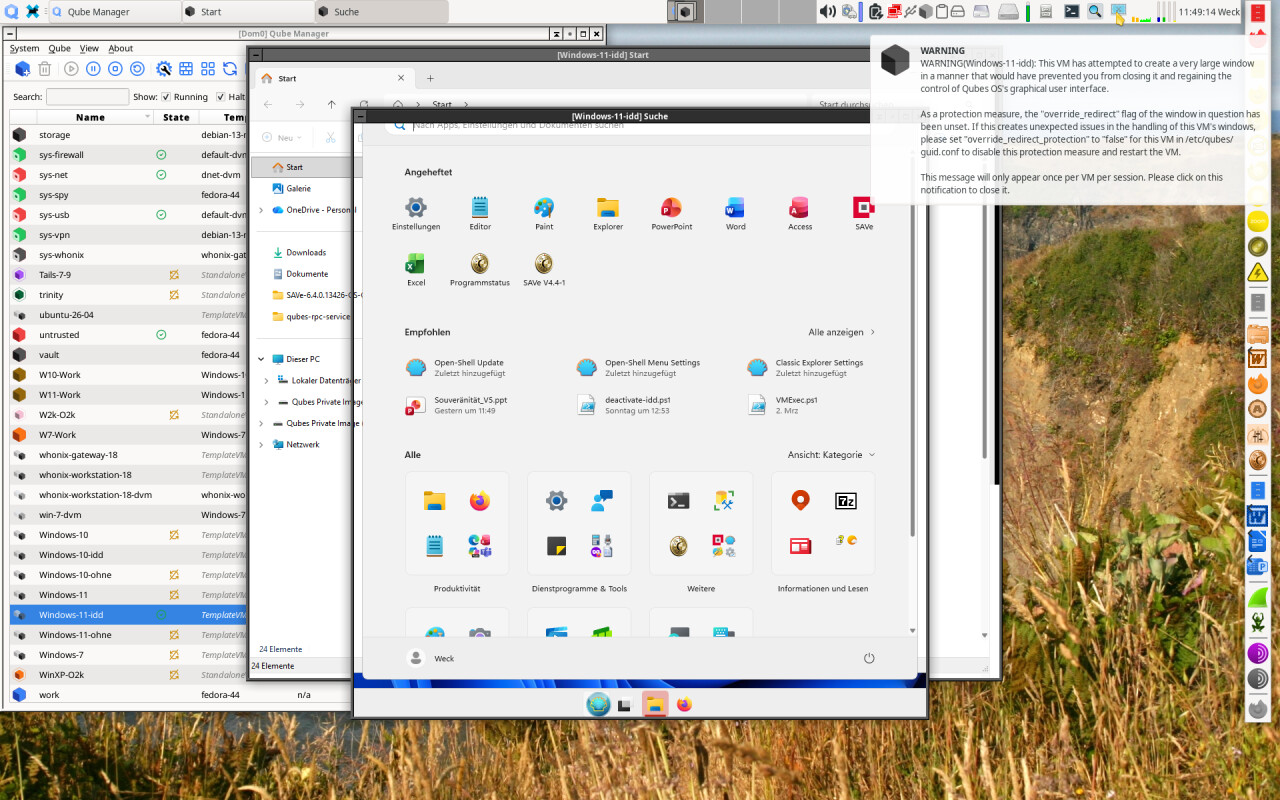
- Trying to start the native Windows menu from Open-Shell at one time clobbered the screen, showing the following picture, but afterwards it worked correctly again and did not try again to show the menu as a complete window with even a taskbar:
So, Windows 11 keeps acting peculiarly. I am asking myself what they are smoking in Redmond when they try to build software.
Just published a huge bugfix/performance update. Please test.
A bit on my test process: it is flaky and going to stay for a while (unless someone sponsors me a proper testing rig). I do it on my desktop, and some tests are sequential in nature and cannot be optimized, some require visual confirmation or manual actions, so I mostly test obvious possible regression paths and something may slip behind.
I have “proper” release testing procedure; yet so far it did not fire even once, because it takes the whole day at least, and I have a lot of stuff I want to try right now, thus so far full freeze was not on the table 
3 Likes