I keep finding more places where stock qwt was broken for years. PV net drivers were dead since 4.2, it fell back to slow emulated hw.
1 Like
fixed this as well. it had amazing failure mode: nothing really stopped working, but random stuff degraded to what shitty emulation provides. will probably publish first testing package today or tomorrow, anyone willing to have a look? i made a feature freeze for a while, next week will make it more user friendly.
1 Like
TWIMC, test release has landed!
6 Likes
Where can we get it for testing?
There are download links on the github page – GitHub - arkenoi/qubes-win-idd-driver · GitHub
Got it - thank you! 
I will test in the next few days with W10 and W11 and report back.
1 Like
Just a few first impressions, using W11 25H2 as a template, which had QWT 4.2.2 installed:
- When trying to install the
.rpmfile indom0, the following text is displayed:
~~~
qvm-create-windows-qube users: one more step is required. Its auto-qwt helper globs for
qubes-tools-*.exe|msi, which matches nothing in this ISO, and it fails SILENTLY - the qube
finishes with no tools installed. Replace its installer stub with the shipped one:
cp /usr/share/qubes-windows-tools-ng/auto-qwt/install-qwt.bat
/tools/auto-qwt/install-qwt.bat
See /usr/share/doc/qubes-windows-tools-ng/README-qvm-create-windows-qube.md
~~~
I have no idea if this is relevent here.
- Trying to install the new QWT will fail if the old one was installed using the PV disk driver. If the QWT version is uninstalled, the disk configuration is changed because the driver falls back to the emulated IDE driver, and the next boot will crash the VM. This can be remedied by booting Windows once in safe mode and then continuing the QWT install on the next normal boot. It might be good to check for this situation and abort the installation.
Off-topic
How to start Win in safe mode, btw?
hm i certainly did upgrade over stock qwt, i will give more testing to the upgrade path. better back up and try 
1 Like
In the situation I described, the Windows qube will crash at boot time with the error “INACCESSIBLE BOOT DEVICE”. Then, after some more reboots, an option will be offered to boot with extended options. After one more reboot, you get a list of options containing safe mode (number 4 in a German system)
1 Like
Yeah I see the problem and I am on it. Will make a new testing release tomorrow, with some performance fixes as well.
3 Likes
Done – upgrade path clean, and .rpm fixes qvm-create-windows-qube too. Also performance is now consistently better on win11.
1 Like
I tested now using a W11-VM without the previous QWT version, and the installation worked. Here are some issues I found with yesterday’s version:
-
During the first part of the installation, the PV disk driver installer asks if a shutdown should be performed, but the panel with this prompt is not clickable. This does not seem to have any consequences.
-
control.exestill reports version 4.2.2.0 in the listing of the installed apps:
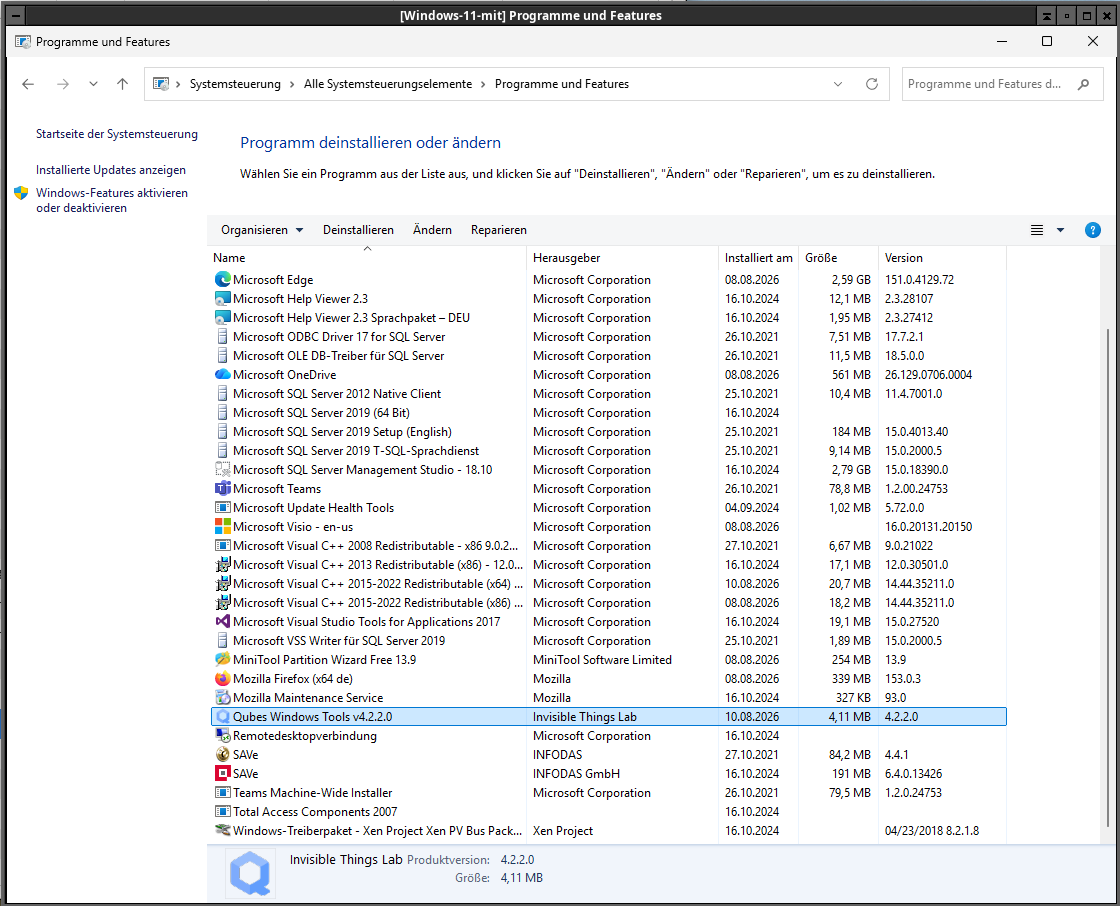
- If I try to start the installer from this panel, it does run but still claims to be 4.2.2.0. The list of installed components shows the PV disk driver. Is that o.k.?
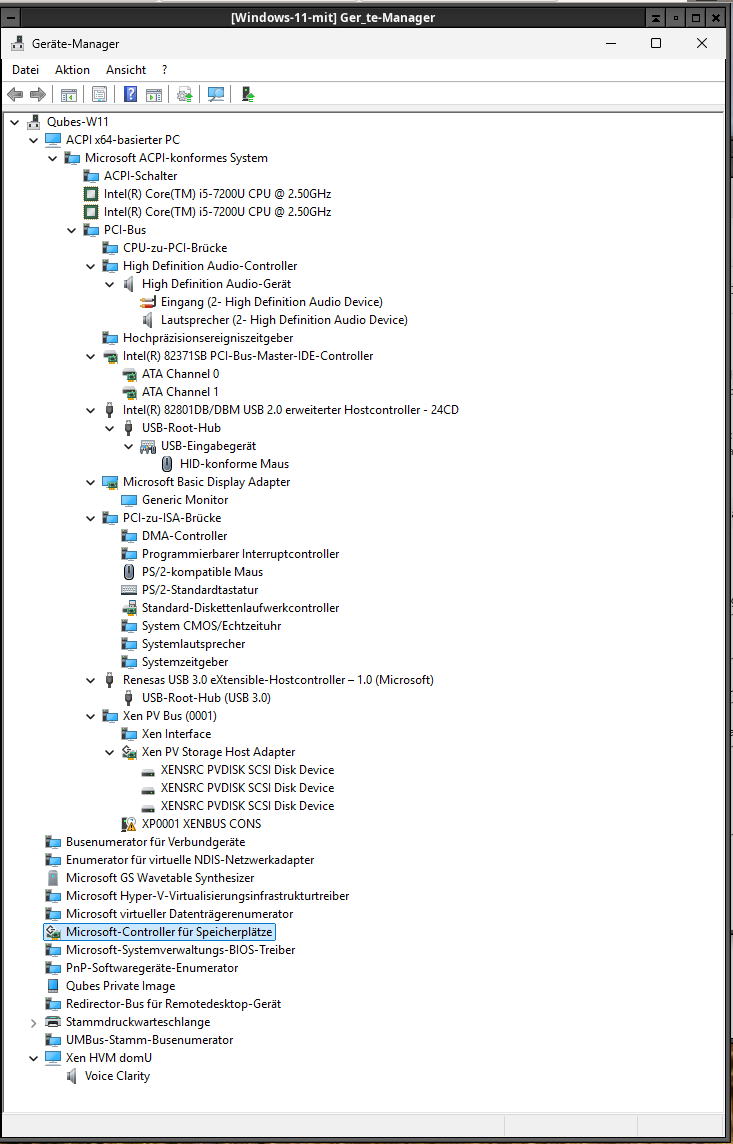
- Here’s the list of the devices shown in the Device Manager. Is that what you expected?
- If you call the Windows menu by pressing the Windows key, the old problems reappear. The menu is displayed only partially and cannot be used:

- I could not select shutdown from this Windows menu; the button is at the bottom right, which is not displayed at all or cannot be clicked. When trying to shut down the VM from the Qube Manager, this works but displays the old message that is mentioned in the still open issue #8090:
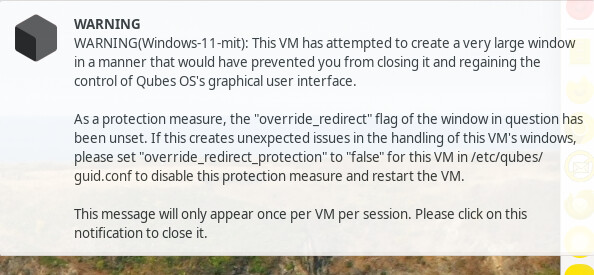
Now I’ll start to torture your new version!
1 Like
The new version detected the previous installation using the PV disk driver correctly and shut down instead of running into trouble. The new switch acceptpvdiskupgrade might be flagged with a skull and crossbones, but, on the other hand, Windows users are likely to accept trouble anyway.)
control.exe now correctly shows version 4.3.0 of QWT and this in the installer, too.
The Windows menu behaves slightly differently, but it remains a horror. But this is to be expected as this is no real window at all. I always wonder what idiots M$ uses as programmers.
The warning message at shutdown still appears.
1 Like
Now I tried to run the installer with the switch /iddand immediately got a file not found error showing the following text:
~~~
-
- Start-Process -FilePath ‘D:\idd’ -ArgumentList ‘/idd’ -Verb RunAs
-
  + CategoryInfo          : InvalidOperation: (:) [Start-Process], InvalidOperationException
  + FullyQualifiedErrorId : InvalidOperationException,Microsoft.PowerShell.Commands.StartProcessCommand
~~~
1 Like
hm hm could you describe the windows menu behavior in more details? i will try to address this. btw, template update via qubes proxy is on the way, will be here in a few days
1 Like
The device list looks fine.
/idd is flag to the installer script (install.cmd /idd). so it is expected to fail if you try to apply this to actual component (not switchable on the fly)
on the menu bug, i made a small diagnostic program, https://github.com/arkenoi/qubes-win-idd-driver/releases/download/v4.3.0-agent09b643e/winenum.exe
could you please run it while the broken start menu is on screen and paste the output here? it will show me what exactly made it look wrong.
UPD: flipped IDD driver to be default install, I somehow managed to miss the fact it wasn’t til now! Everyone who installed it with default options, please reinstall. Things like these are expected to happen during the testing phase, but still are frustrating, sorry for that.
I just set the current directory to D:\ and typed install /idd. What’s wrong with that?
That I made more mess with my quick fix, forgetting to bump version and thus causing unnecessary reinstall path and that my test coverage is insufficient for all install / upgrade scenarios :))) should still work, but give me some time to adjust everything properly.
Thanks for reporting this, better earlier than later. Also if idd driver is off, it explains the weird menu.
1 Like
Quick fix published, both upgrade and reinstall should bring you to the desired configuration. If windows menu is still weird, please run winenum.exe for me. Sorry for the inconvenience, I was in big rush to let the world see it
1 Like