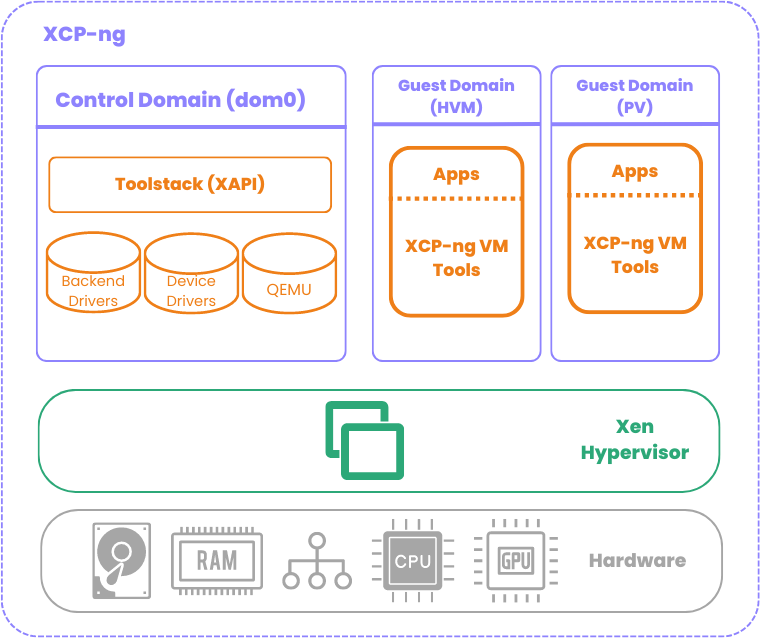
Hey all, wanted to share some findings from a project where we needed Qubes-style VM isolation but couldn’t use Qubes itself due to TCB size constraints. We ended up building a bare Xen setup on Alpine Linux that replicates the core Qubes architecture (sys-net pattern, cross-domain IPC, PCI passthrough) in about 13MB of RAM with zero Python and zero QEMU. Figured some of this might be useful to others thinking about minimal Xen deployments or just curious about what Qubes is doing under the hood.
The setup
Xen 4.17.6 hypervisor (later migrated to 4.19.5), Alpine Linux dom0 running entirely from a gzipped cpio in RAM. After GRUB loads the hypervisor, kernel, and rootfs, the NVMe is never touched again. Four VMs auto-start from cold boot:
- dom0: xl toolstack, IPC broker, no physical NIC after boot
- net-vm: PCI passthrough of physical NIC (ixgbe), acts as network driver domain
- sa-vm: PCI passthrough of USB controller, dedicated to a hardware security device
- workload-vm: application VM, connects through net-vm for external traffic
The whole thing boots to a fully operational state in about 45 seconds with zero manual intervention.
Qubes-style routed networking without Qubes
This was one of the more interesting parts. Qubes uses routed /32 point-to-point links between VMs instead of bridging, which eliminates layer 2 attacks between sibling VMs. We replicated this pattern using vanilla xl and iproute2.
The key mechanism is Xen’s vif hotplug scripts. When xl creates a VM with a vif, it calls a hotplug script that can configure the interface however you want. We wrote a custom vif-route-sh that reads the VM’s IP from xenstore (set via the ip= parameter in the xl vif config), adds a /32 host route, and enables proxy_arp. That’s it. No bridge, no brctl, no xenbr0.
The dom0 auto-start script does a NIC handoff at boot: dom0 starts with the physical NIC, fetches VM images from a build server over HTTP, then unbinds the NIC from ixgbe, hands it to pciback, and creates net-vm with PCI passthrough. Dom0’s IP moves to the vif backend interface and routes through net-vm. If the fetch fails (build server unreachable), the script aborts and dom0 keeps its NIC as a fallback.
Net-vm has ip_forward=1 and proxy_arp on both interfaces. The build server reaches dom0 and other VMs through net-vm’s proxy ARP. Exactly the Qubes sys-net pattern, just without the Qubes toolstack.
The Xen toolstack version matching trap
This one cost us real time. If you’re running the Xen 4.17 hypervisor (like from a Qubes install), you need the 4.17 toolstack. Not 4.18, not 4.20. The domctl/sysctl hypercall interface versions must match.
The confusing part is that some commands work with a mismatched toolstack and some don’t. xl info and xl list use the sysctl interface, which wasn’t bumped between 4.17 and 4.19. xl create uses the domctl interface, which was bumped. So you get a system where xl list works fine but xl create fails with “Permission denied” which is actually a version mismatch, not an access control issue. The error comes from do_domctl() returning -EACCES when the version doesn’t match.
On Alpine, the toolstack version maps to the Alpine release: 3.18 ships Xen 4.17, 3.19 ships 4.18, 3.20 ships 4.18, 3.21 ships 4.19. We extract just the xl binary, xenstored, xenconsoled, and the xen-libs from the correct Alpine version inside a Docker build container.
PVH on 4.19: the good and the bad
We migrated from 4.17 to 4.19 specifically for PVH support. PVH gives you hardware VT-x CPU isolation with PV drivers and zero QEMU. It’s basically the best of both worlds.
The good: PVH domUs without PCI passthrough work perfectly on 4.19. Our workload VM boots as PVH and has hardware CPU isolation with no device model anywhere.
The bad: libxl explicitly blocks PCI passthrough for PVH domUs on x86. The error is passthrough not yet supported for x86 PVH guests. This is a toolstack limitation, not a hypervisor one. The vPCI infrastructure exists in the hypervisor but nobody has written the libxl code path for PVH domU passthrough. The upstream work (there’s a patch series going through many revisions) is about passthrough FROM a PVH dom0 TO HVM domUs, which is a different thing.
Also, PVH dom0 breaks the ability to pass devices to domUs entirely. The NetBSD Xen docs are explicit about this for 4.19.
So if you need PCI passthrough (we do, for the NIC and USB controller), those VMs must stay PV. The architecture ends up being: VMs with passthrough run PV, VMs without passthrough run PVH. For our use case, the workload VM (which handles sensitive data and external requests) gets hardware CPU isolation, and the driver domains get IOMMU DMA isolation with minimal kernels.
Replacing qrexec
We built a custom IPC system in Rust that replaces qrexec for cross-domain communication. Transport is Xen vchan (grant-table shared memory + event channels). Dom0 runs a broker daemon that evaluates a policy file and routes service requests between VMs. Each VM runs an agent that fork/execs service handler scripts.
A few things we learned the hard way about vchan:
The event channel fd is edge-triggered, not level-triggered. After poll() returns POLLIN, if you call your recv function and there’s no data, you MUST call libxenvchan_wait() to consume the stale event channel notification. Otherwise poll() returns POLLIN immediately again and you get a 100% CPU busy loop. This one was fun to debug on real hardware.
xenstore permissions matter for vchan. After creating a VchanServer endpoint in dom0, you must xenstore-chmod the path to grant the target domain read access. Without this, the guest’s VchanClient can’t find the endpoint.
Domain IDs are dynamic. Xen assigns them at VM creation time. If you destroy and recreate a VM, it gets a new domain ID. Any daemon that was talking to the old domain ID now has stale vchan endpoints. We handle this by reading domain IDs from xl list after creation and passing them to the daemon via --listen domid:name pairs. The policy file uses names, not IDs.
Things that are different from what you’d expect
No devtmpfs under Xen PV. Alpine’s mdev can’t scan /sys/dev under Xen PV. You have to create /dev/xen/* device nodes manually by parsing /proc/misc with awk and calling mknod. Same for /dev/hvc0 (the console device under PV).
DHCP doesn’t work under Xen PV dom0. BPF/packet sockets are restricted. Static IP only. This might be a kernel CONFIG_PACKET issue or a fundamental Xen PV limitation, we didn’t dig further since static was fine for our use case.
dom0_mem needs the max: qualifier on large memory systems. On a 128GB machine, dom0_mem=4096M without max:4096M causes the kernel to allocate struct page metadata for the full 128GB reservation (~2GB overhead), consuming the entire dom0 allocation. System freezes during grant table init. The max: caps the reservation.
hvc0, not ttyS0. Under Xen PV, the interactive console is /dev/hvc0. ttyS0 is owned by Xen for kernel printk. Userspace programs that try to use ttyS0 as a terminal fail silently. This manifests as what looks like a frozen system but is actually a system running fine with invisible output.
Was it worth it?
I’ll let you be the judge. We went from a ~30GB Qubes install to a 13MB stateless image. No Python, no QEMU, no persistent disk state. But I wouldn’t recommend this path for general use. Qubes handles an enormous amount of complexity that you don’t appreciate until you have to reimplement it. The VM auto-start sequencing, the NIC handoff, the vif routing, the IPC policy engine, the serial console workflows for remote hardware with no physical access… it’s a lot of plumbing. We also strictly do not require a desktop OS, we needed something closer to the Qubes Air / headless setup.
If you’re curious about any of this or have thoughts on the PVH passthrough situation, would love to hear. The Xen community seems to be actively working on PVH dom0 passthrough for 4.21 but PVH domU passthrough doesn’t seem to be on anyone’s roadmap.