Error while processing ‘/home/qubes/Qubesincoming/backup#restore/tmpapobnxz_/vm100/private.img,000’
ERROR: unable to extract files for /nome/qubes/Qubesincoming/backupsrestore/tmpapobnxz_/vmt00/
private.img,000, tar output:
I just ran my Restore Backup. Now I’m getting this message—can anyone tell me which files weren’t restored? Because I’d really like to restore all of them.
What do I need to do now to restore all my data 100%?
I’m stuck with this error message. What should I do now, and what settings do I need to change so that I don’t get an error message during the recovery process? I want to make sure that 100% of the files are recovered.
It would be helpful if you could summarise the ocntent of the image,
which would make it more easily understood and have the benfit of
being serachable by other users.
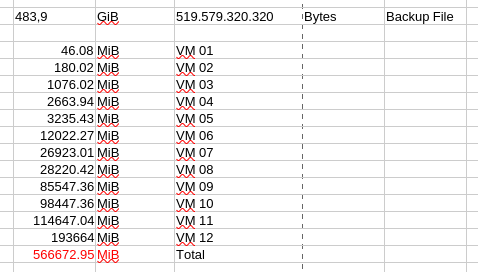
In this case I assume it is just a list of qubes.
Since the error you had was specific to one qube, I would attempt to
restore the other qubes, excluding vm100. That process should complete
and you would then be content with the results.
For the one qube where you reported an issue I would use the emergency
restore process
It’s long but quite clearly documented: if you follow the steps given,
you should gain some insight in to what is happening.
I never presume to speak for the Qubes team.
When I comment in the Forum I speak for myself.
I wanted to restore the 12 VMs from this backup file, and right at the very bottom of the dialog box, this text appeared!
Error while processing ‘/home/qubes/Qubesincoming/backup#restore/tmpapobnxz_/vm100/private.img,000’
ERROR: unable to extract files for /nome/qubes/Qubesincoming/backupsrestore/tmpapobnxz_/vmt00/
private.img,000, tar output:
Now, my question from the beginning: Have all the individual files within each VM been restored, and how can I verify this?
If you will, open the backup file in the restore program, and select
one of the other 11 qubes and restore it. Do this 11 times in sequence,
excluding vm100.
You should see the restore complete for each of those 11 and you can
have full confidence that the individual files in each of those qubes
have been restore.
As to vm100,
For the one qube where you reported an issue I would use the emergency restore process
It’s long but quite clearly documented: if you follow the steps given,
you should gain some insight in to what is happening.
That will enable you to confirm which files have been restored for
qube vm100, and where any errors lie.
I never presume to speak for the Qubes team.
When I comment in the Forum I speak for myself.
In the years I have been using Qubes I have never seen a qube
automagically created without my input.
If you did not create this qube, then you have no problem. Simply run
restore, select all qubes except vm100, and restore them. From your
previous account this will complete without error and you can be sure
that all the relevant files have been restored.
If after some use you realise that you are missing some data, or some
qube that you used to use, then you can attempt to restore vm100 - you
know that it is in the backup that you took. If the backup tool fails,
then that case resort to the manual method that I pointed you to.
But at the moment I cant see you have a problem.
I never presume to speak for the Qubes team.
When I comment in the Forum I speak for myself.
I received these two error messages. So far, I haven’t been able to fully restore these two VMs.
Question: How can I fix these errors?
Error while processing ‘/home/qubes/QubesIncoming/backup#restore/tmpOb9w9gpr/vm 178/private.img,008’
gzip: stdin: invalid compressed data-crc error gzip: stdin: invalid compressed data-length error tar: Unerwartetes
Dateiende im Archiv. tar: Unerwartetes Dateiende im Archiv. tar: Error is not recoverable: exiting now
ERROR: unable to extract files for/home/qubes/QubesIncoming/backup#restore/tmpOb9wagpr/vm178/
private.img.008, tar output: gzip: stdin: invalid compressed data~crc error gzip: stdin: invalid compressed data-length
error tar: Unerwartetes Datelende im Archiv. tar: Unerwartetes Datelende im Archiv. tar: Error is not recoverable: exiting
Error extracting data: failed to decrypt /home/qubes/Qubesincoming/backupifrestore/tmp0b9w9gpr/vm178/
private.img,022.enc: b’scrypt: Input is not valid serypt-encrypted block\n
Error while processing ‘shome/qubes/Qubesincoming/backup#restore/tmpksk6op0p/vm34/private.img.012’ gzip:
stdin: invalid compressed data-format violated tar: Unerwartetes Datelende im Archiv. tar: Unerwartetes Dateiende im
Archiv. tar: Error is not recoverable: exiting now
ERROR: unable to extract files for/home/qubes/Qubesincoming/backup#restore/tmpkskGopOp/vm34/
private.img.012, tar output: gzip: stdin: invalid compressed data-format violated tar: Unerwartetes Dateiende im
Archiv. tar: Unerwartetes Datelende im Archiv. tar: Error is not recoverable: exiting now
Error extracting data: failed to decrypt /home/qubes/Qubesincoming/backupiirestore/tmpksk6opOp/vm34/
private.img.015.enc: b’scrypt: Input is not valid scrypt-encrypted block\n’