Rejecting hard work of qubes os developers (gui integration)

Lately I’ve been tinkering around trying to get full desktop environment out of Debian and Fedora xfce templates. More specifically, I am curious to know what exactly prevents them from showing me their beautiful whiskers. I also want to do it without uninstalling stuff, just a reconfiguration, as minimal as possible, preferably easily reversible. Here’s what I come up with:

#!/usr/bin/env bash
qvm-clone fedora-42-xfce mushroom
# run `systemctl set-default multi-user.target` to revert this
qvm-run -u root mushroom -- systemctl set-default graphical.target
 # Fedora login screen won't let you through without a password, and auto-login doesn't work for some reason.
qvm-run -u root mushroom -- 'echo "user" | passwd --stdin user'
qvm-prefs mushroom debug true
qvm-prefs mushroom virt_mode hvm
qvm-prefs mushroom kernel ''
qvm-prefs mushroom memory 1000
qvm-prefs mushroom maxmem 0
qvm-service mushroom lightdm on
qvm-shutdown mushroom
#!/usr/bin/env bash
qvm-clone debian-13-xfce plank
qvm-run -u root plank -- mv /etc/X11/xorg-qubes.conf /etc/X11/xorg-qubes.conf.backup
qvm-prefs plank debug true
qvm-prefs plank virt_mode hvm
qvm-prefs plank kernelopts "systemd.unit=graphical.target" # thanks ddevz!
qvm-service plank lightdm on
qvm-shutdown plank

I don’t like two things about this. First, both cases require setting virt_mode to hvm - otherwise you won’t get the window upon starting your vm. It would be nice to have a full-desktop pvh. Second, fedora boots and works with qubes kernel but won’t start desktop environment (or at least it doesn’t display it), which forces me to use distribution kernel and disable memory balancing. Not cool.

Perhaps most interesting discovery is the lightdm service. From qvm-service manual:

       lightdm:
              Default: disabled

              Start lightdm and avoid starting  qubes-gui-agent.   In  this  case,
              lightdm is responsible to start the X.org server.

Mainly because nobody seems to be aware of it on this forum, at least not in the related topics I have checked. It also doesn’t do everything that manual says - it doesn’t result in working xorg. You still need to set graphical target.

It would be nice to see full desktop VMs as first citizens in qubes. Without the jank of unresizeable window, at least. Right now we’re mildly stuck with the templates we have.

Why am I doing this?


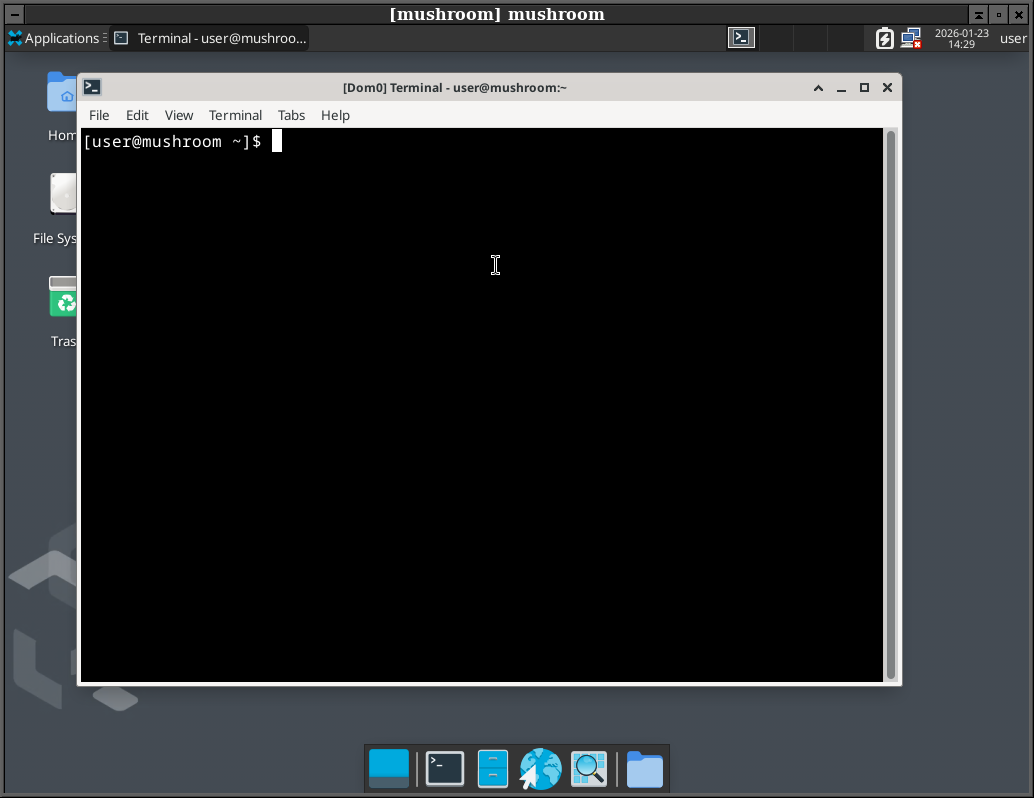
For fun, I guess. Speaking of fun: if you get full desktop in a template, windows there are marked as dom0’s:
5 Likes

What do you mean by “full desktop”? Getting the same window of a VM like with KVM/Virtualbox?

A desktop environment, not integrated into dom0’s DE. What you would get by running default debian 13 with xfce desktop on your hardware, for example.

1 Like

Use a VNC service on the qube, and access it with a VNC client

3 Likes

This is interesting, some users may prefer to have full desktops (and only use a couple) but still benefits qubes Os infrastructure. This is a no-go currently with the seamless integration.

3 Likes

Possibly related:

Might need another template flavor.

This is the way. It’s a simple solution and provides full desktop qubes with
all qvm features, if that is what you want.

I never presume to speak for the Qubes team.
When I comment in the Forum I speak for myself.

I don’t get it. How is this full desktop? VNC will require the end device to have a good GPU for example to work properly. It will still suffer from running under Xen.

That is an interesting prospect, but it seems like unman’s configuration needs an update. For now I’m just ending up with a separate dom0 window for each vnc xfce window (panels, desktop, actual windows, etc.), ~6 windows overall. I need some time to figure it out.

Do you? :thinking:
It works fine for me… with “xfce4-session” instead of “gnome-session” because… reasons… I use debian-NN-xfce.

It really doesnt.
This provides the full desktop experience with menus, task bar, virtual
desktops - I’ve used it for years to provide Gnome, KDE, XFce, etc, and
it works just fine. (No doubt it will be said that I have low
standards, but other users seem happy enough.)

I never presume to speak for the Qubes team.
When I comment in the Forum I speak for myself.

This usually suggests that you have run the Xfce4 session outwith the
VNC connection.
Check the shell script - it’s easily adapted to run KDE,Xfce4, Mate -
whatever you like.

I never presume to speak for the Qubes team.
When I comment in the Forum I speak for myself.

Okay I’ve found a way. Debian installation works exactly as described. Fedora installation is warning about being replaced by a systemd unit, but works if you remove -useold - for some reason this parameter isn’t supported.

I’ve tried to make systemd unit approach work the same way a couple of times but found no success.

Qubes templates - alongside with the PHV mode - are designed to run in a seamless mode, where dom0 overriding the windwo decorations. This is described here:

I’m not sure which packages are actually doing ‘the trick’, but those are surely comes from Qubes repositories, not from the original distribution… But… as the seamless GUI is one of the main and core feature of Qubes OS, it might be very hard do ‘remove’ - if posibble at all.

If you want to run a ‘vanilla’ OS in it’s own window - without the qubes related things - then you need a HVM Qube, where you can install your preferred OS. - even if it is a Fedora or Debian.
However, this will not give you the Qubes related ‘convenience features’ that’s why it not makes to much sense for most of the Qubes users out there.

The ‘workaround’ is to reach your VM’s desktop via VNC - as others suggested.

I thought of this somehow different… completely different. :roll_eyes:
I thought like really full desktop, with nested virtualization and so on… wet dreams I guess :smile: meanwhile I have issues with playing high quality videos

that was solved a while back.

heres a speal from a ansible version. this is not pretty, and has not been tested in a while. you can probably get the idea whats involved by reading it though, even if you dont have ansible-qubes set up

  • name: call a shell
    ansible.builtin.shell:
    cmd: “qvm-prefs {{ inventory_hostname }} debug True”
    delegate_to: localhost
    become: true

  • name: call a shell
    ansible.builtin.shell:
    cmd: “qvm-prefs {{ inventory_hostname }} virt-mode hvm”
    delegate_to: localhost
    become: true

  • debug:
    msg: “Allow lightdm to autologin”

  • name: LINEINFILE
    ansible.builtin.lineinfile:
    path: /etc/lightdm/lightdm.conf
    line: ‘autologin-user=user’
    firstmatch: yes
    become: true

  • name: ‘call a shell - change this to “file”’
    ansible.builtin.shell:
    cmd: “mkdir -p /rw/bind-dirs/etc/lightdm/”
    become: true

  • name: call a shell
    ansible.builtin.shell:
    cmd: “cp /etc/lightdm/lightdm.conf /rw/bind-dirs/etc/lightdm/”
    become: true

  • name: ‘call a shell - change this to “file”’
    ansible.builtin.shell:
    cmd: “mkdir -p /rw/config//qubes-bind-dirs.d/”
    become: true

  • name: LINEINFILE
    ansible.builtin.lineinfile:
    path: /rw/config/qubes-bind-dirs.d/50_user.conf
    line: “binds+=( ‘/etc/lightdm/lightdm.conf’ )”
    firstmatch: yes
    create: true
    become: true

  • name: ‘call a shell - change this to “file”’
    ansible.builtin.shell:
    cmd: “mkdir -p /rw/bind-dirs/etc/lightdm/”
    become: true

  • name: call a shell
    ansible.builtin.shell:

chdir: “{{build_directory}}”

cmd: "cp /etc/lightdm/lightdm.conf /rw/bind-dirs/etc/lightdm/"

become: true

  • name: ‘call a shell - change this to “file”’
    ansible.builtin.shell:
    cmd: “mkdir -p /rw/config//qubes-bind-dirs.d/”
    become: true

  • name: LINEINFILE
    ansible.builtin.lineinfile:
    path: /rw/config/qubes-bind-dirs.d/50_user.conf
    line: “binds+=( ‘/etc/lightdm/lightdm.conf’ )”
    firstmatch: yes
    create: true
    become: true

  • debug:
    msg: “remove the user password (for lightdm logins)”

  • name: “call a shell - change this to lineinfile”
    ansible.builtin.shell:
    cmd: “sed ‘s/user:[^:]*:/user::/’ /etc/shadow > /rw/bind-dirs/etc/shadow”
    become: true

  • name: LINEINFILE
    ansible.builtin.lineinfile:
    path: /rw/config/qubes-bind-dirs.d/50_user.conf
    line: “binds+=( ‘/etc/shadow’ )”
    firstmatch: yes
    create: true
    become: true

  • debug:
    msg: start the X server on boot

  • name: call a shell
    ansible.builtin.shell:
    cmd: ‘qvm-prefs {{ inventory_hostname }} kernelopts “systemd.unit=graphical.target”’
    delegate_to: localhost
    become: true

  • debug:
    msg: prevent qubes-gui-agent from starting

  • name: call a shell
    ansible.builtin.shell:
    cmd: ‘qvm-service {{ inventory_hostname }} lightdm on’
    delegate_to: mgmtvm
    become: true

NOTE: the “on” in the above line turns the service OFF (YES: i said OFF!!!)

#qubes shutdown:

  • name: “Shutdown qube”
    qubesos:
    guest: “{{ inventory_hostname }}”
    state: shutdown

wait: true #qubes 4.3 only

changed_when: false
delegate_to: localhost

1 Like

Cool trick with kernel opt, thanks for posting this! Upon testing it only works with debian, fedora requires setting default target.