This toolkit for Qubes OS 4.3 could save you time and close leaks in your VPN qubes, whether you already run them or are setting up new ones:
- VPN qubes you already have: test them for DNS leaks, leaks across a restart and what the qube itself connects to, without installing anything in them. Or move their logins into fresh, hardened qubes without logging in again.
- New VPN qubes: build them from one template, each VPN in its own small qube, driven from dom0 with one command,
qv. - Less disk, smaller backups: with Qubes’
custom-persist, each VPN qube keeps only its VPN login and settings across reboots (a few MB), not a home folder that fills up with caches and logs, and anything else written to it is gone at the next boot.qv logs pruneand optional template slimming keep the rest small.
In every case, the qubes behind a VPN qube fail closed: while the VPN is down, starting, crashing or being switched, they have no internet rather than leaking around it, and DNS stays inside the tunnel.
Not maintained: shared as-is, as a record of what worked, with everything someone would need to pick it up: the source, the offline tests, the design notes and the roadmap. No support or fixes will be provided, but thoughts and ideas are welcome here. Anyone is welcome to build on it; if you do, please say so in this thread.
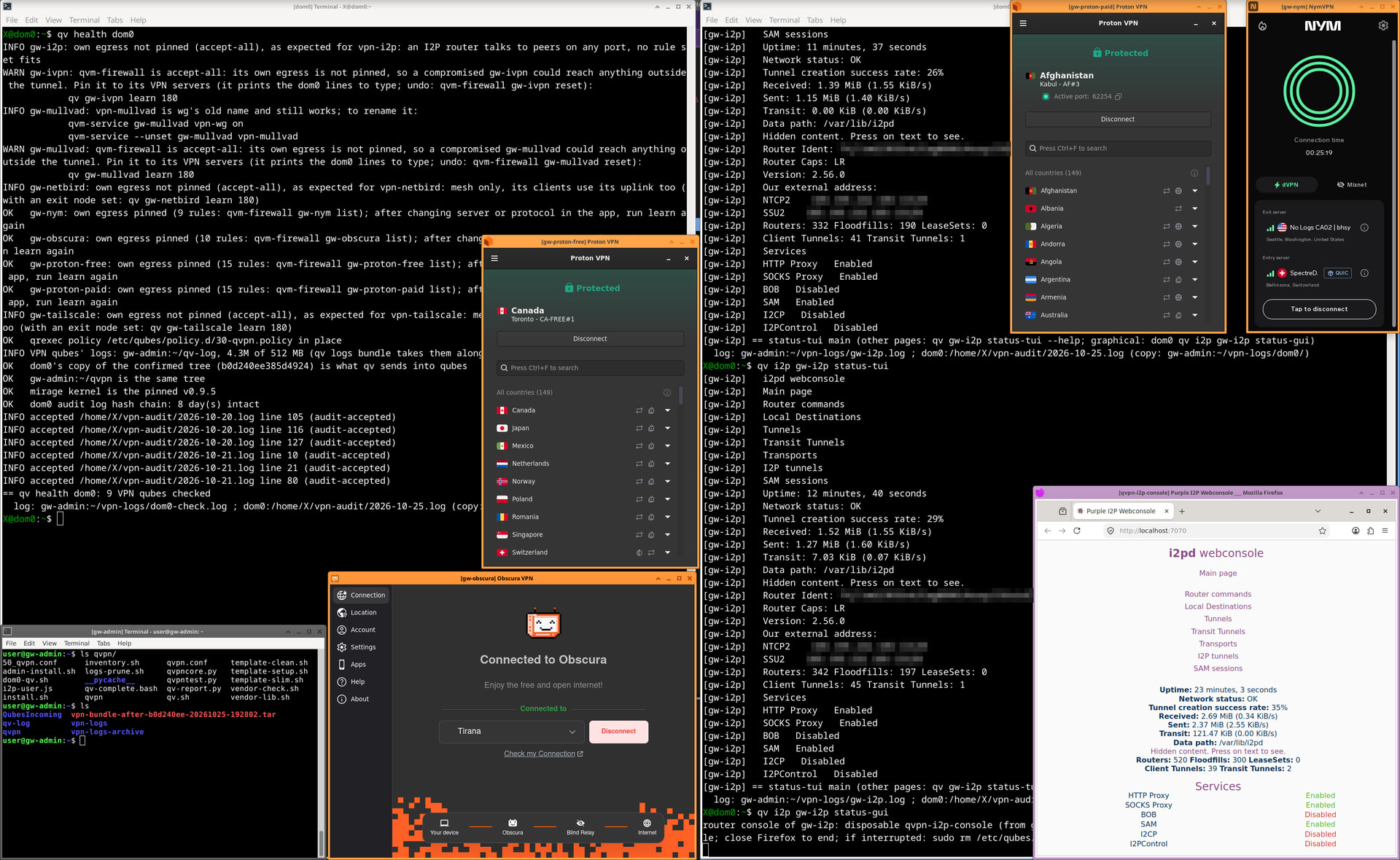
Several VPN qubes at once: the Proton (free and paid), NymVPN and Obscura apps connected, each in its own qube;
qv health dom0 in a dom0 terminal; qv i2p gw-i2p status-tui with i2pd’s status (network OK, tunnels, services); the I2P router console from qv i2p gw-i2p status-gui, in a disposable qvpn-i2p-console (Firefox at localhost:7070, reached over qubes.ConnectTCP); and the offline gw-admin qube holding the toolkit (qvpn/) and the shipped logs (qv-log, vpn-logs).
Downloads
The toolkit, its tests and all the docs, in one package (MIT):
[qvpn-1.0.zip]
sha256 a0f08b418fbb9c5f0d072b6d977d972df06dd74278cff575dfa237837736c967
Start with README.md. Everything that runs in dom0 is one bash file, qvpn/dom0-qv.sh: read it before you load it. Its SHA-256 and the hash of the whole qvpn/ folder are in RUNBOOK.md; take them from your downloaded copy, not from a copy inside a qube.
What it does
- A kill switch outside the VPN app: nftables rules in each VPN qube let client traffic out only through the tunnel, with a drop-everything failsafe if anything goes wrong at boot, and the rules are put back within seconds if something removes them.
- DNS that can’t leak: the VPN’s own resolver, or encrypted DNS inside the qube (dnscrypt-proxy through anonymising relays), switchable per qube from dom0. No resolver found means DNS is blocked, not sent to the ISP.
- Plain Qubes parts: one VPN template (or one per vendor), AppVMs with
custom-persist, so only the VPN’s login survives a reboot (a few MB per qube). Optional disposable VPN qubes, and an optional mirage or Linux firewall qube after the VPN qube. - A clean VPN template: keep it to VPN software, so no Docker, libreoffice or browsers: every package in a template runs as root in every qube built from it.
qv debian-13-vpn cleanpreviews what would go,clean -aremoves it (apt simulates first and stops if any Qubes or Xfce core package would go). - Logins carried, not redone:
qv movecopies only a VPN’s state from an old qube to a new one, hashed at both ends. - Optional egress pinning:
qv QUBE learnrecords where a VPN qube connects and printsqvm-firewallrules for dom0, so even a compromised VPN qube can reach only its own servers.qvm-firewall QUBE resetundoes it. - Every vendor’s units gated to that vendor’s qubes, and vendor repos pinned to their own packages. (Mullvad’s early-boot blocker had been running in a Proton qube before that.)
- One dom0 command,
qv, with Tab completion for verbs, qube names, in-qube commands and options; every fix a check suggests is printed on its own line, ready to paste. - Qubes tags as targets:
@qvpnreaches every VPN qube (qv @qvpn test,qv restart @qvpn). Tag a subset yourself, e.g.qvm-tags gw-nym add qvpn-liveon the ones that work, andqv health -s @qvpn-live(Tab completes your own tags too) checks only those, leaving qubes without a login yet halted. - Tests: leak and kill-switch tests inside each qube, a throwaway client through it, a leak test across a forced restart watched from the netvm, a capture of what the VPN qube itself connects to, and one
qv healthtable for all of it. - Logs in one place, kept small: every VPN qube’s journal goes to the offline admin qube (capped at 512 MB in all).
qv logsshows where logs and caches take space in each qube;qv logs pruneshows what would go, then asks: files older than 14 days, a persistent journal over 200 MiB, all but the newest 2 bundles (-o DAYS,-m MiB,-b Nchange these), and gives the freed space back to dom0. It never removes the newest log a program writes to, or dom0’s audit log. A VPN qube’s journal starts fresh at each boot, unless you switch onpersist-logsfor an investigation (qvm-features QUBE vm-config.qvpn-persist-logs on).
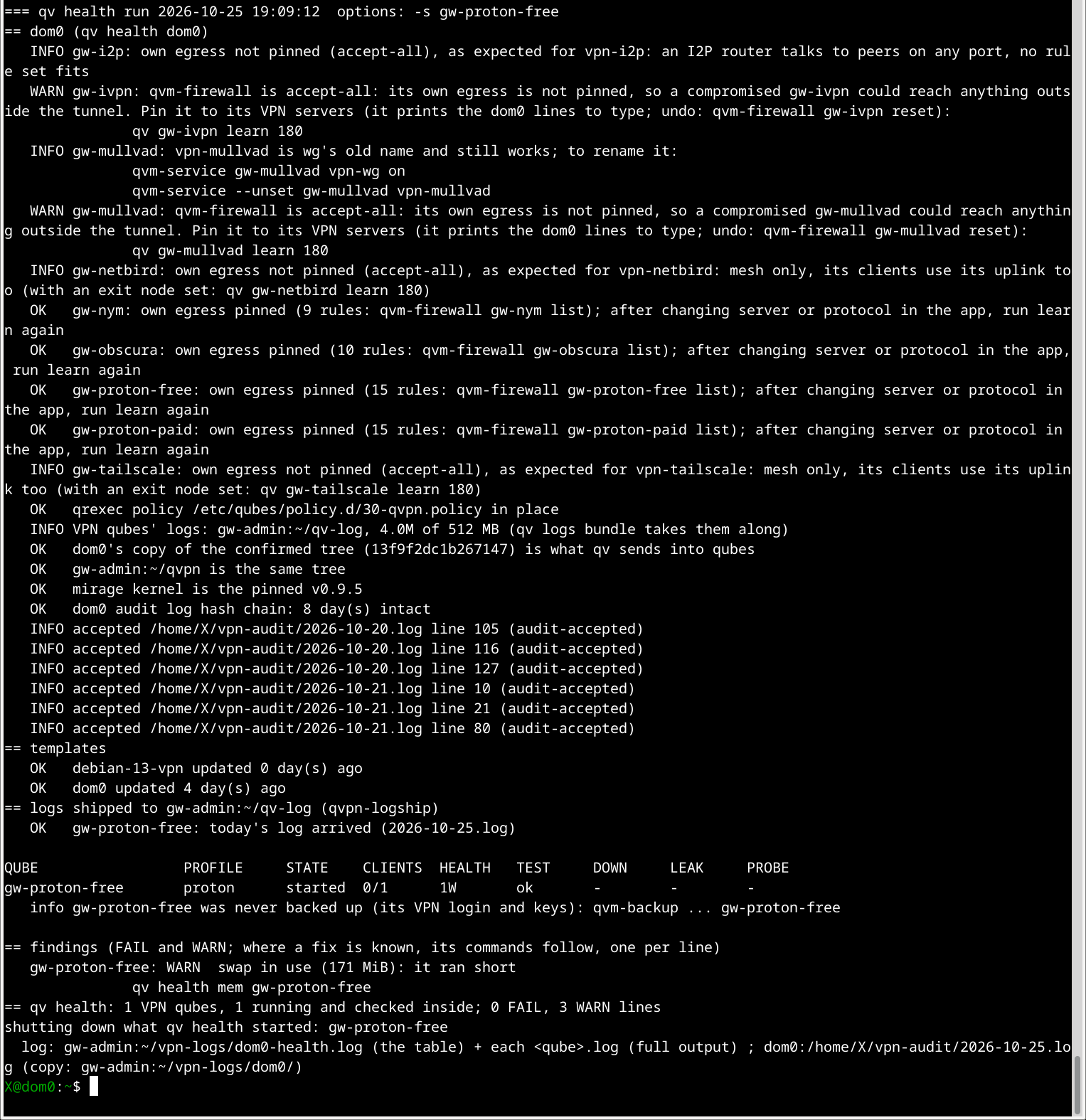
qv health -s gw-proton-free in dom0: first the dom0 checks (whether each VPN qube’s own egress is pinned, with the qv QUBE learn 180 line to pin it; the qrexec policy; the confirmed tree; the mirage kernel; an intact audit-log hash chain), then templates and log shipping, then the table row for the qube it started and checked inside. Findings at the end: one WARN (swap in use), with its fix qv health mem gw-proton-free on its own line; the qube it started is shut down again.
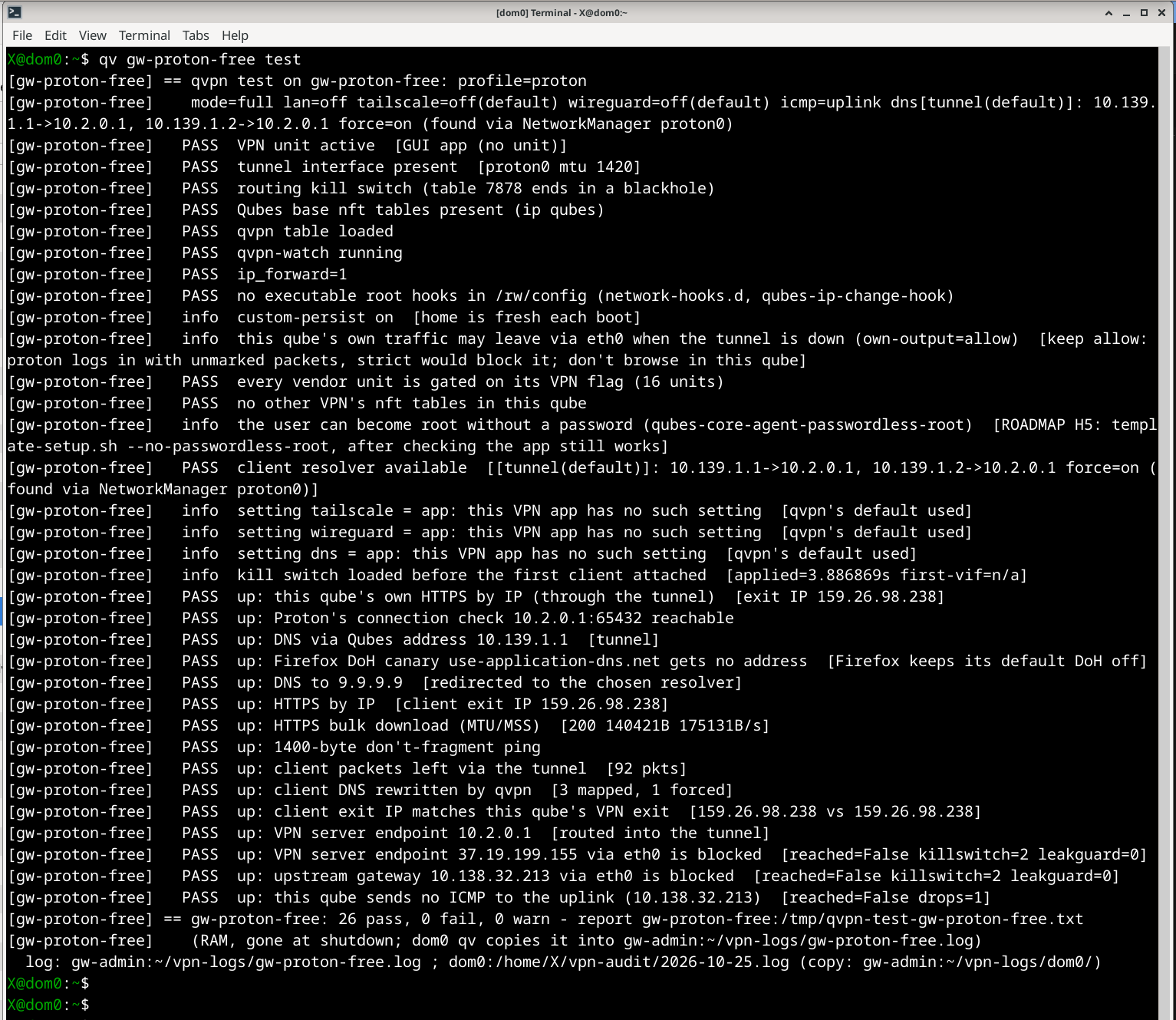
qv gw-proton-free test, run inside the qube from dom0: PASS for the tunnel interface, the routing kill switch (table 7878 ends in a blackhole), the qvpn nft table and its watcher, no root hooks in /rw/config, and every vendor unit gated (16 units). Then the checks through the tunnel: DNS via the Qubes address, the Firefox DoH canary, DNS to 9.9.9.9 redirected, a bulk download, a 1400-byte don’t-fragment ping, and the VPN server reachable only through the tunnel, never via eth0. The info lines note what a test can’t change, with the ROADMAP item.
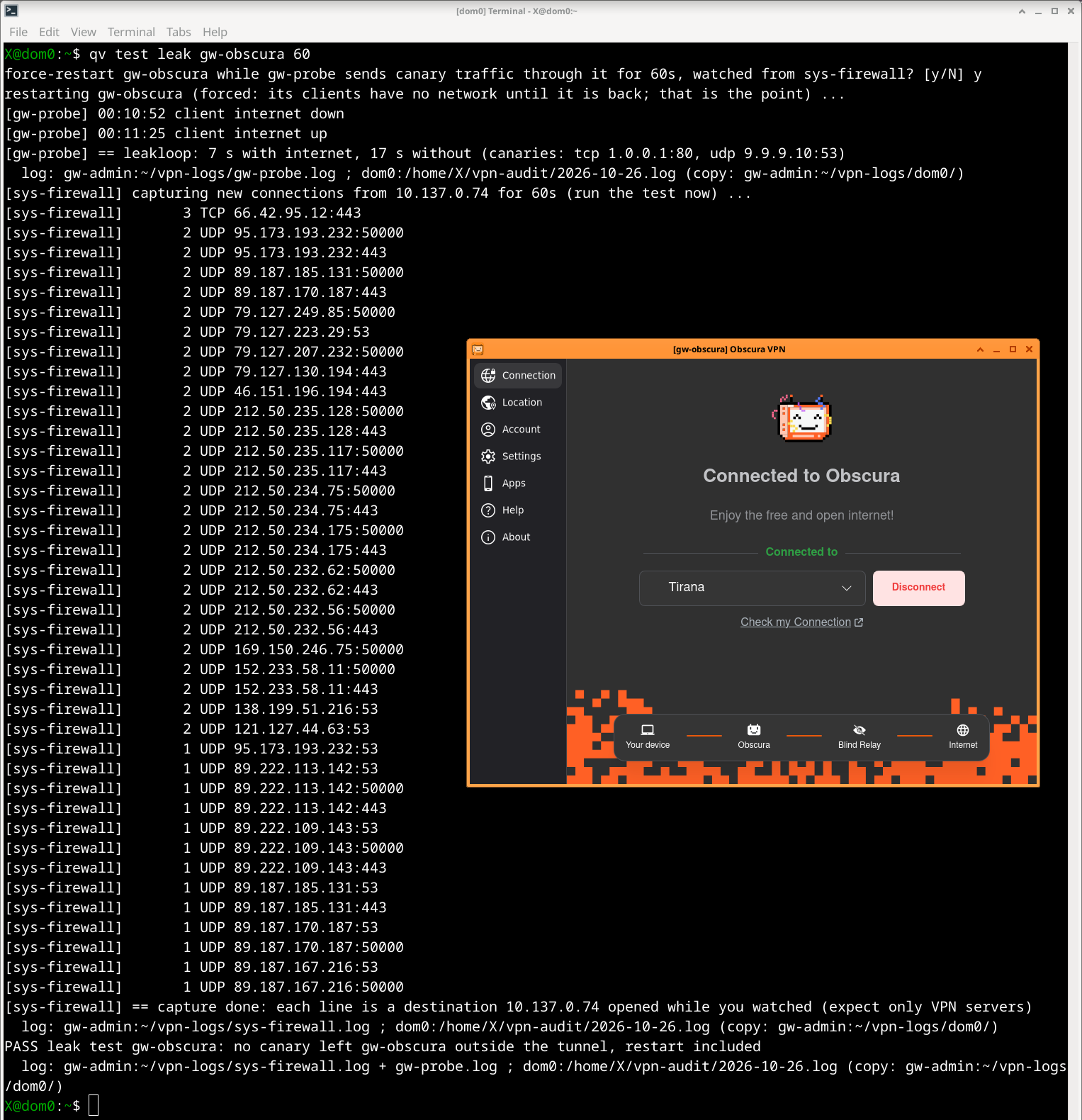
qv test leak gw-obscura 60: dom0 force-restarts gw-obscura while gw-probe sends canary traffic through it (TCP to 1.0.0.1:80, UDP to 9.9.9.10:53), watched from sys-firewall. The client had internet for 7 s and none for 17 s across the restart. The capture lists every destination gw-obscura itself opened: only Obscura relays on UDP 443/50000/53 and TCP 443, matching its egress pin. Result: PASS, no canary left outside the tunnel, restart included.
Already have VPN qubes? Use just the tests
You don’t have to rebuild anything. With the two toolkit qubes (gw-admin, offline, and a throwaway gw-probe) and qv loaded in dom0, these work on VPN qubes you built yourself, from a guide or a vendor’s instructions:
qv test probe QUBE (DNS, exit IP, download through it) · qv test leak QUBE (restarts it while watching for leaks) · qv test capture QUBE · qv QUBE inventory · qv health dom0 QUBE
DIAGNOSTICS.md has the ten-minute setup and how to read the results. Below, a VPN qube built by hand before qvpn: the app says connected, yet a client behind it gets no DNS.
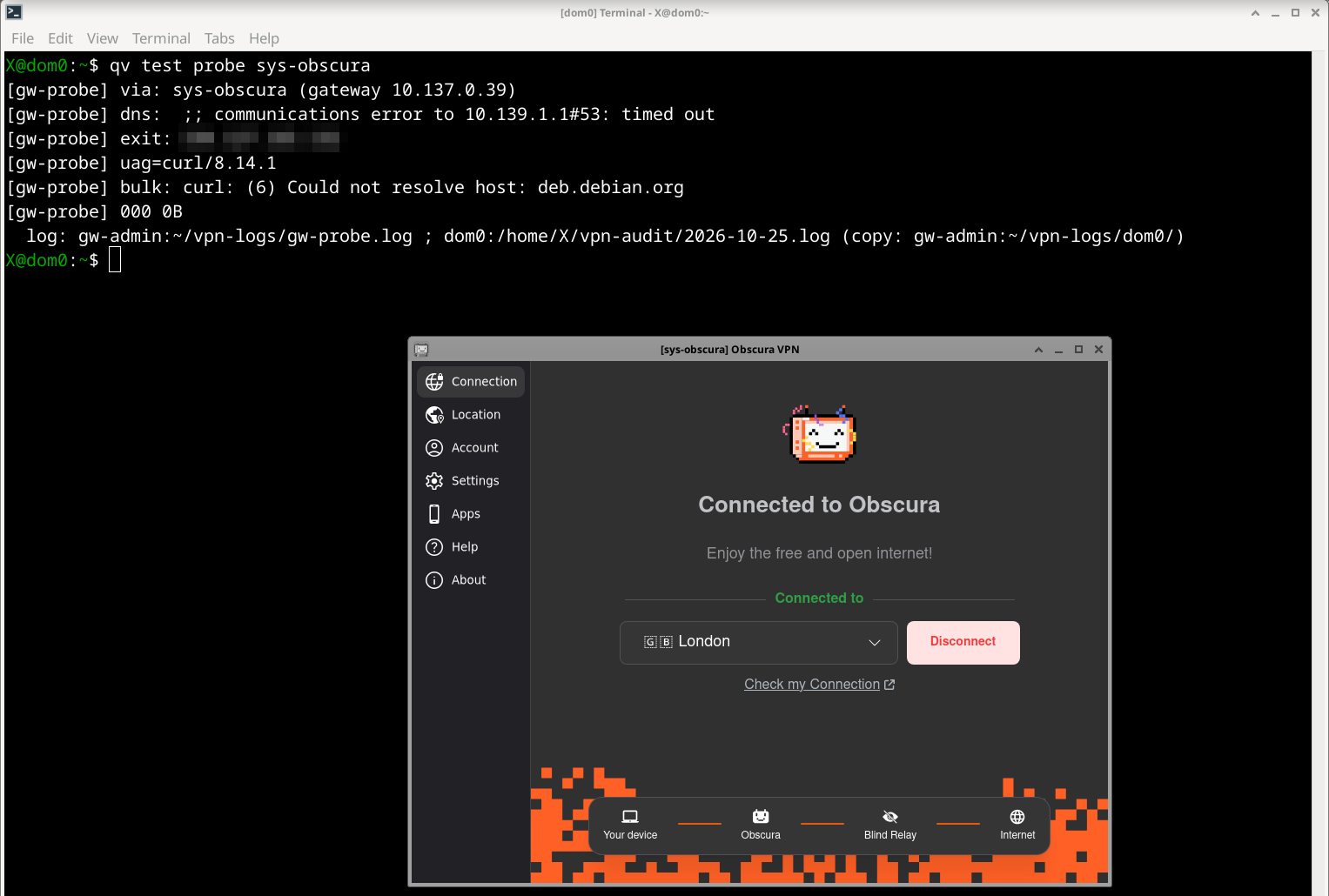
qv test probe sys-obscura, on a VPN qube built by hand before qvpn: the Obscura app says “Connected”, yet the gw-probe client behind it gets no DNS (communications error to 10.139.1.1#53: timed out), no exit IP and no download (Could not resolve host). Nothing was installed in sys-obscura for this test.
How dom0 stays safe
dom0 never runs anything a qube sends. dom0-qv.sh comes in once as text, checked against its hash. Updates come only through qv update HASH: dom0 copies every file out of the offline admin qube as data, compares the tree hash with the one you typed, shows what changed in its own script before replacing it, and keeps its own copy of the confirmed files. The one place it acts on qube text (qv apply) splits each line into words, checks it against a short allow-list of qvm-* commands and settings, and asks first. No function deletes a qube or a login; every change prints its undo line and goes into a hash-chained audit log. SECURITY.md has the full table, and what it does not protect against.
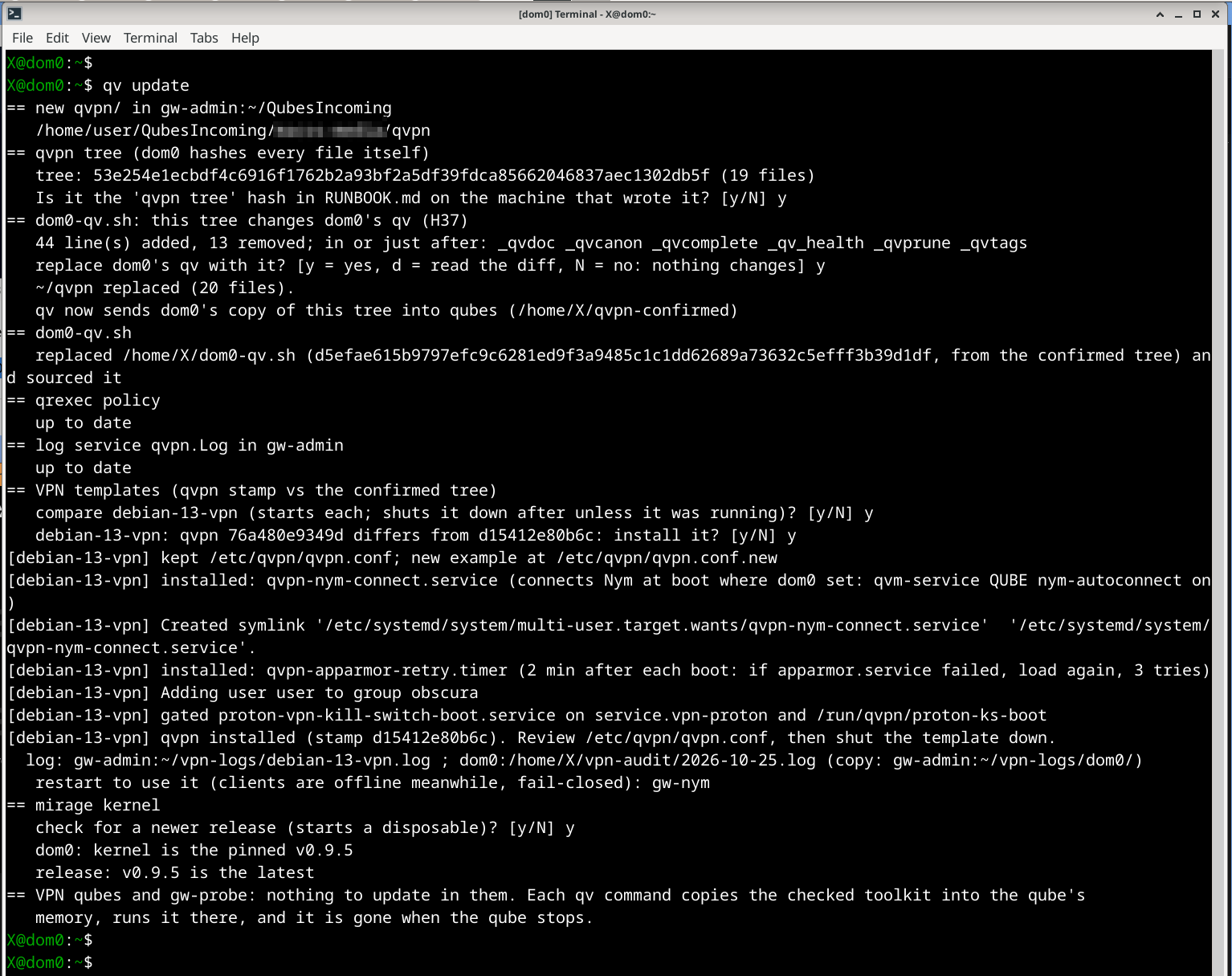
qv update in dom0: dom0 hashes every file of the new qvpn/ in gw-admin:~/QubesIncoming itself, then asks whether the tree hash matches the one in RUNBOOK.md. This tree changes dom0’s own script, so before replacing dom0-qv.sh it shows how many lines changed and in which functions. It then checks the qrexec policy and the log service, updates the VPN template (keeping the edited qvpn.conf, gating Proton’s boot kill switch), names the qube to restart (its clients stay offline meanwhile, fail-closed), and checks the mirage kernel against the latest release. Nothing is installed in the VPN qubes: each qv command copies the checked toolkit into the qube’s memory.
What works, what doesn’t
| VPN | On the author’s machine |
|---|---|
| Obscura, Proton (free and paid), NymVPN | working, tests pass, own egress pinned to their servers |
| Tailscale, NetBird, I2P | working, tests pass |
| WireGuard config from any provider | kill switch works; no account to test |
| IVPN | built, never logged in, no account to test |
| Mullvad app, OpenVPN | offline tests only, no account to test |
Not there: IPv6 for clients (blocked on purpose), port forwarding into a client.
Before you start: what to expect
- Run on one machine only: the author’s. The kit has not been run from scratch elsewhere.
- The RUNBOOK is long because it covers ten VPNs, two template layouts, two firewall layouts and carrying logins over. One VPN qube needs a small part of it.
- VPN apps change. A new version can move its state or its DNS;
qv QUBE testwill usually say what broke, but as it isn’t maintained, fixes would need someone in the community to pick them up.
Lessons from the live runs
- I2P never integrates behind a mirage firewall (its NAT breaks I2P’s UDP sessions); straight on the VPN qube it works.
- Proton’s “permanent mode” boot unit blocks Proton’s own app from connecting. The app’s own kill switch, plus a kill switch outside the app, works.
- A tunnel can look connected while passing nothing: Obscura lost its only resolver inside its own dead tunnel. A watchdog now restarts it, and tells Obscura and Nym to connect again, because both daemons come back disconnected after a restart.
- AppArmor fails at boot in small qubes (out of memory); a timer loads it again two minutes later.
The rest is in FINDINGS.md, and every design decision, with the alternatives, in DESIGN-NOTES.md.
Roadmap
Nothing more is planned. Where someone could take it (ROADMAP.md has the details):
- live checks not yet done (Proton Free’s one-device behaviour, IVPN, the Mullvad app, OpenVPN);
- hardening: the WireGuard key in a vault qube, host-based egress pins where a provider publishes its servers;
- IPv6 for clients as an opt-in, port forwarding into a client;
- the Qubes way: a Salt formula, a .deb for the in-qube part, dom0’s part as Python on
qubesadmin; - things Qubes OS itself could do that would help every VPN qube (ROADMAP.md “For Qubes OS upstream”), such as a built-in fail-closed option for network-providing qubes, and AppArmor loading reliably in small qubes.
How it was made
Made by Ros Mac with Claude Code. Ros Mac set the goal and brought the ideas, the questions, the live tests and the steer; Claude Code wrote the code, the tests and the docs. It never touched dom0 or the Qubes machine: each build reached dom0 by hand, checked against its hash. It is still AI-written code that has run on one machine, so read dom0-qv.sh before you load it.
If you try it
Run qv logs bundle LABEL and look at the REPORT.md it makes; it lists every FAIL with its fix.
Feedback is welcome in this thread: what worked or failed on your machine, VPNs or setups not covered, and links to guides, issues or tools that would help others doing the same. If you build on it, MAINTAINING.md and ROADMAP.md say where to start.