I bought a starlabs laptop but am having problems
How do I access dom0
How do I update it fails to update
Can anyone please help
1 Like
Good evening,
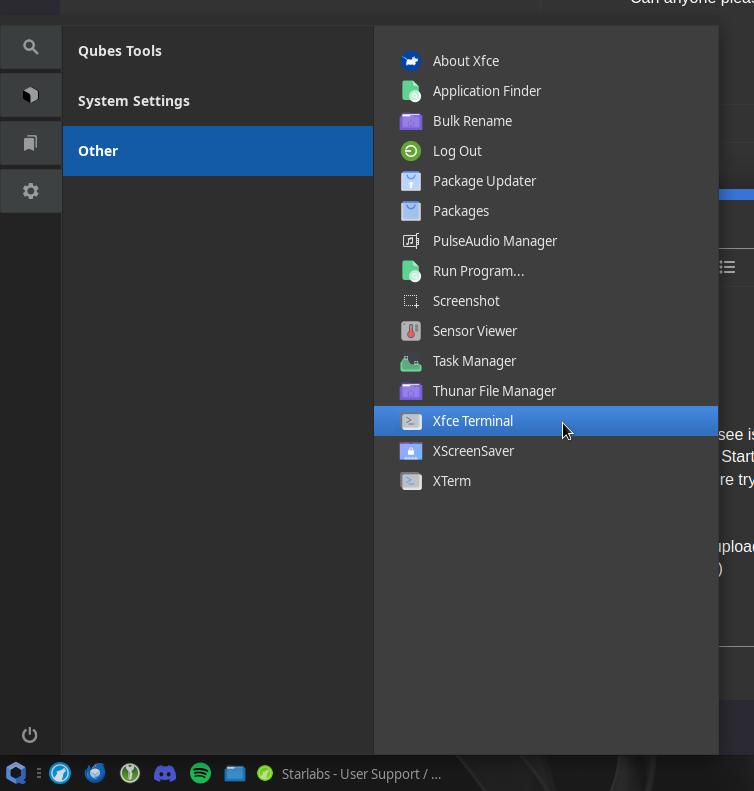
When you first boot up, everything you see is technically dom0. If you want to open a terminal in dom0, you can go to Start → Gear Icon → Other → Xfce terminal (or Thunar File Manager if you’re trying to access the file system of dom0).
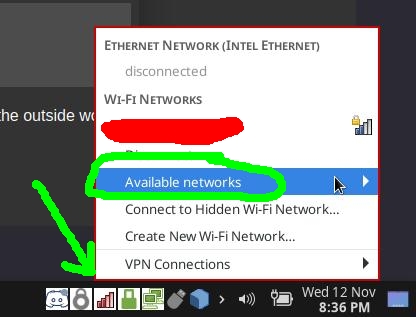
Assuming you’re using the Qubes Update tool, make sure you’re connected to a Wi-Fi connection that’s open to the outside world. What error does it give you when you try to update?
1 Like
Hi @sss
be mindful of starlabs and their products
their laptop died under warranty
starlabs returned the laptop suggesting to be repaired
upon arrival the laptop died again
starlabs found unbelievable excuses and never fulfilled the warranty
good luck, if you need to use their warranty
2 Likes
That is disappointing to hear as I was thinking about getting their Starbook. It has the strongest CPU out of all the certified laptops.
Do you know what exactly which component killed it?
1 Like
The laptop died slowly while corrupting data (and back-ups)
It is likely to be the motherboard (bad quality)
Another thing, StarLabs is based in the UK
any dispute would likely need to be filed there
any lawyer would cost more than the laptop
1 Like