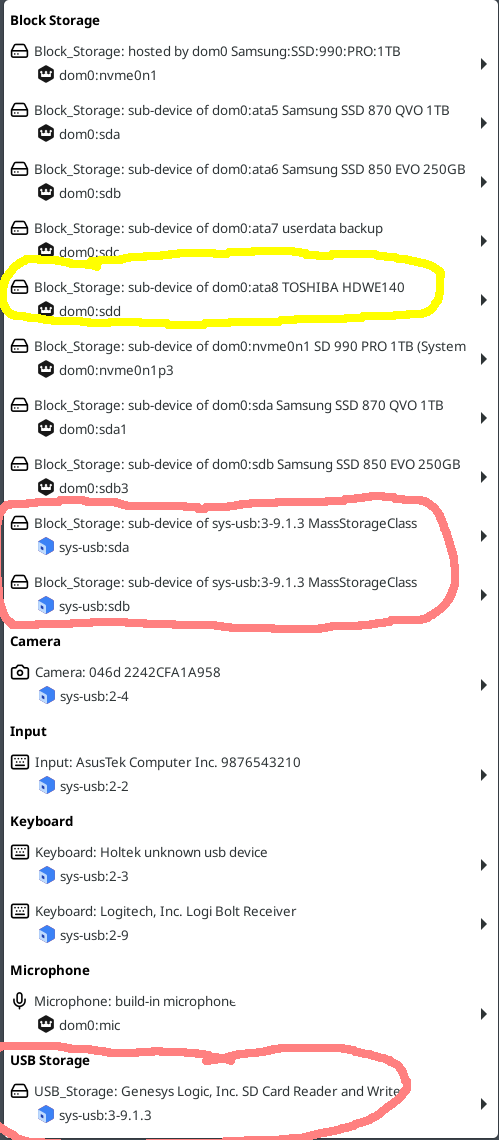
After upgrading to Qubes OS 4.3, I noticed a regression in the dom0 panel block-device overview:
In Qubes 4.2, the panel showed the size of attached SATA drives, which made it easy to distinguish between multiple internal disks. In Qubes 4.3, the size information for SATA devices is no longer displayed. Only the device name (e.g. dom0:sdX) and model (e.g. TOSHIBA HDWE140) is shown.
While this does not break functionality, it significantly reduces usability on systems with more than one internal disk, as it becomes harder to identify the correct device when attaching disks to VMs. From an admin/user perspective, this feels like a UX regression compared to 4.2.
The information is still available via dom0 CLI tools (lsblk, qvm-block), but having basic metadata like drive size directly in the panel was very helpful and reduced the risk of attaching the wrong disk.
It would be great if drive size could be reintroduced in the panel block-device menu, or made optional.
First one in red. This is a SD Card Reader with several slots (USB storage below in the picture). There is just one card in it but it shows up as two block devices (sda & sdb). And…there is no info which of them is the SD card. In v4.2 it showed one with 0 GB (sda) and the other with 1 GB (sdb)
Second example in yellow: v4.2 showed the capacity of the Toshiba disk, v4.3 does not.
BTW the SSD’s are shown very nicely with capacity and type which makes it easy for me to distinguish them.
While I don’t have a 4.2 system handy to check, I do believe that what you’re saying is true, I think there was a size indication and it was really handy.
It would be helpful if you made an issue about this in the issue tracker.