This project was made using AI: Claude Opus 5.5 + Fable 5.1
https://github.com/renehoj/qubes-cpu-affinity
I wrote this utility for hybrid CPUs (e.g. Intel 12th–14th gen) to make it easy to use the P and E cores, but it will work with other CPUs as well.
The daemon is a systemd service in dom0 (qubes-cpu-affinity.service). It runs a Python script that talks to qubesd through the Qubes OS Admin API (qubesadmin).
The script uses the API’s event stream to listen for domain-start and reads each qube’s tags and features. Then it pins the qube with xl vcpu-pin. When the service starts, it also handles the qubes that are already running.
- Hard affinity (the same for all qubes) useful to keep every qube off dom0’s cores.
- Soft affinity comes from the qube’s tags, for example
performance→ P-cores andefficient→ E-cores. Untagged qubes are assigned thedefault_cores. - HVM qubes’
-dmstubdomains are pinned along with their qube. - The optional qvm-feature
vcpus-onlinebrings only N vCPUs online at start (xl vcpu-set).
vcpus-online allows you to control how many CPUs are online, the max is the amount set in the qube settings. With Debian based qubes, you need an udev rule to automatically online the CPUs, when adding them back to the qube.
Caveat: soft affinity only works with the credit scheduler. Qubes’ default, credit2, ignores it, so you need sched=credit on the Xen command line.
Everything is set in one JSON file:
{
  "hard_cores": "4-31",
  "tags": { "performance": "4-15", "efficient": "16-31" },
  "default_cores": "4-31"
}
qvm-tags gaming add performance
qvm-tags sys-net add efficient
qvm-features gaming vcpus-online 2
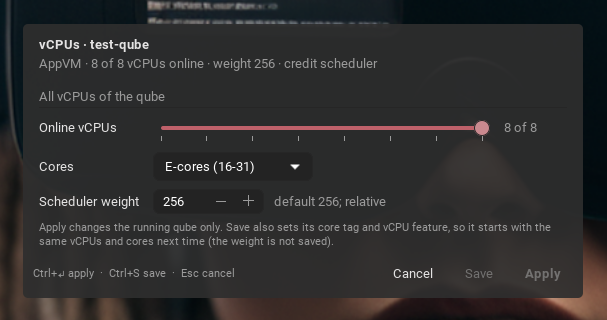
qubes-vcpu <qube> is a small GTK window for a running qube with three settings: online vCPUs (a slider), the core set and the scheduler weight.
Apply changes only the running qube.
Save also sets the tag and the feature through the Admin API, so the qube starts the same way next time. When you add vCPUs it first writes the udev rule that brings hot-added vCPUs online, which Debian templates lack.
You can use a shell script you change the settings for the active qube
#!/bin/bash

CUR_WIN_ID=`xdotool getwindowfocus`
CUR_VM=`xprop _QUBES_VMNAME -id $CUR_WIN_ID |cut -d \" -f2`

/home/user/.local/share/qubes-cpu-affinity/bin/qubes-vcpu $CUR_VM

exit 0
As always, it runs in dom0, so read it before you install it.