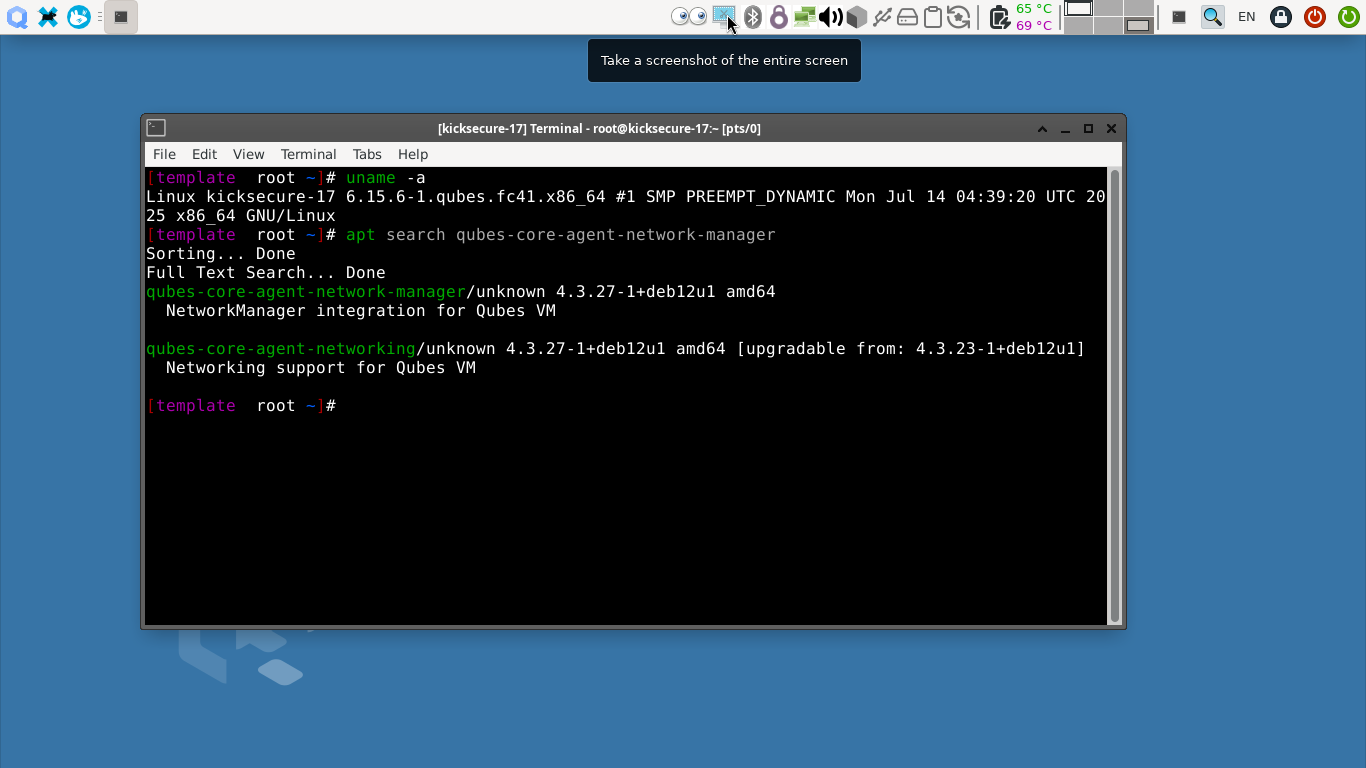
Hi,Qubes-core-agent-network-manager package is not present .
Hi.
Short answer is that you should disable the main Qubes updates repo in /etc/apt/sources.list.d/qubes-r4.list and enable the Qubes updates candidates repo there. Then you apt update and the required package becomes available (and you will also receive other qubes os related updates for your template).
Detailed explanation:
opened 05:34PM - 16 Jul 25 UTC
closed 10:55AM - 17 Jul 25 UTC
R: not applicable
P: default
### Qubes OS release
Qubes OS 4.3
### Brief summary
Upon a fresh install of t… he most recent QubesOS 4.3 build (untested with older builds of 4.3), the Testing repository is off by default.
This results in several missing packages, and thus failures in trying to install Windows qubes, `sys-gui`, and possibly other things as well
### Steps to reproduce
I Installed 4.3 using default settings, updated my dom0 & templates, then rebooted.
I noticed that many things seem to be missing, because the Testing repo is not enabled by default.
---
# Windows Setup
In order to fix this for installing a Windows qube, I had to enable this repo and update:
1. I transferred `install.sh` to dom0, from https://github.com/elliotkillick/qvm-create-windows-qube
2. Ran `chmod + x && ./install.sh`
```[i] Installing Qubes Windows Tools...
Using sys-firewall as UpdateVM for Dom0
Downloading packages. This may take a while...
Updating and loading repositories:
Fedora 41 - x86_64 100% | 35.4 MiB.0 B
Fedora 41 - x86_64 - Updates 100% | 10.6 MiB
Qubes Host Repository (updates) 100% | 49.2 KiB
_[?25hRepositories loaded.
Failed to resolve the transaction:
No match for argument: qubes-windows-tools
You can try to add to command line:
--skip-unavailable to skip unavailable packages
[!] Error installing Qubes Windows Tools! Exiting...
```
3. Attempted to install `qubes-windows-tools` in dom0:
```
user@dom0:~$ sudo qubes-dom0-update qubes-windows-tools
Using sys-firewall as UpdateVM for Dom0
Downloading packages. This may take a while...
Updating and loading repositories:
Fedora 41 - x86_64 - Updates 100% | 29.3 KiB.0 B
Fedora 41 - x86_64 100% | 29.8 KiB
Qubes Host Repository (updates) 100% | 2.7 KiB
_[?25hRepositories loaded.
Failed to resolve the transaction:
No match for argument: qubes-windows-tools
You can try to add to command line:
--skip-unavailable to skip unavailable packages
```
4. Tried to search for the `qubes-windows-tools` package:
```
user@dom0:~$ sudo qubes-dom0-update --action=search qubes-windows-tools
Using sys-firewall as UpdateVM for Dom0
Updating package lists. This may take a while...
Updating and loading repositories:
Fedora 41 - x86_64 100% | 29.8 KiB.0 B
Fedora 41 - x86_64 - Updates 100% | 29.3 KiB
Qubes Host Repository (updates) 100% | 2.7 KiB
_[?25hRepositories loaded.
No matches found.
```
5. If I enable `Qubes Global Config > Updates > Enable all testing updates`, then run `sudo qubes-dom0-update`, and accept all the packages, then we can proceed to the next step
6. `sudo-qubes-dom0-update qubes-windows-tools` will now install `qubes-windows-tools-0:4.2.0-1.fc41`
---
# `sys-gui` setup
In order to fix this for setting up `sys-gui`, I had to go into the `fedora-42-xfce` template and edit `/etc/yum.repos.d/qubes-4.repo`
1. I followed https://www.qubes-os.org/doc/gui-domain/#hybrid-gui-domain-sys-gui, and ran the commands with `--show-output. Here's the interesting snippet:
```
fedora-42-xfce:
----------
ID: sys-gui-xfce
Function: pkg.installed
Result: False
Comment: Error occurred installing package(s). Additional info follows:
errors:
- Running as unit: run-p1318-i1618.scope; invocation ID: 8129fb74cb844b2e96e4f589265d1212
Updating and loading repositories:
Repositories loaded.
Failed to resolve the transaction:
No match for argument: qubes-manager
No match for argument: qubes-desktop-linux-manager
No match for argument: qubes-vm-guivm
No match for argument: xfce4-settings-qubes
No match for argument: dummy-psu-receiver
No match for argument: dummy-psu-module
No match for argument: dummy-backlight-vm
You can try to add to command line:
--skip-unavailable to skip unavailable packages
Started: 13:07:30.236515
Duration: 6698.649 ms
Changes:
----------
```
2. Upon switching into `sys-gui`, I get only a default Fedora GUI environment, with no access to tools such as `qubes-qube-manager`
<img width="1920" height="1080" alt="Image" src="https://github.com/user-attachments/assets/519e00f9-2469-46ca-b543-ccda294b909d" />
3. In the `fedora-42-xfce` template, I edited `/etc/yum.repos.d/qubes-r4.repo`, and set `enabled=1` under `qubes-vm-r4.3-current-testing`
4. I then ran `sudo dnf update -y`
5. I deleted `sys-gui`
6. I re-applied the setup steps from: https://www.qubes-os.org/doc/gui-domain/#hybrid-gui-domain-sys-gui
### Expected behavior
Windows setup and `sys-gui` setup in 4.3 should behave largely as they would in 4.2, save for the changes introduced by 4.3
### Actual behavior
Testing repositories being off by default is resulting in several missing packages in a default installation.
### Additional information
_No response_
1 Like
Oh ok!@alimirjamali
1 Like
I also need to enable qubes-dom0-current-testing in dom0 ?
Not necessarily for the specific package you asked earlier. But generally it would be a good idea (at this point). While it is still testing repository and theoretically some of its updates might break the entire system, r4.3 has almost stabilized in recent weeks and I would trust its testing updates.
You may revert back to stable repos after r4.3 stable is finalized and its stable repositories become available.
1 Like
Ok thank you
1 Like