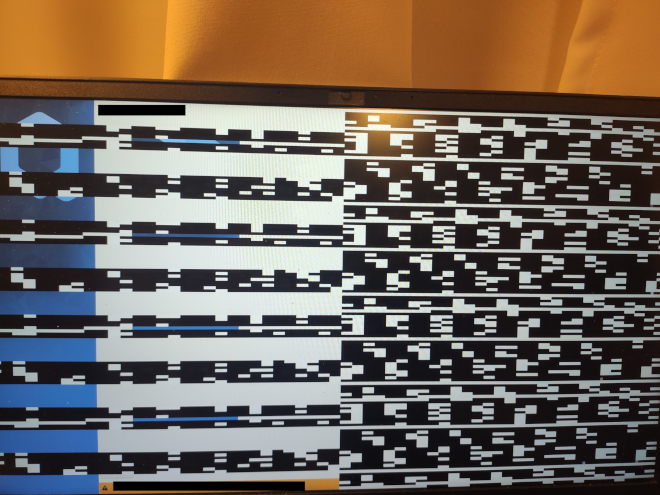
I’m stuck in the (post)installation of Qubes 4.3 rc3.
Installation brought no errors, installer told me to reboot.
The problem arises then, at booting the first time on the fresh install, before the configuration process. The screen is totally unusable, as on the picture.
I aldready browsed the topics here and on a search engine, but found nothing. As I’m not very skilled in linux, I don’t know what to do to identify the problem, and so I need your help.
Some infos:
I aldready had Qubes 4.2.4 running on this computer (I removed it and cleaned the SSD before trying to install 4.3rc3)
installation on the internal SSD 512Go NVMe
Qubes Iso double checked (signatures, hashes…), copied on a USB key via 2 methods : Gnome Disks (restore disk image) ; dd as stated in the Qubes documentation ; both brings the same problem
USB medium checked at start up, before installing ; no errors (or didn’t I had time to see them ?)
I’ll send any other needed info. Please just tell me which commands to run for getting them, or which logs to send (and where to find them).
For the moment, I had to install another OS for working on the computer. I will try again installing Qubes as soon as I have some advice.
How can I get the adress ? For the moment I run another debian based linux OS (I had to install it for daily work, witing for qubes to run again). Is it possible to have this info after the installation, and before rebooting in the configuration process ?
EDIT : Please forgive me my begginer level, the more precisions I’ll have the better it will be
EDIT 2 : lspci in tha actual OS gives me a lot of cezanne results ; only one starts with VGA compatible : is it this one to block ?
When i’ll have this info confirmed, when to edit the grub ?
add rd.qubes.hide_pci= with your PCI address
that’s what my line looks like after modification (00:1f.6 is my igpu so it would disable every gfx I have, that’s why search for Navi 24):
OK,
It seems this is the line I need : 03:00.0 Display controller: Advanced Micro Devices, Inc. [AMD/ATI] Navi 24 [Radeon RX 6400/6500 XT/6500M] (rev c3)
Big question, as a newbie, before I proceed :
When exactly should I edit the grub file ? Step by step please. I will install Qubes on the internal SSD. I think I will have to edit the file BEFORE restarting (or I will miss the configuration steps, because of the graphic problem), but how can I achieve this ? Should I first type “c” a the first grub prompt after the install (and before the config process) complete the configuration process, and somehow later edit the grub file with sudo nano ?
Aren’t you’ve checked PCI devices on installed qubesos?
If you have no access to text running OS then you can edit grub temporally.
During boot, when grub will show, hit e - it will put you in the live grub edit.
Edit the line and hit F10 to boot. It will boot with changes.
If this repair your boot, then you need make it permanent.
So in a system open terminal in dom0 and then edit as in my previous post.
Hm…
It might be that 4.3 with newer drivers make your hybrid graphics hi-wire.
It might be, since Navi 24 is first VGA, that display output is connected to it, but when dom0 loads then Cezanne is loaded as well by Xorg and magic happens. Or any other way.
Back with good news, the mods you proposed worked, many thanks for that !
Last question, will I miss this NAvi 2 component (and what is it for ?) or should I let the grub pci-hide as this ?
I’m now facing other problems with sys-usb and USB keys/ssd, I’m going to open a new post.