NVMe Issue when drive passed to HVM

I have a read/write corruption issue with an NVMe drive passed to a HVM using PCI passthough. I don’t have issues when I attach the device to a regular template based VM or if I use qvm-block.

The problem occurs if the secondary graphics card slot has a graphics card.

Qubes: 4.2.4

The original hardware combination:
Asus TUF Gaming B550-Plus - Mother board
AMD Ryzen 7 5700G - CPU
AMD RX 9060 XT 16 GB - Graphics card 1
Asus nVidia RTX 3050 - Graphics card 2
2 x PCIe USB
WD Black SN770 2TB NVMe drive - My main drive I have had no issues at all
Crucial E100 480GB PCIe Gen4 NVMe M.2 SSD - The problem drive

The drive is connected to a secondary slot on the motherboard, which shares the bandwidth with the SATA interface. On that interface I have 8 TB regular HDD and small 256 GB SSD drive.

When the drive is attached to a HVM and I copy a large amount of data I can replicate the issue every time with a 20GB directory copy. The copy starts and continues for a little while, then stops. The journalctl in the HVM shows errors. Screenshots later. It will take some minutes, but eventually the journalctl displays more errors and a segfault. When that happens, the Qubes gets frozen for a hile, but then resumes. After that I can continue using Qubes normally, until I eventually get tired and close the HVM. When the HVM closes, Qubes crashes.

The drive gives clean SMART info. It passes self tests and I have no problem if I boot into regular Linux and try to do large copies. I have tested attaching the drive to a regular template based VM and doing same copying in that with no issues. I have checked for corruption using diff -r. Please correct if that is not good enough. What I know from the HVMs, even read corruptions have been numerous and easily spotted. One peculiar thing (to me) that I have noticed when copying in a regular VM, the speeds spurt high and then go down all the way to HDD speeds for a long time and then go back up again. All the files should be pretty similar in the copied folders.

Out dated paragraph hidden. Update: Passthrough works fine unless a graphics card is insterted to the secondary graphics card slot.

I’m pretty sure the setup used to work perfectly fine before in this same slot before I added new graphics card, the AMD one and one new USB card to a remaining PCIe slot. Only one slot remains empty, but it is not accessible. I moved the former number 1 nVidia card to the secondary slot. I cannot rule out Qubes updates, but my hunch is leaning towards the PCIe shuffle as the origin of the problems. But anyone who has done debugging or problem solving knows how much user hunch is worth on things they don’t understand. I hope I’m not misleading other users or future readers.

During research I found that my motherboard has had issues with SMT in Qubes 4.1 version. I have tried changing the BIOS setting from auto to disabled, but that did not change anything apart from slightly cleaner journalctl in dom0. For the record, I have tried smt on and off and all my issues have always been same with either setting. Can’t be sure if disabled in BIOS would have solved something in the past.

I have tried limiting the problem drive to x1 speed in BIOS, but that did not help.

The BIOS version of the motherboard is 3621. There is a newer stable version that I haven’t flashed. I’m always afraid of flashing the BIOS. From my research (reading wikipedia AGESA change log for AM4) I have been doubtful it fixes anything relevant.

I haven’t yet tried updating to 4.3. In case this is fixed in a newer Xen version. Because all the effort it takes to do the work and because I have been scared of breaking a working system or not being able to restore my VMs from backups.

Screenshots from journalctls in case they offer any relevant information:
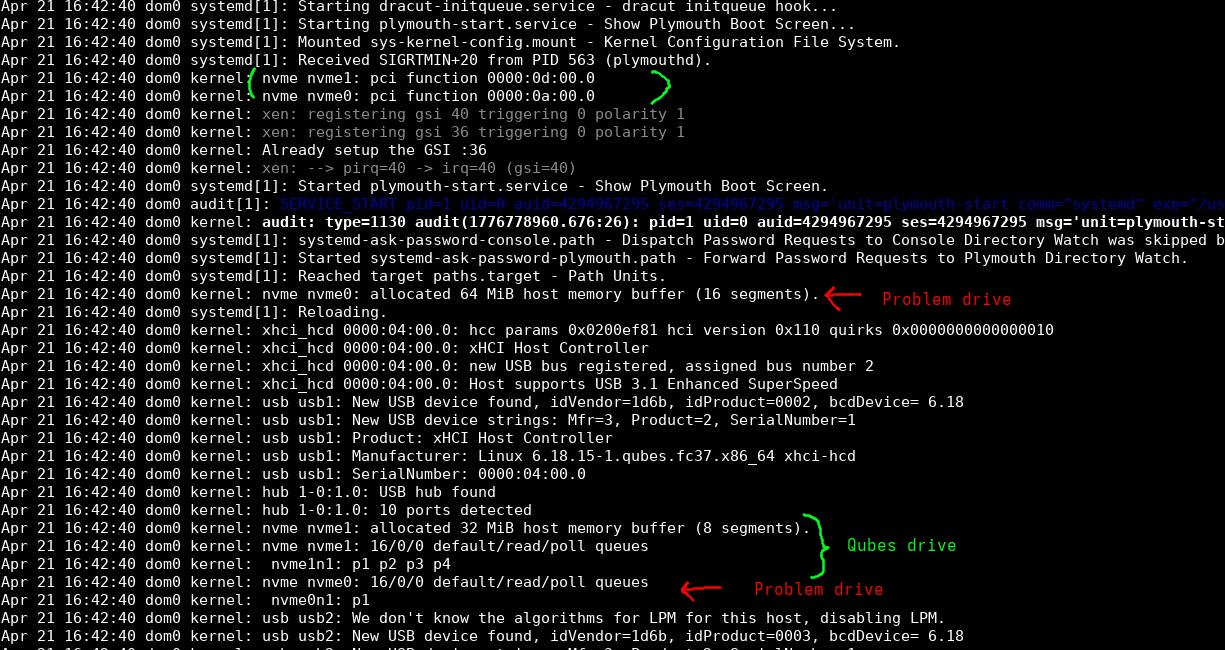
Drives found:
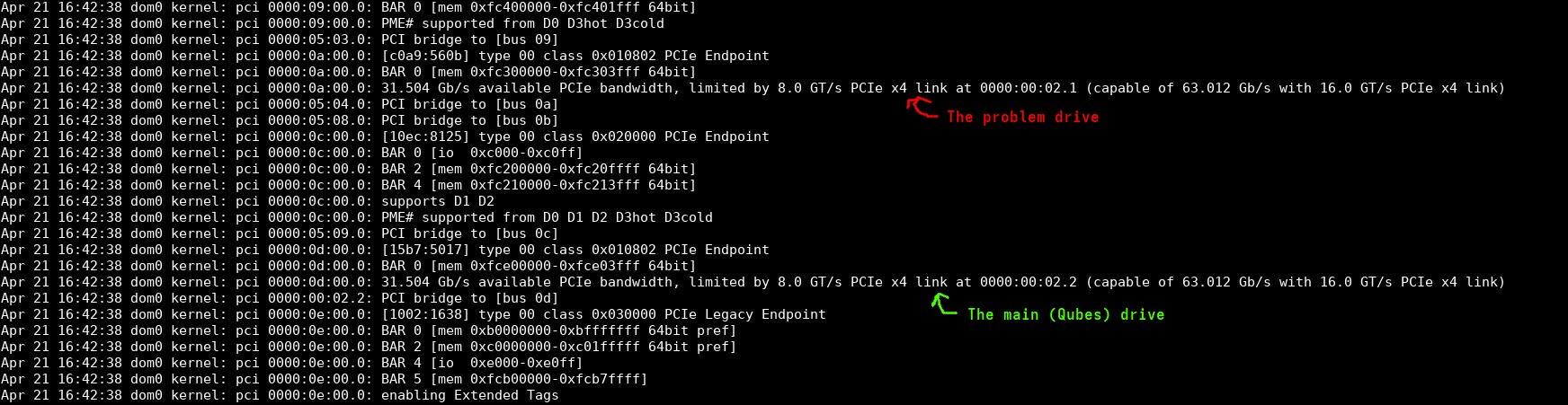


What it says in dom0 about the problem drive when it errors:

How it looks like in the HVM when it happens:
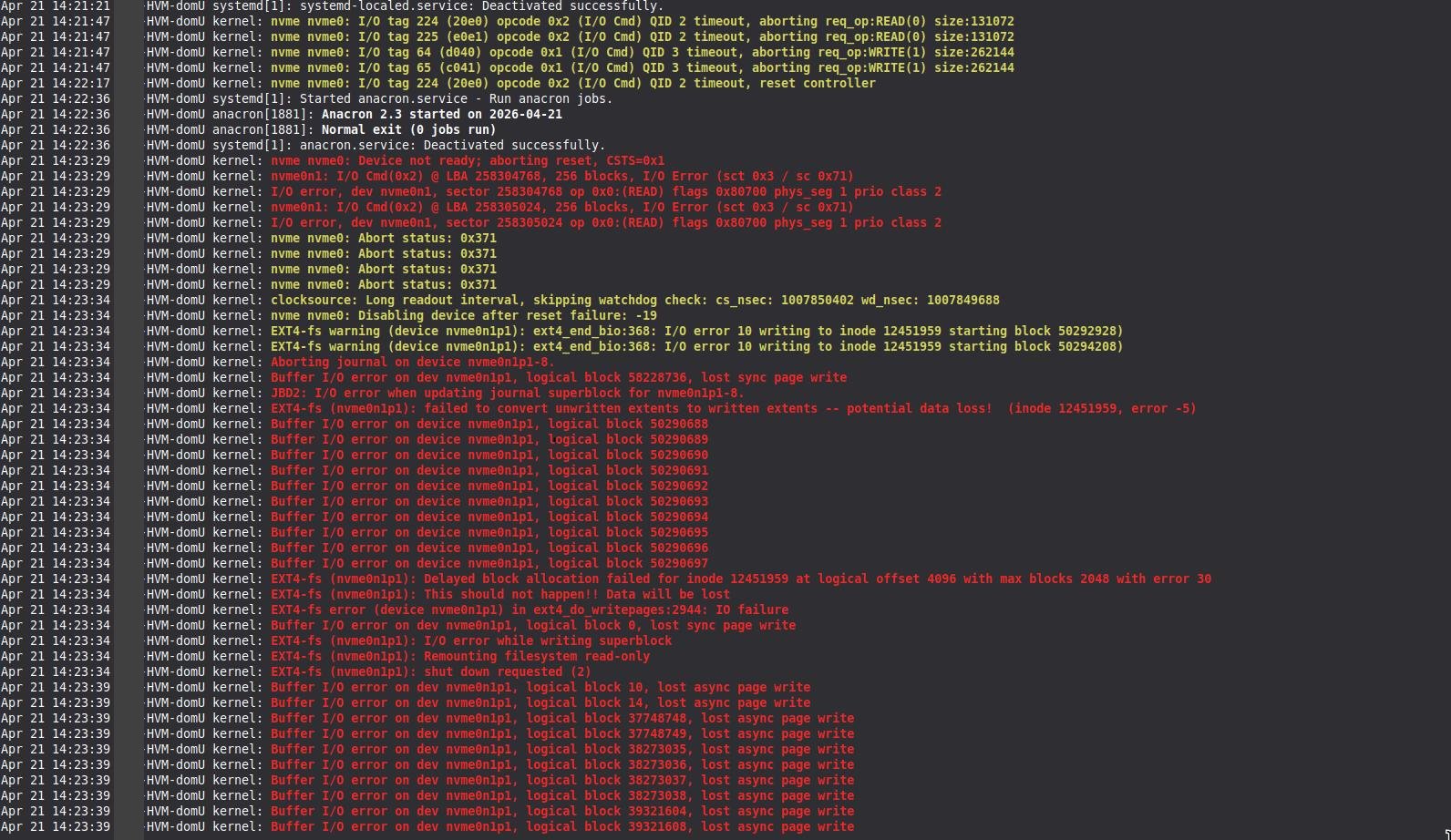
During the spurt of the red lines, Qubes freezes but resumes after and can be used normally.
How it looks like in the dom0 when the Qubes crashes when shutting down the HVM.
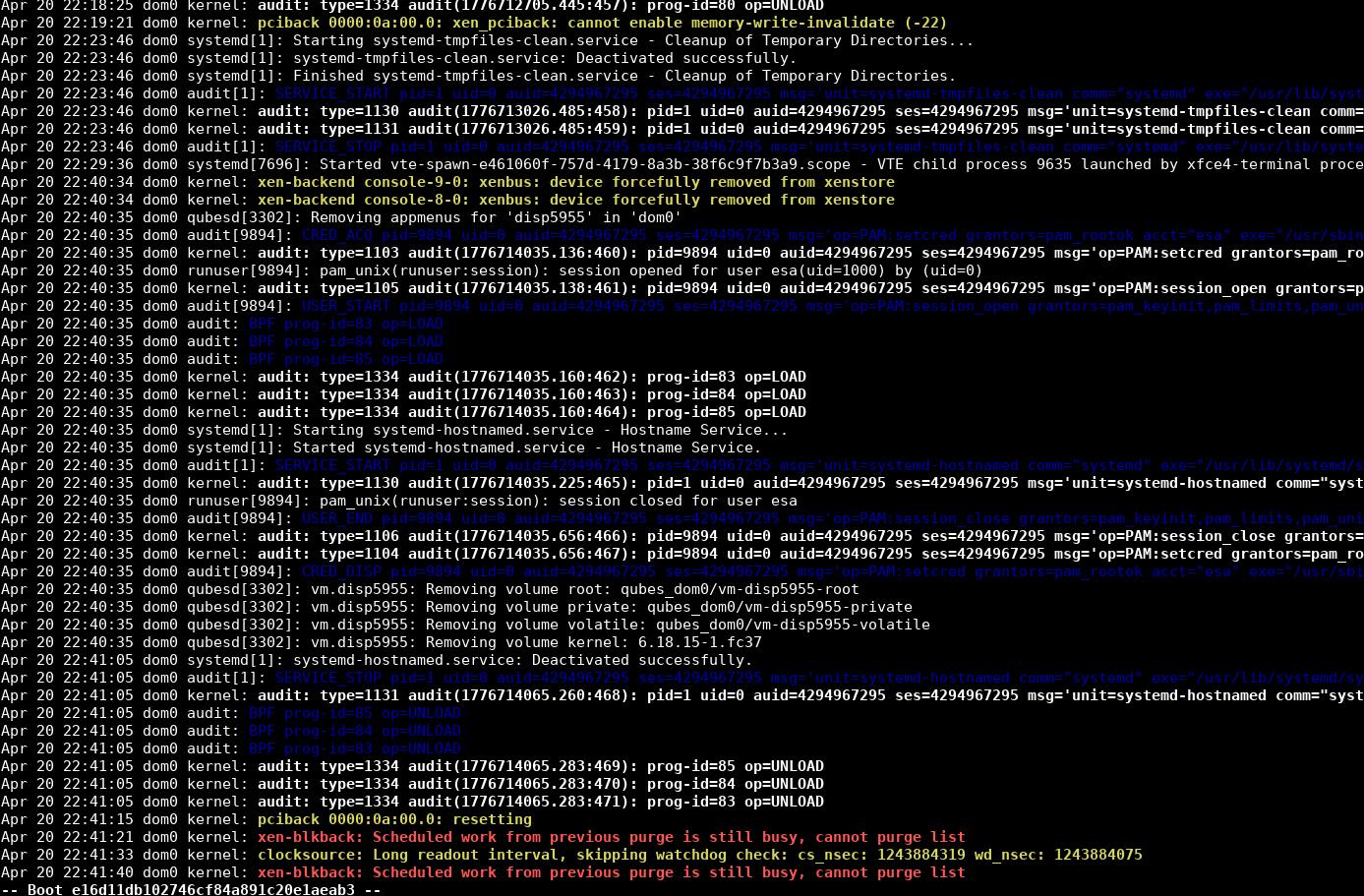
The disp5955 is unrelated to the problem. The problem starts ate memory-write-invalidate (-22) after which I have continued using Qubes and closing VMs to prepare myself to the eventual crash.

If I try to shutdown Qubes without shutting down the HVM first, I can generate segfault dump to dom0, but I kind of think that is unrelated. It seems like (to someone who is not familiar) the segfault is for logging. Those screenshots were too large for this.

I would have normally just moved to 4.3 before posting here since 4.2.4 is soon gone, but decided to post first because data corruptions can be significant problems to some people. To me, this case is just an inconvenience.

I forgot to clarify. When I’m attaching to a regular VM, I’m using the mouse menu interface from the Qubes system tray. When attaching to HVMs the dom0 terminal commands qvm-block or qvm-pci with --persistent. Just in case there are any differences with the methods.

Update information.

After laborious effort to backup the computer I have continued with this and I can now post more accurate information. The problem is caused by a graphics card in the second PCIe slot intended for graphics cards. Using qvm-block, everything works fine. Problem only happens with PCI passthrough. I must have remembered wrong in my original post. The real problem with qvm-block is that nvme devices keep switching places and persistent can’t be used. That is why I have used PCI passthrough.

The type of the graphics card doesn’t matter. I have tested by shuffling different cards to rule out hardware failure on card and other devices cards add. Right now, I think the problem comes from merely the existence of a graphics card in the secondary slot. Primary slot being empty. AMD card or NVIDIA card doesn’t matter.

I have not dared to update BIOS to see if that fixes the issue. I’m certainly unsure where to point my finger. Can it be merely a hardware bug, when regular Linux doesn’t have an issue. Or am I misusing the QubesOS with PCI passthrough for nvme controller.

I will update the top post to reflect my current understanding.

I have a feeling this might be related to the IOMMU groups. When configuring PCI passthrough, it is important to understand the IOMMU groups; if you passthrough only some of the devices in the group rather than all of them, such problems may occur.

I found someone on another forum who has the same board as you and posted about IOMMU groups, but that grouping seems a bit odd…

Also, even when devices are grouped in the ideal configuration of “one device per group”, some problematic boards (though it’s unclear whether this is Xen or a board issue) may crash when performing passthrough (as is the case with the board I have).
So, If you want PCI passthrough to work as expected, you should buy a model that has good reputation on relevant forums. (However, since many of those reviews assume the use of KVM(Proxmox), it remains to be seen whether they will work on Qubes OS using Xen…)

1 Like

That could be it. It looks like the board has created an IOMMU super group with the nvme device, second graphics card and with a bunch of other devices I would prefer not to be in it. I’m lucky only the nvme is impacted. The SATA interface in the same group seems to be working fine and it seems that the disks copies without corruptions. I can live with these limitations as long as I understand them.

1 Like

Just a quick thought - perhaps disabling the SSD’s HMB (Host Memory Buffer) may bypass the problem even when the second slot is in use:

[user@dom0 ~]$ qvm-prefs <name of hvm> kernelopts nvme.max_host_mem_size_mb=0

My guess is that the HMB is filling up during continuous writing operations, and that might be causing a memory conflict with another device (in the second slot?).
that said, I’m not an expert, so I’m not entirely sure.

Unfortunately this didn’t help.

The kernelopts didn’t work for me, but I used nvme-cli to manually disable HMB before mounting for the test.

To readers ending here for their own reasons, the commands AI was pushing were wrong. You can get better help using man nvme after installing nvme-cli and you can get the feature ids and values with a nvme get-feature <device> -H command.

1 Like

Thank you for testing it. Hopefully there’s some workaround or solution. I can’t think of anything else. sorry.

1 Like

I think this thread is now a compatibility report of the motherboard.

I finally updated the BIOS to 3636 version. It didn’t fix the issues but it also didn’t cause issues.

I have done more testing and there is also an issue with the secondary graphics card if the SATA interface is also passed with PCI passthrough. The problem is not as dramatic. On Windows HVM there is screen corruptions and on Linux the open source graphics driver seems to crash. I did some proper, I think, stress testing and if I passthrough only the graphics card and simultaneously run copying on the secondary nvme and the SATA devices in a different VM, the disks attached with qvm-block or the SATA interface passed with PCI passthrough, there doesn’t seem to be any problems in the HVM with the secondary graphics card. There has not been any read/write corruptions with the SATA devices in any tests not even when using PCI passthrough to the same HVM.

So my conclusion of the hardware combination problems if the secondary graphics card slot has a graphics card on Asus TUF GAMING B550-PLUS and PCI passthrough on BIOS version 3636:

  • PCI passthrough can not be used with the secondary nvme device at all. qvm-block works perfectly fine though.
  • The SATA interface can be passed and the disks on it didn’t have any data corruption issues at all.
  • The secondary graphics card cannot be passed to the same HVM with the SATA interface. It will have issues.

Couple additional notes, previously I had an nvme expansion card with an nvme SSD in the secondary wide PCIe slot and there was no secondary nvme SSD directly on the motherboard and I didn’t notice any problems with PCI passthrough at any time. But didn’t really look for them either. Maybe there is still more variation if the secondary nvme slot is not used. Through out the tests, I have had PCI USB cards passed to the VMs and they don’t seem to be giving any issues at all.

I speculate that in 4.3 the problem would not be relevant because with QWT and more advanced device manager (I hope the nvme devices stop switching names), using PCI passthrough for the disks is not necessary at all and there hasn’t been any issues with the disks when using qvm-block.