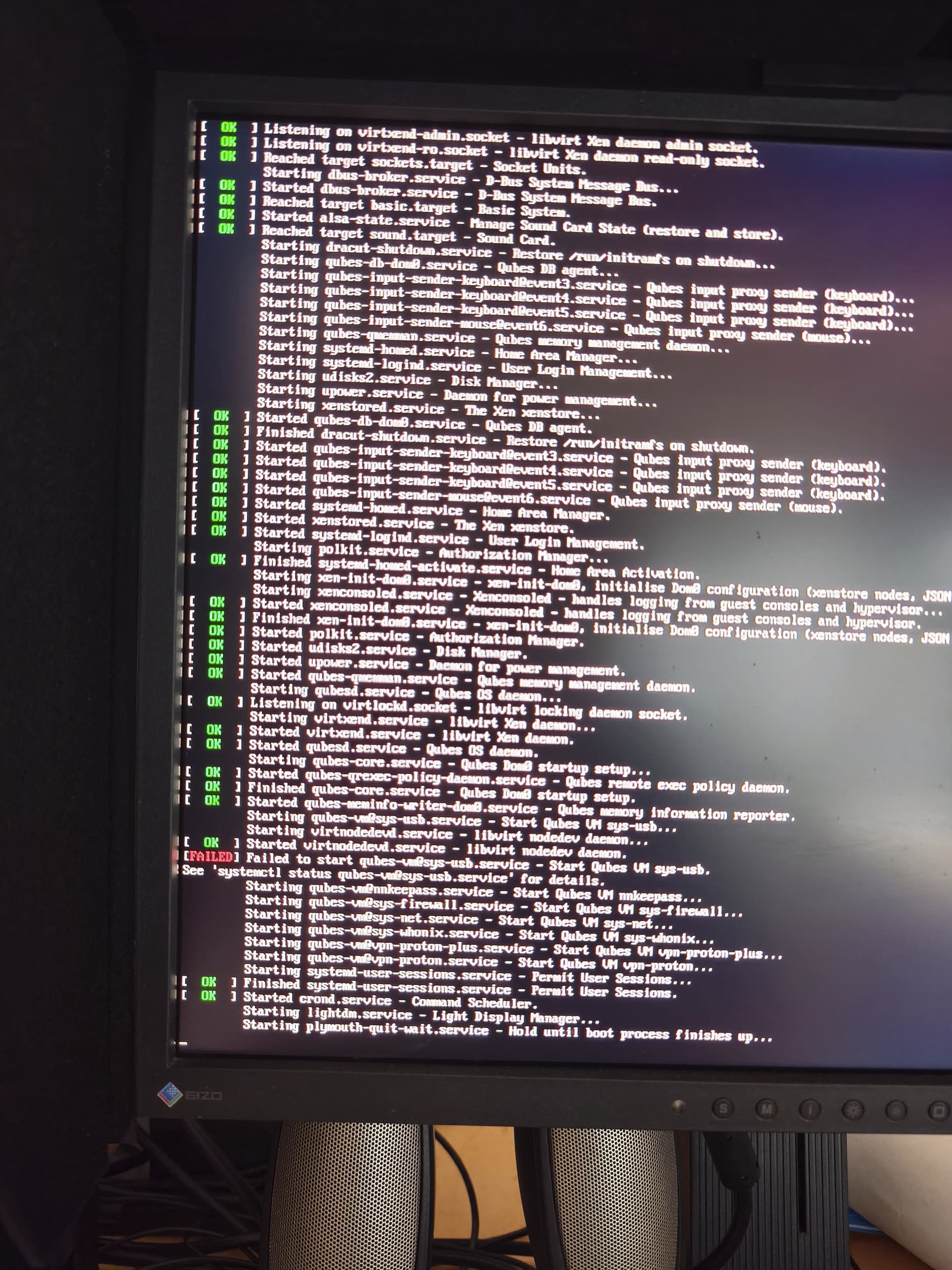
I can’t log in after the operating system starts up. Probably because the keyboard isn’t working—either sys-usb is broken or it’s not starting up. Here’s what happens: I start Qubes OS. Then I enter the disk password. After that, the operating system seems to boot up correctly. Then the user login screen appears. And now it freezes. Apparently, my keyboard isn’t recognized, and I can’t enter the user password. I have no choice but to press the hardware reset button. Then Qubes OS seems to shut down normally.
This all happened after an update.
I can repeat the procedure multiple times. Every time after startup and booting, I get stuck at the user login screen.
During the boot process I can see this error message:
[Failed] Failed to start qubes-vm@sys-usb.service - Start Qubes VM sys-usb.
See ‘systemctl status qubes-vm@sys-usb.service’ for details
Attached is a screenshot of the boot process showing that there is a problem with the VM sys-usb.
Well, I was just about to recommend to enter the console for having a look, but hey, you can’t…
Yes, after boot process finished, I can’t do anything. My keyboard is locked out.
What about booting a live USB based OS and check out logfiles?
You can use qubes.skip_autostart to bypass the failed sys-usb autostart and gain access to your desktop. Here’s how to fix it:
- Boot with
qubes.skip_autostart :
- At the GRUB menu, press
e to edit the boot entry.
- Find the line starting with
module2 or containing rhgb quiet .
- Add
qubes.skip_autostart to the end of that line.
- Press
Ctrl+X or F10 to boot.
-
Start sys-usb manually :
Once you reach the desktop try to open sys-usb and check for any errors if it fails to start remove the sys-usb vm and then open a terminal in dom0 then run this command it will create new sys-usb vm.
sudo qubesctl state.sls qvm.sys-usb
Thank you, wafmtjwadllc ! Yes, I got now access to my PC again with skip autostart. But when I want to open sys-usb manually, it crashes again.
How do I remove sys-usb? Like this? sudo remove sys-usb
What command I have to do before I create the new one with this sudo qubesctl state.sls qvm.sys-usb ?
Alternativ: I have a backup of an older working sys-usb. Should I try to replace the damaged sys-usb by the older backup?
Ive ordered a PS2 keyboard mouse exact for the same reasons above: every couple of times,it refuses to work…maybe due to other devices connected…dunno.