Hey!
Hey!
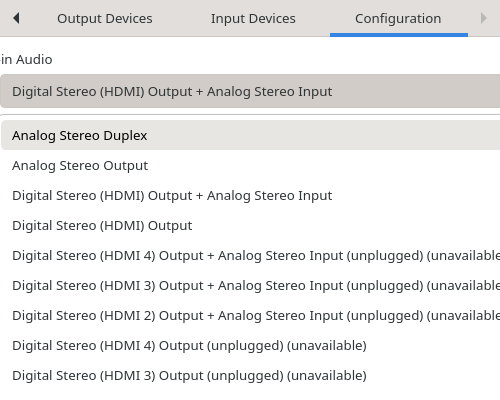
I can’t get any audio output through my monitor’s speakers via HDMI. I have a MSI Z790-P (Dasharo coreboot) with i9-14900KS and I’m using integrated graphics. I have no audio virtualization setup.
Some logs:
aplay -L | grep -i HDMI
hdmi:CARD=PCH,DEV=0
    HDMI Audio Output
hdmi:CARD=PCH,DEV=1
    HDA Intel PCH, HDMI 1
    HDMI Audio Output
hdmi:CARD=PCH,DEV=2
    HDA Intel PCH, HDMI 2
    HDMI Audio Output
hdmi:CARD=PCH,DEV=3
    HDA Intel PCH, HDMI 3
    HDMI Audio Output
sudo dmesg | grep -i HDMI
[    5.975718] input: HDA Intel PCH HDMI/DP,pcm=3 as /devices/pci0000:00/0000:00:1f.3/sound/card0/input14
[    5.975745] input: HDA Intel PCH HDMI/DP,pcm=7 as /devices/pci0000:00/0000:00:1f.3/sound/card0/input15
[    5.975774] input: HDA Intel PCH HDMI/DP,pcm=8 as /devices/pci0000:00/0000:00:1f.3/sound/card0/input16
[    5.975795] input: HDA Intel PCH HDMI/DP,pcm=9 as /devices/pci0000:00/0000:00:1f.3/sound/card0/input17
Thanks