You can congratulate me, I became the happy owner of a brand new top-tier StarFighter laptop from Star Labs. The laptop is gorgeous, but one serious problem came up.
Since I was on a 14-inch before, I got used to Qubes OS installing perfectly and adapting by itself. But with this new 16-inch ultra-super-duper screen (4K, 120Hz, matte, natively 3840x2400), it’s a complete failure.
The new 3.0 installed perfectly, but one problem popped up - the scale.
In native 3840x2400 resolution, everything in Qubes OS looks like it was designed for ants. If I simply try to change the display resolution to 1920x1200 (or 1080p) via the regular Display settings - it only helps partially. Some things get bigger, while others stay tiny and don’t change at all.
I changed the fonts in Appearance, played around with the Custom DPI setting. Then tried setting Window Scaling to 2x. All in vain.
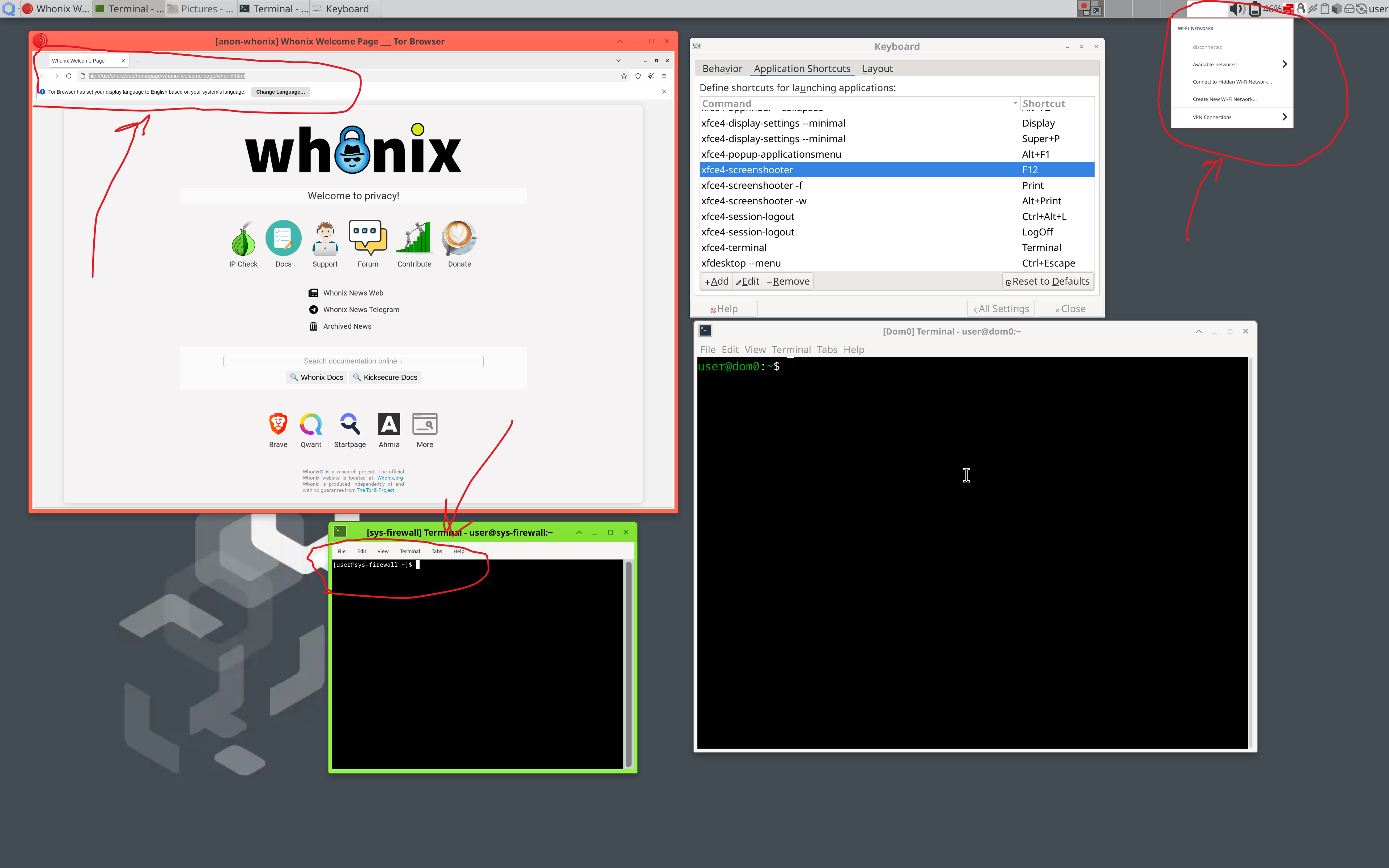
Help, what should I do to get normal scaling everywhere? I’m attaching a screenshot where I highlighted the parts that absolutely refuse to scale up no matter what.
P.S. By the way, I want to send my regards to Star Labs. Good job, you did your thing, even if it took 8 months of waiting. But it would be nice to reply to emails or at least provide a working email address - I’ve already sent about 5 emails, and in return, dead silence. You sold the laptop and abandoned me with the problem.
Well done, shaking your hand.
Congrats on your new acquisition!
I would try to change the scaling, not the resolution: unintuitively, you have to scale down (under 1) to get lager elements on the screen! Start with 0.9 and go down from there - 0.8, 0.75 etc. - until you are a happy giant ant.
I recently moved to a 4k screen on my desktop and yes, it is a pain.
Each qube needs to have its appearance setting changed. I just doubled the dpi. But then some things ignore it like if you open a qt application. For that, you need to open the application with scale factor changed
Stuff like dvm Firefox needs to have the font and/or zoom changed in the dvm template.
Whonix is the worst. It just ignores a lot of changes. Probably for fingerprinting reasons. I use zoom % to address but it is janky. Appearance setting won’t open at all for some reason.
Dom0 is its own version of customizing hell. Have you tried panel settings changing the font size ?
This is helpful info, I’ve linked it in a related starbooks thread
One thing I would separate: dom0 panel/window chrome, GTK apps inside templates, and Qt apps can all need different knobs. For dom0, try the panel preferences first (panel height/icon size/font), then Appearance → Fonts/DPI. For app qubes, set DPI in that template’s Appearance settings and restart the qube so new apps inherit it. For the stubborn Qt apps, testing with QT_SCALE_FACTOR=2 or QT_AUTO_SCREEN_SCALE_FACTOR=1 is usually quicker than changing the whole display resolution. Lowering resolution tends to create the mixed result you described.
Thank you! Although, I haven’t been able to fully enjoy this wonderful purchase just yet:(
So far, the score is 0:1 against me.
I tried setting the scale to 0.9, and things really did get a bit better, but only partially.
As others have written in the comments below, it seems I need to configure each system element separately.
But I am very grateful for the tip! Before this, I was only thinking in the direction of 1 and above.
I was really in denial about this and kept hoping there was a magic button or setting to make everything just like it was on my 14-inch screen so I could live happily ever after…
I didn’t quite understand the part about Qt applications. To be honest, that goes a bit over my head, so I’ll just pick an AI’s brain whenever I actually run into that problem.
Whonix is the biggest headache here, since I use it quite often, and I still have to figure out exactly how to configure everything in there.
The tip about the Dom0 panel settings is pure gold, thank you from the bottom of my heart! It actually fixed the scaling for some of the icons in the top right corner. True, it didn’t fix all of them, but hey, it’s better than nothing.
To be honest, I feel a little embarrassed now that I was trying to find a “one-size-fits-all” solution, considering I love Qubes precisely for its compartmentalization. I suppose I was so misguided because everything worked completely flawlessly on my 14-inch screen
Thanks for pointing me in the right direction! I’ll hadle it in my free time, because right now my laptop is basically just serving as a beautiful desk ornament
Congratulations. I literally was about to purchase the same 4k StartFighter Ultra a few months ago. thank you for letting us know about this issue - unless thats fixed I’m not gonna buy it…
If you change it to 2k resolution instead of 4k, how does it look?
By the way, before I pull the trigger on the purchase, could you be so kind to share with me a few pics of how the laptop looks in real life? I’m afraid of cheap quality and too light keys on the keyboard type of stuff… and mostly the display quality…
in starlabs defense, this problem is 100% on qubes not on their hardware… That said after a 3k purchase they were obliged to at least reply your email what the heck! If thats their customer support, I can’t imagine what their warranty process is like…
If you wait for the devs, you will wait longer than the 8 months u waited for the laptop believe me.
I think you can just vibecode your way out of this scaling issue with claude code, describe, make a new appvm install it, opus 4.8 will be able to solve this easy, show him the screenshot and tell it to start debugging the case, and give him the two github links on the issue.
that thing can identify the problem, patch a fix and build again and do everything. Its just a scaling issue after all and all the software you’re running on is open source… dont forget to make backups first
edit: about the small size on the sys-firewall terminal, you know you can just increase the font size in the terminal settings right??
Scaling must be done in all VMs, since this information is currently not transferred to the VMs.
If you switch regularly between a HiDPI monitor and a LoDPI monitor I can recommend you a part of my script collection for this. If you don’t switch reguarly I would recommend setting it in the Templates and in dom0 permanently.
Alternatively changing your display resolution also should work good (at least for me it does) and also deals effectively with Programs that don’t scale. What you described as some things then being bigger then the rest, it may be necessary, that you restart your Apps so the pick up the new scaling settings.
i got a starbook ultra just recently and it defaulted to max resolution (3840x2160), but i changed it immediately to 1920x1080 and everything worked fine.
do you notice high cpu fan usage and heat while the machine is mostly idle? i’m interested to know for sake of comparison to the ultra i have, which has the fan constantly running and kicks out a lot of heat. powertop shows 20-30 W with light usage.