I installed nordvpn wireguard with this tutorial: GitHub - dazller4554328/qubes-nordlynx: How to Set Up NordVPN Wireguard on Qubes OS 4.2 . I followed the instructions until step 3 because i had trouble doing it and I’m skeptical. Anyway, I can connect to nord vpn servers on my sys-vpn and it works intended when I launch firefox in sys-vpn but when I set any other app’s or service’s net qube to sys-vpn no network traffic is routed through and I cant connect to the internet even when its set to provides network. Also pressing vm uplink eth0 doesnt work in network manager. My desired configuration: sys-net ↔ sys-firewall ↔ sys-vpn ↔ sys-whonix ↔ anon-whonix ↔ Tor Browser. Please help me resolve this problem.
If you trusted that guide, why were you sceptical about one particular
step?
It would be good to know if the failure is simply one of DNS or whether
traffic is genuinely not able to pass through the VPN.
One thing you could do to test this:
edit /etc/hosts in a qube attached to your sys-vpn.
Add a line: 185.199.110.153 www.qubes-os.org
then run ping www.qubes-os.org in that qube.
I never presume to speak for the Qubes team.
When I comment in the Forum I speak for myself.
nothing is able to be pinged in the qube attached to sys-vpn
when i try your test i get: --- www.qubes-os.org ping statistics --- 13 packets transmitted, 0 received, 100% packet loss, time 12319ms
I did the github tutorial perfectly. I have internet on the attached qube when the vpn is off but not when its on.
nordvpn should carry DNS requests to it’s own DNS.
This /etc/resolv.conf from step 3 isn’t for a case when nordvpn is not working?
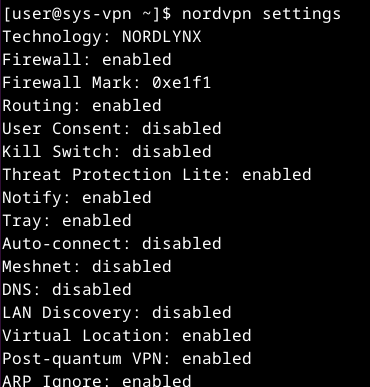
What nordvpn settings shows in DNS line? Should be disabled.
One more thing, try to ping IP address:
ping 185.199.110.153
I misunderstood. I thought you had followed the instructions until
step3, not including step 3.
I never presume to speak for the Qubes team.
When I comment in the Forum I speak for myself.
If you open nordvpn site in firefox in sys-vpn does it says that you are protected?
Did you made sys-vpn from xfce template or from minimal template?
Here are my full Nordvpn settings:
Please provide the content.
Even though I did all the steps correctly, are you suggesting that I don’t follow steps 3, 4, and 5 and go back because they are messing things up? When I ping that ip nothing shows up as usual.
No, I thought you had omitted step 3
I never presume to speak for the Qubes team.
When I comment in the Forum I speak for myself.
Can you confirm you are on Qubes 4.2, and tell us what template you used
for this?
yes the nordvpn site says im protected. I made sys-vpn on a standalone appvm based on fedora 42 xfce. im trying to get it to work on qubes 4.3. Is there a way to get it to work on qubes os 4.3? Do i have to change the selected appvms firewall settings?
Does ping to IP from appVM connected to sys-vpn works?
no it doesn’t. this is an example of what happens when i try to ping anything: --- www.qubes-os.org ping statistics --- 13 packets transmitted, 0 received, 100% packet loss, time 12319ms. but when the vpn is disconnected I can connect to the internet from the appvm connected to sys-vpn.
no, ping IP
ping 1.1.1.1
i did that and nothing shows up, its blank.
So sys-vpn don’t provide network at all.
This is my sys-protonvpn:
$ ip -4 a
1: lo: <LOOPBACK,UP,LOWER_UP> mtu 65536 qdisc noqueue state UNKNOWN group default qlen 1000
    inet 127.0.0.1/8 scope host lo
       valid_lft forever preferred_lft forever
2: eth0: <BROADCAST,MULTICAST,UP,LOWER_UP> mtu 1500 qdisc fq_codel state UP group 1 qlen 1000
    inet XX.XXX.X.X/32 scope global noprefixroute eth0
       valid_lft forever preferred_lft forever
3: pvpnksintrf1: <BROADCAST,NOARP,UP,LOWER_UP> mtu 1500 qdisc noqueue state UNKNOWN group default qlen 1000
    inet XXX.XX.X.X/24 brd XXX.XX.X.XXX scope global noprefixroute pvpnksintrf1
       valid_lft forever preferred_lft forever
4: proton0: <POINTOPOINT,NOARP,UP,LOWER_UP> mtu 1420 qdisc noqueue state UNKNOWN group default qlen 1000
    inet XX.X.X.X/32 scope global noprefixroute proton0
       valid_lft forever preferred_lft forever
5: vif35.0: <BROADCAST,MULTICAST,UP,LOWER_UP> mtu 1500 qdisc fq_codel state UP group 2 qlen 1000
    inet XX.XXX.X.X/32 scope global vif35.0
       valid_lft forever preferred_lft forever
vif35.0 is a virtual NIC to provide network to connected qubes
Ok Thanks. Im going to change my vpn. Does mullvad vpn work as a good proxyvm? I heard they’re the best for security and anonymity or do you recommend proton?
My friends and I used several VPN applications. Nordvpn, PureVPN, and Windscribe were the most problematic. Mullvad, Amnezia VPN, and Proton worked without any issues.
For Nordvpn, try to add these DNS 103.86.96.100 and 103.86.99.100 to /etc/resolv.conf in appVM
You don’t understand.
vif is qube specific. If your qube don’t have it then you have something wrong with qube not with nord. Whatewer you do you will do it wrongly again with another vpn.
If someones wan’t to help you and asks about something then answer. If you won’t answer then nobody will help you.
check if you have qubes networking packages
sudo dnf info --installed |grep qubes-core-agent-network
I switched to MullvadVPN and it works without any issues.