I was looking to have Qubes route certain traffic with a different MAC address so that it could be identified by my other network equipment. I saw a discussion related to this, but sadly the only answer given was to use firewalls to route traffic instead of other network equipment.
I am well aware that this should be possible in general, since this is done on other OSs that use virtual machines, but I am not certain if it is possible on QubesOS.
The two possible solutions I have come up with but have not been able to implement are as follows:
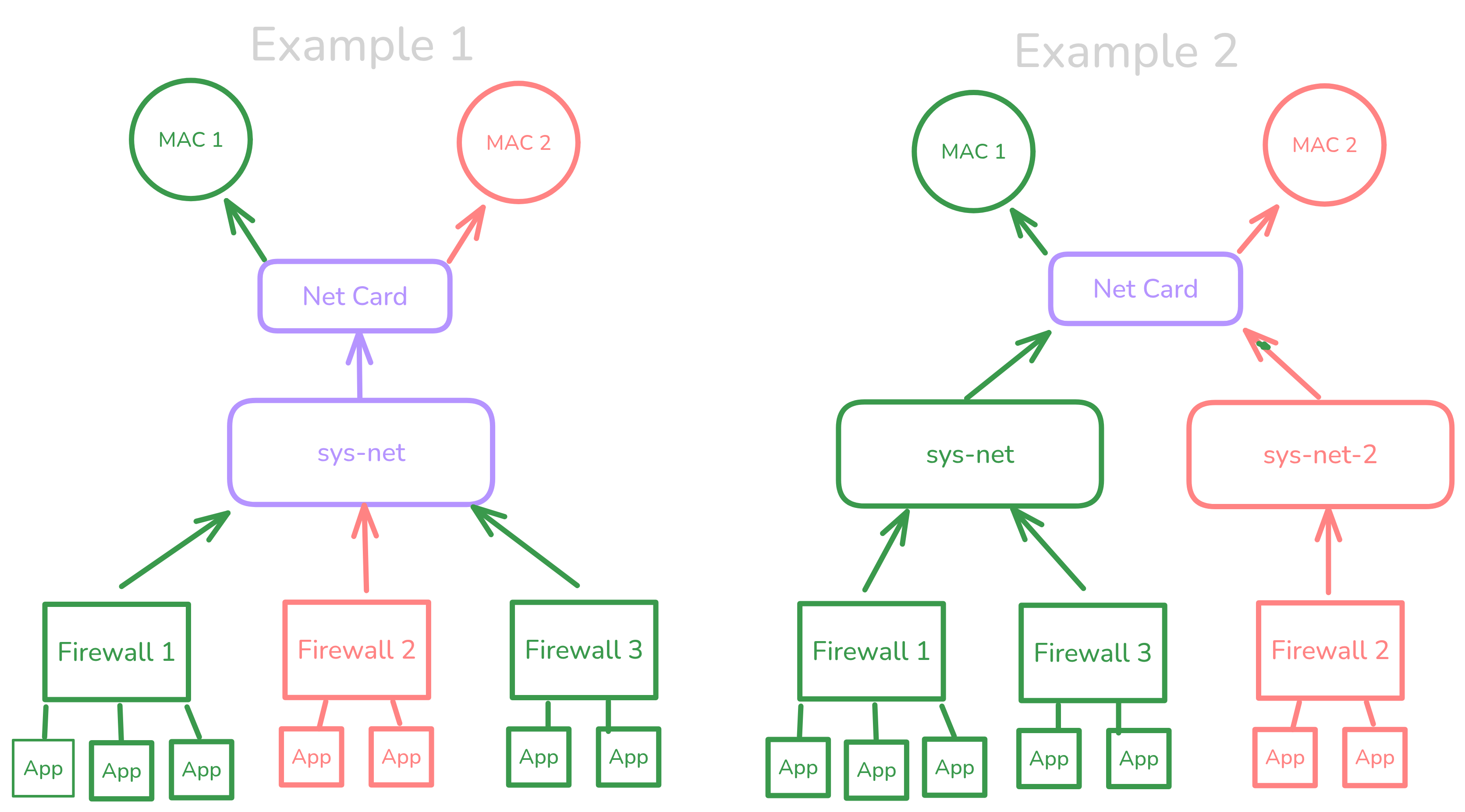
Example 1: All traffic is routed to sys-net, then sys-net sorts traffic based on the firewall it came from.
Example 2: There are “mulitple sys-nets” that are specific to each MAC address. So you just point your firewall at the MAC address you want to use.
The key issue here is only using one network card.
I have created a little graphic to help illustrate what I am trying to accomplish.
Either of the options you outline will work, although I cant see the
graphic, I can imagine what it looks like. (A description or ascii
outline would have helped.)
Example 1 will be easier to implement in Qubes.
Example 2 will work (even with a single card) - you can use macvlan to
create new MAC addresses on the card, or you could use nftables to mark
packets and a routing rule to send them via a specfici routing table.
You dont say what you did to implement 1, or in what way it did not
work. As always, some concrete details would help.
I never presume to speak for the Qubes team.
When I comment in the Forum I speak for myself.
The media in MAC addresses refers to physical media (mediums) or something on top of physical media like how a port aggregate has physical links underneath. If you really want to funnel traffic from different qubes with machines other than the host machine that are beyond sys-net, use layer 3 addresses instead of layer 2 addresses.
A source NAT rule somewhere in sys-firewall and another source NAT rule in sys-net might be closer to what you are after. But don’t burden sys-firewall and sys-net with this ambition, they should remain agnostic to packet flows and tunnels.
If you are serious about what you are trying to do, make the path like:
You could also connect a qube sys-firewall0 and another qube sys-firewall1 to sys-net and have Linux in sys-net rewrite the source MAC address of outgoing packets by referring to specific fwmark applied on packets coming in on a specific downstream interface.
If you really are interested in layer 2 frames, you can encapsulate layer 2 frames with GENEVE, VXLAN, or NVGRE and transport those frames in layer 3 or layer 4 packets (VXLAN is UDP 4789).
In general try to use ipv6 and try to err on ipv6-only. If you need to force packets to move in a certain way use layer 3 tunnels in combination with nftables rules that deny/drop all by default. The fwmark and MAC address source rewriting can work with some rtfm.
For whatever you are trying to do the scripting should be oriented towards durability such as scripts having bash equivalent of set -e and tests that do sanity checks. You may want to make sure you have personally verified how network interfaces in a qube come up and that they will not come up until your nftables rules are in place.