In this guide I used a standalone because I have no idea where mullvad app stores its settings, with this information it’s easy and recommended to use a template and then an appvm.
1 Like
I have followed your very helpful guide & everything works 100% up until the above quoted part as i as a Noooob dont know what to do here, what to add where and how?
Just to clarify, i have tested your stated 2 Pings out in the sys-VPN-app and all is good, i have opened up another VMQube & told it to get internet from sys-VPN yet NO Internet at all unless i Manually input;
$ /usr/local/bin/mullvad-dns.sh &
into the sys-VPN Terminal as as soon as i do then all works amazing but i just cant seem to get it to work if i reboot everything unless i manually re-input the said command into sys-VPN terminal all over again?
My very last attempt i made just now was as follows;
[@sys-vpn-mullvad-app ~]$ /usr/local/bin/mullvad-dns.sh &
[1] 1619
[@sys-vpn-mullvad-app ~]$ Mullvad is on
/rw/config/rc.local
[@sys-vpn-mullvad-app ~]$
but this has obviously NOT worked either 
You are supposed to put the /usr/local/bin/mullvad-dns.sh & command inside the /rw/config/rc.local file.
1 Like
I would love to, how to do that please?
as i have tried to use;
$ sudo nano /rw/config/rc.local
which does indeed open up the file but i dont know what to do when im there?
i did add the
/usr/local/bin/mullvad-dns.sh &
but nothing happen.
Paste the command at the bottom of the file and save.
do i need to input # first then 1 space or 2 spaces or no #?
No #, otherwise it will be considered a comment like the rest of the file.
you are amazing, looks like im up and running thanks to Solene & you for your kind help.
Should i continue with the guide and do the MTU & Kill Switch stuff still?
If so then if i follow the Kill Switch guide herein then does this only effect QubeApps which are set to specifically use sys-VPN for internet or does it effect all other Qube apps?
The MTU rule is mandatory for everything to work properly. As for the kill switch, you can use it and/or use the Qubes firewall.
Done all that up untill Kill Switch which is also done now 
how can i test it all properly works?
Restart the VPN qube to ensure everything is running properly. Then, disconnect from the VPN and check if you have internet access.
It all works as should, thanks again, such basic stuff for you guys im sure but i feel like a computer programmer right now…lol 

1 Like
Congrats!
The settings are stored in /etc/mullvad-vpn. I followed your guide but with a template vm and two app vms (with different settings) instead of a standalone, and a persistent /etc/mullvad-vpn directory. Works well so far.
1 Like
Sorry for the late reply but I discovered a new Qubes OS 4.3 feature that makes my life a little easier:
Post with screenshots here: Opening XTerm with root privileges from Q menu - #2 by alimirjamali
Hello, I have no idea why I wrote it like that sorry. What I meant is it doesn’t work.
I can’t help with this little information level.
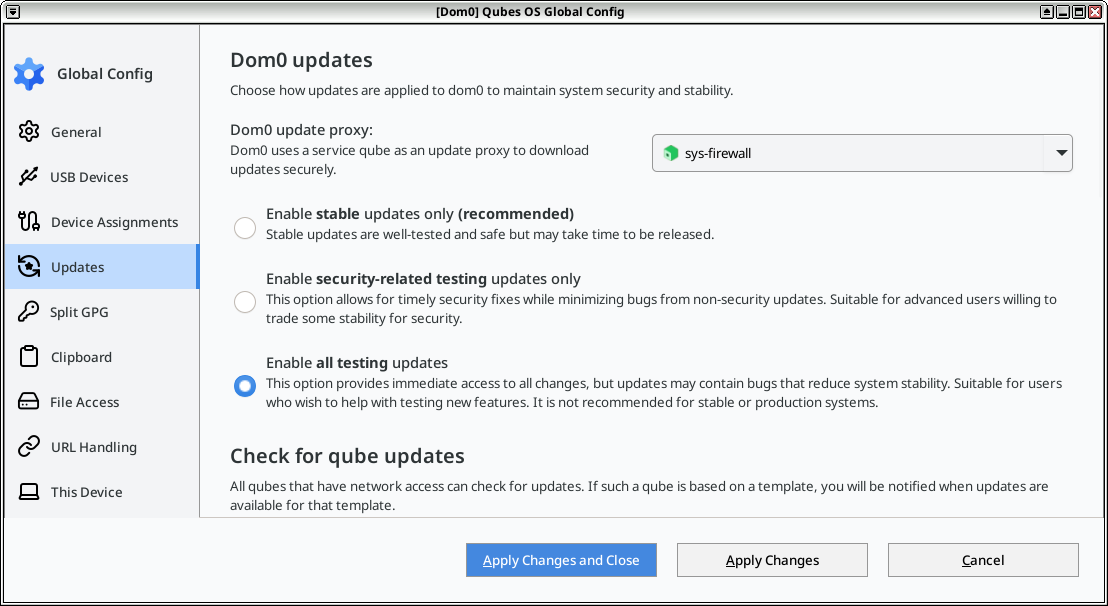
I have an interesting question, well the sys-VPN is working flawlessly, however i just went to update the templates via Dom0 only to find that the sys-VPN doesnt spin and that the updates seem to be happening without sys-VPN spinning so i can only presume that its updating using the Clear Net ISP, if so then why and how do i force it to use only sys-VPN pls? 
For Debian templates, the Mullvad repo is now available with extrepo. After updating the template (or standalone), adding the repo and vpn app is as simple as:
sudo apt-get install extrepo
sudo https_proxy=http://localhost:8082 extrepo enable mullvad
sudo apt-get update && sudo apt-get install mullvad-vpn
1 Like